
1. Киришүү
Thank you for choosing the AFERIY Nano100 Power Bank Station. This portable power solution is designed to provide reliable and efficient charging for a wide range of electronic devices, from smartphones and tablets to laptops and small appliances. Featuring a high-capacity LiFePO4 battery and multiple output ports, the Nano100 is ideal for travel, outdoor activities, and emergency backup. This manual provides essential information for the safe and optimal use of your device.
2. Коопсуздук маалыматы
ЭСКЕРТҮҮ: Бул продуктуну колдонуудан мурун бардык коопсуздук көрсөтмөлөрүн окуп чыгыңыз.
- Advanced 6-in-1 Safety Protection: The Nano100 is equipped with a smart Battery Management System (BMS) and NTC temperature control, providing comprehensive protection against low-temperature, short-circuit, over-temperature, over-current, over-voltage, and low-voltage сценарийлер.
- Long-Lasting & Safe LiFePO4 Battery: Features safer LiFePO4 cells that are resistant to swelling and fire, offering over 3,000 charge cycles with more than 80% capacity remaining.
- Бөлүктү бөлбөөгө, оңдоп же өзгөртпөңүз.
- Ашыкча температурага, түз күн нуруна же жогорку нымдуулукка дуушар болбоңуз.
- Балдар жетпеген жерде сактаңыз.
- Колдонуу жана кубаттоо учурунда туура желдетүүнү камсыз кылыңыз.

Figure 2: HyperSafe™ NTC Tech 6-Protection ShieldSystem
3. Пакеттин мазмуну
Баардык буюмдар пакетиңизге камтылганын текшериңиз:
- AFERIY Nano100 Power Bank Station
- DC 7909 to USB-C Adapter
- User Manual
- Таңгактоочу куту

3-сүрөт: Пакеттин мазмуну
4. Продукт бүтүп калдыview
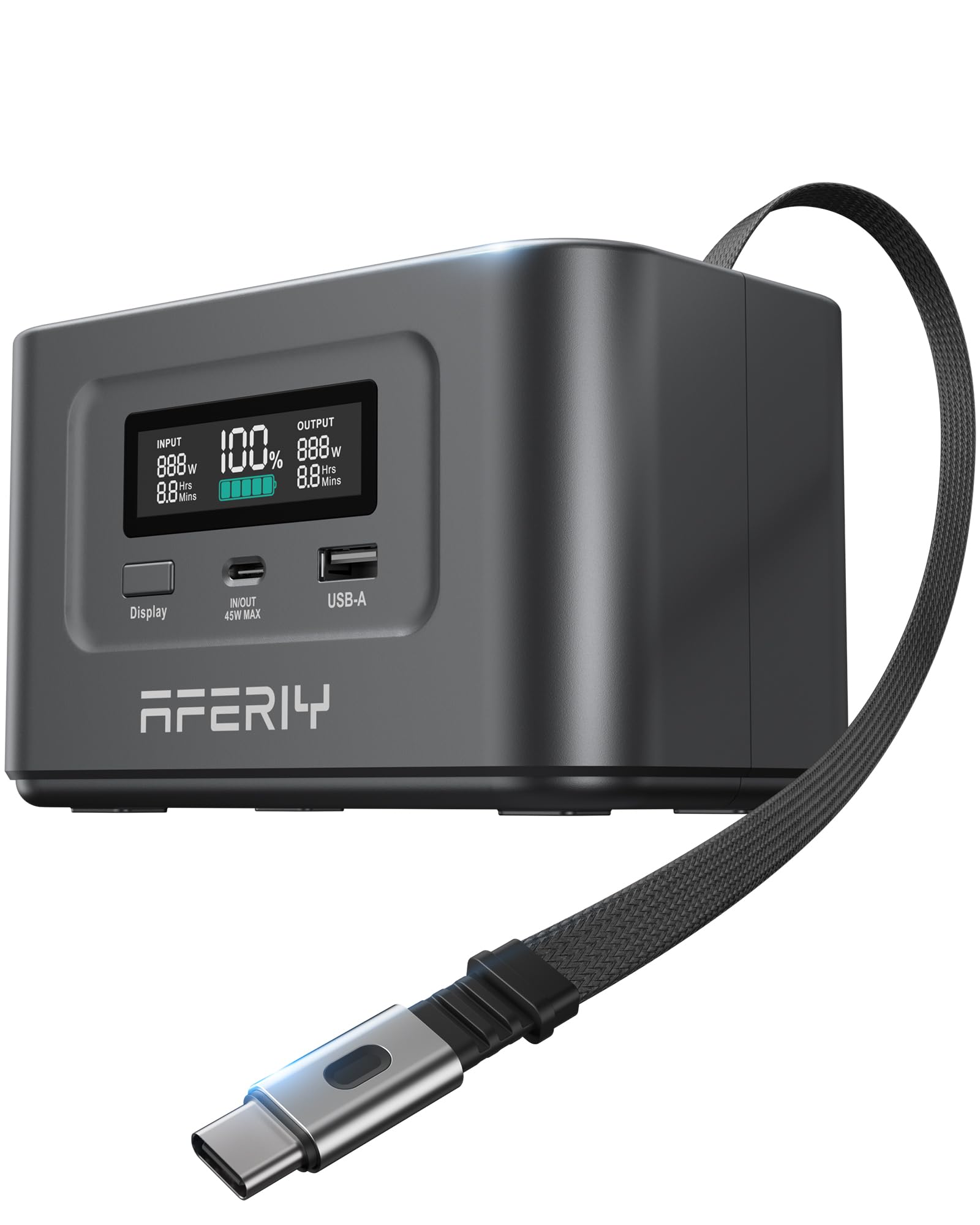
The AFERIY Nano100 is a compact and lightweight portable power station designed for maximum convenience and power delivery. It features a clear display, multiple charging ports, and a unique retractable cable for ease of use.
4.1. Алдыңкы панель

Сүрөт 4: Алдыңкы панелдин үстүндөview
- Дисплей: Батареянын пайызын көрсөтөтtage, кириш/чыгыш ватtage, жана калган болжолдуу убакыт.
- Дисплей баскычы: Activates or deactivates the display.
- USB-C (In/Out 45W Max) Port: For charging devices or recharging the power station.
- USB-A порту: Заряддоо аппараттары үчүн.
4.2. Жогорку панель

Figure 5: Top Panel with Retractable Cable
- Retractable 100W USB-C Cable: Built-in cable for convenient charging and recharging, supporting up to 100W bi-directional power delivery. Features a magnetic snap for secure storage.
4.3. Көчүрүү

Figure 6: Palm-Sized Design for Effortless Portability
Weighing approximately 2.81 pounds and with dimensions of 5.8 x 3.46 x 3.43 inches, the Nano100 is designed for effortless portability, fitting easily into bags and backpacks.
5. Орнотуу
5.1. Баштапкы заряддоо
Before first use, fully charge your AFERIY Nano100 Power Bank Station. Use the built-in retractable USB-C cable or an external USB-C cable with a compatible power adapter (not included) to connect to a wall outlet. The display will show the charging status and estimated time to full charge.
5.2. Retractable Cable Usage
- To extend the cable: Gently pull the USB-C connector from its slot. The cable can extend up to 28 inches.
- To retract the cable: Give the cable a slight pull, and it will automatically retract into the unit. The magnetic snap will secure the connector in place.
6. Иштөө нускамалары
6.1. Аспаптарыңызды кубаттоо
The Nano100 offers versatile charging options for various devices:
- USB-C порттору: Connect your USB-C compatible devices (laptops, smartphones, tablets) to the built-in retractable 100W USB-C cable or the 45W USB-C port.
- USB-A порту: Connect your USB-A compatible devices to the 18W USB-A port.
- Көп түзмөктү кубаттоо: The Nano100 supports simultaneous charging of up to three devices with a total maximum output of 145W.

Figure 7: Triple Device Charging Capability
6.2. Күн кубаттоо
The Nano100 supports up to 100W solar charging, making it an eco-friendly option for outdoor use. Connect a compatible solar panel (not included) to the appropriate input port on the power station. The display will indicate the input wattagкүн панелинен e.

Figure 8: Eco-Friendly Solar Charging
6.3. Flight Approval
The AFERIY Nano100 has a capacity of 99.2Wh, which is below the 100Wh limit for lithium batteries allowed onboard aircraft without requiring airline approval. This makes it a TSA-approved and flight-friendly option for extended travel and road trips. Always check with your airline for specific regulations before flying.

Figure 9: Flight-Approved for Carry-ons
6.4. Видео демонстрация
Video 1: AFERIY Nano100 Power Station Overview by AFERIY. This video provides a visual demonstration of the Nano100's features and usage.
7. Техникалык тейлөө
- Батареяга кам көрүү: To prolong battery life, fully charge the unit at least once every 3-6 months, even if not in use. Avoid completely draining the battery frequently.
- Тазалоо: Электр станциясынын сыртын тазалоо үчүн кургак, жумшак чүпүрөктү колдонуңуз. Суюк тазалоочу каражаттарды колдонбоңуз же агрегатты сууга салбаңыз.
- Сактагыч: Store the unit in a cool, dry place away from direct sunlight and corrosive materials.
8. Кыйынчылыктарды
- Түзмөк күйбөй жатат: Ensure the battery is charged. If the battery is completely depleted, it may take a few minutes of charging before the display activates.
- Түзмөк кубатталбай жатат: Check that the charging cable is securely connected to both the Nano100 and your device. Verify that the device is compatible with the output specifications of the Nano100.
- Жай кубаттоо: Ensure you are using appropriate cables and that your device supports fast charging protocols (PD3.0, QC2.0, QC3.0, etc.). The output wattage displayed on the screen should match your device's charging requirements.
- Ашыкча ысып кетүү: If the unit feels excessively hot, disconnect all devices and allow it to cool down in a well-ventilated area. The built-in safety features will prevent damage.
9. Техникалык шарттар
| Өзгөчөлүк | Спецификация |
|---|---|
| Продукт аты | AFERIY Nano100 Portable Power Station |
| Модел | Nano100 (AF-PB010) |
| Батарея топтомунун кубаттуулугу | 99.2Wh / 31000mAh (3.2V) |
| Клетка түрү | LiFePO4 |
| Cycle Life | 3000+ Cycles (>80% capacity) |
| Заряддоо температурасы | 32°F - 104°F (0°C - 40°C) |
| Заряддоо температурасы | 14°F - 104°F (-10°C - 40°C) |
| Өлчөмдөр | 5.8 x 3.46 x 3.43 дюйм |
| Элемент Салмагы | 2.81 фунт |
| Түс | Gary (Dark Grey) |
| Материал | Акрилонитрил бутадиен стирол (ABS) |
| Power Source | Батарея менен иштейт |
| Жалпы өндүрүш Втtage | 145W макс |
| USB-C (F) Output | 5V-3A/9V-3A/12V-3A/15V-3A/20V-2.25A (45Wmax) |
| USB-C (M) Output (Retractable Cable) | 5V-3A/9V-3A/12V-3A/15V-3A/20V-5A (100Wmax) |
| USB-A чыгаруу | 5V-3A/9V-2A/12V-1.5A (18Wmax) |
| USB-C (M) Solar Input | 12-26V - 5A (100Wmax) |
| USB-C (M) Car Charger Input | 12V-5A (60Wmax) |
| Сертификаттар | FCC, CE, PSE, UL, UN38.3 |
10. Кепилдик маалыматы
The AFERIY Nano100 Power Bank Station comes with a 2-year warranty. For extended warranty options and details, please refer to the warranty information provided in your package or contact customer support.
11. Кардарларды колдоо кызматы
For any questions, technical assistance, or warranty claims, please contact AFERIY customer support:
- Visit the AFERIY Store on Amazon: AFERIY Store