
1. Киришүү
The Uniden BEARTRACKER 885 Hybrid CB Radio and Digital Scanner is a versatile communication device designed to keep you informed and connected. This unit combines a full-featured 40-channel CB radio with a digital trunk-tracking scanner, providing access to public safety transmissions across the US and Canada. With integrated GPS for automatic channel selection and a BearTracker Warning System, it ensures you are always aware of nearby police, fire, ambulance, and DOT radio traffic. The device also includes NOAA Weather with Alerts and a noise-canceling microphone for clear communication.
2. Продукт бүтүп калдыview
The BEARTRACKER 885 offers dual functionality, allowing seamless switching between CB communication and public safety monitoring. Its robust design and advanced features make it an essential tool for road users.
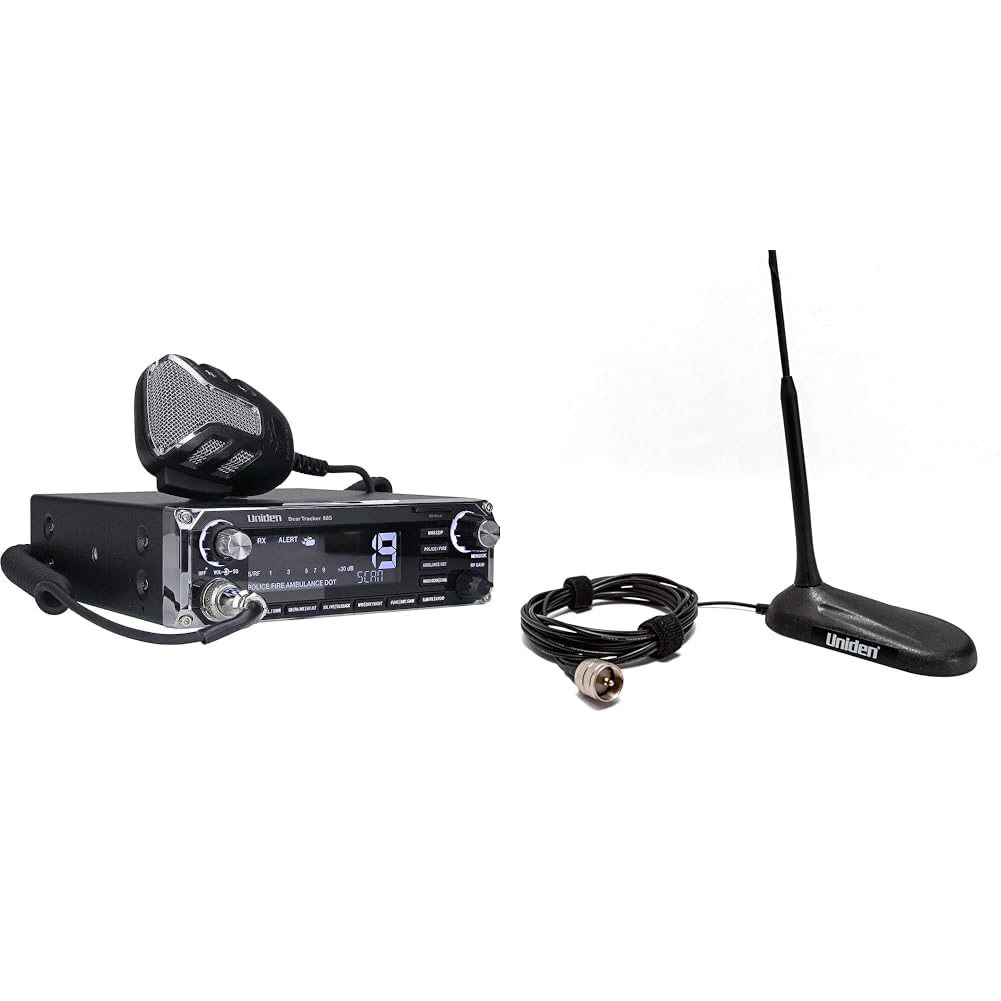
Figure 1: The Uniden BEARTRACKER 885 Hybrid CB Radio and Digital Scanner, shown with its noise-canceling microphone, mounting bracket, power cable, and antenna connector.
Негизги өзгөчөлүктөрү:
- Гибриддик функция: Combines a 40-channel CB radio with a digital trunk-tracking scanner.
- BearTracker эскертүү системасы: Alerts you to nearby public safety transmissions (Police, Fire, Ambulance, DOT).
- Интегралдык GPS: Automatically selects nearby public safety channels from a nationwide database.
- NOAA Weather with Alerts: Provides real-time weather information and alerts.
- 7-Color Display: Customizable display for enhanced visibility.
- Ызы-чууну жокко чыгаруучу микрофон: Ensures clear transmissions even in noisy environments.
- SWR метр: For precise antenna tuning.
- RF Gain, Mic Gain, PA Mode, Talkback: Comprehensive controls for optimal performance.
Видео 1: Бул видео визуалдык көрүнүштү камсыз кылатview of the Uniden BEARTRACKER 885 Hybrid CB Radio and Digital Scanner, highlighting its key components and functionalities.
3. Орнотуу
- Агрегатты орнотуу: Use the included mounting bracket to securely install the BEARTRACKER 885 in your vehicle. Ensure it is placed in a location that does not obstruct your view же транспорт каражаттарын башкарууга тоскоолдук кылуу.
- Антенна туташуу: Connect your CB antenna to the SO-239 antenna connector on the rear of the unit. For optimal performance, use a high-quality 18-inch magnetic mount CB antenna (such as the Uniden 18 Inch Magnetic Mount CB Antenna) and ensure proper SWR calibration.
- Кубат туташуу: Connect the power cable to a 12V DC power source in your vehicle. Ensure correct polarity (red to positive, black to negative).
- Микрофон туташуу: Plug the noise-canceling microphone into the front panel connector.
- GPS модулу: Connect the GPS module to the designated port. This enables automatic channel selection for the scanner feature.
4. Иштөө нускамалары
4.1. CB Radio Operation
- Күйгүзүү/өчүрүү: Turn the VOL/SQL knob clockwise to power on the unit.
- Канал тандоо: Use the channel selector knob to choose one of the 40 available CB channels.
- Үндү көзөмөлдөө: Adjust the VOL/SQL knob to set the desired listening volume.
- Өчүрүү башкаруу: Rotate the VOL/SQL knob counter-clockwise until background noise disappears to set the squelch level.
- RF пайда: Adjust the RF GAIN control to optimize reception sensitivity.
- Микрофон пайда: Use the MIC GAIN control to adjust microphone sensitivity for clear transmissions.
- PA Mode: Switch to PA (Public Address) mode to use an external speaker for public address functionality.
- Talkback: Activate Talkback to monitor your own voice through the radio's speaker during transmission.
- Берүү: Press and hold the PTT (Push-To-Talk) button on the microphone to transmit. Release to listen.
4.2. Digital Scanner Operation
- Сканерди иштетүү: Press the dedicated scanner button to activate the public safety scanning feature. The scanner operates alongside CB radio features, eliminating the need to switch modes.
- BearTracker эскертүү системасы: The system will automatically alert you when nearby public safety transmissions are detected.
- GPS интеграциясы: The built-in GPS automatically selects and scans relevant public safety channels based on your current location, ensuring you receive local alerts without manual programming.
- NOAA Аба ырайы: Access NOAA Weather channels and receive alerts for severe weather conditions.
4.3. Дисплей орнотуулары
- 7-Color Display: The display can be customized with 7 different colors for personal preference and optimal visibility in various lighting conditions. Refer to the full user manual for specific instructions on changing display colors.
5. Техникалык тейлөө
- Тазалоо: Агрегаттын сыртын тазалоо үчүн жумшак, кургак чүпүрөктү колдонуңуз. Абразивдүү тазалагычтардан же эриткичтерден качыңыз.
- Байланыштары: Periodically check all cable connections (antenna, power, microphone, GPS) to ensure they are secure and free from corrosion.
- Антеннаны текшерүү: Inspect your antenna regularly for any damage or wear, especially if it is a magnetic mount antenna exposed to the elements.
6. Кыйынчылыктарды
- Кубат жок: Check power cable connections, vehicle's fuse box, and ensure the VOL/SQL knob is turned on.
- Poor CB Transmission/Reception: Verify antenna connection, check SWR calibration, adjust RF Gain and Mic Gain. Ensure the antenna is properly tuned for the operating frequency.
- Scanner Not Picking Up Signals: Ensure the GPS module is connected and receiving a signal. Confirm you are in an area with active public safety transmissions.
- Бурмаланган аудио: Adjust Mic Gain and RF Gain. Check microphone connection.
7. Техникалык шарттар
| Өзгөчөлүк | Нарк |
|---|---|
| Бренд | Uniden |
| Каналдардын саны | 40 |
| Жыштык диапазону | 26-28 МГц |
| Сууга туруктуулук деңгээли | Сууга чыдамдуу эмес |
| Шайкеш түзмөктөр | CB Radios, CB Antennas, CB Microphones |
| Бирдик саны | 1.0 Сан |
| Connectivity Protocol | CB |
| Модель номери | BEARTRACKER 885 |
8. Кепилдик жана колдоо
For warranty information, technical support, or further assistance, please refer to the official Uniden website or contact Uniden customer service. Keep your purchase receipt for warranty claims.