
1. Киришүү
This manual provides detailed instructions for the installation, setup, and operation of your ASD 20-Inch Smart RGBW Flush Mount Ceiling Light. This LED lighting fixture combines a modern design with advanced smart features, offering a versatile lighting solution for various indoor spaces. It features RGBW color-changing capabilities, dimming, and control via a remote or a smartphone app, with compatibility for Alexa and Google Assistant.
2. Коопсуздук маалыматы
Сураныч, орнотуу жана колдонуу алдында бардык нускамаларды кылдат окуп чыгыңыз. Бул колдонмону келечектеги маалымат үчүн сактаңыз.
- Электр коопсуздугу: Always turn off power at the circuit breaker before installing, servicing, or cleaning the fixture. Consult a qualified electrician if you are unsure about electrical wiring.
- Орнотуу: Орнотуучу бет арматуранын салмагын көтөрө ала тургандыгын текшериңиз. Бардык жергиликтүү электр эрежелерин жана көрсөтмөлөрүн аткарыңыз.
- Колдонуу: Do not handle the fixture with wet hands. Avoid direct eye exposure to the light source when illuminated.
- Курчап турган чөйрө: Бул шайман d үчүн бааланганamp locations but is intended for indoor use only. Do not expose to direct water spray or submersion.
- Тазалоо: Тазалоо үчүн жумшак, кургак чүпүрөк колдонуңуз. Катуу химиялык заттарды же абразивдүү тазалоочу каражаттарды колдонбоңуз.
3. Пакеттин мазмуну
Орнотууну баштоодон мурун бардык компоненттер бар экендигин текшериңиз:
- ASD 20-Inch Smart RGBW Flush Mount Ceiling Light Fixture (2 units)
- Алыстан башкаруу (1 бирдик)
- Монтаждоочу жабдыктар (бурамалар, зым гайкалар)
- Instruction Manual
4. Продукттун спецификациялары
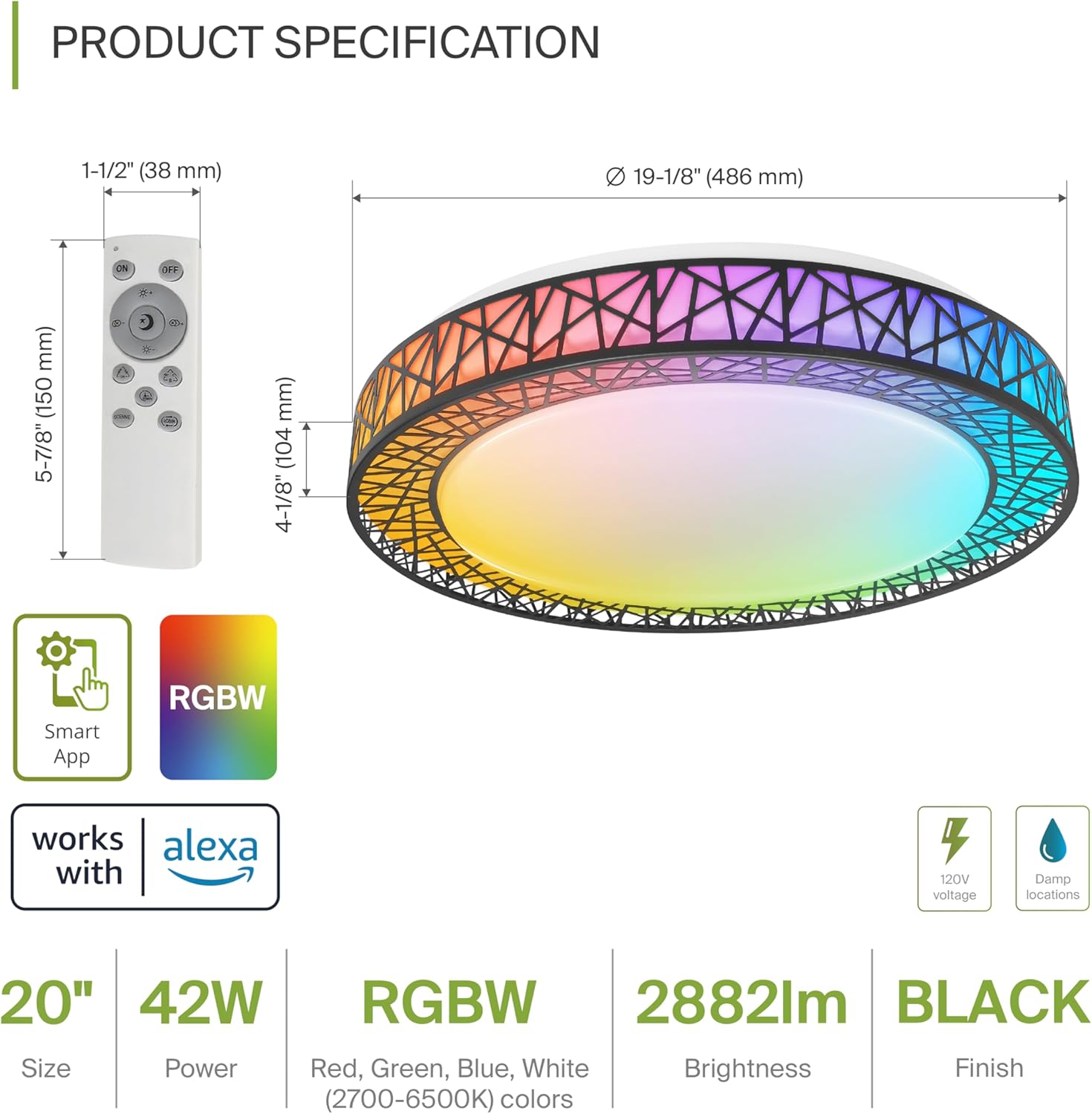
Product Specification Diagram: Dimensions, remote control, and key features.
| Өзгөчөлүк | Деталь |
|---|---|
| Бренд | ASD |
| Модель аты | LOFT |
| Модель номери | A-LFM20D42SRGBW-B-2p |
| Түс | 20" | Black | RGBW |
| Материал | Acrylic, Alloy Steel |
| Продукциянын өлчөмдөрү | 19.1"L x 19.1"W x 4.1"H |
| Power Source | Hardwired |
| Ватtage | 42 ватт |
| Тtage | 120 вольт |
| Жарыктык | 2579 lumen (max) |
| Түс температурасы | 2700-6500K (CCT жөнгө салынуучу) |
| Өзгөчөлүктөр | RGBW, Remote Control, Smart App, Dimmable |
| Башкаруу ыкмасы | Remote, Voice (Alexa, Google Assistant) |
| Ички/тышкы колдонуу | Indoor |
| Сууга туруктуулук деңгээли | Сууга туруктуу (D)amp Жайгашкан жерлерге баа берилген) |
| Орточо жашоо | 50,000 саат |
| Сертификация | ETL тизмеленген |
5. Орнотуу боюнча нускамалар
Баштоодон мурун, автоматтык өчүргүчтө кубат өчүрүлгөнүн текшериңиз.

Installation Diagram: Visual guide for mounting the light fixture.
- Түзмөктү даярдаңыз: Remove the lens from the light fixture by rotating it clockwise.
- Кронштейнди орнотуу: Attach the two screws to the outlet box on your ceiling.
- Зым байланыштары: Connect the wires: Black to Black, White to White, and Ground to Ground. Secure these connections with wire nuts.
- Түзмөктү камсыз кылуу: Carefully tuck all wires back into the outlet box. Attach the light fixture to the mounting bracket.
- Reattach the Lens: Rotate the lens counter-clockwise to secure it to the fixture.
Орнотулгандан кийин, автоматтык өчүргүчтөгү кубатты калыбына келтириңиз.
6. Smart Feature Setup
6.1. ASD SMART App Control
The ASD Smart RGBW Flush Mount Ceiling Light can be controlled via the ASD SMART App on your smartphone (Wi-Fi internet connection required).
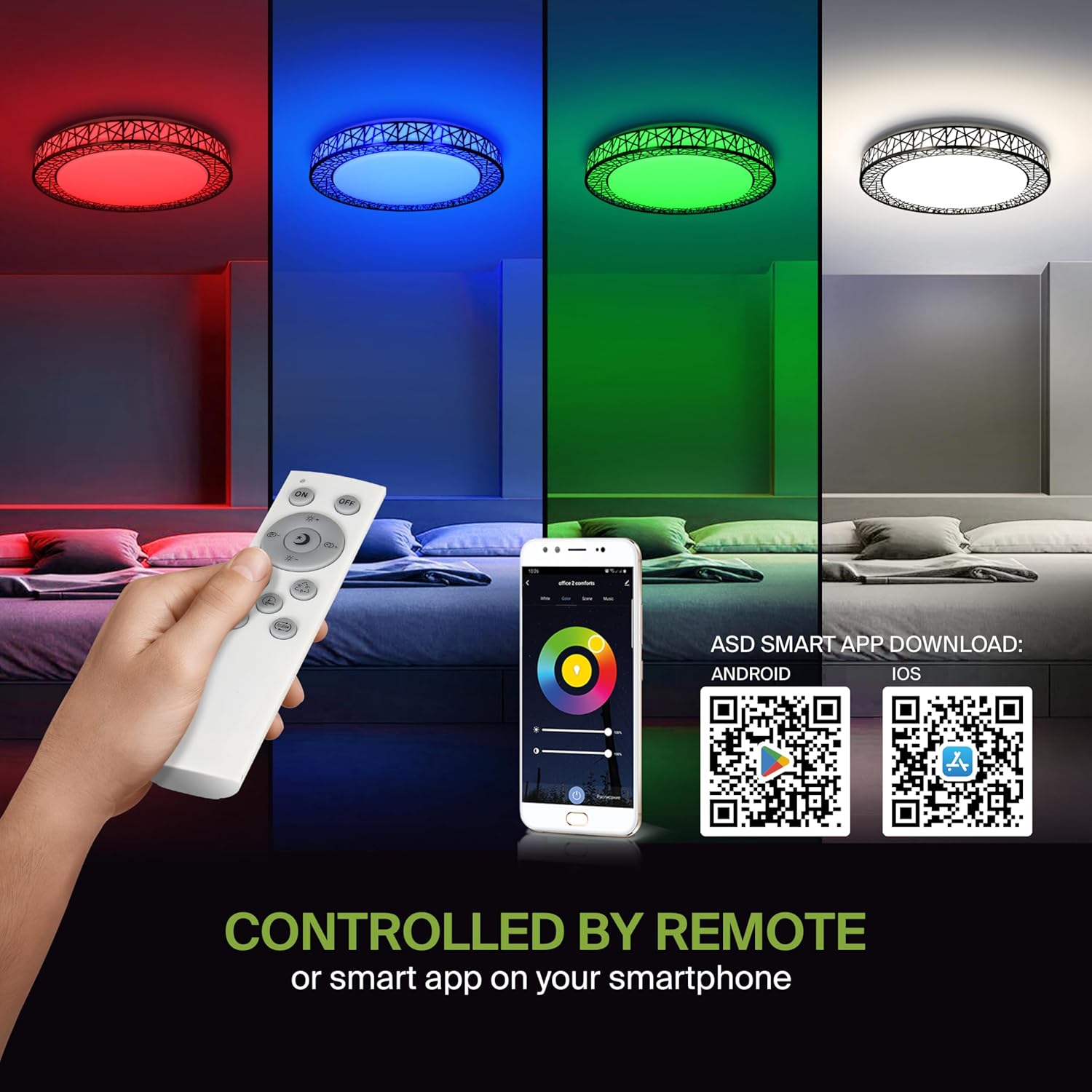
Remote control and ASD SMART App interface with QR codes for download.
- Колдонмону жүктөп алыңыз: Scan the QR code provided in the product images or search for "ASD SMART" in the Apple App Store (iOS үчүн) же Google Play дүкөнү (for Android).
- Катталуу/Кирүү: Каттоо эсебин түзүү же кирүү үчүн колдонмодогу көрсөтмөлөрдү аткарыңыз.
- Түзмөк кошуу: In the app, select the option to add a new device. Follow the pairing instructions to connect your ceiling light to the app via Wi-Fi.
6.2. Үн менен башкаруу (Alexa жана Google Жардамчысы)
The fixture is compatible with Amazon Alexa and Google Assistant for convenient voice control.

Voice control compatibility with Alexa and Google Assistant.
- Каттоо эсебин байланыштыруу: Open your Alexa or Google Home app. Navigate to the 'Skills' or 'Works with Google' section.
- Издөө ASD SMART: Издөө the "ASD SMART" skill/service and enable it.
- Туташуу: Link your ASD SMART account with your Alexa or Google Home account.
- Түзмөктөрдү табуу: Ask Alexa or Google Assistant to discover new devices, or manually initiate device discovery in their respective apps.
7. Иштөө нускамалары
7.1. Алыстан башкаруу операциясы
Use the included remote control to manage your light fixture's functions.
Remote control for easy access to light functions.
- Күйгүзүү/өчүрүү: Жарыкты күйгүзүү же өчүрүү үчүн кубат баскычын басыңыз.
- Жарыктыкты жөндөө: Use the brightness buttons to increase or decrease the light intensity (smoothly dimmable).
- Color Selection (RGBW): Press the dedicated color buttons (Red, Green, Blue, White) or use the color wheel/mode buttons to cycle through 16.7 million colors.
- Түс температурасы (CCT): Adjust the white light color temperature between 2700K (warm white) and 6500K (cool white).
- Сахна режимдери: Select pre-programmed lighting patterns or scenes.
7.2. App Control Operation
The ASD SMART App offers comprehensive control over your light fixture.
- Full Color Spectrum: Access the full 16.7 million RGBW color palette.
- Так караңгылык: Adjust brightness levels with fine control.
- Пландаштыруу: Set schedules for the light to turn on/off or change modes at specific times.
- Топтоо: Group multiple ASD smart lights to control them simultaneously.
- Ыңгайлаштырылган көрүнүштөр: Create and save your own custom lighting scenes.
7.3. Voice Command Examples
After linking your device to Alexa or Google Assistant, use commands such as:
- "Алекса, [Жарыктын аталышын] күйгүз."
- "Эй, Google, [Жарыктын аталышын] көк түскө коюңуз."
- "Алекса, [Жарыктын аталышын] 50% га чейин азайт."
- "Hey Google, make the [Light Name] warmer."
8. Техникалык тейлөө
To ensure the longevity and optimal performance of your ASD Smart RGBW Flush Mount Ceiling Light, follow these maintenance guidelines:
- Тазалоо: Before cleaning, ensure the power to the fixture is turned off. Use a soft, dry, or slightly damp бетти сүртүү үчүн чүпүрөк колдонуңуз. Абразивдүү тазалоочу каражаттарды, эриткичтерди же катуу химиялык заттарды колдонуудан алыс болуңуз, анткени алар каптоого же электрдик компоненттерге зыян келтириши мүмкүн.
- Текшерүү: Periodically check the fixture for any signs of damage, loose connections, or wear. If any issues are found, turn off the power and consult a qualified electrician.
- Лампаны алмаштыруу: This fixture uses integrated LED technology and does not require bulb replacement. The LEDs are designed for a long lifespan.
9. Кыйынчылыктарды
If you encounter issues with your ASD Smart RGBW Flush Mount Ceiling Light, refer to the following common solutions:
| Көйгөй | Мүмкүн себеп | Чечим |
|---|---|---|
| Жарык күйбөйт | Электр энергиясы жок, зымдары бош, өчүргүч бузук | Автоматтык өчүргүчтү текшериңиз. Бардык зымдардын туташууларынын бекем экенин текшериңиз. Дубалдагы өчүргүчтү текшериңиз. |
| Пульт иштебей жатат | Dead batteries, remote out of range, pairing issue | Replace remote batteries. Ensure remote is within operating range. Re-pair the remote with the light (refer to app instructions for pairing). |
| Колдонмо башкаруу иштебей жатат | No Wi-Fi connection, incorrect app pairing, outdated app | Verify Wi-Fi connectivity. Ensure the light is correctly paired in the ASD SMART App. Update the app to the latest version. |
| Үн менен башкаруу жооп бербей жатат | Account not linked, device not discovered, incorrect commands | Ensure ASD SMART account is linked to Alexa/Google Assistant. Redo device discovery. Use correct voice commands. |
| Жарык күтүлбөгөн жерден бүлбүлдөп же өчүп калат | Unstable power supply, loose wiring, incompatible dimmer (if applicable) | Check power supply stability. Verify wiring. This light is dimmable via remote/app; external dimmers may cause issues. |
10. Кепилдик маалыматы
ASD камсыз кылат 5 жылдык чектелген кепилдик for this product. This warranty covers defects in materials and workmanship under normal use. Please retain your proof of purchase for warranty claims. For detailed warranty terms and conditions, please refer to the official ASD webсайтка же кардарларды колдоо менен байланышыңыз.
11. Кардарларды колдоо кызматы
If you have any questions, require technical assistance, or need to make a warranty claim, please contact ASD customer support through the following channels:
- Webсайт: Visit the official ASD Lighting webКөп берилүүчү суроолор жана колдоо булактары үчүн сайт.
- Электрондук почта: Refer to your product packaging or the ASD webкардарларды тейлөө электрондук почта даректери үчүн сайт.
- Телефон: Refer to your product packaging or the ASD webкардарларды тейлөө телефон номерлери үчүн сайт.
Please have your model number (A-LFM20D42SRGBW-B-2p) and purchase date ready when contacting support.