
Introduction
Thank you for choosing the Belkin Portable 20,000 mAh Power Bank. This device is designed to provide reliable and fast charging for your mobile devices, featuring an integrated USB-C cable and 30W Power Delivery. Its compact and lightweight design makes it ideal for travel, ensuring your devices stay powered wherever you go. This manual provides essential information on how to set up, operate, maintain, and troubleshoot your power bank.

Image: The Belkin Portable 20,000 mAh Power Bank in blue, showcasing анын кооз дизайны.
Негизги өзгөчөлүктөрү
- Интегралдык USB-C кабели: For convenient charging on the go.
- 30W кубаттуулугу: Enables fast charging for smartphones, tablets, and even some laptops like the MacBook Air.
- 20,000 мАч кубаттуулугу: Provides up to 87 hours of additional battery life for an iPhone 16 Pro, charging 0-50% in approximately 25 minutes.
- Бир убакта заряддоо: Charge up to three devices concurrently using the integrated USB-C cable, USB-C port, and USB-A port, with a shared output of 30W.
- LED көрсөткүчү: Displays the power bank's charging status.
- Өткөөл кубаттоо: Charge your devices while the power bank itself is being recharged.
- Lightweight and Travel-Friendly: Weighing less than 395 grams, it meets aviation safety standards for carry-on luggage.
- Туруктуу дизайн: Made from 72% post-consumer recycled materials with 100% plastic-free packaging.
Жайгашуу
Power банктын алгачкы заряддоо
Before first use, fully charge your Belkin Power Bank. Connect the power bank to a wall charger using a compatible USB-C cable (not included for recharging the power bank itself, only the integrated cable is for output). The LED indicators will show the charging progress. A full charge typically takes up to 12 hours.

Image: The power bank connected to a wall outlet for recharging, simultaneously charging a smartphone via its integrated cable. This illustrates pass-through charging.
Иштөө нускамалары
Түзмөктөрүңүздү заряддоо
- Интеграцияланган USB-C кабелин колдонуу: Extend the integrated USB-C cable from the power bank and connect it directly to your USB-C compatible device.
- USB-C портун колдонуу: Connect your device's USB-C charging cable to the power bank's USB-C output port.
- USB-A портун колдонуу: Түзмөгүңүздүн USB-A кубаттоочу кабелин кубат банкынын USB-A чыгаруу портуна туташтырыңыз.

Image: The Belkin power bank connected to an iPhone via its integrated USB-C cable, demonstrating seamless high-speed charging.
Бир нече түзмөктөрдү заряддоо
The power bank supports charging up to three devices simultaneously with a combined output of 30W. You can use the integrated USB-C cable, the USB-C port, and the USB-A port at the same time.
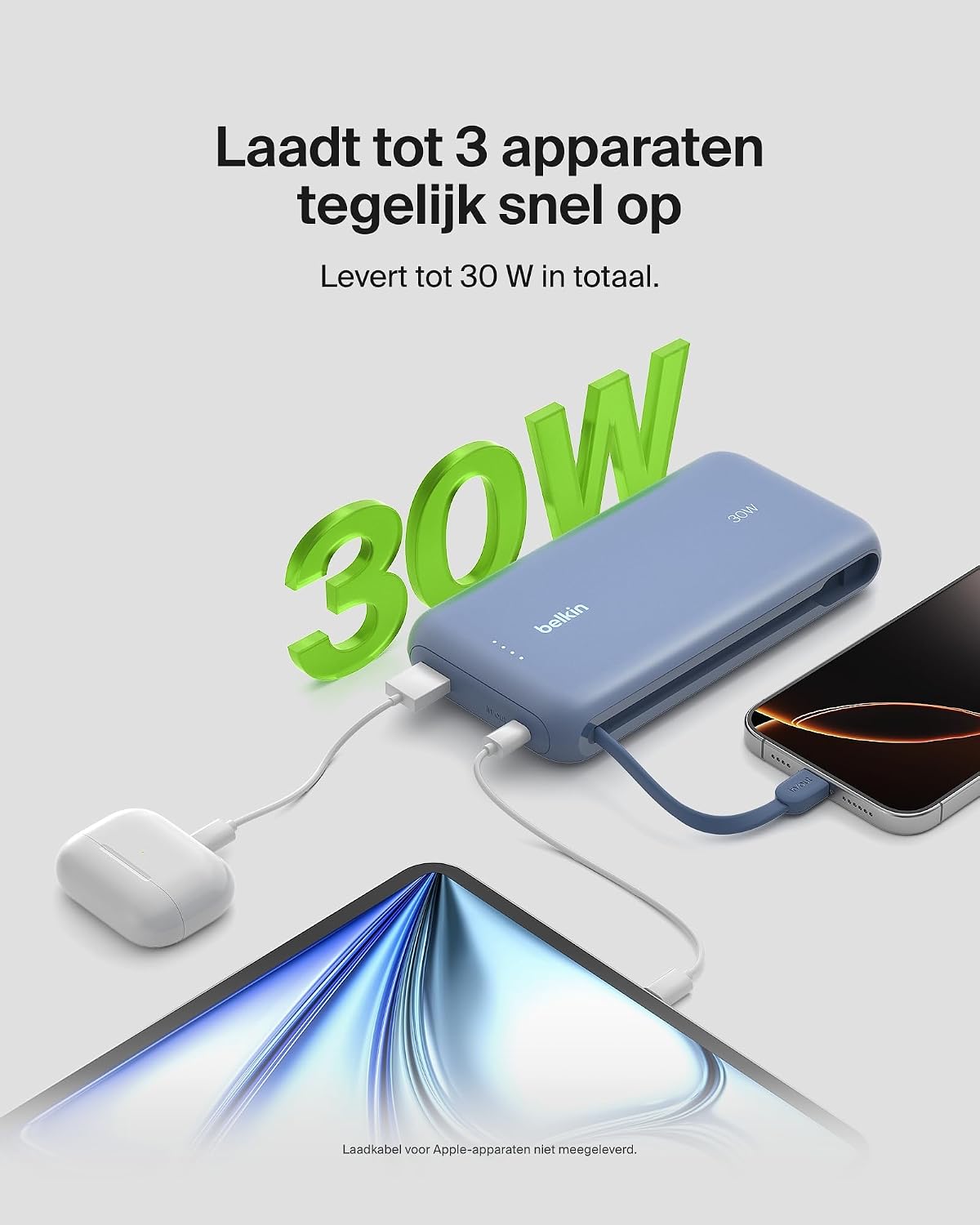
Image: The power bank simultaneously charging a smartphone, a tablet, and wireless earbuds, illustrating its capability to charge up to three devices with a total output of 30W.
LED батареянын абалынын көрсөткүчү
The power bank features LED lights that indicate the remaining battery level and charging status. Refer to the table below for interpretation:
| LED абалы | Мааниси |
|---|---|
| Бардык светодиоддор бекем | Толугу менен заряддалган |
| LEDs blinking sequentially | Кубатталууда |
| Fewer LEDs solid | Калган батареянын кубаттуулугу |
Техникалык тейлөө
- Тазалоо: Power банкты тазалоо үчүн жумшак, кургак чүпүрөктү колдонуңуз. Катуу химиялык заттарды же абразивдүү материалдарды колдонуудан алыс болуңуз.
- Сактагыч: Power банкты күн тийбеген жана экстремалдык температурадан алыс, салкын, кургак жерде сактаңыз.
- Батареяга кам көрүү: Батареянын иштөө мөөнөтүн узартуу үчүн, кубат банкын үзгүлтүксүз толук зарядсыздандырбаңыз. Батареянын деңгээли төмөн болгондо аны кубаттаңыз.
- Integrated Cable Care: When not in use, ensure the integrated USB-C cable is properly stowed to prevent damage.
Проблемаларды чечүү
Жалпы маселелер жана чечимдер
- Түзмөк кубатталбай жатат:
- Ensure the power bank is charged. Check the LED indicators.
- Заряддоо кабели кубат банкына да, түзмөгүңүзгө да бекем туташтырылганын текшериңиз.
- Башка заряддоо кабелин же кубат банкындагы портту колдонуп көрүңүз.
- Confirm your device is compatible with the power bank's charging specifications.
- Жай кубаттоо:
- Ensure your device supports fast charging (Power Delivery) to utilize the 30W output.
- If charging multiple devices, the total 30W output is shared, which may result in slower charging for individual devices.
- Check if the cable used supports fast charging.
- Power банк кубатталбай жатат:
- Ensure the wall adapter and cable used for recharging the power bank are functional and properly connected.
- Try a different wall adapter or cable.
Belkin SmartProtect Safety Features
The Belkin Power Bank is equipped with SmartProtect technology, which includes multiple safety features to protect your devices and the power bank itself:
- Ашыкча заряддан коргоо
- Ашыкча ток коргоо
- Overpower Protection
- Кыска туташуулардан коргоо
- Output Overvoltage Коргоо
- Output High/Low Temperature Protection
- Input High/Low Temperature Protection
- Сигналдын тоскоолдуктарынан коргоо
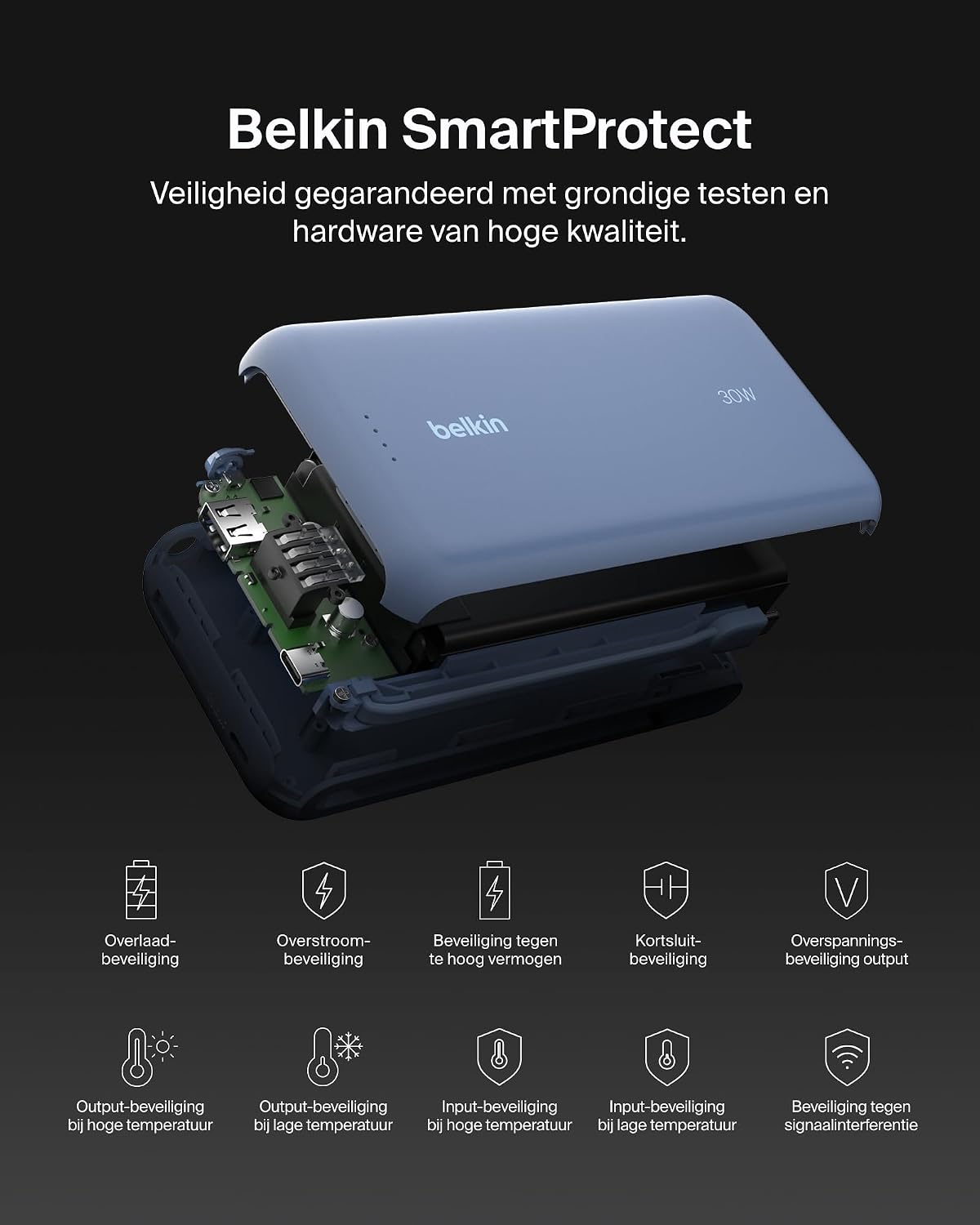
Сүрөт: жарылган view of the Belkin Power Bank, highlighting its internal components and the comprehensive Belkin SmartProtect safety features, including protection against overcharge, overcurrent, and short-circuits.
Техникалык шарттар
| Өзгөчөлүк | Деталь |
|---|---|
| Модель номери | BPB024hqBL |
| Батарея сыйымдуулугу | 20,000 мАч |
| Чыгуу күчү | Up to 30W Power Delivery (shared) |
| Туташтыргыч түрү | Integrated USB-C cable, 1x USB-C port, 1x USB-A port |
| Тtage | 5 вольт |
| Ampөчүрүү | 3 Ampere |
| Кубаттоо убактысы (Power Bank) | Болжол менен 12 саат |
| Продукциянын өлчөмдөрү | 15.4 x 7.62 x 2.51 см |
| Элемент Салмагы | 395 грамм |
| Батарея клеткасынын курамы | Литий-ион |
| Шайкеш түзмөктөр | Apple iPhone 16 series, iPhone 15 series, iPhone 14 series, iPhone 13 series, Samsung Galaxy S22/S23/S24/S25 series, iPad Pro, iPad Air, iPad, iPad Mini, and other USB-C/USB-A compatible devices. |
Кепилдик жана колдоо
Кепилдик маалымат
This Belkin Portable Power Bank comes with a 2 жылдык өндүрүүчүнүн кепилдиги. Additionally, it includes a Connected Equipment Warranty, providing peace of mind for your connected devices. Please retain your proof of purchase for warranty claims.
Кардарларды колдоо
Көбүрөөк жардам, техникалык колдоо же кепилдик боюнча суроолор үчүн, Belkin расмий колдоо кызматына кайрылыңыз webсайтка же кардарларды тейлөөгө кайрылыңыз. Көбүрөөк маалыматты дарегинен таба аласыз www.belkin.com/support.