
Introduction
Сатып алганыңыз үчүн рахматasing the Sharp Digital Alarm Clock, Model SPC5148AMZ. This alarm clock features a large, easy-to-read red LED display, dual alarms, adjustable alarm volume, and a convenient snooze function. It is designed for simple operation and includes a battery backup feature to maintain time and alarm settings during power outages.
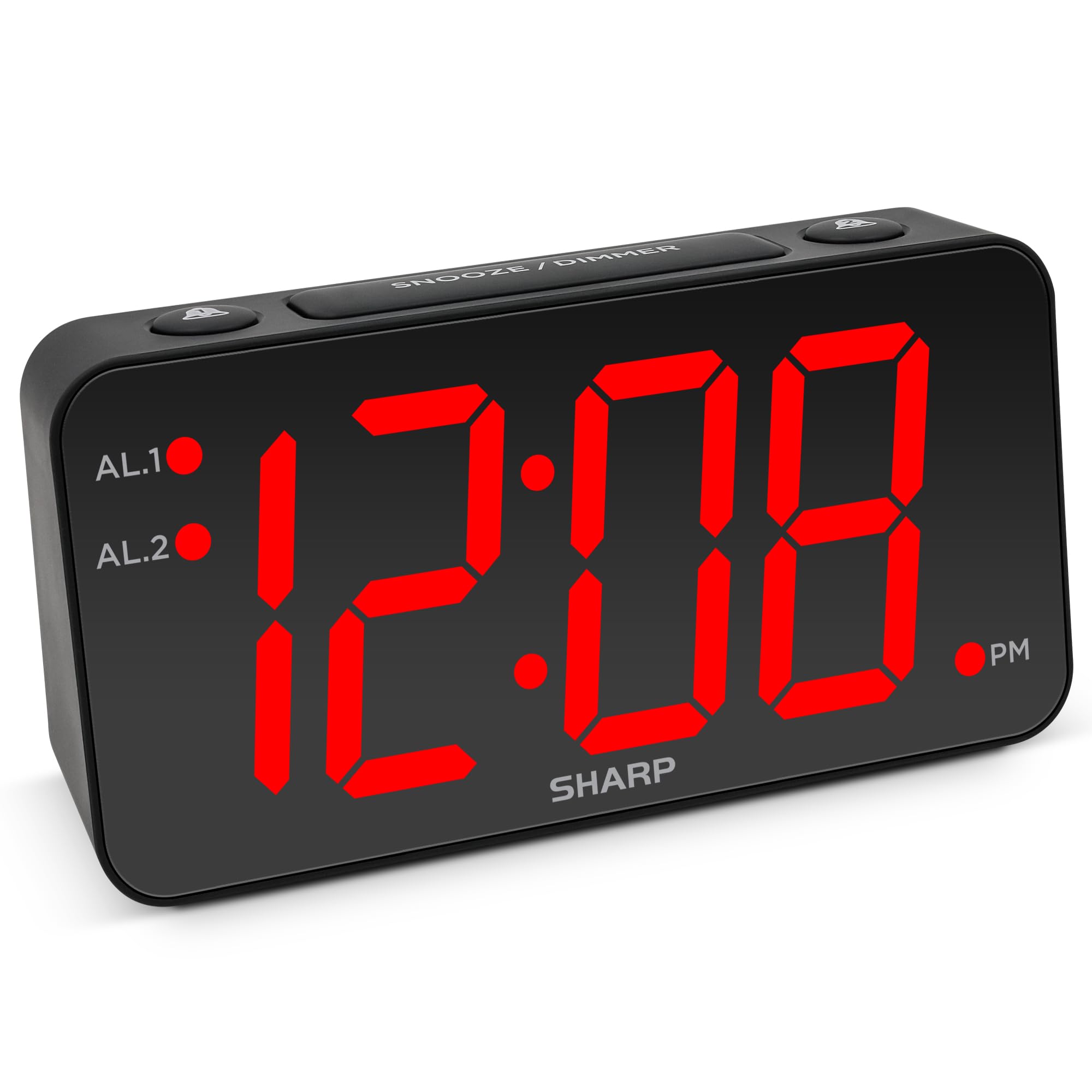
Сүрөт: алдыңкы view of the Sharp Digital Alarm Clock, Model SPC5148AMZ, showcasing its large red LED time display.
Продукт компоненттери жана башкаруу элементтери
Ойготкуч саатыңыздын ар кандай бөлүктөрү жана башкаруу элементтери менен таанышыңыз.
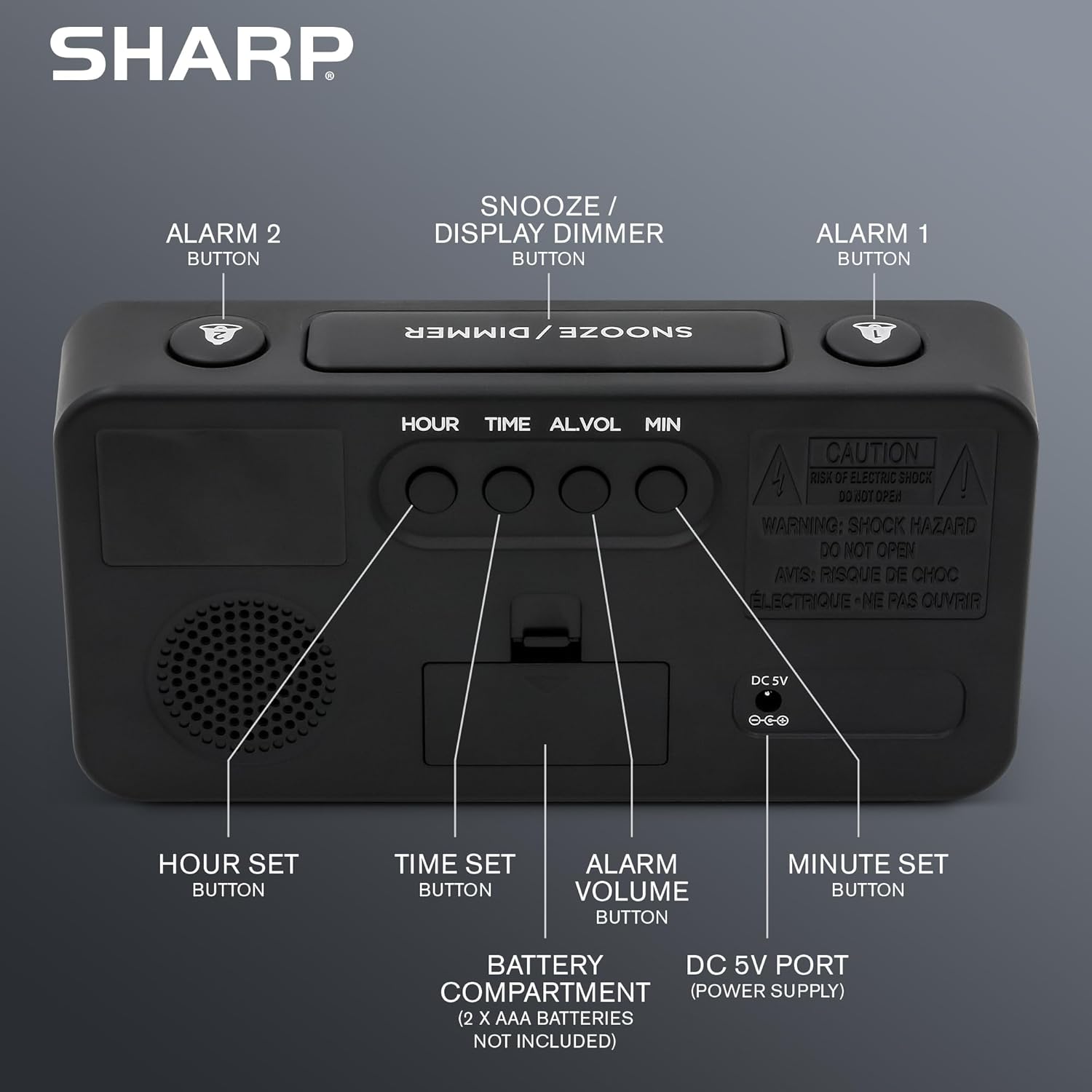
Сүрөт: Арткы view of the alarm clock, highlighting the Hour Set, Time Set, Alarm Volume, Minute Set buttons, Battery Compartment, and DC 5V Power Port.
- ЖАҢЫЛЫКТЫ ТЫНЧТЫКТАНДЫРУУ / КҮҢҮЛДӨТҮҮ баскычы: Located on top. Press to snooze alarm or adjust display brightness.
- СИГНАЛ 1 баскычы: Located on top. Activates/deactivates Alarm 1.
- СИГНАЛ 2 баскычы: Located on top. Activates/deactivates Alarm 2.
- HOUR SET Button: Located on the back. Used to set the hour for time or alarm.
- TIME SET баскычы: Located on the back. Used to enter time setting mode.
- ALARM VOLUME Button: Located on the back. Adjusts the alarm loudness.
- MINUTE SET Button: Located on the back. Used to set the minute for time or alarm.
- DC 5V порт: Power input for the clock.
- Батарея бөлүмү: Holds 2 x AAA batteries (not included) for backup.
Жайгашуу
Power Connection
- Connect the provided power adapter to the DC 5V port on the back of the alarm clock.
- Plug the adapter into a standard 110V/120V AC power outlet. The display will illuminate.
Батарейканын камдык көчүрмөсүн орнотуу
For battery backup, which retains time and alarm settings during a power outage (display will be blank), install batteries:
- Түзмөктүн арткы жагындагы батарея бөлүмүнүн капкагын ачыңыз.
- Insert 2 new AAA batteries (not included), observing the correct polarity (+ and -).
- Батарея уясынын капкагын бекем жабыңыз.
Маанилүү: Batteries are for backup only. The clock requires AC power for the display to function and for the alarm to sound at full volume.
Иштөө нускамалары
Убакытты коюу
- басып, кармап туруңуз УБАКЫТТЫ ОРНОТУУ сааттын цифралары өчө баштаганга чейин сааттын артындагы баскычты басыңыз.
- басыңыз СААТ КОЮЛГАН button repeatedly to adjust the hour. Pay attention to the PM indicator light.
- басыңыз Мүнөт коюу мүнөттөрдү тууралоо үчүн кайра-кайра баскычын басыңыз.
- Каалаган убакыт коюлгандан кийин, басыңыз УБАКЫТТЫ ОРНОТУУ ырастоо жана убакыт орнотуу режиминен чыгуу үчүн кайра баскычын басыңыз.
Setting the Alarm (Alarm 1 and Alarm 2)
This clock features dual alarms. The procedure is the same for both Alarm 1 and Alarm 2.
- басып, кармап туруңуз 1-ДАБЛ or 2-ДАБЛ button on the top of the clock until the alarm hour digits begin to flash.
- басыңыз СААТ КОЮЛГАН Ойготкучтун саатын тууралоо үчүн баскычын кайра-кайра басыңыз. Туура AM/PM тандалганын текшериңиз.
- басыңыз Мүнөт коюу Ойготкучтун мүнөттөрүн тууралоо үчүн баскычын кайра-кайра басыңыз.
- басыңыз 1-ДАБЛ or 2-ДАБЛ button again to confirm the alarm time. The corresponding alarm indicator light (AL.1 or AL.2) will illuminate on the display, indicating the alarm is active.
Ойготкучтарды иштетүү/өчүрүү
- To activate an alarm: Press the 1-ДАБЛ or 2-ДАБЛ button once. The corresponding indicator light will turn on.
- To deactivate an alarm: Press the 1-ДАБЛ or 2-ДАБЛ button again. The corresponding indicator light will turn off.
Тындырма функциясы
Сигнал чыкканда чоң баскычты басыңыз КАЙРЫЛУУ / КӨҢҮЛГӨТ button on top of the clock. The alarm will pause for 9 minutes and then sound again. You can repeat this process until the alarm is manually turned off.
Adjusting Display Brightness (Dimmer)
басыңыз КАЙРЫЛУУ / КӨҢҮЛГӨТ button (when the alarm is not sounding) to cycle through the display brightness levels: High, Medium, Low, or OFF.
Ойготкучтун үнүн тууралоо
басыңыз ОЙГОЛГОНДУН ҮБҮ button on the back of the clock to cycle through the alarm loudness levels: High, Medium, Low.
Техникалык тейлөө
- Тазалоо: Саатты жумшак, кургак чүпүрөк менен сүртүңүз. Абразивдүү тазалагычтарды же эриткичтерди колдонбоңуз.
- Батареяны алмаштыруу: Replace backup batteries annually or when the clock experiences frequent power outages to ensure settings are retained.
- Жайгашкан жери: Place the clock on a stable, flat surface. Avoid direct sunlight, extreme temperatures, and high humidity.
Проблемаларды чечүү
| Көйгөй | Чечим |
|---|---|
| Сааттын дисплейи бош. | Ensure the AC power adapter is securely plugged into both the clock and a working electrical outlet. Check if there's a power outage. If using battery backup, the display will be blank during an outage, but timekeeping continues. |
| Ойготкуч угулбайт. |
|
| Убакытты же ойготкучту коюу мүмкүн эмес. | Ensure you are pressing and holding the correct SET button until the digits flash. Release the button, then use HOUR SET and MINUTE SET to adjust. Press the SET button again to confirm. |
| Дисплей өтө жарык/күңүрт. | басыңыз КАЙРЫЛУУ / КӨҢҮЛГӨТ button (when alarm is not sounding) to cycle through brightness levels. |
Техникалык шарттар
- Модел: SPC5148AMZ
- Бренд: Sharp
- Дисплей түрү: Санариптик LED (Кызыл)
- Дисплей өлчөмү: 3 inches (Jumbo Numbers)
- Кубат булагы: Corded Electric (110V/120V AC)
- Батареянын камдык көчүрмөсү: 2 x AAA батарейкалар (киргизилген эмес)
- Өлчөмдөрү (W x Y): 8.27" x 4.13"
- Салмагы: 0.41 килограмм
- Өзгөчөлүктөр: Dual Alarms, Adjustable Brightness (High, Medium, Low, OFF), Adjustable Alarm Volume (High, Medium, Low), 9-minute Snooze.
Кепилдик маалымат
Sharp products are manufactured and sold by M.Z. Berger & Co. Inc. This product comes with a limited warranty against defects in materials and workmanship. For specific warranty details, including duration and terms, please refer to the warranty card included in your product packaging or contact customer support.
Кардарларды колдоо
For assistance with your Sharp Digital Alarm Clock, please contact the manufacturer's customer support. Contact information can typically be found on the product packaging or the manufacturer's official webсайт.
Manufacturer: Sharp (M.Z. Berger & Co. Inc.)
Продукт бүттүview Video
Video: An official Sharp video showcasing various Sharp clocks, including features like alarm, decor, charging, precision, and specialty functions. This video provides a general overview of Sharp's clock offerings.