
1. Киришүү
Thank you for choosing the JUNJIEUNVO Q16 PRO Wireless Translation Earbuds. These earbuds are designed to provide a versatile audio experience, featuring real-time language translation, high-definition sound, and an open-ear design for comfort. This manual provides essential information for setting up, operating, and maintaining your device.
2. Пакеттин мазмуну
- JUNJIEUNVO Q16 PRO Wireless Translation Earbuds (Left and Right)
- Charging Case with Smart Touch Screen
- User Manual
- Заряддоо кабели (USB-C)
3. Продукт бүтүп калдыview

3.1-сүрөт: JUNJIEUNVO Q16 PRO Wireless Translation Earbuds and Charging Case. This image displays the white and silver earbuds with their unique ear-hook design, alongside the charging case which features a digital display showing time and battery levels.
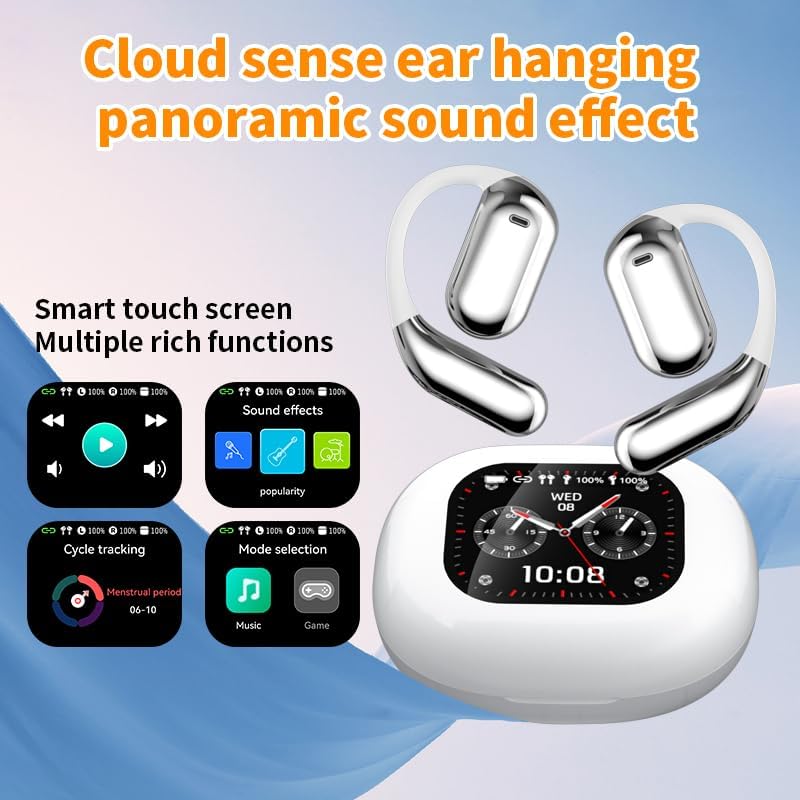
3.2-сүрөт: Smart Touch Screen Functions. This image highlights the charging case's smart touch screen, illustrating various functions such as media playback controls, sound effects, cycle tracking, and mode selection (music/game).

3.3-сүрөт: Environmental Noise Cancellation (ENC). This image depicts a person wearing the earbuds, with an overlay illustrating how the ENC technology reduces ambient noise by up to 99.44%, providing a clearer audio experience.

3.4-сүрөт: Open-Ear Design for Comfort. This image shows a person wearing the earbuds, emphasizing the open-ear design that offers comfort and allows for awareness of external sounds, protecting ear canal health.

3.5-сүрөт: Multiple Sound Adjustment Modes. This image displays the charging case's screen showing "Sound effects" with options for various music genres, indicating the ability to customize audio preferences.

3.6-сүрөт: Extended Battery Life and Rich Functions. This image showcases the earbuds and charging case, highlighting a 40-hour endurance with a 500mAh charging case capacity, along with a mention of multiple functions.

3.7-сүрөт: Earbuds and Charging Case (Open View). A detailed view of both earbuds and the open charging case, showing the internal design and charging contacts.

3.8-сүрөт: Earbuds in Charging Case. This image shows the earbuds securely placed within their charging case, ready for charging or storage.

3.9-сүрөт: Earbuds and Charging Case (Angled View). Another perspective of the earbuds and charging case, emphasizing their sleek design and compact form factor.
4. Орнотуу
4.1 Кулакчындарды жана кутучаны заряддоо
Биринчи колдонуудан мурун, кулакчындарды жана заряддоо кутучасын толук заряддаңыз.
- Кулакчындарды кубаттоочу кутуга салыңыз. Алар тиешелүү уячаларына туура орнотулганын текшериңиз (сол жагына L, оң жагына R).
- Connect the charging cable to the USB-C port on the charging case and to a power source.
- The digital display on the charging case will indicate the charging status.
A full charge for the earbuds takes approximately 1.5 hours. The charging case has a 500mAh battery, providing extended use.
4.2 Түзмөк менен жупташтыруу
The earbuds use Bluetooth 5.4 for a stable connection up to 10 meters.
- Заряддоо кутучасын ачыңыз. Кулакчындар жупташтыруу режимине автоматтык түрдө кирет.
- Түзмөгүңүздө (смартфон, планшет ж.б.) Bluetooth иштетиңиз.
- Издөө available Bluetooth devices and select "Q16 PRO" from the list.
- Туташкандан кийин кулакчындар ийгиликтүү жупташтырылганын көрсөтүп, түзмөк аларды туташкан катары көрсөтөт.
Түзмөктө Bluetooth иштетилген болсо, кулакчындар кутудан чыгарылганда акыркы жупташтырылган түзмөккө автоматтык түрдө кайра туташат.
5. Иштөө нускамалары
5.1 Акылдуу сенсордук экран функциялары
The charging case features a smart touch screen for easy control of various functions. Navigate through options by swiping or tapping on the screen.
- Медиа ойнотуу: Control music (play, pause, skip tracks) directly from the screen.
- Үн эффекттери: Select from various sound modes.
- Режим тандоо: Switch between music and game modes.
- Циклге көз салуу: Access additional features if supported by the connected application.
5.2 Touch Controls (Earbuds)
The earbuds themselves also feature touch-sensitive areas for basic controls:
- Бир жолу таптоо: Музыканы ойнотуу/тындыруу, Чалууга жооп берүү/аяктоо.
- Эки жолу басуу (сол): Мурунку трек.
- Эки жолу таптоо (оң жакта): Кийинки трек.
- Узак басуу: Activate voice assistant, Reject call.
5.3 Которуу функциясы
The Q16 PRO earbuds support real-time translation for up to 144 languages. This feature typically requires a dedicated application on your connected smartphone.
- Download and install the companion translation application (refer to the app store or product packaging for details).
- Open the application and follow the on-screen instructions to connect your earbuds.
- Select the desired source and target languages within the application.
- Use the earbuds as instructed by the application for real-time translation during conversations or audio playback.
5.4 Sound Adjustment Modes
Customize your audio experience through the charging case's smart touch screen. Available sound modes include:
- Кадимки
- Поп
- Rock
- Джаз
- Классикалык
- фольк
- Custom (user-defined equalizer settings)
5.5 IPX5 суу өткөрбөйт рейтинги
The earbuds are rated IPX5 waterproof, meaning they are resistant to splashes and sweat. They are suitable for sports and outdoor activities but should not be submerged in water.
6. Техникалык тейлөө
- Тазалоо: Use a soft, dry cloth to clean the earbuds and charging case. Avoid using abrasive materials or harsh chemicals.
- Сактагыч: Кулакчындарды коргоо жана кубаттоо үчүн колдонулбаган учурда кубаттоо кутучасында сактаңыз.
- Ашыкча температурадан сактаныңыз: Түзмөктү өтө ысыкка же суукка тийгизбеңиз, анткени бул батареяга жана анын ички компоненттерине зыян келтириши мүмкүн.
- Суу таасири: While IPX5 rated, avoid prolonged exposure to water or high humidity. Ensure the charging port is dry before charging.
7. Кыйынчылыктарды
| Көйгөй | Мүмкүн чечим |
|---|---|
| Кулакчындар жупташкан жок | Ensure earbuds are charged. Turn off and on Bluetooth on your device. Forget "Q16 PRO" from your device's Bluetooth list and re-pair. |
| Бир кулактын үнү чыкпайт | Check battery level of both earbuds. Place both earbuds back in the case, close it, then reopen to reset. Re-pair with your device. |
| Заряддоо куту заряддалбай жатат | Ensure the charging cable is securely connected. Try a different USB-C cable and power adapter. |
| Котормо функциясы иштебей жатат | Ensure the companion app is installed and updated. Check app permissions (microphone, internet). Verify a stable internet connection. |
| Үн сапаты начар | Ensure earbuds are clean. Check the distance to your device (within 10m). Avoid obstacles between earbuds and device. |
8. Техникалык шарттар
| Өзгөчөлүк | Деталь |
|---|---|
| Модель аты | YYK-Q16 PRO |
| Bluetooth версиясы | V5.4 + EDR |
| Чип | Blue Flood |
| Колдоого алынган протоколдор | AVRCP V1.6, A2DP V1.3, HFP V1.7, Simultaneous LE and BR / EDR |
| Usage/Playback Time | Болжол менен 8 саат (80% көлөмдө) |
| Күтүү убактысы | 80 саат |
| Заряддоо убактысы | Болжол менен 1.5 саат |
| Зымсыз аралык | 10 метр |
| Кулакчындын батареянын кубаттуулугу | 40 мАч (ар бир кулакчын) |
| Заряддоо корпусунун батареясынын сыйымдуулугу | 500mAh |
| Суу өткөрбөйт рейтинги | IPX5 |
| Элемент Салмагы | 6.4 унция (жалпы) |
| UPC | 884613749637 |
| Өндүрүүчү | БУУнун Волонтёрдук Комитети |
| Түс | White+Silver |
| Кулак жайгаштыруу | On Ear (Open-wear design) |
| Форма фактору | Чыныгы зымсыз |
9. Кепилдик жана колдоо
Кепилдик маалыматы жана кардарларды колдоо үчүн, сатып алууңузда камтылган документтерди караңыз же сатуучу/өндүрүүчү менен түз байланышыңыз. Ар кандай кепилдик дооматтары үчүн сатып алганыңыздын далилин сактаңыз.