
1. Киришүү
Thank you for choosing the Daakro AK30 Mini Bluetooth Amplifier. This compact and powerful 2.0 channel audio amplifier is designed to deliver high-fidelity sound to your passive speakers. Featuring multiple input options including Bluetooth, AUX, USB, and Optical, it offers versatile connectivity for various audio devices. This manual provides detailed instructions for setup, operation, and maintenance to ensure you get the best performance from your ampөмүрлүү.
2. Кутуда эмне бар
- 1 x AK30 Ampөмүрлүү
- 1 x DC12V/5A кубат адаптери
- 1 x USB Type-C кабели
- 1 х 3.5 мм AUX кабели
- 1 x RCA to 3.5mm AUX Cable
- 1 x Type-C - USB адаптер
- 1 x Instruction Manual
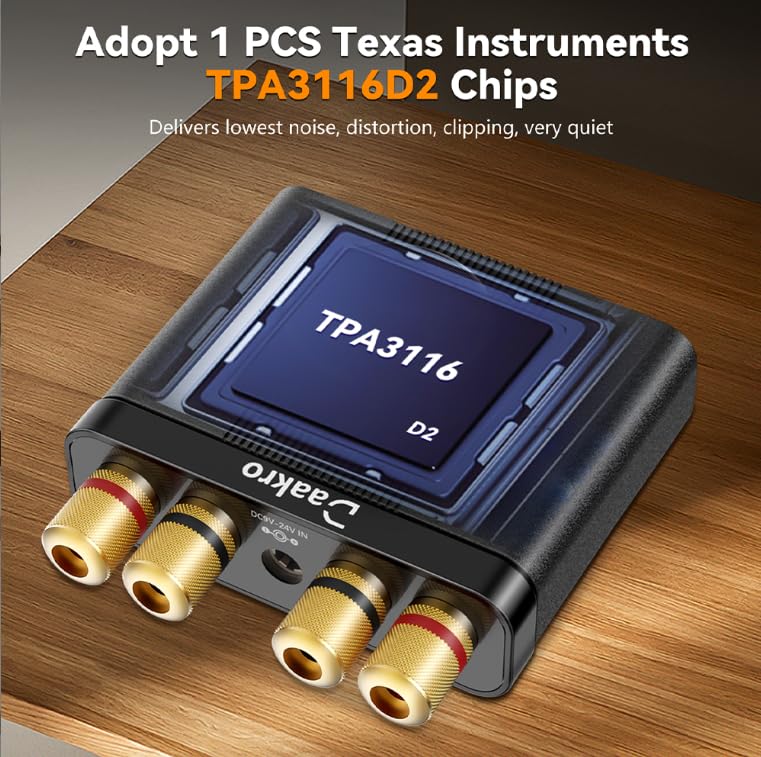
Image: All items included in the Daakro AK30 Mini Bluetooth Ampкөтөргүч пакет.
3. Продукциянын өзгөчөлүктөрү
- Жогорку өндүрүмдүүлүктөгү аудио: Utilizes Texas Instruments TPA3116 chips for reliable performance, delivering 50W+50W maximum output power when paired with 4-ohm passive speakers. Achieves an SNR exceeding 92dB and THD below 0.04%, with a frequency range of 20Hz to 20kHz.
- Компакт жана бышык дизайн: Features a sturdy black alloy case with a minimalist design.
- Intuitive Single-Knob Control: All functions are integrated into one knob for easy operation:
- Press and release: Play/Pause music.
- Press and hold: Switch between input modes.
- Rotate: Adjust volume.
- Multiple Input Methods: Supports Bluetooth, 3.5mm AUX, USB, and Optical (OPT) inputs for broad compatibility with devices like mobile phones, tablets, laptops, and MP3 players.
- Кеңири шайкештик: Compatible with various devices, though it does not support Amazon Echo, Alexa, or Bose speakers.

Сүрөт: Ички view highlighting the TPA3116D2 chip.

Сүрөт: Ички view highlighting the QCC3040 Bluetooth 5.0 chip.
4. Орнотуу
4.1 Динамиктерди бириктирүү
АК30 amplifier supports passive speakers. Connect your speakers to the binding posts on the rear of the amplifier. You can use either banana plugs or bare speaker wire. Ensure correct polarity (positive to positive, negative to negative) for optimal sound quality.

Image: Speaker connection options for the AK30 ampөмүрлүү.
4.2 Кубат туташтыруу
Connect the provided DC12V/5A power adapter to the 'DC9V-24V IN' port on the rear of the amplifier, then plug the adapter into a power outlet. The amplifier is designed for reliable performance with the included power supply.
Сүрөт: Арткы панелдик байланыштар, анын ичинде кубат киргизүү.
4.3 Input Source Connection
The AK30 offers multiple input options:
- Bluetooth: For wireless connection from your smartphone, tablet, or laptop.
- AUX: Use the 3.5mm AUX cable to connect devices like MP3 players or older audio sources.
- USB: Connect a USB drive or a computer via the USB-C port for digital audio playback.
- OPT: Use an optical fiber cable for high-quality digital audio from TVs or other optical output devices.

Image: Front panel inputs and controls.
Video: Official Daakro AK30 Mini Audio Ampкөтөргүчview and setup guide. This video demonstrates the unboxing, connections, and basic operation of the amplifier with various input sources.
5. Иштөө нускамалары
5.1 Көп функциялуу баскыч
The single knob on the front panel controls all primary functions:
- Солго/Оңго айлантуу: Increases/Decreases volume. A beep sound indicates minimum/maximum volume.
- Click (Press and Release): Play/Pause music (available in Bluetooth & USB modes).
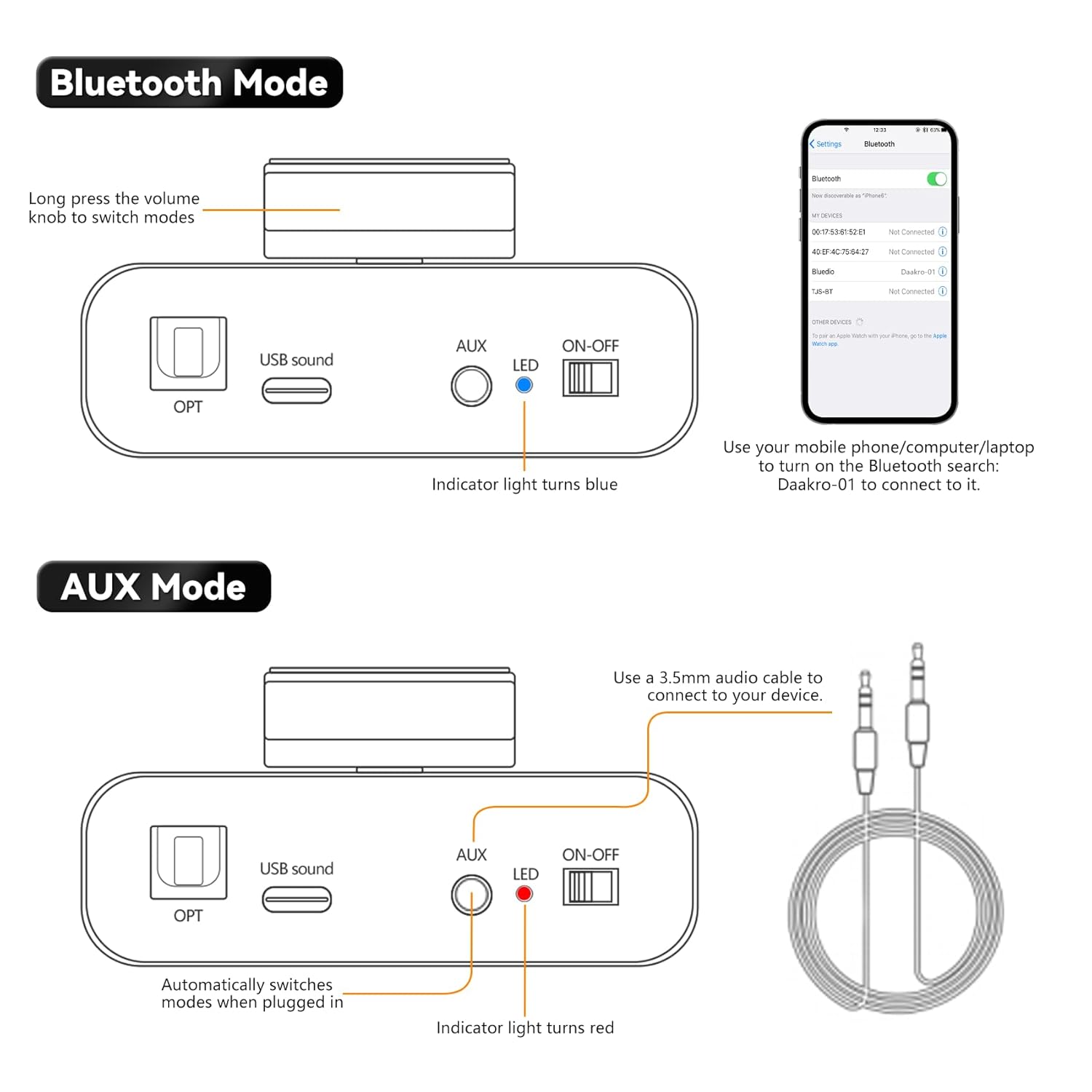
- Long Press (Press and Hold): Switch between input modes (Blue: Bluetooth, Red: AUX, Green: USB, Purple: OPT).

Image: Multifunctional knob controls.
5.2 Bluetooth режими
Long press the volume knob to switch to Bluetooth mode (indicator light turns blue). On your device (phone, computer, laptop), search for "Daakro-01" in Bluetooth settings and connect.
5.3 AUX режими
Plug a 3.5mm audio cable into the AUX input. The amplifier automatically switches to AUX mode (indicator light turns red) when a cable is detected.
5.4 USB режими
Connect a USB stick directly or use the Type-C to USB adapter to connect a USB device to the USB Sound port. The amplifier automatically switches to USB mode (indicator light turns green).
5.5 OPT Mode
Press and hold the volume knob to switch to OPT mode (indicator light turns purple). Connect an optical fiber cable to the OPT input.

Image: USB and OPT mode connections.
6. Техникалык шарттар
| Өзгөчөлүк | Спецификация |
|---|---|
| Бренд | Daakro |
| Модель номери | AK30 |
| Каналдардын саны | 2 |
| Чыгуу күчү | 100 Watts (50W+50W @ 4Ω) |
| Тtage | 12 вольт (ток) |
| Maximum Supply Voltage | 12 вольт (ток) |
| Minimum Supply Voltage | 12 вольт (ток) |
| Материал | Эритме |
| Монтаж түрү | бурун |
| Элемент Салмагы | 1.15 фунт |
| Пакеттин өлчөмдөрү | 6.57 x 6.3 x 2.52 дюйм |

Image: Power output table.
7. Кыйынчылыктарды
- Үн жок:
- Ensure the power adapter is securely connected and the ampкөтөргүч күйгүзүлгөн.
- Check all audio cables for secure connections and correct polarity.
- Verify the correct input mode is selected on the amplifier (indicated by LED color).
- Эки учурда тең үндү күчөтүңүз ampкөтөргүч жана аудио булагы түзмөгүңүз.
- Ensure speakers are properly connected and functional.
- Bluetooth туташуу маселелери:
- камсыз кылуу amplifier is in Bluetooth mode (blue LED).
- Keep your device within 32ft/10m of the amplifier (6.5ft/2m for PC devices) without obstructions.
- Forget "Daakro-01" from your device's Bluetooth list and try pairing again.
- Экөөнү тең кайра иштетиңиз ampкөтөргүч жана Bluetooth түзмөгүңүз.
- Бурмаланган үн:
- Экөөнүн тең үнүн азайтыңыз ampкүчөткүч жана аудио булагы.
- Check speaker connections for loose wires or incorrect polarity.
- Аудио булагы ашыкча сигнал жөнөтпөгөнүн текшериңиз.
- Үзгүлтүктүү аудио:
- Кабелдик туташуулардын боштугун текшериңиз.
- For Bluetooth, ensure no interference from other wireless devices and maintain close proximity.
8. Техникалык тейлөө
- Тазалоо: Тазалоо үчүн жумшак, кургак чүпүрөктү колдонуңуз amplifier's exterior. Avoid using liquid cleaners or solvents.
- Вентиляция: камсыз кылуу amplifier has adequate ventilation to prevent overheating. Do not block any vents.
- Сактагыч: Узак мөөнөткө колдонулбаганда, сактаңыз ampтүз күндүн нурунан жана экстремалдык температурадан алыс салкын, кургак жерде liifier.
- Колдонуу: Физикалык зыян келтирбөө үчүн түзмөктү этияттык менен кармаңыз.
9. Кепилдик жана колдоо
The Daakro AK30 Mini Bluetooth Ampкөтөргүч а менен келет 30 күндүк кайтаруу/алмаштыруу саясаты. For any product inquiries, technical assistance, or warranty claims, please contact Daakro customer support. Our team is dedicated to providing online customer service and ensuring 100% customer satisfaction.
Кошумча жардам алуу үчүн, сураныч, баш багыңыз Daakro Store.