
1. Киришүү
This manual provides essential information for the safe and efficient operation of your ZDSSY ZD-L018AQ Smart Projector. This device offers 1080P native resolution with 4K support, 600 ANSI lumens brightness, electric focus, and auto keystone correction. It features integrated WiFi 6 and Bluetooth 5.2 for seamless connectivity and a built-in Smart TV OS with access to various applications.

Image 1.1: ZDSSY ZD-L018AQ Smart Projector, a compact device with a lens on the front and a stand for adjustable positioning.
2. Кутуда эмне бар
Бардык буюмдар кутудан чыгарылганда бар экенин текшериңиз:
- Мини проектор
- Алыстан башкаруу
- Электр кабели
- Колдонуучунун Колдонмосу (бул документ)
3. Продукт бүтүп калдыview
Проектордун компоненттери жана порттору менен таанышып алыңыз.
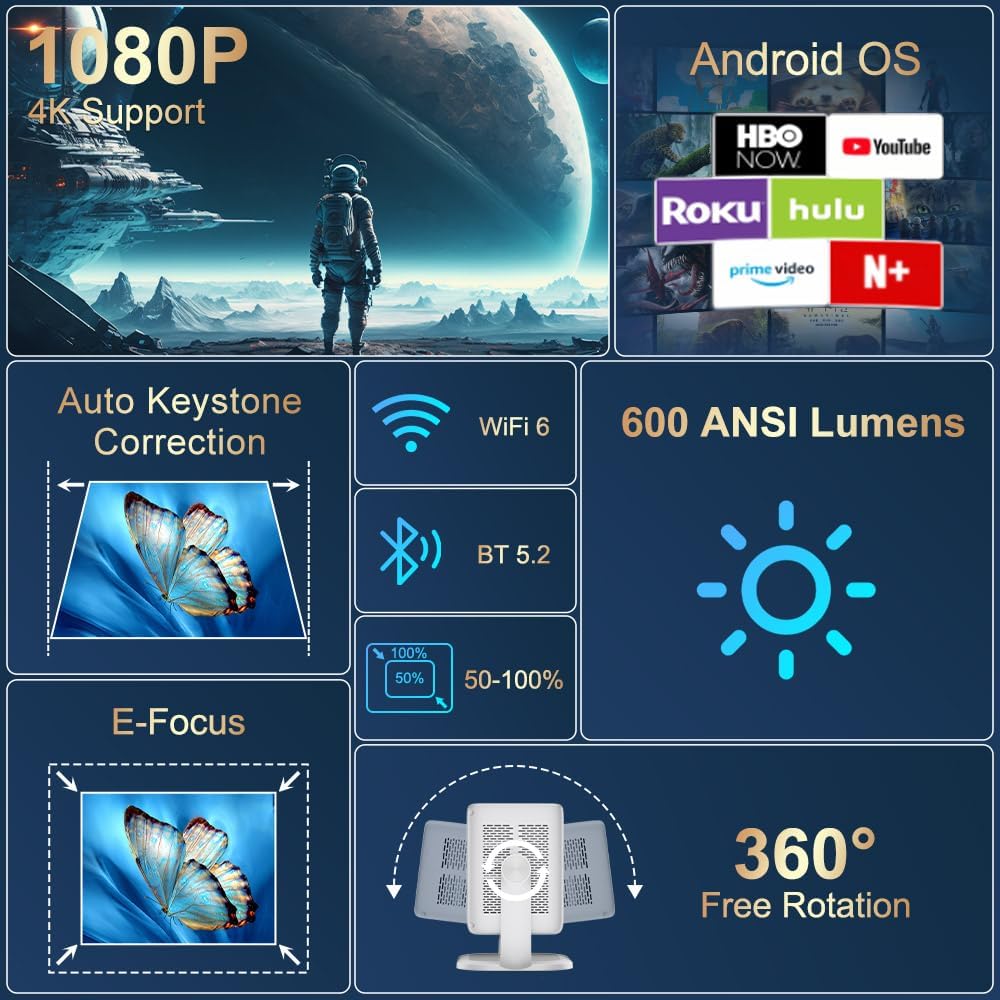
Сүрөт 3.1: Бүттүview of the projector's key features including 1080P 4K support, Auto Keystone, WiFi 6, Bluetooth 5.2, E-Focus, 600 ANSI Lumens, and 360° Free Rotation.
3.1 алдыңкы панели
- Проекциялык линза: Сүрөттү экранга же анын бетине чыгарат.
- Фокус шакеги: Manual adjustment for image sharpness (though electric focus is primary).
3.2 Арткы панель
- Электр порту: Connects to the included power cord.
- HDMI порту: Connects to external devices like laptops, gaming consoles, or DVD players.
- USB порт: USB сактагыч түзүлүштөрүн же башка перифериялык түзүлүштөрдү туташтыруу үчүн.
- Аудио чыгышы (3.5 мм уяча): Тышкы кулакчындарды же динамиктерди туташтыруу үчүн.
- Кубат баскычы: Проекторду күйгүзөт/өчүрөт.
4. Орнотуу
4.1 Кубат туташтыруу
- Connect the included power cord to the projector's power port.
- Электр шнурунун экинчи учун стандарттуу электр розеткасына сайыңыз.
4.2 Жайгаштыруу жана тууралоо
Position the projector on a stable, flat surface. The integrated 360° rotatable and adjustable stand allows for flexible projection angles, including ceilings and walls.
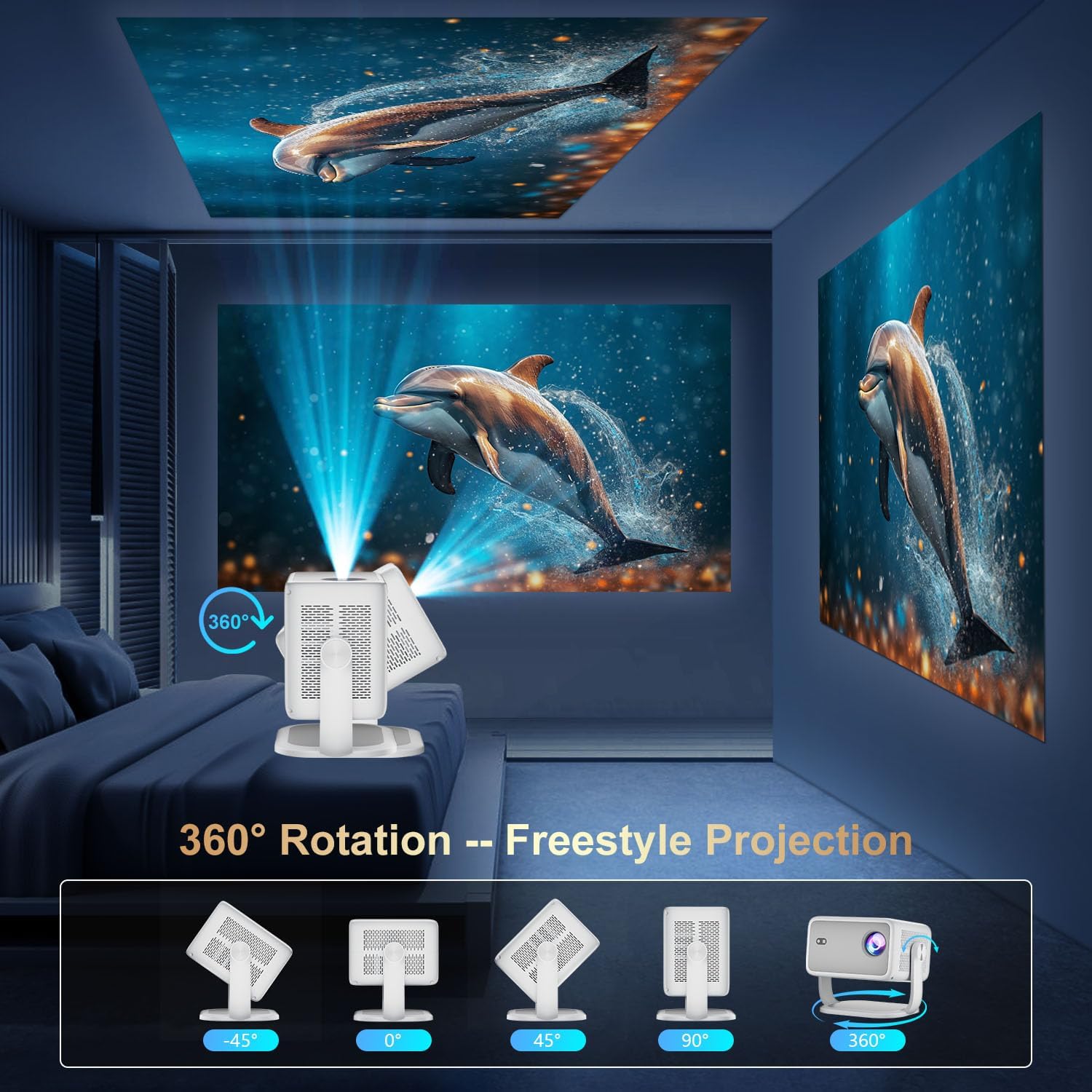
Image 4.1: The projector demonstrating its 360-degree rotation capability for versatile projection angles.
4.3 Фокустоо жана Keystone коррекциясы
The projector features automatic keystone correction and electric focus for quick image alignment and sharpness. Digital zoom (50%-100%) allows for image resizing without moving the unit.

Image 4.2: The projector automatically adjusting focus and keystone correction for a perfectly aligned and sharp image.
4.4 Initial Network Setup
- Power on the projector using the power button on the rear panel or the remote control.
- Navigate to 'Networking Setting' on the home screen using the remote.
- Select your WiFi network and enter the password to connect.
5. Иштөө
5.1 Алыстан башкарууну колдонуу
The included remote control is the primary interface for navigating the projector's Smart TV OS. It requires two AAA batteries (not included).
- Кубат баскычы: Проекторду күйгүзөт/өчүрөт.
- Чабыттоо баскычтары: Use the directional arrows to move between menu options.
- OK баскычы: Тандоолорду ырастайт.
- Артка баскычы: Мурунку экранга кайтат.
- Үн баскычтары: Аудио чыгарууну тууралайт.
5.2 Smart TV OS and Applications
The projector runs on a Smart TV OS, providing access to various streaming applications.

Image 5.1: The projector's home screen displaying various built-in applications such as Netflix, YouTube, Prime Video, and Hulu.
- From the home screen, select the desired application (e.g., Netflix, YouTube, Hulu, Prime Video).
- Зарыл болсо, аккаунтуңуздун маалыматтары менен кириңиз.
- Browse and enjoy content.
- Additional apps can be downloaded from the App Store.
5.3 Тышкы түзмөктүн туташуусу
Connect external devices via HDMI or USB:
- HDMI: Connect an HDMI cable from your external device to the projector's HDMI port. Select 'HDMI' input from the projector's home screen.
- USB: Insert a USB drive into the USB port. Navigate to 'Files' on the home screen to access content.
5.4 Wireless Screen Mirroring (Miracast/AirPlay)
The projector supports Miracast and AirPlay for wireless screen mirroring from compatible devices (Windows, iOS, Android).

Image 5.2: A smartphone wirelessly mirroring its screen content to the ZDSSY ZD-L018AQ Smart Projector via WiFi.
- Ensure your device and the projector are connected to the same WiFi network.
- On the projector, select the 'AirPin' or 'ScreenCast' option (may vary by firmware version).
- Мобилдик түзмөгүңүздө экранды чагылдырууну/трансляциялоону иштетип, жеткиликтүү түзмөктөрдүн тизмесинен проекторду тандаңыз.
5.5 Bluetooth аудио
Жакшыртылган аудио үчүн тышкы Bluetooth динамиктерин же гарнитураны туташтырыңыз.

Image 5.3: The projector wirelessly connected to a soundbar via Bluetooth 5.2, enhancing the audio experience.
- Navigate to 'Bluetooth Setting' on the projector's home screen.
- Bluetooth'ду иштетиңиз жана жеткиликтүү түзмөктөрдү издеңиз.
- Select your Bluetooth audio device to pair.
6. Техникалык тейлөө
Проекторуңуздун үзгүлтүксүз техникалык тейлөөсү анын оптималдуу иштешин жана узак мөөнөттүү иштешин камсыздайт.
- Линзаны тазалоо: Проекциялык линзаны акырын сүртүү үчүн оптикалык линзалар үчүн атайын иштелип чыккан жумшак, мамыксыз чүпүрөктү колдонуңуз. Абразивдүү материалдардан же катуу химиялык заттардан алыс болуңуз.
- Вентиляция: Ensure the projector's ventilation openings are clear of dust and obstructions to prevent overheating. Do not block the vents during operation.
- Сактагыч: When not in use, store the projector in a cool, dry place, away from direct sunlight and extreme temperatures. Use the original packaging or a protective case if available.
- Өчүрүү: Always power off the projector properly before unplugging it.
7. Кыйынчылыктарды
Жалпы маселелерди чечүү үчүн бул бөлүмдү караңыз.
| Көйгөй | Мүмкүн себеп | Чечим |
|---|---|---|
| Күч жок | Электр шнуру туташтырылган эмес; розеткада көйгөй бар. | Электр шнурунун туташуусун текшерүү; башка розеткага аракет кылып көрүңүз. |
| Сүрөт жок | Input source not selected; external device not connected. | Select correct input source (HDMI, USB); ensure external device is on and connected. |
| бүдөмүк сүрөт | Focus not adjusted; projector too close/far. | Use electric focus or manual focus ring; adjust projector distance. |
| Үн жок | Үнү өтө төмөн; тышкы аудио түзмөк туташкан/жупташтырылган эмес. | Increase volume; check Bluetooth pairing or 3.5mm audio cable connection. |
| WiFi/Bluetooth Connectivity Issues | Incorrect password; device out of range; interference. | Re-enter password; move closer to router/device; reduce interference. |
8. Техникалык шарттар
| Өзгөчөлүк | Деталь |
|---|---|
| Бренд | ZDSSY |
| Модель номери | ZD-L018AQ |
| Display Resolution | 1920 x 1080 (Негизги) |
| 4K колдоо | Ооба |
| Жарыктык | 600 ANSI челинин |
| Байланыш технологиясы | Bluetooth 5.2, HDMI, USB, Wi-Fi 6 |
| Өзгөчөлүктөр | Auto Screen Alignment, Built-In Speaker, Built-In Wi-Fi, Portable, Electric Focus |
| Сунушталган Колдонуулар | Ички/тышкы |
| Продукциянын өлчөмдөрү | 6.69 x 5.9 x 9.05 дюйм |
| Элемент Салмагы | 2.97 фунт |
9. Кепилдик жана колдоо
ZDSSY is committed to providing high-quality products and customer satisfaction.
- Кардарларды тейлөө: 24/7 Professional Service is available for any inquiries or assistance.
- Кайтаруулар/алмаштыруулар: A 30-day return or exchange policy is offered.
- Техникалык колдоо: Өмүрүңүзгө техникалык колдоо көрсөтүлөт.
For further assistance, please refer to the contact information provided with your purchase or visit the official ZDSSY webсайт.