
1. Киришүү
Сатып алганыңыз үчүн рахматasing the YUEHISY 48MP 2.7K Waterproof Digital Camera. This camera is designed for capturing high-resolution photos and videos, featuring a 48-megapixel image sensor and 2.7K video recording capabilities. Its waterproof design allows for use up to 10 feet (3 meters) underwater, making it suitable for various outdoor and aquatic activities. The dual-screen design enhances convenience for both standard photography and selfies.
2. Коопсуздук маалыматы
- Суу өткөрбөйт мөөр: Before each use, especially underwater, ensure the battery compartment door is securely locked. Failure to do so will compromise the waterproof seal and may damage the camera.
- Depth and Time Limits: The camera is waterproof up to 10 feet (3 meters) for approximately one hour per use. Exceeding these limits may result in water ingress.
- Температура: Камераны өтө жогорку температурага дуушар кылбаңыз.
- Тазалоо: After using the camera in saltwater, rinse it thoroughly with fresh water and dry it completely before opening any compartments.
- Батареянын коопсуздугу: Use only recommended batteries. Do not attempt to open or modify the battery. Dispose of batteries properly.
- Балдар: Keep the camera and its accessories out of reach of small children to prevent choking hazards.
3. Пакеттин мазмуну
Пакетиңизде бардык буюмдар бар экенин текшериңиз:
- YUEHISY 48MP 2.7K Waterproof Digital Camera
- USB заряддоо кабели
- Камера баштыгы
- Билек боо
- Колдонуучунун Колдонмосу (бул документ)
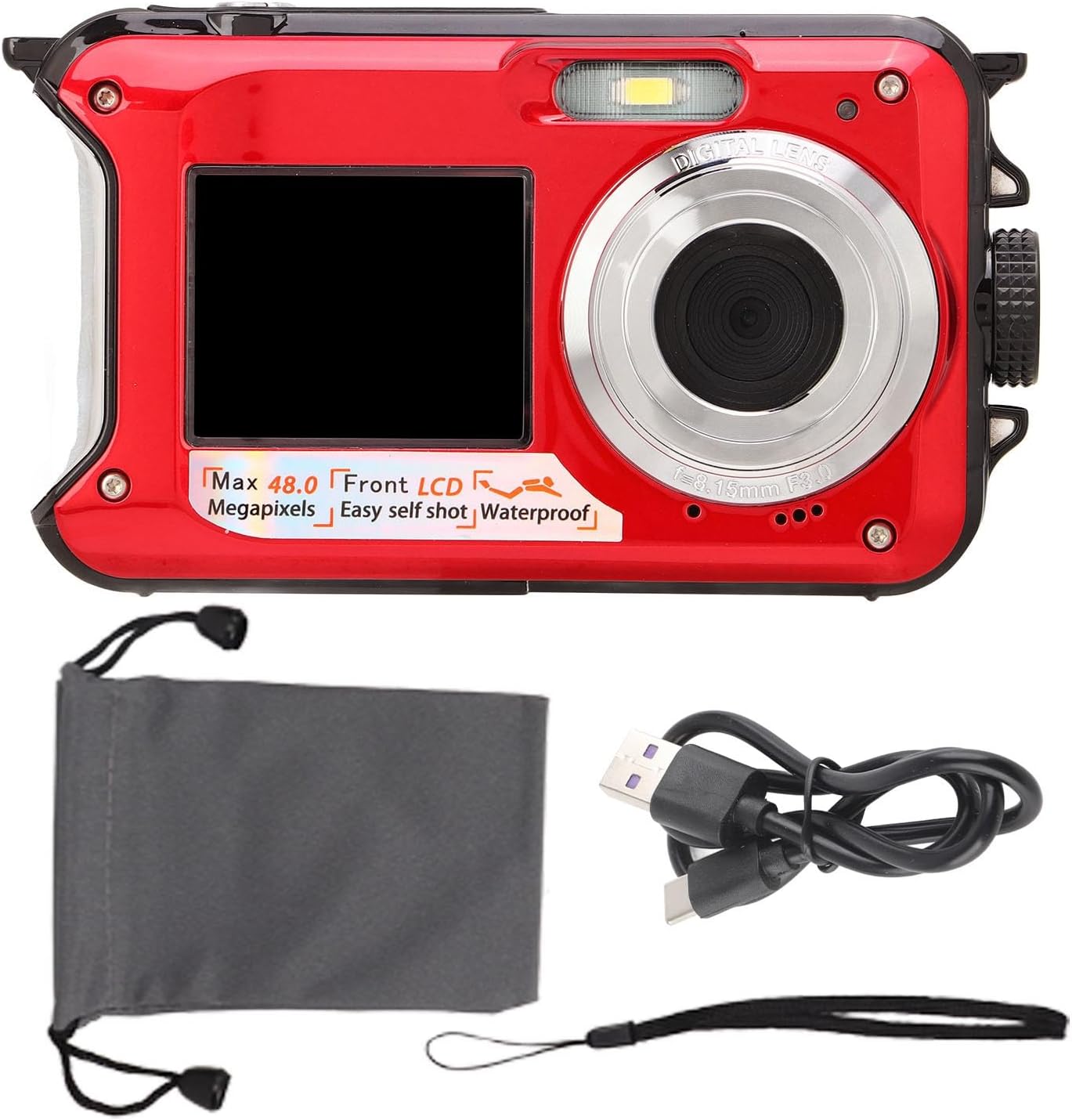
Image 3.1: Camera with included USB cable and carrying pouch.
4. Продукт бүтүп калдыview жана Бөлүктөрдү идентификациялоо
Камеранын компоненттери менен таанышыңыз:

Image 4.1: Detailed diagram showing the camera's various buttons, screens, and ports.
- Shutter Key: Сүрөткө тартуу же видео жаздырууну баштоо/токтотуу үчүн басыңыз.
- Кубат ачкычы: Камераны күйгүзөт же өчүрөт.
- Display Screen Switching Key: Toggles between the front (selfie) and rear LCD screens.
- Rope Hole: Билек боону бекитүүчү жер.
- Flash Light: Жарык аз шарттарда жарыкты камсыз кылат.
- Selfie Screen (Front LCD): 1.8-inch display for self-portraits.
- Selfie Indicator: Light indicating selfie mode.
- Объектив: The primary optical component for capturing images.
- Battery Cover / TF Card / USB Compartment: Sealed compartment for battery, microSD card, and USB port.
- Battery Cover Lock: Mechanism to secure the battery compartment.
- Main Screen (Rear LCD): 2.7 дюймдук дисплей үчүн viewменю жана навигация.
- Күч көрсөткүчү: Электр кубатынын абалын көрсөткөн жарык.
- Zoom In / Up Key: Zooms in during photo/video mode, navigates up in menus.
- Zoom Out / Down Key: Zooms out during photo/video mode, navigates down in menus.
- Flash Light / Right Key: Controls flash settings, navigates right in menus.
- Delete / Left Key: Жок кылат files, navigates left in menus.
- Режим ачкычы: Сүрөт, видео жана ойнотуу режимдери ортосунда которулат.
- Меню ачкычы: Камера жөндөөлөрүнө жана параметрлерине кирет.
- OK Ачкыч: Менюлардагы тандоолорду ырастайт.
5. Орнотуу
5.1 Батарейканы орнотуу
- Батарея бөлүмүн камеранын капталынан табыңыз.
- Press the battery cover lock with one hand.
- With the other hand, push out the battery cover and open the door.
- Insert the provided battery, ensuring correct polarity (+/-).
- Close the battery door firmly and ensure the lock clicks into place. It is crucial that the battery door is completely sealed and locked before any water exposure.
5.2 Эстутум картасын салуу
This camera supports microSD cards up to 128GB (not included, please purchase separately).
- Open the battery compartment door as described in Section 5.1.
- Бөлүмдүн ичиндеги microSD карта уячасын табыңыз.
- Insert the microSD card with the gold contacts facing the front of the camera until it clicks into place.
- Батарейканын эшигин бекем жабыңыз.
5.3 Камераны заряддоо
The camera has a 650mAh battery capacity, providing 2 to 3 hours of continuous operation. It supports recording while charging.
- Батарея бөлүмүнүн эшигин ачыңыз.
- Connect the USB charging cable to the camera's USB port.
- USB кабелинин экинчи учун кубат булагына туташтырыңыз (мисалы, компьютердин USB порту, USB дубал адаптери).
- The power indicator light will illuminate during charging.
- Once fully charged, the indicator light may change or turn off. Disconnect the cable and close the battery door securely.
6. Иштөө нускамалары
6.1 Күйгүзүү/өчүрүү
- Күйгүзүү үчүн: басып, кармап туруңуз Кубат ачкычы экран жарыктанганга чейин.
- Өчүрүү үчүн: басып, кармап туруңуз Кубат ачкычы экран өчкөнгө чейин кайра басыңыз.
6.2 Сүрөт тартуу
- Ensure the camera is in Photo Mode (press the Режим ачкычы зарыл болсо).
- Frame your shot using the rear or front screen.
- басыңыз Жапкыч halfway down to focus (if applicable).
- басыңыз Жапкыч fully down to capture the photo.
6.3 Видеолорду жаздыруу
- басыңыз Режим ачкычы to switch to Video Mode.
- басыңыз Жапкыч to start recording. A red indicator or timer will appear on the screen.
- басыңыз Жапкыч жазууну токтотуу үчүн дагы.
6.4 Using Dual Screens and Selfie Mode
The camera features a rear 2.7-inch LCD and a front 1.8-inch LCD for versatile shooting.
- Switching Screens: басыңыз Display Screen Switching Key to toggle between the rear and front screens.
- Селфи таймери: The camera has built-in 2-second, 5-second, and 10-second selfie timers. Access these options through the camera's menu settings.

Image 6.1: The camera's front screen displaying a selfie, highlighting the dual-screen design.
6.5 Underwater Photography
This camera is designed for underwater use up to 10 feet (3 meters).
- Сууга түшүүгө чейинки текшерүү: Always ensure the battery compartment door is completely sealed and locked before submerging the camera.
- Depth and Time: Do not exceed 10 feet (3 meters) depth or 1 hour of continuous underwater use.
- Post-Dive Care: After use in saltwater, rinse the camera thoroughly with fresh water and dry it completely with a soft cloth before opening any compartments.

Image 6.2: The camera being used underwater to capture images of swimmers.
6.6 Playback and Deletion
- Ойнотуу: басыңыз Режим ачкычы to enter Playback Mode. Use the Left/Right Keys to navigate through your photos and videos.
- Жок кылуу: Ал эми viewing a photo or video in Playback Mode, press the Ачкычты жок кылуу. Confirm deletion when prompted.
6.7 Меню Навигациясы
- басыңыз Меню ачкычы to access camera settings.
- колдонуу Өйдө/төмөн баскычтары to scroll through options.
- колдонуу Left/Right Keys to adjust settings or navigate sub-menus.
- басыңыз OK ачкычы тандоону ырастоо үчүн.
- басыңыз Меню ачкычы кайра менюдан чыгуу үчүн.
7. Техникалык тейлөө
- Тазалоо: Use a soft, lint-free cloth to clean the camera body and screens. For stubborn dirt, slightly dampчүпүрөктү суу менен. Катуу химиялык заттарды же абразивдүү материалдарды колдонбоңуз.
- Линзага кам көрүү: Use a lens cleaning cloth or brush to gently remove dust and smudges from the lens. Avoid touching the lens surface with your fingers.
- Сактагыч: Колдонулбаган учурда камераны күн нурунан жана өтө температурадан алыс салкын, кургак жерде сактаңыз. Узак мөөнөткө сактасаңыз, батареяны алып салыңыз.
- Батареяга кам көрүү: Recharge the battery regularly, even if not in use, to maintain its lifespan. Avoid fully discharging the battery frequently.
8. Кыйынчылыктарды
- Камера күйбөйт:
- Ensure the battery is fully charged.
- Check if the battery is inserted correctly.
- Try pressing and holding the Power Key for a few seconds. - Сүрөткө тартууга/видео жаздырууга болбойт:
- Check if a microSD card is inserted and has sufficient free space.
- Ensure the microSD card is formatted correctly (FAT32 recommended).
- The battery might be too low; charge the camera. - Сүрөттөр бүдөмүк:
- Ensure the lens is clean and free from smudges or condensation.
- Check lighting conditions; use flash if necessary.
- Hold the camera steady while shooting. - Water leakage after underwater use:
- Камераны дароо өчүрүп, батарейканы алып салыңыз.
- This indicates the battery compartment was not properly sealed. Do not attempt to use the camera again. Contact customer support. - Камера катып калат же жооп бербей калат:
- Remove and reinsert the battery to perform a hard reset.
9. Техникалык шарттар
| Өзгөчөлүк | Спецификация |
|---|---|
| Сүрөттүн чечилиши | 48 мегапиксел |
| Video Resolution | 2.7K |
| Суу өткөрбөйт | 10 фут (3 метр) чейин |
| Алдыңкы экран | 1.8 дюймдук LCD |
| Арткы экран | 2.7 дюймдук LCD |
| Батарея сыйымдуулугу | 650mAh |
| Үзгүлтүксүз иштөө убактысы | 2-3 саат |
| Эстутум картасын колдоо | 128 ГБ чейин MicroSD (киргизилген эмес) |
| Элемент Салмагы | 9.1 унция |
| Пакеттин өлчөмдөрү | 5.91 x 4.72 x 1.97 дюйм |
| Модель номери | YUEHISYvfrcsz7oge-12 |
| Өндүрүүчү | YUEHISY |
10. Кепилдик жана колдоо
Кепилдик маалыматы же техникалык колдоо үчүн, сатып алуу учурунда берилген документтерди караңыз же сатуучуга кайрылыңыз. Ар кандай кепилдик дооматтары үчүн сатып алганыңыздын далилин сактаңыз.