
ttec KM156
ttec SoundFlow OWS зымсыз Bluetooth кулакчындары KM156 колдонуучусунун колдонмосу
Модел: KM156
1. Киришүү
This manual provides instructions for the proper use and maintenance of your ttec SoundFlow OWS Wireless Bluetooth Earphones, model KM156. Please read this manual thoroughly before using the product to ensure optimal performance and longevity.
The ttec SoundFlow OWS earphones feature an open-ear design for situational awareness, dynamic acoustic system for clear sound, and Bluetooth 5.4 for stable wireless connectivity.
2. Пакеттин мазмуну
Продукцияңыздын таңгагында бардык элементтер бар экенин текшериңиз:
- ttec SoundFlow OWS Wireless Bluetooth Earphones (Left and Right)
- Заряддоо кутусу
- USB-C заряддоо кабели
- User Manual
3. Продукт бүтүп калдыview
Familiarize yourself with the components of your ttec SoundFlow OWS earphones.

Image 3.1: ttec SoundFlow OWS Earphones and Charging Case. The image displays the two black earphones with ear hooks, positioned above their open black charging case.
Кулакчындын компоненттери:
- Кулак илгич: Кулакка коопсуз жана ыңгайлуу отурууну камсыз кылат.
- Динамик бирдиги: Аудио чыгарууну берет.
- Микрофон: Чалуулар жана үн буйруктары үчүн.
- Touch Sensor Area: For controlling music, calls, and other functions.
- Заряддоо байланыштары: Кубат алуу үчүн заряддоо кутучасына туташат.

Image 3.2: Close-up of an earbud highlighting the touch sensor area. The image shows a detailed view of the earbud's outer surface, indicating the touch-sensitive zone for controls.
Заряддоо кутусунун компоненттери:
- Кулакчын уячалары: Кулакчындарды бекем кармап, кубаттайт.
- USB-C заряддоо порту: Ишти заряддоо үчүн.
- LED көрсөткүчү: Заряддоо абалын жана батареянын деңгээлин көрсөтөт.
4. Орнотуу
4.1 Наушникти жана капты заряддоо
Биринчи колдонуудан мурун, наушникти жана кубаттоочу кутучаны толук заряддаңыз.
- Place the earphones into the charging case. Ensure the charging contacts align.
- USB-C кубаттоочу кабелин корпустагы кубаттоо портуна, ал эми экинчи учун кубат булагына (мисалы, USB дубал адаптери, компьютердин USB порту) туташтырыңыз.
- The LED indicator on the case will show the charging status. Once fully charged, the indicator will change or turn off.
A full charge provides up to 6 hours of earphone use, and the charging case provides up to 30 hours of additional battery life. The Charge&Go feature allows 2.5 hours of use from a 15-minute charge.
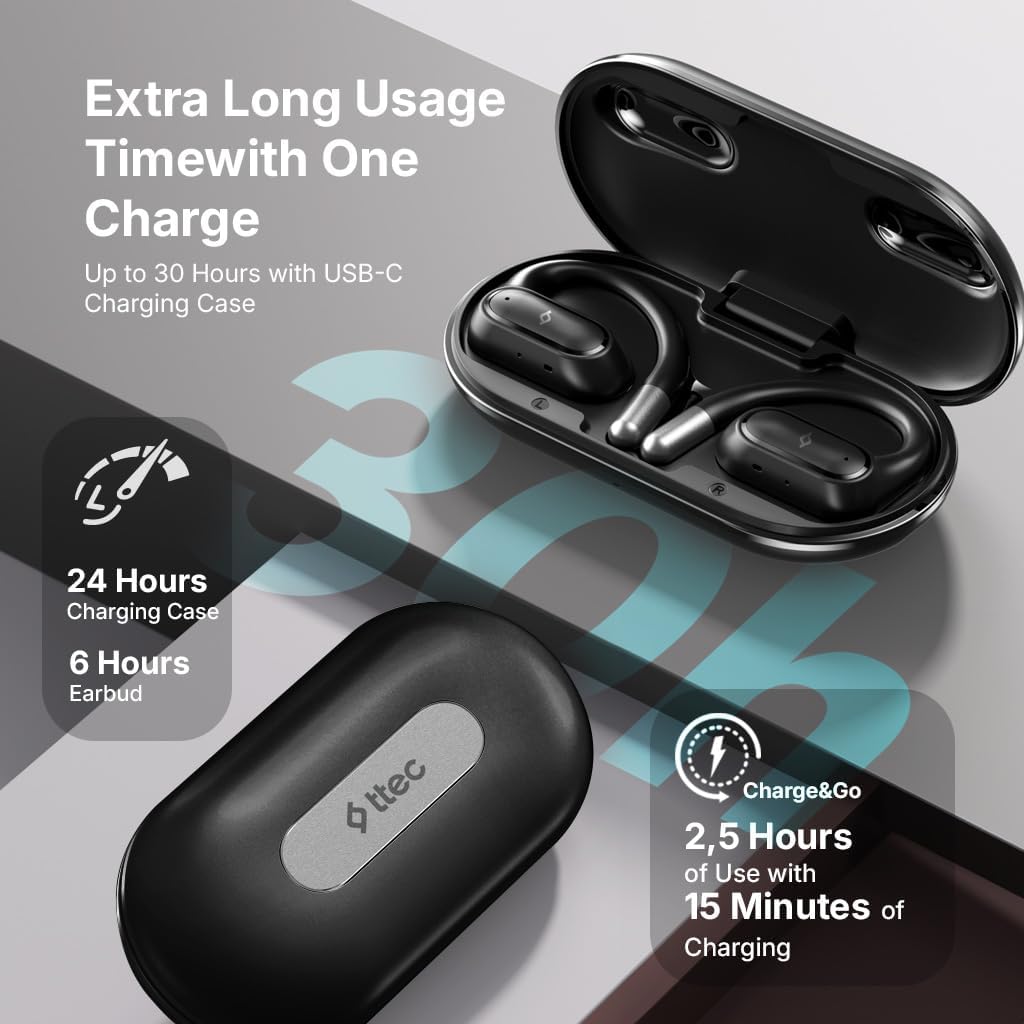
Image 4.1: Charging case displaying battery life. The image illustrates the charging case with text indicating 24 hours from the charging case, 6 hours from earbuds, and 2.5 hours of use from 15 minutes of charging.
4.2 Bluetooth түзмөгү менен жупташтыруу
To connect your earphones to a smartphone or other Bluetooth-enabled device:
- Кулакчындардын заряддалганын жана кубаттоочу кутуга салынганын текшериңиз.
- Open the charging case. The earphones will automatically enter pairing mode, and their LED indicators will flash.
- Түзмөгүңүздө Bluetooth иштетиңиз жана жеткиликтүү түзмөктөрдү издеңиз.
- Select "ttec SoundFlow" from the list of found devices.
- Once connected, the earphone LED indicators will stop flashing or turn off, and you will hear a confirmation tone.
The earphones will automatically reconnect to the last paired device when removed from the case, if Bluetooth is enabled on the device.
5. Иштөө нускамалары
5.1 Наушник тагынуу
Gently place the ear hook over your ear and position the speaker unit comfortably in front of your ear canal. The open-ear design allows you to remain aware of your surroundings.

Image 5.1: A person cycling while wearing the ttec SoundFlow OWS earphones. The image highlights the open-ear design, allowing the user to stay connected to their surroundings.

Image 5.2: A woman wearing a ttec SoundFlow earbud, demonstrating the comfortable and secure fit. The image also indicates the lightweight design: 8.2g per earbud and 52g for the charging case.
5.2 Сенсордук башкаруу
The earphones feature touch sensors for easy control of various functions:
| Акция | Функция |
|---|---|
| Бир таптоо (сол/оң) | Музыканы ойнотуу/тындыруу, чалууга жооп берүү |
| Эки жолу таптаңыз (L) | Мурунку трек |
| Эки жолу таптаңыз (R) | Кийинки трек |
| Үч жолу таптоо (сол/оң) | Үн жардамчысын жандырыңыз |
| Узак басуу (сол/оң) | Reject Call, End Call |
5.3 Оюн режими
The earphones feature a low-latency game mode for an enhanced gaming and video experience. This mode reduces audio delay to 50ms.
- To activate Game Mode: Refer to the specific instructions in the quick start guide or product packaging for the exact touch gesture to enable/disable game mode. (Typically a specific tap sequence or long press).
- When Game Mode is active, you may notice a slight change in audio profile, optimized for lower latency.

Image 5.3: ttec SoundFlow earphones and charging case, surrounded by gaming console symbols, highlighting the 50ms low latency feature for an optimized gaming and video experience.
6. Техникалык тейлөө
6.1 Тазалоо
- Наушниктерди жана заряддоо кутусун жумшак, кургак, түксүз чүпүрөк менен сүртүңүз.
- Абразивдүү тазалагычтарды, спиртти же химиялык эриткичтерди колдонбоңуз.
- Ensure charging contacts are clean and dry to prevent charging issues.
6.2 Сууга жана терге туруктуулук
The ttec SoundFlow OWS earphones are IPX6 rated, meaning they are resistant to high-pressure water jets from any direction. This makes them suitable for use during workouts and in light rain.
- Наушниктерди сууга салбаңыз.
- Ensure the earphones are dry before placing them back into the charging case to prevent damage.

Image 6.1: A man running outdoors, illustrating the sweat and water-resistant design of the ttec SoundFlow earphones, which are IPX6 rated.
6.3 Сактоо
Колдонулбаганда, кулакчындарды коргоо жана кубаттоо үчүн кубаттоо кутусуна сактаңыз. Салкын, кургак жерде, экстремалдык температурадан алыс сактаңыз.
7. Кыйынчылыктарды
Наушникиңизде көйгөйлөргө туш болсоңуз, төмөнкү жалпы чечимдерди караңыз:
| Көйгөй | Чечим |
|---|---|
| Кулакчын жупташкан жок | Ensure earphones are charged. Turn off and on Bluetooth on your device. Forget the device in your Bluetooth settings and re-pair. |
| Бир гана кулакчын иштейт | Place both earphones back in the case, close the lid, then open again. Ensure both are charged. |
| Үн жок | Check device volume. Ensure earphones are connected. Try playing different audio. |
| Заряддоо маселелери | Ensure charging cable is securely connected. Clean charging contacts on earphones and case. Try a different USB-C cable or power source. |
Эгер көйгөй чечилбесе, кардарларды колдоо менен байланышыңыз.
8. Техникалык шарттар
| Өзгөчөлүк | Деталь |
|---|---|
| Модель аты | SoundFlow |
| Модель номери | KM156 |
| Байланыш технологиясы | Зымсыз (Bluetooth 5.4) |
| Форма фактору | True Wireless, Open-Ear |
| Кулакчынын салмагы | 8.2 грамм (ар бири) |
| Заряддоо кутусунун салмагы | 52 грамм |
| Наушниктин батареясынын иштөө мөөнөтү | 6 саатка чейин (бир кубаттоо) |
| Батареянын жалпы иштөө мөөнөтү (корпус менен) | 30 саатка чейин |
| Тез заряддоо | 15 min charge for 2.5 hours use (Charge&Go) |
| Суу каршылык | IPX6 рейтинги (тер жана суу өткөрбөйт) |
| Төмөн күтүү | 50мс (Оюн режими) |
| Өндүрүүчү | ttec |
9. Кепилдик жана колдоо
Your ttec SoundFlow OWS Wireless Bluetooth Earphones are covered by a manufacturer's warranty. For detailed warranty information, please refer to the warranty card included in your product packaging or visit the official ttec webсайт.
For technical support, troubleshooting assistance, or to inquire about replacement parts, please contact ttec customer service through their official channels. Contact information can typically be found on the product packaging or the official ttec webсайт.
Ask a question about this manual
Ask about setup, troubleshooting, compatibility, parts, safety, or missing instructions. Manuals+ will review the question and use this page’s manual context to help answer it.