
1. Киришүү
This manual provides detailed instructions for the setup, operation, maintenance, and troubleshooting of your Yeabomy Smart Bluetooth Glasses E13C. Please read this manual thoroughly before using the product to ensure proper function and longevity.

A pair of black smart Bluetooth sunglasses, viewбир бурчтан ed, showcasing the integrated technology in the temples.
2. Продукт бүтүп калдыview
2.1 Пакеттин мазмуну
Пакетте бардык буюмдар бар экенин текшериңиз:
- Smart Bluetooth Glasses (E13C)
- Магниттик кубаттоочу кабель
- Тазалоочу кездеме
- Eyeglasses Storage Bag
- Көз айнек кутусу
- Колдонуучунун Колдонмосу (бул документ)
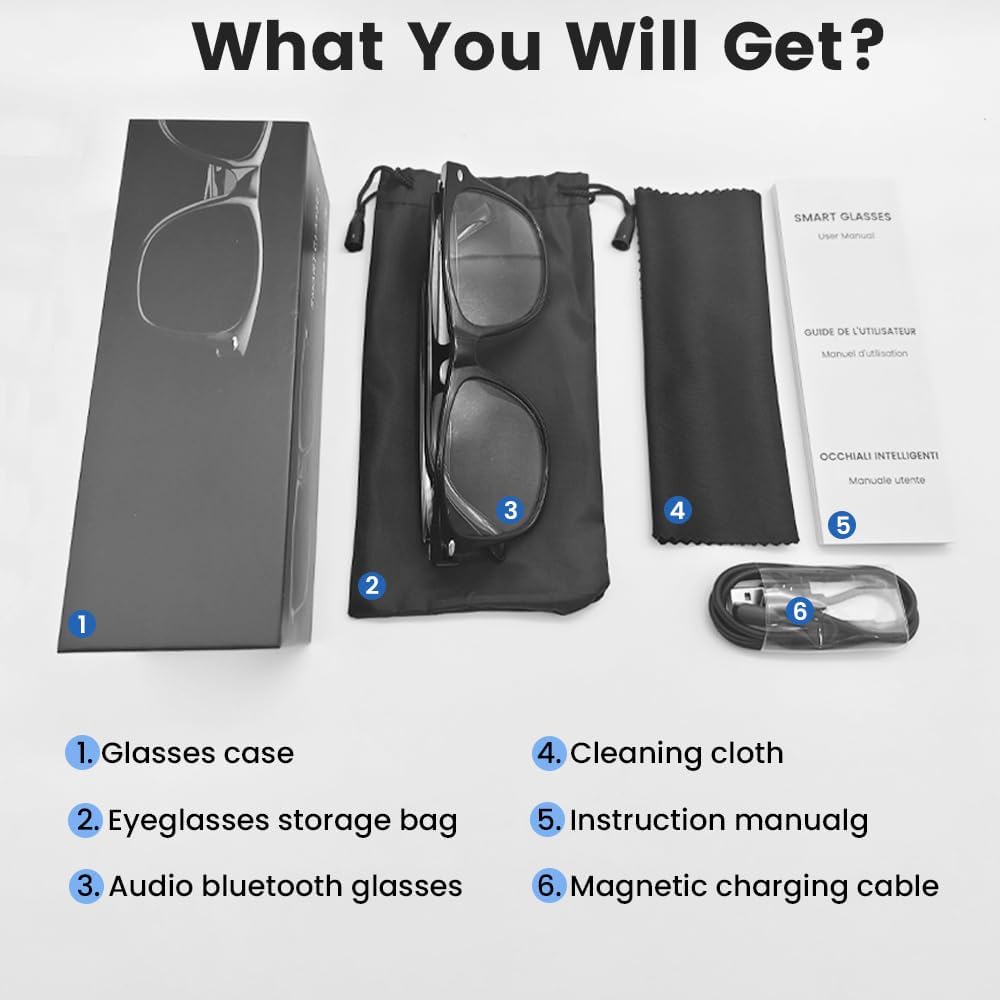
An image displaying the package contents: a glasses case, an eyeglasses storage bag, the audio Bluetooth glasses, a cleaning cloth, an instruction manual, and a magnetic charging cable.
2.2 Негизги өзгөчөлүктөрү
- Акылдуу үн башкаруу: Operate functions using voice commands.
- Поляризацияланган линзалар: Effective blue light filtering and 100% UV protection. Lenses are replaceable with prescription lenses.
- Кеңири шайкештик: Connects with various devices including smartphones (Android, iOS) and computers via Bluetooth 5.4.
- Бир кадам жупташтыруу: Automatic reconnection to the last paired device.
- Суу өткөрбөйт (IPX5): Resistant to sweat and rain.
- Жеңил дизайн: Weighs approximately 27g for comfortable extended wear.
- Dual Magnetic Charging: Efficient and secure charging.
- Интуитивдик сенсордук башкаруулар: For media playback, calls, and voice assistant activation.
3. Орнотуу
3.1 Көз айнекти кубаттоо
Before first use, fully charge the smart glasses. Use the provided magnetic charging cable.
- Connect the magnetic charging cable to the charging contacts on the temple of the glasses.
- Connect the USB end of the cable to a standard USB power adapter (not included) or a computer's USB port.
- The indicator light will show yellow during charging.
- Charging is complete when the indicator light turns green. A full charge takes approximately 1.5 hours.
The glasses provide approximately 4-6 hours of media playback and over 300 hours of standby time on a full charge.

An illustration showing the magnetic charging cable connecting to the glasses' temple, with indicators for charging (yellow light) and fully charged (green light). Battery capacity, charging time, playback time, and calling time are also displayed.
3.2 Bluetooth жупташтыруу
To connect your smart glasses to a device:
- Көз айнектин заряддалганын жана күйүп турганын текшериңиз.
- Смартфонуңузда же башка түзмөгүңүздө Bluetooth'ду иштетиңиз.
- Издөө available Bluetooth devices. The glasses will appear as "E13".
- Select "E13" to pair. Once paired, the glasses will automatically reconnect to this device when powered on and within range (up to 33 feet).

A person wearing the smart glasses while running, with a smartphone screen showing Bluetooth settings and the glasses (E13) connected. The image highlights the 33ft Bluetooth 5.4 transmission range and voice control functionality.
4. Иштөө нускамалары
4.1 Күйгүзүү/өчүрүү
- Күйгүзүү: Long touch the control area for 5 seconds.
- Өчүрүү: Long touch the control area for 5 seconds.
4.2 Сенсордук башкаруу
The smart glasses feature intuitive touch controls located on the temples:
- Музыканы ойнотуу/тындыруу: Once-Tap
- Кийинки трек: Twice-Tap
- Мурунку трек: Twice-Tap
- Чакырууга жооп берүү: Once-Tap
- Чакырууну токтотуу: Once-Tap
- Үн Жардамчысын жандыруу: Long Touch for 2 seconds
- Алыстан сүрөткө тартуу: Double click to control your smartphone's camera.

A diagram illustrating the touch control gestures on the smart glasses for various functions: pick up calls, turn on music, open navigation, take photos, previous/next track, play/pause, voice assistant, answer/hang up calls, and power on/off.
4.3 Үн менен башкаруу
After activating the voice assistant (Long Touch for 2 seconds), you can use voice commands for various functions, such as:
- Making calls (e.g., "Call [Contact Name]")
- Playing music (e.g., "Play [Song Title]")
- Билдирүүлөрдү жөнөтүү
- Opening navigation
5. Техникалык тейлөө
- Тазалоо: Use the provided cleaning cloth to gently wipe the lenses and frame. Avoid harsh chemicals or abrasive materials.
- Суу каршылык: The glasses are IPX5 water-resistant, meaning they can withstand sweat and light rain. Do not submerge them in water or expose them to strong jets of water.
- Сактагыч: When not in use, store the glasses in the provided eyeglasses storage bag or glasses case to protect them from scratches and dust.
- Температура: Avoid exposing the glasses to extreme temperatures (hot or cold) as this can affect battery life and electronic components.

A pair of smart glasses resting on a surface, emphasizing their lightweight design (27g) and comfort for extended wear. A magnified inset shows the dual magnetic charging contacts.
6. Кыйынчылыктарды
- Күйгүзүлбөйт: Ensure the glasses are fully charged. Connect to the magnetic charging cable and check the indicator light.
- Түзмөк менен жупташтыруу мүмкүн эмес:
- Түзмөгүңүздө Bluetooth иштетилгенин текшериңиз.
- Make sure the glasses are within the 33-foot Bluetooth range.
- Turn the glasses off and on again, then try pairing.
- Телефонуңуздун Bluetooth жөндөөлөрүнөн түзмөктү унутуп, кайра жупташтырып көрүңүз.
- Үн жок/Төмөн үнү:
- Check the volume settings on both the glasses (if applicable via touch control) and your connected device.
- Көз айнектер Bluetooth аркылуу туура туташып турганын текшериңиз.
- Confirm that the audio output on your device is set to the smart glasses.
- Тийүү башкаруулары жооп бербейт: Ensure the glasses are powered on and connected. Try restarting the glasses.
7. Техникалык шарттар
| Модел | E13C |
| Бренд | Yeabomy |
| Байланыш технологиясы | Bluetooth 5.4 |
| Операциялык системанын шайкештиги | Android, iOS Devices |
| Өзгөчөлүктөр | Music Player, Phone Call, Voice Control, UV Protection, Polarized Lenses, Remote Photography |
| Батарея сыйымдуулугу | 1 Amp Hours (80mAh per temple) |
| Заряддоо убактысы | Болжол менен 1.5 саат |
| Continuous Playback Time (Music) | Болжол менен 5 саат |
| Continuous Calling Time | Болжол менен 4 саат |
| Күтүү убактысы | 300 XNUMX сааттан ашык |
| Элемент Салмагы | 0.07 фунт (болжол менен 27 г) |
| Суу каршылык | IPX5 |
| Пакеттин өлчөмдөрү | 6.65 x 2.4 x 2.24 дюйм |
| Screen Size | 1.96 Inches (Visible screen diagonal) |
| Эстутум сактоо сыйымдуулугу | 128 MB |
| GPS | GPS жок |

An image detailing the physical dimensions of the smart glasses, including lens width, frame width, and temple length. It also shows various face shapes (oval, triangle, round, square, diamond) indicating suitability.
8. Кепилдик жана колдоо
For warranty information or technical support, please refer to the contact details provided with your purchase documentation or visit the official Yeabomy webсайт. Ар кандай кепилдик дооматтары үчүн сатып алганыңыздын далилин сактаңыз.