
1. Киришүү
Thank you for choosing the UNITOPSCI 7086W Double Din Car Stereo. This advanced multimedia system is designed to enhance your driving experience with its 6.9-inch IPS touchscreen, wireless Apple CarPlay, Android Auto, Bluetooth 5.2, and a range of connectivity options. This manual provides essential information for installation, operation, and maintenance to ensure optimal performance and safety.

Image 1.1: UNITOPSCI 7086W Double Din Car Stereo and accessories.
2. Коопсуздук маалыматы
- Always consult a professional for installation to prevent damage to the unit or your vehicle.
- Агрегатты айдоодон алаксыта тургандай иштетпеңиз. Ар дайым жол коопсуздугун биринчи орунга коюу.
- Кыска туташууларды же электрдик кырсыктарды болтурбоо үчүн бардык зымдар туура туташтырылганын текшериңиз.
- Агрегатты суудан жана ашыкча нымдан алыс кармаңыз.
- Агрегатты өзүңүз оңдоого аракет кылбаңыз. Квалификациялуу тейлөө кызматкерлерине кайрылыңыз.
- Use only the specified power supply (DC 12V).
3. Пакеттин мазмуну
Пакетте бардык буюмдар бар экенин текшериңиз:
- 1 x Car MP5 Player (UNITOPSCI 7086W)
- 1 x Кубат кабели
- 1 x Динамик кабели
- 1 x Микрофон (МИК)
- 1 x Steering Wheel Control (Battery Not Included)
- 1 x User Manual
- 1 x D-BUS кабели
- 1 х Камера
- 1 x Remote Control (Battery Not Included)
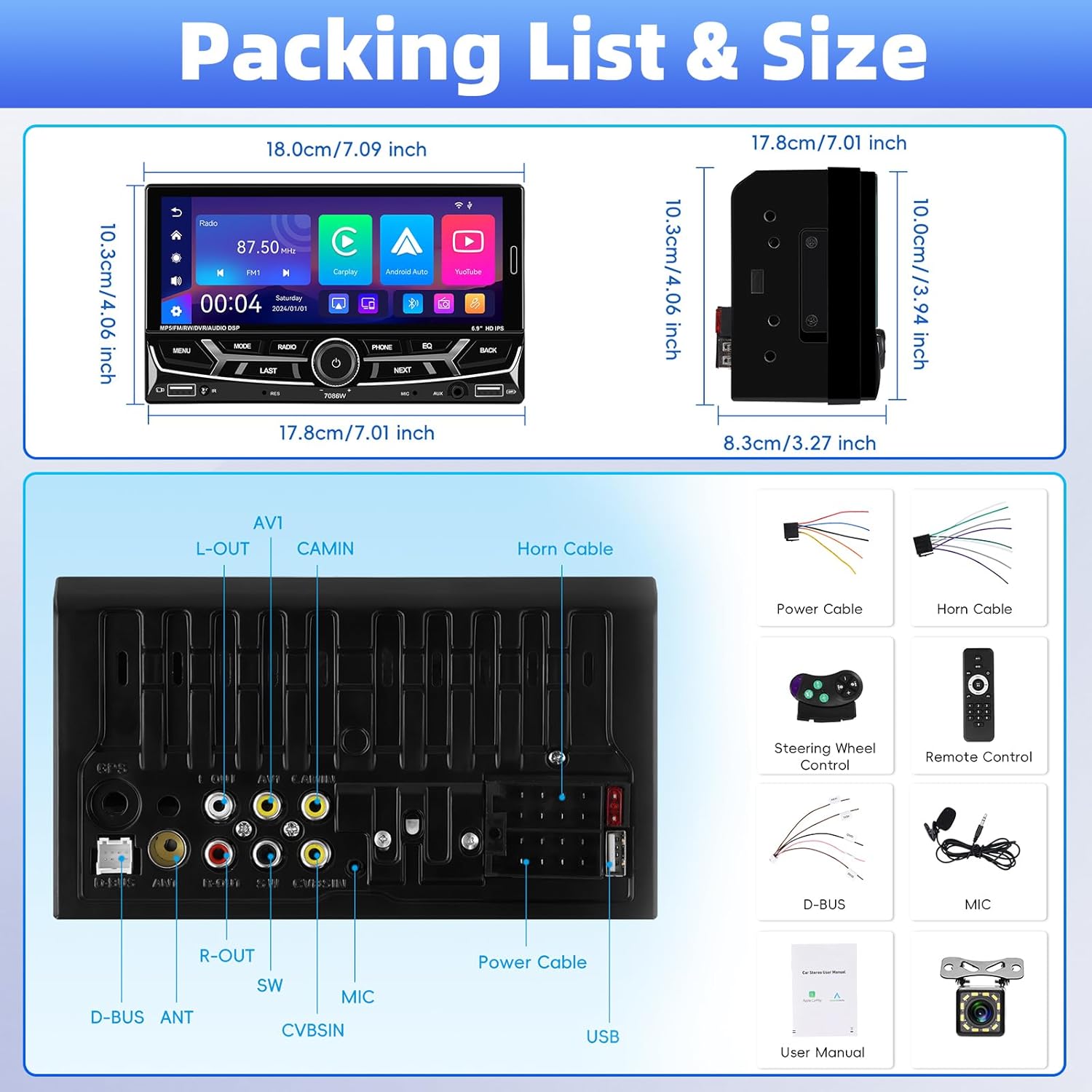
Сүрөт 3.1: Детальдуу view of package contents and wiring diagram.
4. Техникалык шарттар
| Өзгөчөлүк | Спецификация |
|---|---|
| Модел | 7086 Вт |
| Экран материалы | IPS |
| Тtage | DC 12V |
| CPU чип | 2900 |
| Screen Size | 6.9 дюйм |
| Screen Resolution | 1280*480 |
| Mirror Link | Support (iOS up to 13.4, Android up to 10.1) |
| Радио тобу | FM/AM/RDS |
| Радио чип | QN8035 |
| Power Output | 45W*4 (Max 180 Watts) |
| Иш температурасы | -10~60℃ |
| Bluetooth версиясы | 5.2 |
| Түстүү арткы жарык | Колдоо (7 түс) |
| Reversing Input | AHD720/CVBS |
| Күч Ampкөтөргүч чип | TDA7388 |
| Радио жыштыгы | FM: 87.5-108MHz, AM: 530-1710KHz |
| Аудио формат | MP3 / WMA / WAV / APE / FLAC |
| Video Format | RM/RMVB/AVI/MP4/MKV/3GP |
| Сүрөт форматы | JPG BMP PNG |
| Продукциянын өлчөмдөрү | 4.37 x 7 x 4.01 дюйм |
| Элемент Салмагы | 2.64 фунт |
5. Орнотуу жана орнотуу
Proper installation is crucial for the performance and safety of your car stereo. It is highly recommended to have the unit installed by a qualified professional.
5.1 Зымдарды туташтыруу
Refer to the detailed wiring diagram provided in Image 3.1 (Packing List & Size) and the included user manual for specific connection points. Key connections include:
- Кубат кабели: Connect to vehicle's power supply (constant 12V, accessory 12V, and ground).
- Динамик кабели: Унааңыздын динамиктерине туташыңыз. Туура полярдуулукту камсыз кылыңыз.
- Backup Camera Input (CVBSIN): Connect the included backup camera for automatic rear view көрсөтүү.
- Микрофон (МИК): Connect the external microphone for improved hands-free calling.
- Руль башкаруусу (SWC): Connect to your vehicle's steering wheel control wires for integrated control.
- USB порттору: Two USB ports are available for media playback, charging, and DVR input.
- AUX киргизүү: Тышкы аудио түзүлүштөрдү туташтыруу үчүн.
Кыска туташуунун алдын алуу үчүн бардык туташуулардын коопсуз жана изоляцияланганын текшериңиз.
6. Иштөө нускамалары
6.1 Күйгүзүү/өчүрүү жана негизги башкаруу каражаттары
The unit powers on automatically with the vehicle's ignition. Use the physical knob and buttons on the front panel for basic operations like volume control, mode selection, and track skipping.
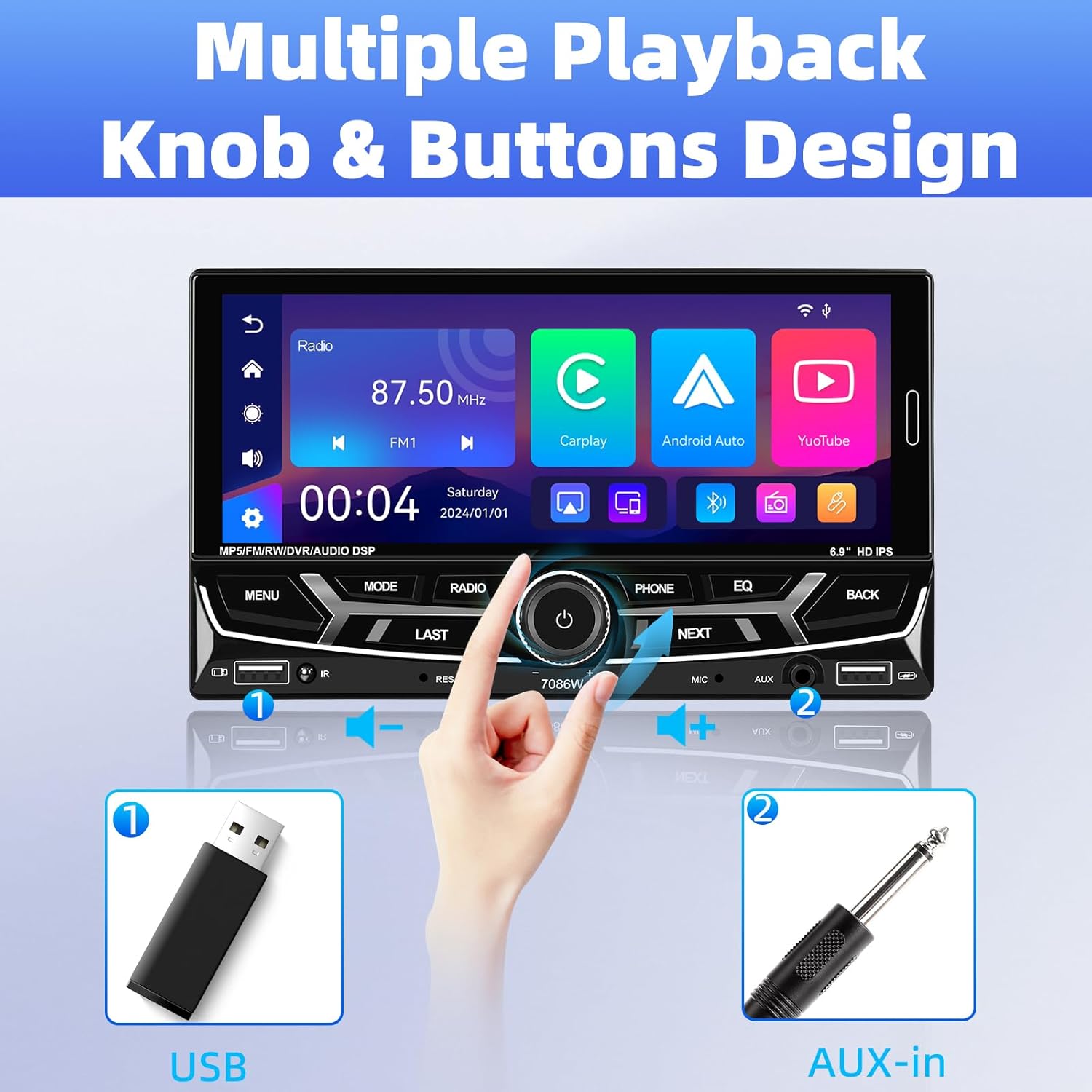
Image 6.1: Front panel controls and connectivity options.
6.2 Зымсыз Apple CarPlay жана Android Auto
Connect your smartphone wirelessly via Bluetooth to access Apple CarPlay or Android Auto. This allows you to use navigation, make calls, send messages, and listen to music directly from your phone's interface displayed on the stereo screen.
- Смартфонуңузда Bluetooth иштетилгенин текшериңиз.
- On the car stereo, navigate to the Bluetooth settings and pair with your phone.
- Once paired, select the CarPlay or Android Auto icon on the stereo's main menu.
- Follow any on-screen prompts on your phone to grant necessary permissions.

Image 6.2: Wireless Apple CarPlay and Android Auto interfaces.
6.3 Bluetooth 5.2 Hands-free Calling and Audio Streaming
The built-in Bluetooth 5.2 module allows for stable hands-free calling and high-quality audio streaming.
- Жупташтыруу: Go to the Bluetooth menu on the stereo, search for your phone, and pair.
- Handsfree чалуулар: Once paired, you can dial numbers, answer, or end calls directly from the stereo's touchscreen or via voice commands (e.g., Siri). The external microphone ensures clear communication.
- Аудио агым: Bluetooth аркылуу унаанын динамиктери аркылуу телефонуңуздан музыка ойнотуңуз.

Image 6.3: Bluetooth 5.2 hands-free and audio features.
6.4 Mirror Link функциясы
The Mirror Link function allows you to display your smartphone's screen directly onto the car stereo. This is compatible with iOS devices up to version 13.4 and Android devices up to version 10.1.
- Смартфонуңузду USB кабели аркылуу стереого туташтырыңыз.
- Select the 'Mirror Link' option on the stereo.
- Байланышты орнотуу үчүн экрандагы нускамаларды аткарыңыз.
6.5 FM/AM/RDS радиосу
Access local radio stations with the built-in FM/AM/RDS tuner.
- тюнинг: Use the touchscreen to scan for stations or manually tune to a specific frequency.
- Алдын ала коюлган станциялар: Save up to 30 of your favorite stations for quick access.
- RDS (Radio Data System): Displays station information such as song title or program type where available.
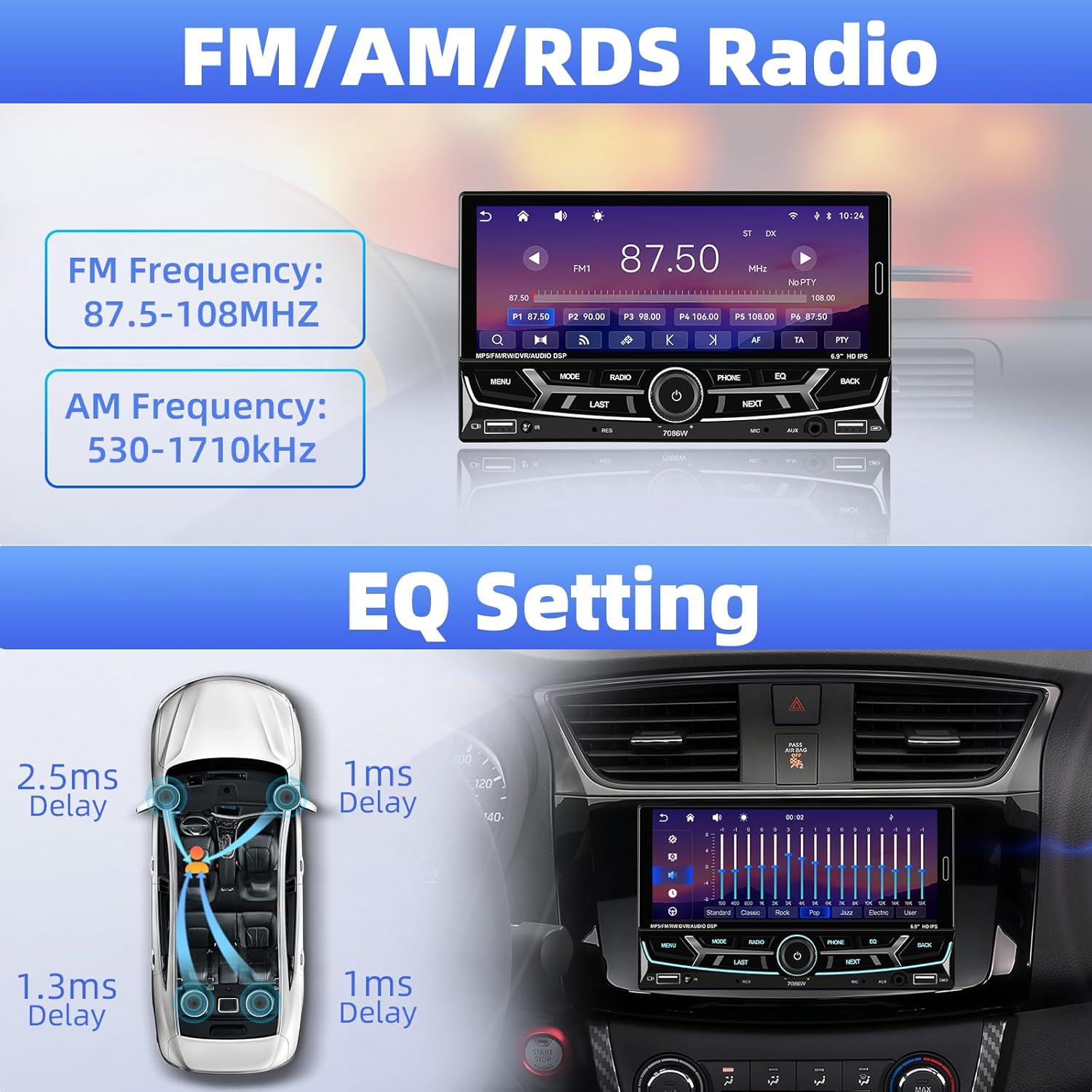
Image 6.4: FM/AM/RDS Radio interface and EQ settings.
6.6 DSP/EQ Audio Setting
Customize your audio experience with the Digital Sound Processor (DSP) and Equalizer (EQ) settings. Choose from preset sound styles like Pop, Rock, Classic, Jazz, or create your own custom profile.
6.7 USB Playback and Charging / Auxiliary Audio Input
- USB: Insert a USB drive into one of the USB ports for media playback (audio/video/pictures) or to charge your devices.
- AUX: Connect external audio devices (e.g., MP3 players) to the 3.5mm AUX input on the front panel.
6.8 Арткы View Камера
When the vehicle is shifted into reverse gear, the stereo automatically displays the feed from the connected backup camera. The included camera features 12 LEDs, a 170° wide angle, and night vision for clear visibility, along with parking guidelines.

Сүрөт 6.5: Арткы view camera display and features.
6.9 Рулду башкаруу (SWC)
If your vehicle supports steering wheel controls, connect the SWC wires to the stereo. This allows you to control functions like volume, track skipping, and mode switching directly from your steering wheel for convenience and safety.
Image 6.6: Steering wheel control functionality.
6.10 6.9-Inch IPS Touchscreen and 7-Color Backlight Display
The high-definition IPS touchscreen offers clear visuals and responsive touch control. You can customize the backlight color of the physical buttons to match your vehicle's interior or personal preference, choosing from 7 available colors.

Image 6.7: IPS Touchscreen and 7-color backlight display.
7. Техникалык тейлөө
- Экранды тазалоо: Сенсордук экранды акырын сүртүү үчүн жумшак, мамыксыз чүпүрөктү колдонуңуз. Абразивдүү тазалоочу каражаттарды же эриткичтерди колдонбоңуз.
- Жалпы тазалоо: Түзмөктү чаңдан жана таштандылардан таза кармаңыз. Сыртын тазалоо үчүн жумшак, кургак чүпүрөк колдонуңуз.
- Ашыкча температурадан сактаныңыз: Түзмөктү узак убакыт бою түз күн нуруна же өтө суукка дуушар кылбаңыз, анткени бул анын иштешине жана иштөө мөөнөтүнө таасир этиши мүмкүн.
8. Кыйынчылыктарды
| Көйгөй | Мүмкүн себеп | Чечим |
|---|---|---|
| Күч жок | Туура эмес зымдар; Күйгүзүүчү | Электр кабелдеринин туташууларын текшериңиз; зарыл болсо, сактагычты текшерип, алмаштырыңыз. |
| Үн жок | Speaker wires disconnected; Volume too low; Incorrect audio source | Verify speaker connections; Increase volume; Select correct audio input. |
| Bluetooth туташпай жатат | Bluetooth off on phone/stereo; Incorrect pairing process | Ensure Bluetooth is active on both devices; Re-attempt pairing process. |
| CarPlay/Android Auto ишке кирбей жатат | Phone not compatible; Incorrect connection; App issues | Check phone compatibility; Ensure proper Bluetooth connection; Restart phone and stereo. |
| Камдык камера көрсөтүлбөй жатат | Camera wiring incorrect; Reverse trigger wire not connected | Check camera power and video signal cables; Ensure reverse trigger wire is connected to vehicle's reverse light. |
| Руль башкаруусу иштебей жатат | SWC wires not connected; Incorrect configuration | Verify SWC wiring; Refer to vehicle-specific instructions for SWC setup. |
Эгер көйгөйлөр чечилбесе, кардарларды колдоо кызматына кайрылыңыз.
9. Кепилдик жана колдоо
UNITOPSCI is committed to providing high-quality products and customer satisfaction.
- Алмаштыруу: Сатып алынгандан кийин 24 айдын ичинде алмаштырууга болот.
- Кайтаруулар: 60-day no-worry return policy.
- Техникалык колдоо: Өмүр бою сатуудан кийинки консультация жана техникалык колдоо.
- Жооп убактысы: Quick response to inquiries within 16 hours.
Колдоо үчүн биз менен байланышыңыз: UNITOPSCI@126.com