
Introduction
Thank you for choosing the Billboard Soul Advance True Wireless Stereo (TWS) Earbuds. These earbuds are designed to provide a superior audio experience with Active Noise Cancellation (ANC), Environmental Noise Cancellation (ENC), and a comfortable, splash-resistant design. This manual will guide you through the setup, operation, and maintenance of your new earbuds.
Коопсуздук маалыматы
- Do not expose the earbuds or charging case to extreme temperatures or direct sunlight for extended periods.
- Аппаратты түшүрүүдөн же ашыкча күч колдонуудан качыңыз.
- Keep the earbuds and charging case away from water and liquids, except for light splashes as per IPX4 rating. Do not submerge.
- Буюмду ажыратууга же өзгөртүүгө аракет кылбаңыз. Бул кепилдикти жокко чыгарат.
- Берилген заряддоо кабелин же тастыкталган эквивалентти гана колдонуңуз.
- Listening at high volumes for prolonged periods can cause hearing damage. Adjust volume to a safe level.
Пакеттин мазмуну
- Billboard Soul Advance TWS Earbuds (Left and Right)
- Заряддоо кутусу
- USB заряддоо кабели
- User Manual
Продукт бүттүview
Familiarize yourself with the components of your Billboard Soul Advance TWS Earbuds and charging case.
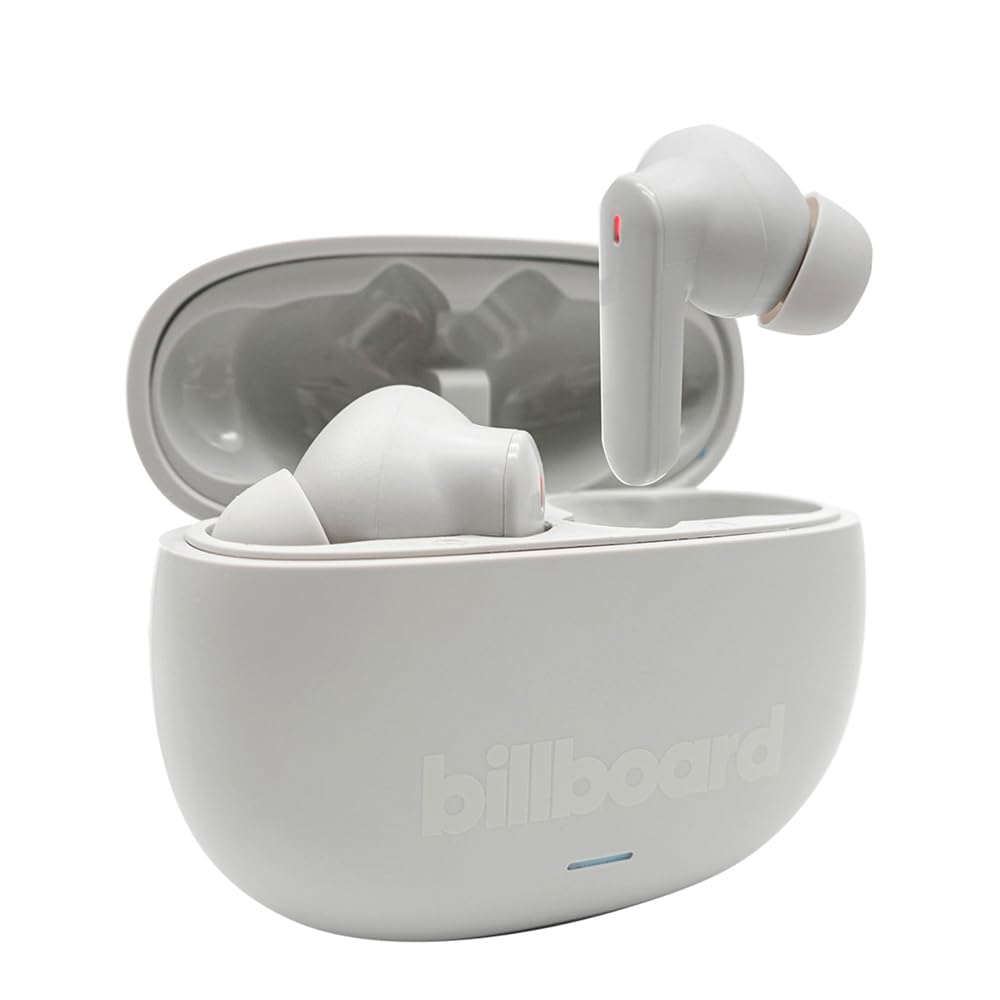
Image: The Billboard Soul Advance TWS Earbuds resting inside their open charging case. The earbuds are grey with red indicator lights visible, and the case is also grey with the 'billboard' logo embossed on the front.

Image: The Billboard Soul Advance TWS Earbuds charging case in a closed position. The case is grey with the 'billboard' logo embossed on the front and a small indicator light at the bottom.
Image: A person holding a single Billboard Soul Advance TWS earbud and the open charging case, demonstrating the compact size and design.
Жайгашуу
1. Кулакчындарды жана кутуну кубаттоо
Биринчи колдонуудан мурун, кулакчындарды жана заряддоо кутучасын толук заряддаңыз.
- Кулакчындарды заряддоо кутусуна салыңыз. Алардын тиешелүү уячаларына туура отурганын текшериңиз.
- USB кубаттоочу кабелди корпустагы кубаттоочу портко жана USB кубат булагына (мисалы, компьютерге, дубал адаптерине) туташтырыңыз.
- The indicator light on the case will show charging status. Once fully charged, the indicator will change or turn off. A full charge takes approximately 5 hours for the case and earbuds.
2. Түзмөк менен жупташтыруу
Кулакчындарыңызды смартфонго же Bluetooth иштетилген башка түзмөккө туташтыруу үчүн:
- Кубаттоочу кутучаны ачыңыз. Кулакчындар автоматтык түрдө жупташтыруу режимине өтөт, бул кулакчындардагы жаркылдаган жарыктар менен көрсөтүлөт.
- Түзмөгүңүздө Bluetooth жөндөөлөрүнө өтүп, Bluetooth иштетилгенин текшериңиз.
- Издөө available devices and select "Billboard Soul Advance" from the list.
- Туташтырылгандан кийин, кулакчындын индикатор жарыгы күйүп-өчүүнү токтотот.
- Түзмөктө Bluetooth иштетилген болсо, кулакчындар кутудан чыгарылганда акыркы жупташтырылган түзмөккө автоматтык түрдө кайра туташат.
Иштеп жатат
Touch Controls
The earbuds feature touch-sensitive controls on their outer surface. Specific functions may vary slightly by device or app.
| Акция | Функция |
|---|---|
| Бир таптоо (Сол/Оң) | Музыканы ойнотуу/тындыруу, Чалууга жооп берүү/Аяктоо |
| Эки жолу таптаңыз (оңго) | Кийинки трек |
| Эки жолу таптаңыз (солго) | Мурунку трек |
| Үч жолу таптап (Сол/Оң) | Үн жардамчысын жандырыңыз |
| Узун басуу (Сол/Оң) | ANC/Тунук режимин которуу |
| Incoming Call Long Press | Чакырууну четке кагуу |
Активдүү ызы-чууну жокко чыгаруу (ANC) & Экологиялык чууну жокко чыгаруу (ENC)
The Soul Advance earbuds feature both ANC and ENC for an optimized listening and calling experience.
- Активдүү ызы-чууну жокко чыгаруу (ANC): Reduces external ambient noise, allowing for a more immersive audio experience. Activate/deactivate by long-pressing an earbud.
- Экологиялык чууну жокко чыгаруу (ENC): Utilizes 4 built-in microphones to filter out background noise during calls, ensuring clearer conversations for both you and the listener. This feature is active automatically during calls.

Image: A graphic illustrating the concept of Ultra ANC (Active Noise Cancellation), showing sound waves being blocked by headphones, emphasizing a quiet listening experience.
Техникалык тейлөө
Тазалоо
- Кулакчындарды жана кубаттоочу кутуну жумшак, кургак, түксүз чүпүрөк менен акырын сүртүңүз.
- Абразивдүү тазалагычтарды, спиртти же химиялык эриткичтерди колдонбоңуз.
- Ensure charging contacts on both earbuds and case are clean and dry for optimal charging.
Сактагыч
Колдонулбаганда, кулакчындарды коргоо жана кубаттоо үчүн кубаттоочу кутучага сактаңыз.
Проблемаларды чечүү
| Көйгөй | Чечим |
|---|---|
| Кулакчындар жупташкан жок | Кулакчындардын кубатталганын текшериңиз. Түзмөгүңүздүн Bluetooth'ун өчүрүп, күйгүзүңүз. Bluetooth жөндөөлөрүнөн түзмөктү унутуп, кайра жупташтырыңыз. |
| Бир гана кулакчын иштейт | Place both earbuds back in the case, close it, then open again. Ensure both are charged. |
| Үн жок | Түзмөктүн үнүн текшериңиз. Кулакчындар туташып турганын текшериңиз. Башка аудиону ойнотуп көрүңүз. |
| Заряддоо маселелери | Ensure charging cable is securely connected. Clean charging contacts. Try a different USB port or cable. |
Техникалык шарттар
- Модель аты: Soul Advance
- Байланыш технологиясы: Зымсыз
- Камтылган компоненттер: Кубаттоочу станция
- Атайын колдонуулар: Outdoor activities, Sports
- Заряддоо убактысы: Болжол менен 5 саат
- Шайкеш түзмөктөр: Телефондор, Планшеттер
- Сууга туруктуулук деңгээли: IPX4 (чачылышына туруктуу)
- Батареянын орточо иштөө мөөнөтү: 27 саат (заряддоо кутусу менен)
- Кулак жайгаштыруу: In-Ear
- Форма фактору: In-Ear
- Ызы-чууну көзөмөлдөө: Активдүү ызы-чууну жокко чыгаруу

Image: A graphic highlighting long battery life, showing headphones with '40H' and earbuds with '42H*' (battery + case), indicating extended usage times.
Расмий продукт Videos
Video: Product demonstration video (0:49 duration).
Video: Product feature overview (0:44 duration).
Video: Additional product details (0:44 duration).
Video: Short product highlight (0:24 duration).
Video: Product feature showcase (0:24 duration).
Video: Detailed product review/demonstration (1:57 duration).
Video: Quick product overview (0:34 duration).
Video: Comprehensive product guide (2:00 duration).
Кепилдик жана колдоо
Your Billboard Soul Advance TWS Earbuds come with a standard manufacturer's warranty. For detailed warranty information, please refer to the warranty card included in your package or visit the official Billboard website. For technical support or customer service, please contact the retailer or manufacturer directly.
For returns, a 30-day free return policy is available from the purchase date.