
1. Киришүү
This manual provides detailed instructions for the installation, operation, and maintenance of your GIGABYTE B550M DS3H AC R2 motherboard. This micro-ATX motherboard is designed to support AMD Ryzen 5000, 4000, and 3000 series CPUs on the AM4 socket, offering a robust platform for various computing needs. Please read this manual thoroughly before beginning installation to ensure proper setup and functionality.
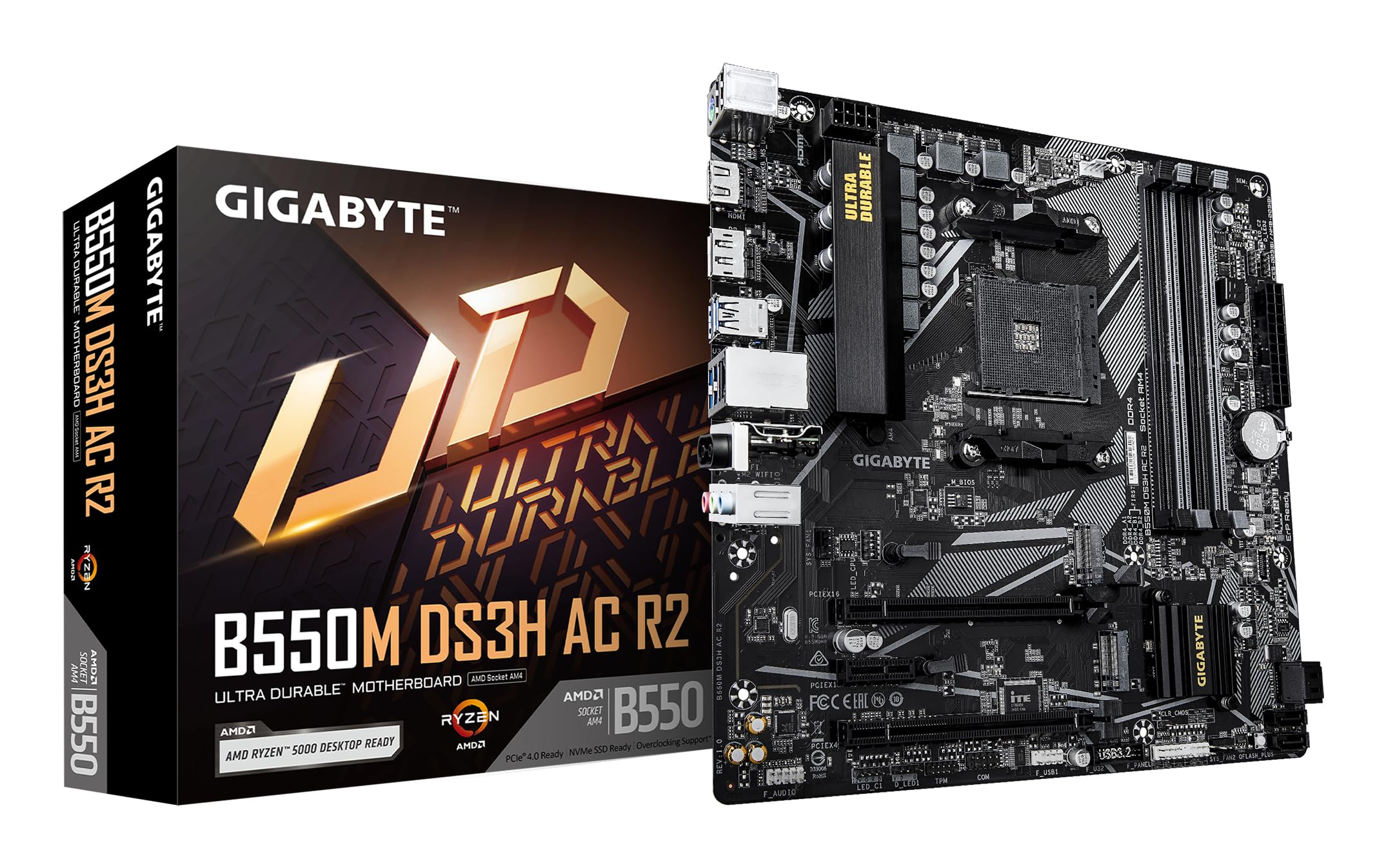
1.1-сүрөт: жогорудан ылдыйга view of the GIGABYTE B550M DS3H AC R2 Motherboard, showcasing its layout including the CPU socket, DIMM slots, and various connectors.
2. Негизги өзгөчөлүктөрү
- AMD B550 чипсети: Supports AMD Ryzen 5000, 4000, and 3000 series CPUs with AM4 socket.
- Жогорку ылдамдыктагы DDR4 эс тутуму: Dual-channel support for up to 4733MHz (O.C.) across 4 DIMM slots.
- Advanced Storage Options: Includes one PCIe 4.0 M.2 slot and one PCIe 3.0 M.2 slot, alongside PCIe slots for graphics and expansion.
- Интегралдык байланыш: Features Wi-Fi 5, Bluetooth 5.0, and 1GbE LAN for reliable network connections.
- Flexible Display Outputs: Equipped with HDMI and DisplayPort for multi-monitor configurations.
- Акылдуу муздатуу системасы: Smart Fan 6 with multiple temperature sensors ensures efficient thermal management.
- Q-Flash Plus: Allows BIOS updates without the need for CPU, memory, or graphics card installation.
3. Орнотуу жана орнотуу
3.1 CPU орнотуу
- CPU розеткасынын рычагы ачык абалда экенин текшериңиз.
- Carefully align the triangular mark on the AMD Ryzen CPU with the mark on the AM4 socket.
- Процессорду мажбурлабастан акырын розеткага салыңыз.
- CPUну ордуна бекитүү үчүн рычагды түшүрүңүз.
- CPU муздаткычын өндүрүүчүнүн көрсөтмөлөрүнө ылайык орнотуңуз.
3.2 Эстутум (RAM) орнотуу
- DIMM уячаларынын эки учундагы клиптерди ачыңыз.
- DDR4 эстутум модулундагы оюкту DIMM уячасындагы ачкыч менен тууралаңыз.
- Insert the memory module firmly until the clips snap into place. For dual-channel operation, refer to the motherboard manual for recommended slot configurations.
3.3 Сактагыч түзүлүштү орнотуу
This motherboard supports both M.2 NVMe SSDs and SATA drives.
- M.2 SSD: Locate the M.2 slots (one PCIe 4.0, one PCIe 3.0). Insert the M.2 SSD at an angle and secure it with the provided screw.
- SATA дисктери: Connect SATA data cables from your SSDs/HDDs to the SATA ports on the motherboard. Connect power cables from your power supply to the drives.
3.4 Кеңейтүү картасын орнотуу
Install your graphics card or other PCIe expansion cards into the appropriate PCIe slots. Ensure they are seated firmly and secured with the case screw.
3.5 Кубат туташтыруу
- 24 пин ATX негизги кубат туташтыргычын кубат булагыңыздан энелик платага туташтырыңыз.
- 8 иштиктүү ATX 12V CPU кубат туташтыргычын энелик платага туташтырыңыз.
3.6 Rear I/O Panel Overview

Figure 3.1: The rear I/O panel of the GIGABYTE B550M DS3H AC R2 motherboard, showing various ports including USB, HDMI, DisplayPort, LAN, and audio jacks.
The rear I/O panel provides connectivity for external devices. It includes USB 2.0, USB 3.2 Gen 1, HDMI, DisplayPort, 1GbE LAN, Wi-Fi antenna connectors, and audio jacks. Refer to the detailed diagram in the physical manual for specific port identification.
4. Иштөө нускамалары
4.1 BIOS орнотуу
The BIOS (Basic Input/Output System) is firmware that initializes hardware during the booting process. To enter BIOS Setup, press the DEL key during the Power-On Self-Test (POST). Here you can configure system settings, boot order, and monitor hardware status.
4.2 Q-Flash Plus
Q-Flash Plus allows you to update the BIOS without installing the CPU, memory, or graphics card. Simply download the latest BIOS file GIGABYTEден website, rename it to GIGABYTE.bin, save it to a USB flash drive, and insert it into the designated Q-Flash Plus USB port. Press the Q-Flash Plus button to initiate the update.
4.3 Драйверди орнотуу
After installing your operating system, install the necessary drivers for the motherboard chipset, audio, LAN, Wi-Fi, and other integrated components. These drivers are typically provided on a support DVD or can be downloaded from the official GIGABYTE webсайт.
5. Техникалык тейлөө
5.1 Тазалоо
Regularly clean your computer's interior to prevent dust buildup, which can lead to overheating and reduced performance. Use compressed air to remove dust from components, especially heatsinks and fans. Ensure the system is powered off and unplugged before cleaning.
5.2 BIOS жаңыртуулары
Мезгил-мезгили менен GIGABYTE текшерип туруңуз website for BIOS updates. Updates can improve system stability, add support for new hardware, or fix known issues. Follow the instructions provided by GIGABYTE carefully when performing a BIOS update.
5.3 Smart Fan 6
Utilize the Smart Fan 6 utility in the BIOS or GIGABYTE's software to monitor system temperatures and adjust fan speeds. Proper fan configuration helps maintain optimal operating temperatures and extends component lifespan.
6. Кыйынчылыктарды
- Система жүктөлбөй жатат: Check all power connections (24-pin ATX, 8-pin CPU), ensure RAM modules are properly seated, and verify the CPU is correctly installed. Try clearing the CMOS.
- Дисплей чыгышы жок: Confirm the graphics card is fully seated in its PCIe slot and connected to power (if required). Ensure your monitor cable is connected to the graphics card, not the motherboard's integrated graphics ports (unless using an APU).
- Перифериялык маселелер: If USB devices or other peripherals are not working, ensure drivers are installed and check BIOS settings for port enablement.
- Системанын туруксуздугу/бузуулар: This can be caused by outdated drivers, overheating, or faulty hardware. Update drivers, monitor temperatures, and test components individually if possible.
- BIOS жаңыртуу катасы: If a BIOS update fails, use the Q-Flash Plus feature to recover the BIOS.
7. Техникалык шарттар
| Өзгөчөлүк | Спецификация |
|---|---|
| Бренд | GIGABYTE |
| Модель аты | B550M DS3H AC R2 |
| CPU розетка | Розетка AM4 |
| Шайкеш процессорлор | AMD Ryzen 3000 сериясы, AMD Ryzen 4000 сериясы, AMD Ryzen 5000 сериясы |
| Чипсет түрү | AMD B550 |
| RAM эс технологиясы | DDR4 |
| Memory Clock Speed | Up to 4733 MHz (O.C.) |
| Эстутум Slots Жеткиликтүү | 4 |
| RAM эс максималдуу өлчөмү | 128 ГБ |
| Графикалык карта интерфейси | PCI Express 4.0 |
| Total PCIe Ports | 1 (PCIe 4.0 x16 for GPU) + other PCIe slots |
| M.2 Slots | 1x PCIe 4.0 M.2, 1x PCIe 3.0 M.2 |
| Total SATA Ports | 4 |
| Зымсыз байланыш | Wi-Fi 5, Bluetooth 5.0 |
| LAN | 1GbE LAN |
| Жалпы USB порттору | 6 (Арткы киргизүү/чыгаруу) + Ички колонкалар |
| Display Outputs | 1x HDMI, 1x DisplayPort |
| Форма фактору | Micro ATX |
| Элементтин өлчөмдөрү L x W x H | 24.4L x 24.4W x 3.5H Сантиметр |
| Элемент Салмагы | 980 грамм |
8. Кепилдик маалыматы
The GIGABYTE B550M DS3H AC R2 motherboard comes with a 3-YEAR Manufacturer Warranty. Please retain your proof of purchase for warranty claims. For detailed terms and conditions, refer to the official GIGABYTE warranty policy available on their webсайт.
9. Колдоо жана байланыш
Техникалык колдоо, драйверди жүктөө, BIOS жаңыртуулары жана кошумча продукт маалыматы үчүн расмий GIGABYTE сайтына баш багыңыз website. You can also contact GIGABYTE customer service for assistance.
Өндүрүүчүнүн Байланыш маалыматы:
GIGABYTE Technology (India) Pvt. Ltd.
Unit No. 807 & 808, 8th Floor, Naman Midtown B-Wing,
Elphinstone Road, Mumbai – 400013, India
For the most up-to-date contact details and support resources, please refer to the GIGABYTE official webсайт: www.gigabyte.com