
VENTION FHRB0
VENTION Mini Power Bank FHRB0 User Manual
Model: FHRB0
1. Киришүү
The VENTION Mini Power Bank FHRB0 is a compact, portable charging solution designed for various mobile devices. It features a 4800mAh capacity, 22.5W Power Delivery (PD) fast charging, and integrated USB-C and Lightning cables for convenience. An LED display provides real-time battery status. This manual provides instructions for safe and efficient use of your power bank.

Image: VENTION Mini Power Bank FHRB0, showcasing its design and available colors.

Image: The power bank's mini portable size and foldable Lightning interface for easy storage.

Image: The power bank's convenient design, featuring a built-in USB-C cable that doubles as a lanyard.
2. Орнотуу
2.1 кутудан чыгаруу
Carefully remove the power bank from its packaging. Verify that all components are present and undamaged.
2.2 Баштапкы төлөм
Before first use, it is recommended to fully charge the power bank. This ensures optimal battery performance and accuracy of the LED display.
- Powerbank'тан USB-C киргизүү портун табыңыз.
- USB-C кубаттоочу кабелин (кошулмада жок) Power Bankтын киргизүү портуна туташтырыңыз.
- Connect the other end of the USB-C cable to a compatible power adapter (e.g., wall charger, computer USB port).
- The LED display will illuminate, showing the current battery percentage and indicating that the power bank is charging.
- Charging is complete when the LED display shows 100%.

Image: Illustration of the power bank's two-way fast charging capability, highlighting the 18W Max recharging input via USB-C.
3. Иштөө нускамалары
3.1 Түзмөктөрдү заряддоо
The VENTION Mini Power Bank offers multiple options for charging your devices:
- Камтылган USB-C кабелин колдонуу: For devices such as iPhone 15 series and Android smartphones, connect the integrated USB-C cable directly to your device's charging port. This supports up to 22.5W PD fast charging.
- Using the Built-in Lightning Cable: For devices such as iPhone 8-14 series, connect the integrated Lightning cable directly to your device's charging port. This supports up to 12W charging.
- USB-A портун колдонуу: For other devices, or to charge a third device simultaneously, use your device's standard USB-A charging cable and connect it to the power bank's USB-A output port.
The power bank can charge up to three devices simultaneously using its built-in cables and USB-A port.

Image: The power bank's cable-ready convenience, demonstrating simultaneous charging for Apple (Lightning, 12W Max) and Android (USB-C, 22.5W Max) devices.

Image: The power bank's three-port output capability, allowing simultaneous charging of a smartwatch, smartphone, and earbuds.
3.2 LED санарип дисплей
Интегралдык LED дисплей батареянын калган пайызын көрсөтөтtage of the power bank in real-time (0-100%). This allows you to monitor the power level and recharge the power bank as needed.
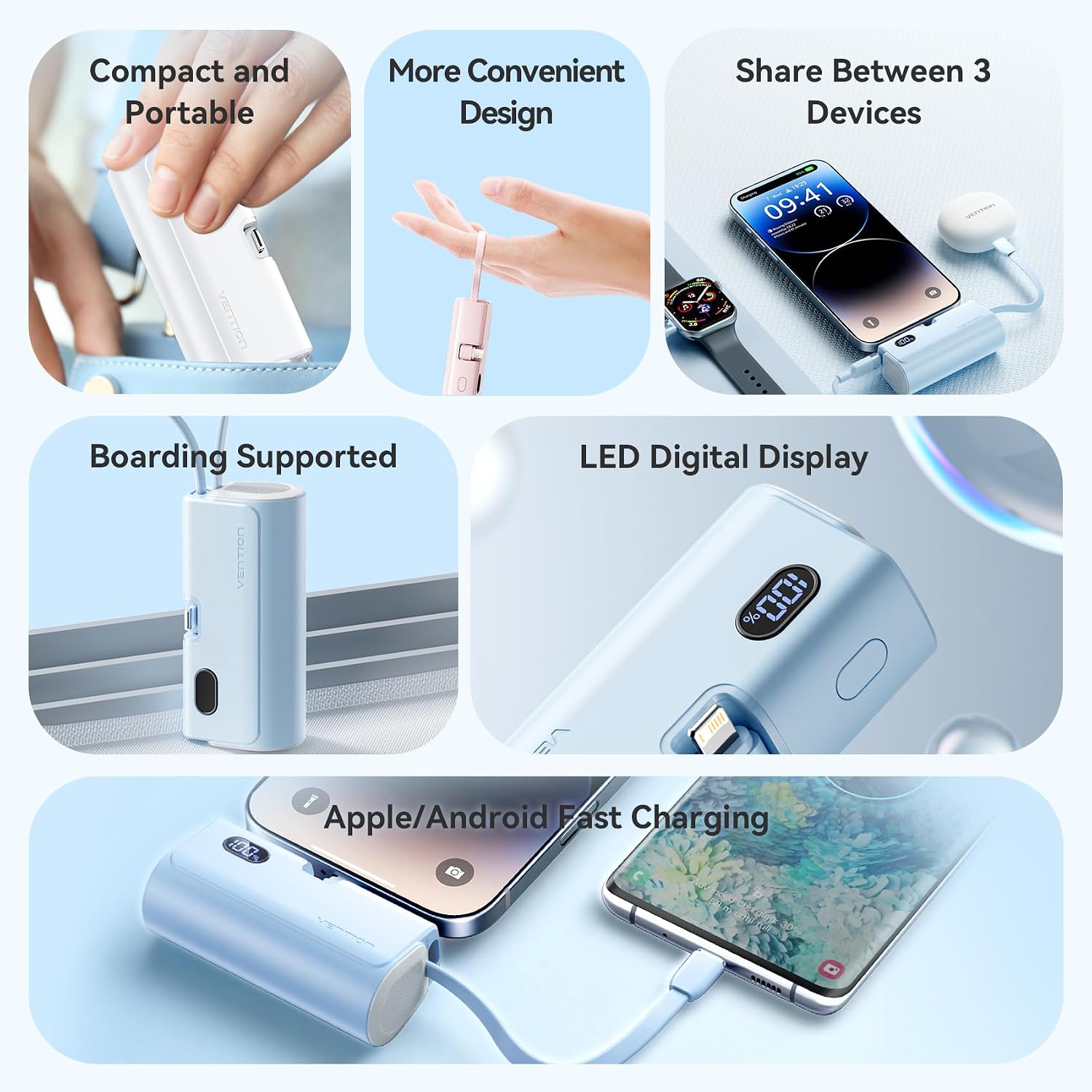
Image: A visual summary of the power bank's features, including its compact design, multi-device charging, and clear LED digital display.
4. Техникалык тейлөө
4.1 Тазалоо
To clean the power bank, use a soft, dry cloth. Do not use liquid cleaners, aerosols, or solvents, as these may damage the device.
4.2 Сактоо
Power bankты салкын, кургак жерде, күндүн түз нурунан жана өтө жогорку температурадан алыс сактаңыз. Аны жогорку нымдуулуктагы чөйрөдө сактоодон алыс болуңуз.
4.3 Батареяга кам көрүү
To prolong the lifespan of the internal battery, avoid completely discharging the power bank. Recharge it regularly, even if not in frequent use. Do not expose the power bank to fire or water.
4.4 Кабельге кам көрүү
Handle the integrated USB-C and Lightning cables gently. Avoid excessive bending or pulling, which can cause damage to the cables or connectors.
5. Кыйынчылыктарды
| Көйгөй | Мүмкүн себеп | Чечим |
|---|---|---|
| Power банк заряддалбай жатат | Charging cable or adapter faulty; power source issue; power bank internal fault. | Ensure the USB-C charging cable and power adapter are working correctly. Try a different power source. |
| Түзмөк кубат банкынан кубатталбай жатат | Power bank battery depleted; incorrect cable connection; device incompatibility; device charging port issue. | Check the power bank's LED display for battery level. Ensure cables are securely connected. Verify device compatibility. Try charging a different device. |
| LED дисплей иштебейт | Убактылуу программалык камсыздоодогу мүчүлүштүк; батареянын заряды аз. | Try charging the power bank or connecting a device to charge. If the issue persists, contact support. |
| Жай кубаттоо | Non-fast charging compatible cable/device; multiple devices charging simultaneously. | Ensure your device and cable support fast charging. Disconnect other devices to test single-device charging speed. |
6. Техникалык шарттар
- Модель номери: FHRB0
- Батарея сыйымдуулугу: 4800mAh
- Киргизүү (USB-C): 18W макс
- Output (Built-in USB-C): 22.5W PD Max
- Output (Built-in Lightning): 12W макс
- Порттардын саны: 3 (1x Built-in USB-C, 1x Built-in Lightning, 1x USB-A)
- Шайкеш түзмөктөр: Smartphones (iOS and Android), Tablets (e.g., iPad), Earbuds (e.g., AirPods)
- Продукциянын өлчөмдөрү: 11.5 x 7.5 x 3 см
- Продукт Салмагы: 144 г
- Өндүрүүчү: ВЕНЦИЯ
7. Кепилдик маалыматы
This VENTION product is covered by a limited warranty. For specific warranty terms and conditions, please refer to the warranty card included with your purchase or visit the official VENTION webсайт. Ар кандай кепилдик дооматтары үчүн сатып алганыңыздын далилин сактаңыз.
8. Кардарларды колдоо кызматы
If you encounter any issues or have questions regarding your VENTION Mini Power Bank FHRB0, please contact VENTION customer support or your retailer. Provide your product model number (FHRB0) and a detailed description of the issue for efficient assistance.
Ask a question about this manual
Ask about setup, troubleshooting, compatibility, parts, safety, or missing instructions. Manuals+ will review the question and use this page’s manual context to help answer it.