
1. Киришүү
This manual provides comprehensive instructions for the safe and efficient operation of your Jesverty SPS-1352 Universal Compact Bench Power Supply. This AC-to-DC power converter offers an adjustable 9-15V (or fixed 13.8V switchable) output with a robust 50A capacity, featuring Anderson connectors, noise offset control, USB-C ports, and a cigarette plug terminal. Please read this manual thoroughly before use to ensure proper functionality and to prevent damage to the unit or connected devices.

Сүрөт 1: Алдыңкы view of the Jesverty SPS-1352 Bench Power Supply.
2. Коопсуздук маалыматы
To ensure safe operation and prevent personal injury or damage to the power supply and connected equipment, always adhere to the following safety precautions:
- Бардык нускамаларды окуңуз: Familiarize yourself with the operation and safety features before using the device.
- Туура желдетүү: Ensure the power supply is placed in a well-ventilated area. Do not block ventilation openings.
- Жабык жайда гана колдонуу: This device is designed for indoor use in dry environments. Do not expose to rain, moisture, or extreme temperatures.
- Туура томtage киргизүү: Connect the power supply only to an AC outlet with the specified voltage жана жыштык.
- Негиздөө: Электр менен жабдуунун туура жерге туташтырылганын текшериңиз.
- Ашыкча жүктөөдөн качыңыз: Максималдуу чыгуу токунан же ваттан ашпаңызtage ratings of the power supply.
- Электр кубатын өчүрүү: Always disconnect the power cord from the AC outlet before performing any maintenance or if the unit will be unused for an extended period.
- Колдонуучу тейлей турган бөлүктөр жок: Түзмөктү ачууга же оңдоого аракет кылбаңыз. Бардык тейлөө иштерин квалификациялуу тейлөө кызматкерлерине тапшырыңыз.
- Балдардан алыс болуңуз: Store the power supply out of reach of children.
- Use appropriate cables: Ensure all connecting cables are rated for the current and voltagе колдонулууда.
3. Продукт бүтүп калдыview
The Jesverty SPS-1352 is a compact and robust bench power supply designed for various applications requiring stable DC power. It features multiple output options and precise controls.
3.1 Алдыңкы панелдин өзгөчөлүктөрү
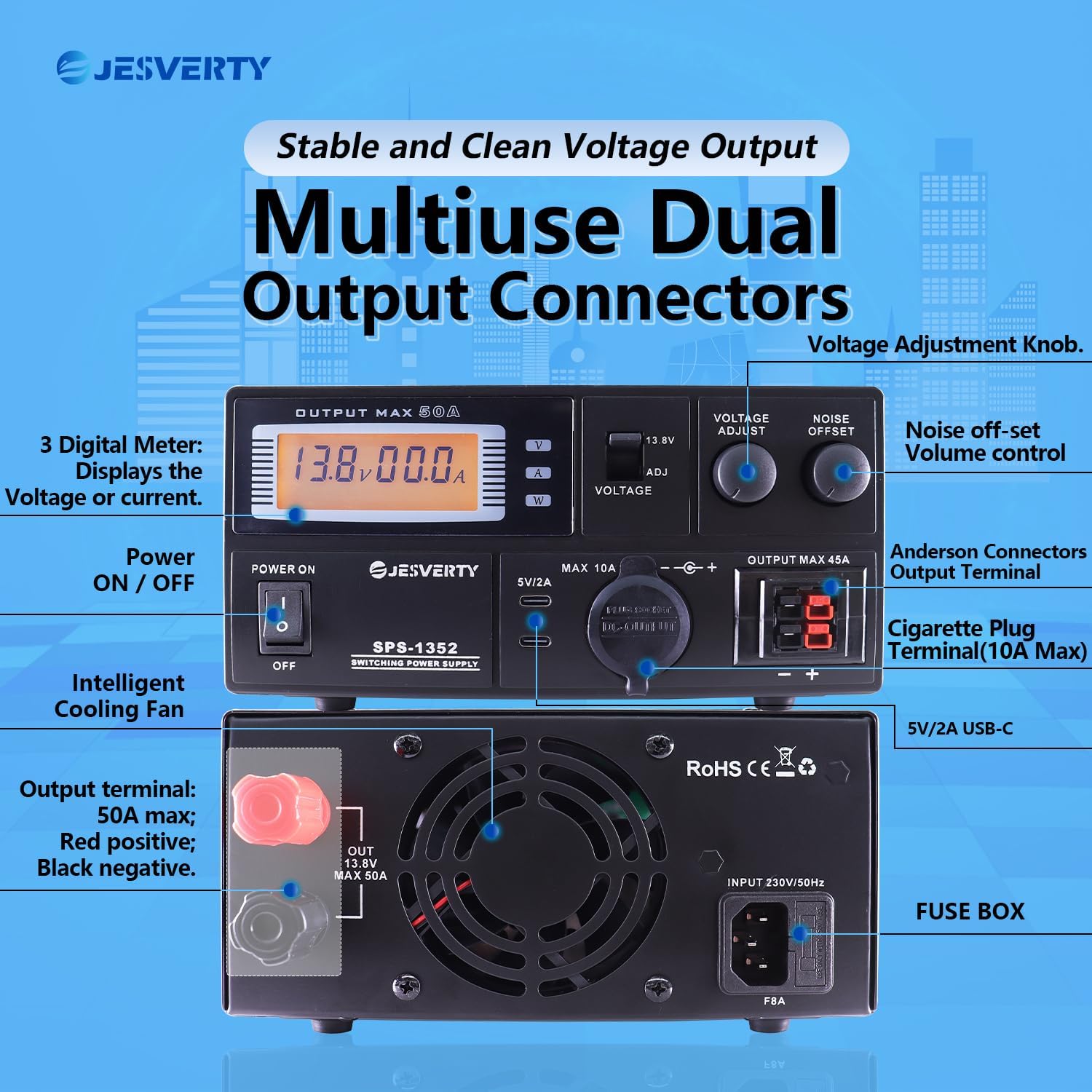
2-сүрөт: Детальдуу view of the front panel with key features labeled.
- Санариптик эсептегич: Чыныгы убактагы томду көрсөтөтtagд жана ampкызуу окуулар.
- Кубатты күйгүзүү / өчүрүү Түзмөктүн негизги кубаттуулугун башкаруу.
- Тtage Adjust Knob: Fine-tunes the output voltage (9-15V).
- 13.8V Fixed/Adjustable Switch: Toggles between fixed 13.8V output and adjustable voltage режими.
- Noise Offset Knob: Adjusts the noise reduction level to minimize interference.
- USB-C Ports (5V/2A): Кичинекей электрондук шаймандарды кубаттоо үчүн.
- Cigarette Plug Terminal (MAX 10A): Standard automotive-style power outlet.
- Anderson Connectors Output Terminal (MAX 45A): High-current output for compatible devices.
3.2 Арткы панелдин өзгөчөлүктөрү
3-сүрөт: Детальдуу view of the rear panel with key features labeled.
- Output Terminal (MAX 50A): Main high-current output terminals (Red: Positive, Black: Negative).
- Акылдуу муздатуу желдеткичи: Automatically activates to maintain optimal operating temperature.
- AC киргизүү розеткасы: Электр шнурын туташтыруу үчүн.
- Сактандыргыч кутучасы: Түзмөктүн коргоочу сактагычын камтыйт.
4. Орнотуу
Follow these steps to set up your Jesverty SPS-1352 power supply:
- Пакеттен чыгаруу: Carefully remove the power supply from its packaging. Inspect for any signs of damage.
- Жайгашкан жери: Place the unit on a stable, flat surface with adequate clearance around all sides for proper ventilation. Ensure it is away from direct sunlight, heat sources, and moisture.
- Кубат туташуу:
- Ensure the power ON/OFF switch on the front panel is in the "OFF" position.
- Берилген AC кубат шнурун кубат булагынын арткы панелиндеги AC киргизүү розеткасына туташтырыңыз.
- Plug the other end of the AC power cord into a suitable grounded wall outlet.
- Туташуу жүк:
- Before connecting any device, ensure the power supply is OFF and the device to be powered is also OFF.
- Connect your device to the appropriate output terminal (Anderson, Cigarette Plug, or Rear Terminal) ensuring correct polarity (positive to positive, negative to negative).
- Verify that the current draw of your connected device does not exceed the maximum rating of the chosen output terminal or the overall power supply.

Figure 4: The compact and rugged housing construction, illustrating various power cord types that may be included depending on region.
5. Иштөө нускамалары
Once the power supply is set up and your devices are connected, follow these steps for operation:
- Күйгүзүү: Flip the Power ON/OFF switch to the "ON" position. The digital meter will illuminate, displaying the current voltagд жана ampөчүрүү.
- Тtage Тандоо:
- For a fixed 13.8V output, ensure the 13.8V Fixed/Adjustable switch is in the "13.8V" position.
- For adjustable voltage (9-15V), set the switch to the "ADJ" position. Then, rotate the Voltage Adjust knob to set the desired output voltage. Observe the digital meter for the precise voltage окуу.
- Түзмөктөрдү туташтыруу:
- Anderson Connectors: Use for high-current devices up to 45A. Ensure secure connection.
- Cigarette Plug Terminal: Suitable for devices up to 10A.
- Rear Output Terminal: Provides the full 50A capacity. Ensure proper wiring with appropriate gauge wire.
- USB-C порттору: For charging USB-powered devices (5V/2A).
- Noise Offset Adjustment: If experiencing interference, particularly with radio communications equipment, slowly rotate the Noise Offset knob to find the optimal setting that minimizes noise.
- Мониторинг: Continuously monitor the digital meter for voltagд жана amperage readings to ensure your devices are operating within their specified limits and the power supply is not overloaded.
- Өчүрүү: When finished, turn off all connected devices first, then flip the Power ON/OFF switch on the power supply to the "OFF" position. Disconnect the power cord from the wall outlet if the unit will not be used for an extended period.
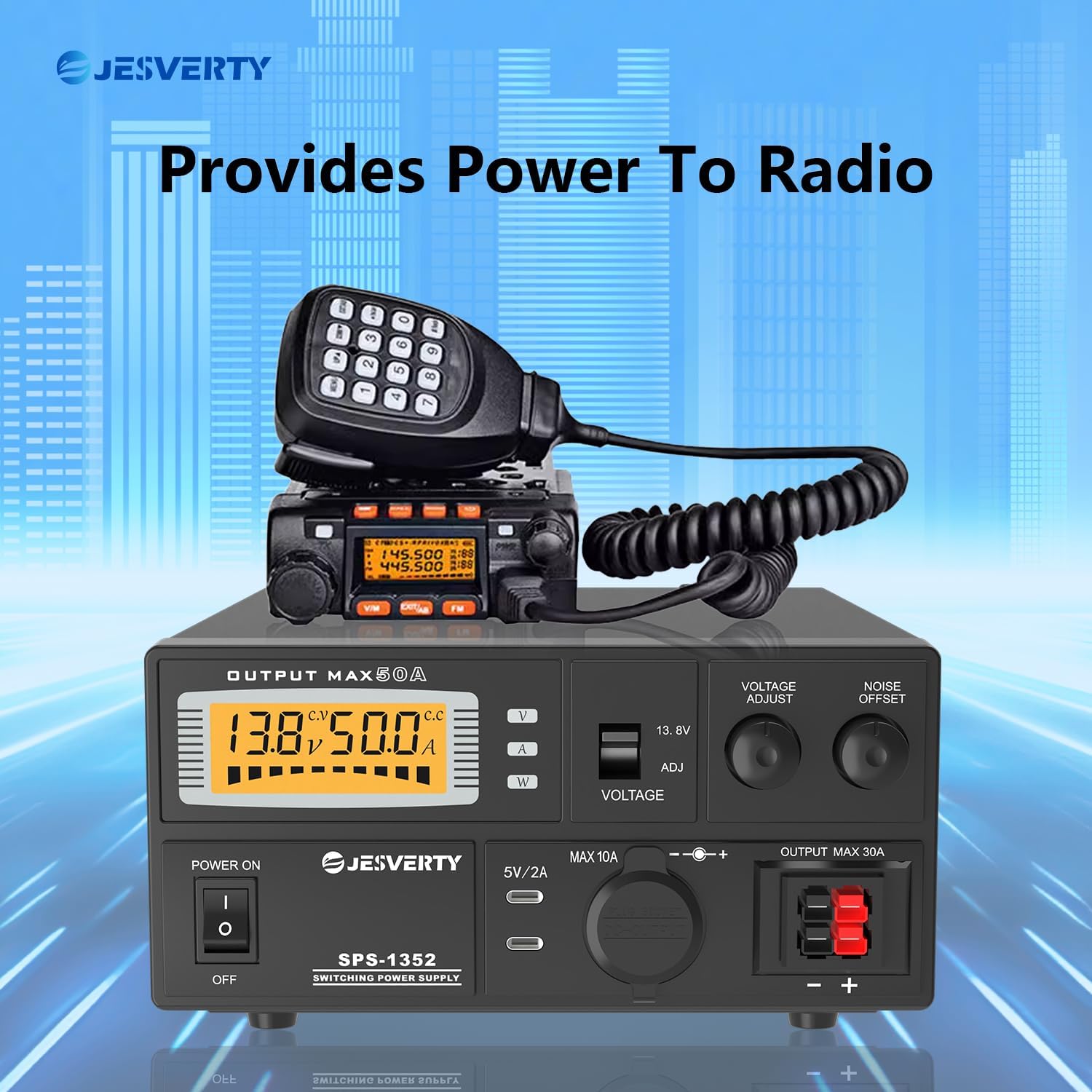
Figure 5: The Jesverty SPS-1352 providing stable power to a radio transceiver.

6-сүрөт: Мисamples of the Jesverty SPS-1352 in radio communications environments.
6. Техникалык тейлөө
Regular maintenance helps ensure the longevity and reliable operation of your power supply.
- Тазалоо: Тазалоодон мурун электр кубатын розеткадан сууруп алыңыз. Сыртын сүртүү үчүн жумшак, кургак чүпүрөктү колдонуңуз. Суюк тазалоочу каражаттарды же эриткичтерди колдонбоңуз.
- Вентиляция: Желдетүүчү тешиктердин чаң жана таштандылардан тазаланганын мезгил-мезгили менен текшерип туруңуз. Зарыл болсо, тыгылып калган жерлерди акырын тазалоо үчүн кысылган абаны колдонуңуз.
- Кабелдик текшерүү: Regularly inspect the power cord and all connecting cables for any signs of damage, fraying, or loose connections. Replace damaged cables immediately.
- Сактагычты алмаштыруу: If the unit fails to power on, the fuse may need replacement. Disconnect the power cord, open the fuse box on the rear panel, and replace the fuse with one of the exact same type and rating (refer to specifications).
7. Кыйынчылыктарды
If you encounter issues with your Jesverty SPS-1352, refer to the following common problems and solutions:
| Көйгөй | Мүмкүн себеп | Чечим |
|---|---|---|
| Түзмөк күйбөйт. |
|
|
| Чыгаруунун көлөмү жокtage. |
|
|
| Output current is lower than expected. |
|
|
| Excessive noise/interference. |
|
|
8. Техникалык шарттар
Key technical specifications for the Jesverty SPS-1352 power supply:
| Өзгөчөлүк | Деталь |
|---|---|
| Бренд | Jesverty |
| Модел | SPS-1352 |
| Output Voltage | Adjustable 9-15V DC (Switchable to Fixed 13.8V DC) |
| Чыгуу Ampөчүрүү | 50 Amps (Continuous) |
| Чыгуу Wattage | 552 Watts (Maximum 690 Watts) |
| Киргизүү көлөмүtage | AC 230V / 50Hz (Typical, check unit label for specific range) |
| Туташтыргычтар | Anderson Powerpole (45A), Cigarette Plug (10A), Rear Terminal (50A), Dual USB-C (5V/2A) |
| Материал | Алюминий |
| Элемент Салмагы | 3 килограмм |
| Өлчөмдөрү (L x W x Y) | Болжол менен 280 мм x 190 мм x 90 мм (11 дюйм x 7.5 дюйм x 3.54 дюйм) |
| Муздатуу | Интеллектуалдык муздаткыч желдеткич |
| Коопсуздук өзгөчөлүктөрү | Overheat, Short-circuit, Amperage Surge Protection, Overload/Fuse Protection |
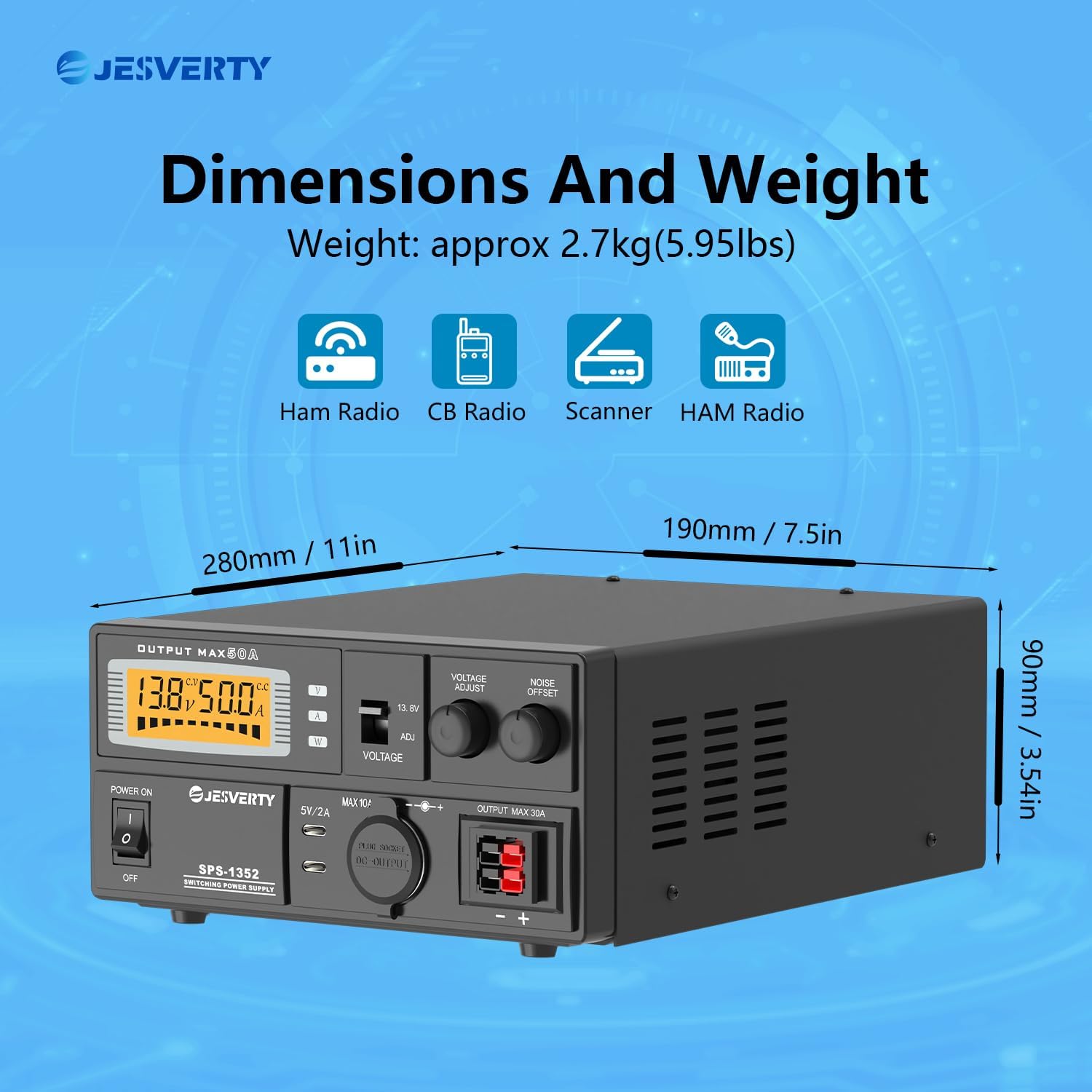
Figure 7: Dimensions and weight of the Jesverty SPS-1352 power supply.
9. Кардарларды колдоо кызматы
For technical assistance, warranty information, or service inquiries, please contact Jesverty customer support through your purchase platform or the official Jesverty website. Please have your model number (SPS-1352) and purchase date available when contacting support.