
1. Киришүү
This manual provides detailed instructions for the installation and operation of your ANKEWAY XBH-7703 Car Stereo Head Unit. This unit is designed to upgrade the in-car entertainment and navigation experience for specific Chevrolet, GMC, and Hummer H2 models.
Унаанын шайкеш моделдери:
- Чеви: Silverado, Tahoe, Colorado, and Suburban (2003–2006)
- GMC: Yukon, Sierra, and Canyon (2003–2006)
- Hummer: H2 (2003–2007)
For a complete list of compatible models, please refer to the product images or contact technical support.

Image: Compatibility chart for Chevrolet, GMC, and Hummer H2 models, showing the head unit installed in a compatible vehicle dashboard.
2. Кутуда эмне бар
Пакетти ачканда, төмөнкү компоненттердин бардыгы камтылганын текшериңиз:
- ANKEWAY XBH-7703 Car Stereo Head Unit
- Арткыview Камера
- Микрофон
- CANbus Protocol Decoder
- Panel Removal Tools (various orange plastic tools)
- Электр кабели
- Радио антенна адаптери
- Камера кабели
- GPS антеннасы
- RCA кабели
- USB кабелдери (x2)
- User Manuals (Android Product Operating Manual, ZLINKS User Manual)

Image: A flat lay of all components included in the ANKEWAY XBH-7703 car stereo package, including the head unit, cables, camera, and tools.
Video: An unboxing video demonstrating the contents of the ANKEWAY car stereo package, including the head unit, various cables, camera, and installation tools.
3. Негизги өзгөчөлүктөрү
- CarPlay and Android Auto (Wireless & Wired): Навигация, музыка жана чалуулар үчүн смартфондун кемчиликсиз интеграциясы.
- Android системасы: Access to apps via Wi-Fi, split-screen mode, multi-language support.
- FM RDS радиосу: Search and save favorite FM channels, adjust sound with DSP and equalizer.
- AHD Арткыview Камера: High-definition image input, night vision, automatic display on reverse.
- CANbus Adapter: Preserves steering wheel control functions.
- Системанын жаңыртуулары: Regular firmware updates for optimized performance.
- Оңой орнотуу: Pre-grouped cables and connectors for simplified setup.

Image: The ANKEWAY car stereo head unit showcasing the Apple CarPlay interface with various app icons.

Image: The ANKEWAY car stereo head unit displaying the Android Auto interface with various app icons.
4. Орнотуу боюнча колдонмо
The ANKEWAY XBH-7703 car stereo is designed for straightforward installation. The included cables are pre-grouped with connectors to match your vehicle's original system.
4.1. Даярдоо
- Унааны баштоодон мурун, анын от алдыруу системасы өчүрүлгөнүнө жана аккумулятору ажыратылганына ынаныңыз.
- Use the provided panel removal tools to carefully detach the original car stereo and surrounding trim.
- Refer to your vehicle's specific service manual for detailed instructions on removing the factory head unit.
4.2. Туташтыруучу компоненттер
- Негизги электр өткөргүч: Connect the main power harness from the new head unit to the vehicle's wiring harness. The included CANbus decoder ensures compatibility and retains steering wheel controls.
- CANbus декодери: Connect the CANbus decoder to the main wiring harness as indicated in the diagram.
- Арткыview Камера: Арткы жагын орнотууview camera at the rear of your vehicle. Connect its video output to the "CVBS-IN-1" RCA input on the head unit and the power wire to the reverse light circuit for automatic activation.
- GPS антеннасы: GPS антеннасын ачык жерге орнотуңуз view асмандын, адатта аспаптар тактасында же алдыңкы айнектин астында.
- Микрофон: Чалуунун сапатын жакшыртуу үчүн тышкы микрофонду туташтырыңыз. Үндү оптималдуу кабыл алуу үчүн аны айдоочунун жанына коюңуз.
- USB кабелдери: Connect the USB extension cables to the rear of the head unit and route them to a convenient location for connecting USB devices or for wired CarPlay/Android Auto.
- RCA кабелдери: Utilize the RCA cables for connecting external amplifiers or other audio/video components if desired.
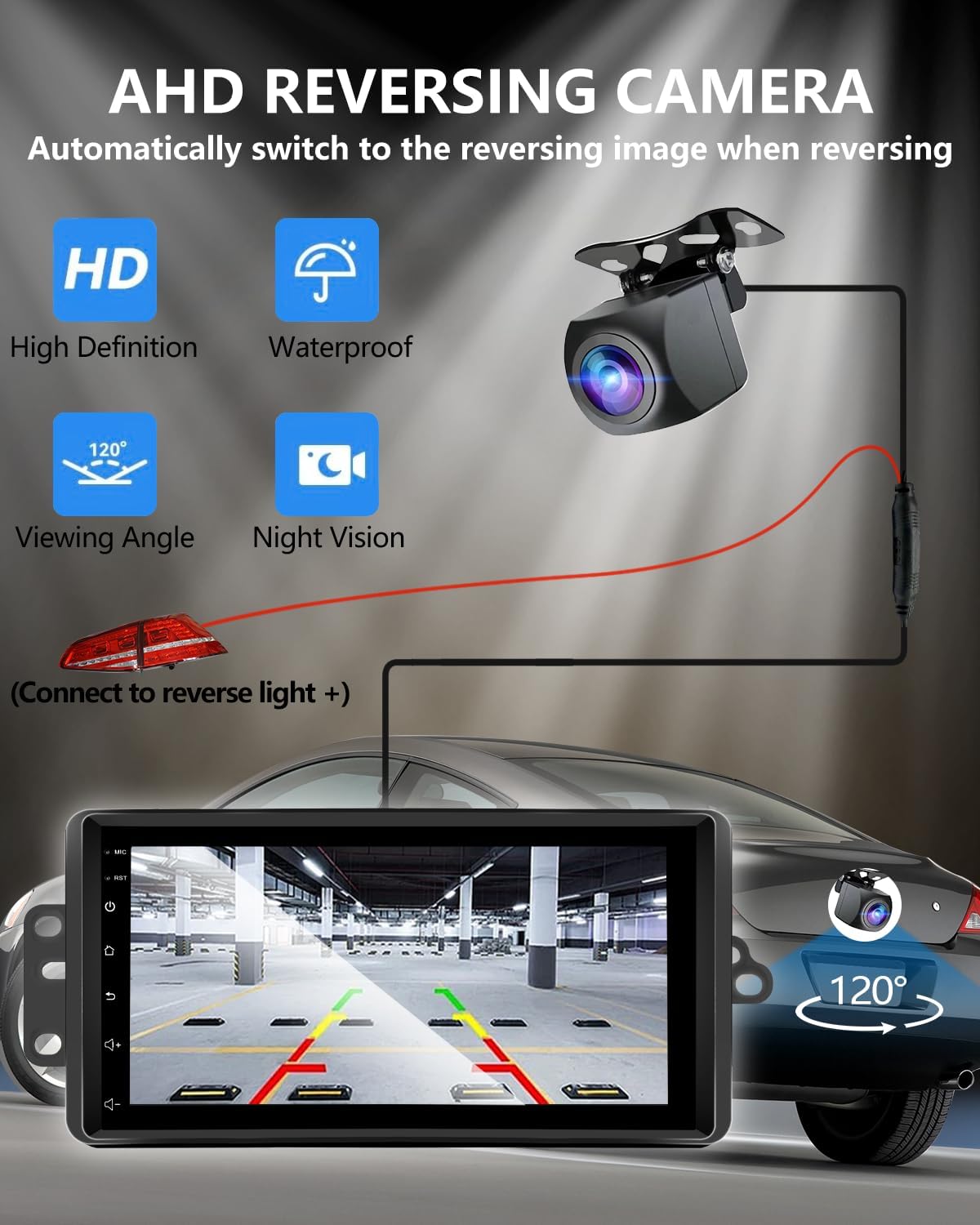
Image: A diagram illustrating the connection of the AHD rearview camera to the car stereo, showing the video input and power connection to the reverse light.
4.3. Акыркы кадамдар
- Carefully slide the new head unit into the dashboard opening, ensuring all cables are not pinched.
- Secure the head unit with the original screws or mounting brackets.
- Reattach any removed trim pieces.
- Унаанын аккумуляторун кайра туташтырыңыз.
- Turn on the ignition and test all functions of the new car stereo.
5. Иштөө нускамалары
5.1. Баштапкы орнотуу
Upon first power-on, the system may guide you through initial setup steps, including language selection and Wi-Fi connection.
5.2. CarPlay жана Android Auto
Connect your iOS or Android smartphone via USB cable or wirelessly (via Bluetooth and Wi-Fi) to activate CarPlay or Android Auto. This allows access to compatible apps like navigation, music, and messaging directly on the head unit screen.

Image: A split image showing both the Apple CarPlay and Android Auto interfaces running on the car stereo screen.
5.3. GPS навигациясы
The unit supports GPS navigation. You can use pre-installed map applications or download others from the app store. Offline map support is available for navigation without an internet connection.

Image: The car stereo screen showing a GPS navigation map with icons for phone, messages, and music, alongside voice command prompts.
5.4. Үн менен башкаруу
Utilize voice assistants (Siri for CarPlay, Google Assistant for Android Auto) for hands-free control of navigation, music playback, calls, and messages. This feature is active when CarPlay or Android Auto is running.

Image: The car stereo screen displaying various voice commands for Siri and Google Assistant, such as "Hey Siri, Call Tom" or "Hi Google, Play Music."
5.5. FM RDS Radio
Access the FM radio tuner to listen to local stations. The RDS (Radio Data System) feature displays station information where available. You can search for and save your favorite channels for quick access.
5.6. Руль башкаруу
Thanks to the integrated CANbus adapter, your vehicle's original steering wheel controls will function with the new head unit, allowing you to manage audio, calls, and other features without taking your hands off the wheel.

Image: The car stereo screen showing the FM radio interface and a separate image illustrating the functionality of steering wheel controls with the unit.
5.7. Internet Connectivity (Wi-Fi)
Connect the head unit to the internet via your mobile hotspot or a Wi-Fi network. This enables access to online content, app downloads, and real-time traffic updates for navigation.

Image: The car stereo screen showing various online applications like YouTube, TikTok, and social media, indicating Wi-Fi connectivity.
6. Техникалык тейлөө
To ensure the longevity and optimal performance of your ANKEWAY XBH-7703 Car Stereo Head Unit, follow these general maintenance guidelines:
- Тазалоо: Use a soft, dry cloth to clean the screen and exterior surfaces. Avoid abrasive cleaners or solvents that could damage the finish.
- Программалык камсыздоо жаңыртуулары: Regularly check for and install system updates provided by ANKEWAY to ensure the latest features and security patches. Contact technical support for firmware update packages.
- Экологиялык шарттар: Аппаратты экстремалдык температурага, түз күн нуруна узак убакытка же ашыкча нымдуулукка дуушар кылуудан алыс болуңуз.
7. Кыйынчылыктарды
Эгерде сиз унааңыздын стереосу менен көйгөйлөргө туш болсоңуз, төмөнкү жалпы көйгөйлөрдү чечүү кадамдарын караңыз:
- Кубат жок: Check all power connections and ensure the vehicle's battery is properly connected. Verify fuses are intact.
- Үн жок: Check speaker connections. Ensure the volume is not muted or set to minimum. Verify audio output settings.
- CarPlay/Android Auto туташпай жатат: Ensure your phone's Bluetooth and Wi-Fi are enabled. Try connecting with a different USB cable. Restart both the head unit and your smartphone.
- Рулдун башкаруу элементтери иштебейт: Verify the CANbus decoder is correctly connected. Ensure the vehicle's original wiring is intact.
- Арткыview Камера көрүнбөйт: Check the camera's video input connection and power supply. Ensure the reverse gear is engaged.
- GPS сигналынын көйгөйлөрү: GPS антеннасынын тунук экенин текшериңиз view асмандан. Тоскоолдуктардан качыңыз.
If the problem persists after attempting these steps, please contact ANKEWAY technical support for further assistance.
8. Техникалык шарттар
| Өзгөчөлүк | Деталь |
|---|---|
| Модель номери | XBH-7703 |
| Операция системасы | Android |
| Эстутум (RAM) | 2 ГБ |
| Сактагыч (ROM) | 64 ГБ |
| Байланыш | Bluetooth, USB, Wi-Fi |
| Өзгөчөлүктөр | Android Auto, Built-In Bluetooth, Built-In Wi-Fi, DSP, GPS Navigation |
| Шайкеш түзмөктөр | Ampөмүрлүү |
| Туташтыргыч түрү | RCA |
| Аудио чыгаруу режими | Стерео |
| Surround Sound | 5.1 Канал конфигурациясы |
| Видеону коддоо | H.264, H.265/HEVC, MPEG-4 |
| Каналдардын саны | 2 |
| Элемент Салмагы | 3.09 фунт |
| Пакеттин өлчөмдөрү | 11.42 x 7.28 x 3.94 дюйм |
9. Кепилдик жана колдоо
For any questions regarding product accessories, system updates, or technical assistance, please contact ANKEWAY technical support. Our development team regularly releases firmware updates to optimize the system experience.
Кепилдиктин конкреттүү чоо-жайын билүү үчүн сатып алуу документтериңизден караңыз.