
1. Киришүү
This manual provides essential information for the safe and efficient operation of your DEWIN VFD Inverter. Please read these instructions carefully before installation, operation, or maintenance. Retain this manual for future reference.
2. Коопсуздук маалыматы
ЭСКЕРТҮҮ: Электр тогуна урунуу коркунучу. Орнотуу жана техникалык тейлөө иштерин квалификациялуу адистер гана аткарышы керек.
- Зымдарды туташтыруудан же техникалык тейлөөдөн мурун электр менен камсыздоонун ажыратылганын текшериңиз.
- Туура томду текшериңизtage and current ratings before connecting the inverter.
- Ground the inverter properly to prevent electrical hazards.
- Do not operate the inverter with damaged wiring or components.
- Avoid exposing the inverter to moisture, dust, or corrosive environments.
- Allow sufficient cooling time after operation before handling internal components.
3. Продукт бүтүп калдыview
The DEWIN VFD Inverter (Model AT4-2200X) is designed to regulate motor power and speed, offering energy savings and reducing voltage fluctuations. It features a robust design with multiple protection mechanisms.
Негизги өзгөчөлүктөрү:
- Intelligent Motor Speed Regulation: Provides precise control over motor speed.
- Энергияны үнөмдөө: Optimizes power consumption for connected equipment.
- Тtage Fluctuation Reduction: Stabilizes the power supply to the motor.
- Жогорку аткаруу: Achieves high torque, high precision, and a wide speed range.
- Алынуучу башкаруу панели: Allows for flexible installation and remote operation.
- Мыкты курулуш: Made from high-impact, heat-resistant, flame-retardant ABS plastic.
- Натыйжалуу муздатуу: Features a thickened heatsink and dual high-efficiency fans for superior heat dissipation.
- Low Noise and EMI: Optimized PWM control technology minimizes operational noise and electromagnetic interference.
Коргоо өзгөчөлүктөрү:
- Ашыкча жүктөн коргоо
- Ашыкча ысып кетүүдөн коргоо
- Overvoltage Коргоо
- Load Drop Protection
- Low Voltage Коргоо
- Ашыкча ток коргоо
- Phase Loss Protection
- Жерден коргоо
- Кыска туташуулардан коргоо
- Турактан коргоо
4. Техникалык шарттар
| Параметр | Нарк |
|---|---|
| Продукт сериясы | AT4-2200X |
| Rated Input Voltage | Single-phase 220V AC |
| Рейтингдүү Чыгуу Voltage | Three-phase 380V AC |
| Номиналдуу ток | 8A |
| Номиналдуу кубаттуулук | 2.2 кВт |
| Чокусу чыгаруу күчү | 2500 Ватт |
| Заводдук жыштык | 50/60 Гц |
| Башкаруу режими | V/F Open Loop |
| Output Voltage Mode | PWM башкаруу |
| Output Waveform | Модификацияланган синус толкуну |
| Shell Material | ABS пластик |
| Сертификаттар | CE |
5. Орнотуу
5.1 Физикалык орнотуу
Mount the VFD inverter in a well-ventilated area, away from direct sunlight, excessive heat, moisture, and corrosive substances. Ensure adequate clearance around the unit for proper airflow and heat dissipation. The unit features a thickened heatsink and dual fans for efficient cooling.
5.2 Электр өткөргүч схемасы
Refer to the diagram below for correct wiring connections. Ensure all connections are secure and comply with local electrical codes.

Image: Wiring diagram for the DEWIN VFD Inverter. It illustrates connecting a single-phase 220V power supply to the L and N terminals, and a three-phase 380V motor to the W, V, and U terminals.
- Connect the single-phase 220V input power supply to the L жана N терминалдар.
- Connect the three-phase 380V motor to the W, V, жана U терминалдар.
- Ensure proper grounding of the inverter and the motor.
6. Операция
6.1 Башкаруу панели
The inverter features a user-friendly control panel for setting parameters and controlling operation. The panel is removable, allowing for separate installation and remote control.
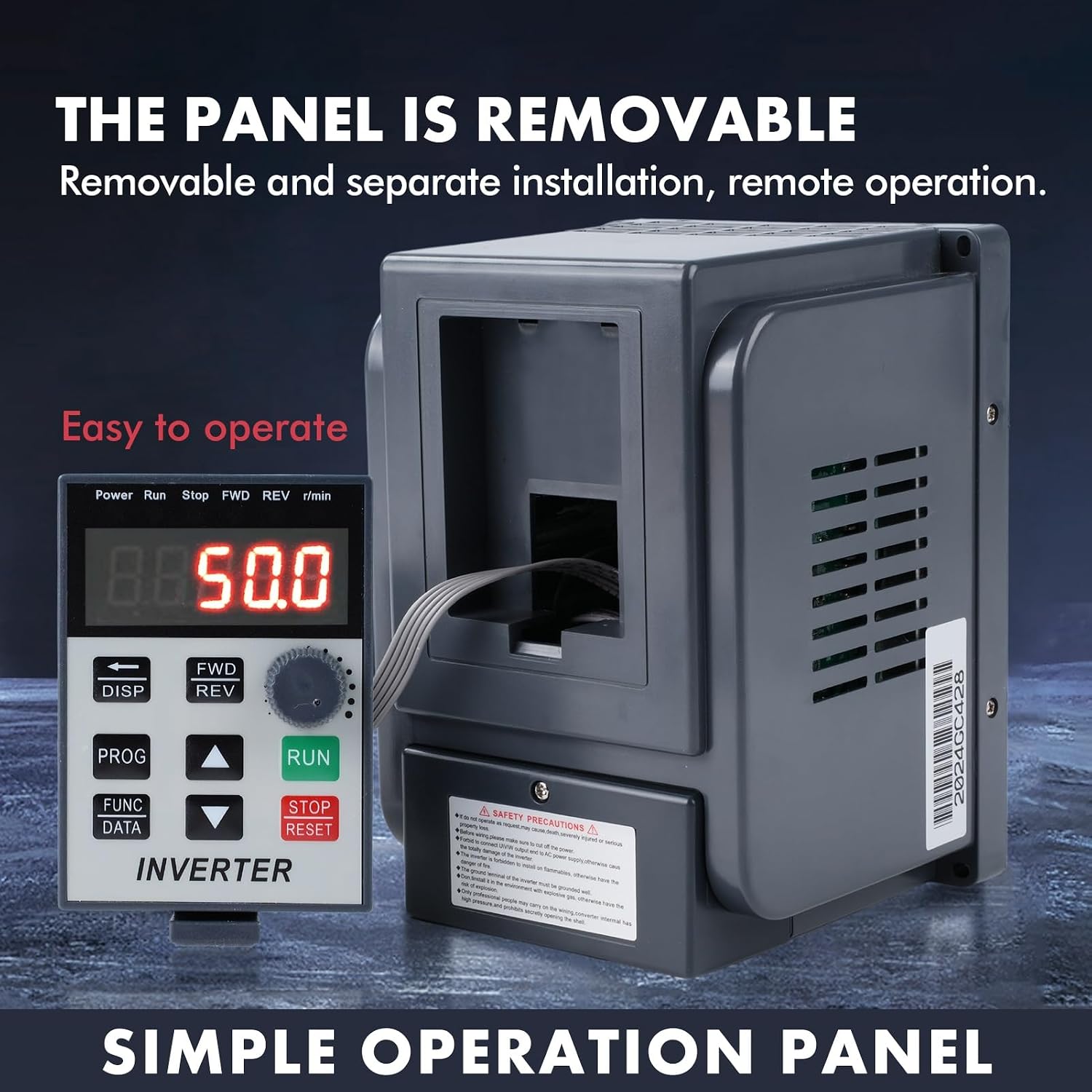
Image: The DEWIN VFD Inverter with its control panel detached, highlighting its removable design for remote operation. The panel displays current frequency (e.g., 50.0 Hz) and control buttons.
Башкаруу панелинин баскычтары:
- ЖҮГҮРҮҮ: Моторду иштетет.
- ТОКТОТУУ/КАЙРА ОРНОТУУ: Stops the motor or resets errors.
- FWD/REV: Changes motor direction (Forward/Reverse).
- DISP: Toggles display modes.
- ПРОГ: Программалоо режимине кирет.
- FUNC/DATA: Accesses function parameters and data.
- Өйдө/төмөн жебелер: Adjusts parameters or frequency.
- Ротари баскычы: Жыштыктын же параметрдин маанилерин так жөнгө салат.
6.2 Негизги операция
- Күйгүзүү: Connect the inverter to the single-phase 220V power supply. The display will light up.
- Жыштык коюу: Use the Up/Down arrows or the rotary knob to set the desired output frequency.
- Моторду ишке киргизүү: басыңыз RUN моторду ишке киргизүү үчүн баскыч.
- Моторду токтотуу: басыңыз ТОКТОТ/КАЛЫПТАҢЫР моторду токтотуу үчүн баскыч.
- Багытын өзгөртүү: басыңыз FWD/REV button to switch between forward and reverse rotation.
7. Тиркемелер
The DEWIN VFD Inverter is suitable for a wide range of industrial and manufacturing applications requiring precise motor speed control and power optimization. It is designed for use with various three-phase 380V equipment.

Image: Visual representation of common applications for the VFD Inverter, including motors, water pumps, fans, conveyor belts, and compressors.
Жалпы колдонулуштарга төмөнкүлөр кирет:
- Күйөрмандар
- Pumps (Water Pumps, Industrial Pumps)
- CNC станоктору
- Ball Mills
- Injection Molding Machines
- Майдалагычтар
- Conveyors / Conveyor Belts
- Textile Equipment
8. Техникалык тейлөө
Regular maintenance ensures the longevity and reliable operation of your VFD inverter.
- Тазалоо: Periodically clean the exterior of the inverter and ensure ventilation openings are free from dust and debris. Use a soft, dry cloth.
- желдеткич текшерүү: Check the cooling fans for proper operation and cleanliness. Ensure no obstructions impede airflow.
- Туташуу текшерүү: Regularly inspect all electrical connections for tightness and signs of corrosion or damage.
- Экологиялык шарттар: Иштөө чөйрөсү белгиленген температуранын жана нымдуулуктун чегинде болушун камсыз кылыңыз.
- Кесиптик текшерүү: For internal components or complex issues, consult a qualified technician.

Сүрөт: Жакын план views highlighting the inverter's quality details, including the CE certified cooling fan, the robust ABS plastic shell, and the corrosion-resistant stainless steel bottom.
9. Кыйынчылыктарды
If you encounter issues with your DEWIN VFD Inverter, refer to the following general troubleshooting steps. For complex problems, contact customer support.
- Кубат жок: Check the input power supply, circuit breaker, and all wiring connections.
- Мотор иштебей жатат: Verify the RUN command is active, check motor connections, and ensure no fault codes are displayed.
- Ашыкча жүктөө катасы: Reduce the motor load, check for mechanical issues with the driven equipment, or verify the inverter's current settings.
- Overheat Error: Ensure adequate ventilation, clean cooling fins and fans, and check ambient temperature.
- Анормалдуу ызы-чуу: Check motor bearings, coupling, and ensure the inverter is securely mounted.
- Дисплей каталары: Note any error codes displayed and consult the manual for specific meanings (if available in the full product manual). Try resetting the inverter.

Image: The DEWIN VFD Inverter alongside a comprehensive list of its ten protection features, designed to ensure electrical safety and operational stability.
10. Кепилдик жана колдоо
For warranty information or technical support, please refer to the documentation included with your purchase or contact DEWIN customer service. Keep your purchase receipt and product model number (AT4-2200X) handy when contacting support.