
1. Продукт бүтүп калдыview
The Jectse Air Quality Monitor is designed to provide real-time detection of various indoor air pollutants. This device utilizes advanced semiconductor, infrared, and electrochemical detection technologies to accurately measure levels of Carbon Dioxide (CO2), Total Volatile Organic Compounds (TVOC), Formaldehyde (HCHO), Particulate Matter 2.5 (PM2.5), and Particulate Matter 10 (PM10).
Its compact and portable design makes it suitable for use in homes, offices, schools, and hotels, ensuring you are aware of your indoor air quality.

Image: Two Jectse Air Quality Monitors, illustrating the compact design and display.

Image: Diagram highlighting the monitor's core features including accurate sensors and intelligent calibration.
2. Орнотуу колдонмосу
2.1. Аппаратты заряддоо
Before initial use, fully charge the air quality monitor. The device features a built-in 1200mAh rechargeable battery, providing approximately 5-6 hours of continuous operation on a full charge. Use the provided USB Type-C cable to connect the monitor to a compatible USB power source (e.g., computer, wall adapter).

Image: The air quality monitor shown with its USB-C charging cable.
2.2. Баштапкы күйгүзүү
Press and hold the power button located on the side of the device until the display illuminates. The monitor will perform a brief self-calibration upon startup.
2.3. Оптималдуу жайгаштыруу
For accurate readings, place the monitor in an area with good air circulation, away from direct drafts, windows, or vents that might skew readings. The device is designed with ventilation openings on both sides and the back to facilitate convective airflow for precise real-time detection.

Сүрөт: каптал view of the monitor, illustrating the innovative ventilation hole design for accurate measurement.
3. Иштөө нускамалары
3.1. Дисплейди түшүнүү
The 2.8-inch HD LCD screen displays real-time data for all detected air quality parameters. Each parameter is shown with its current concentration and a corresponding color indicator to quickly assess air quality status (e.g., Good, Slight, Moderate, Serious).
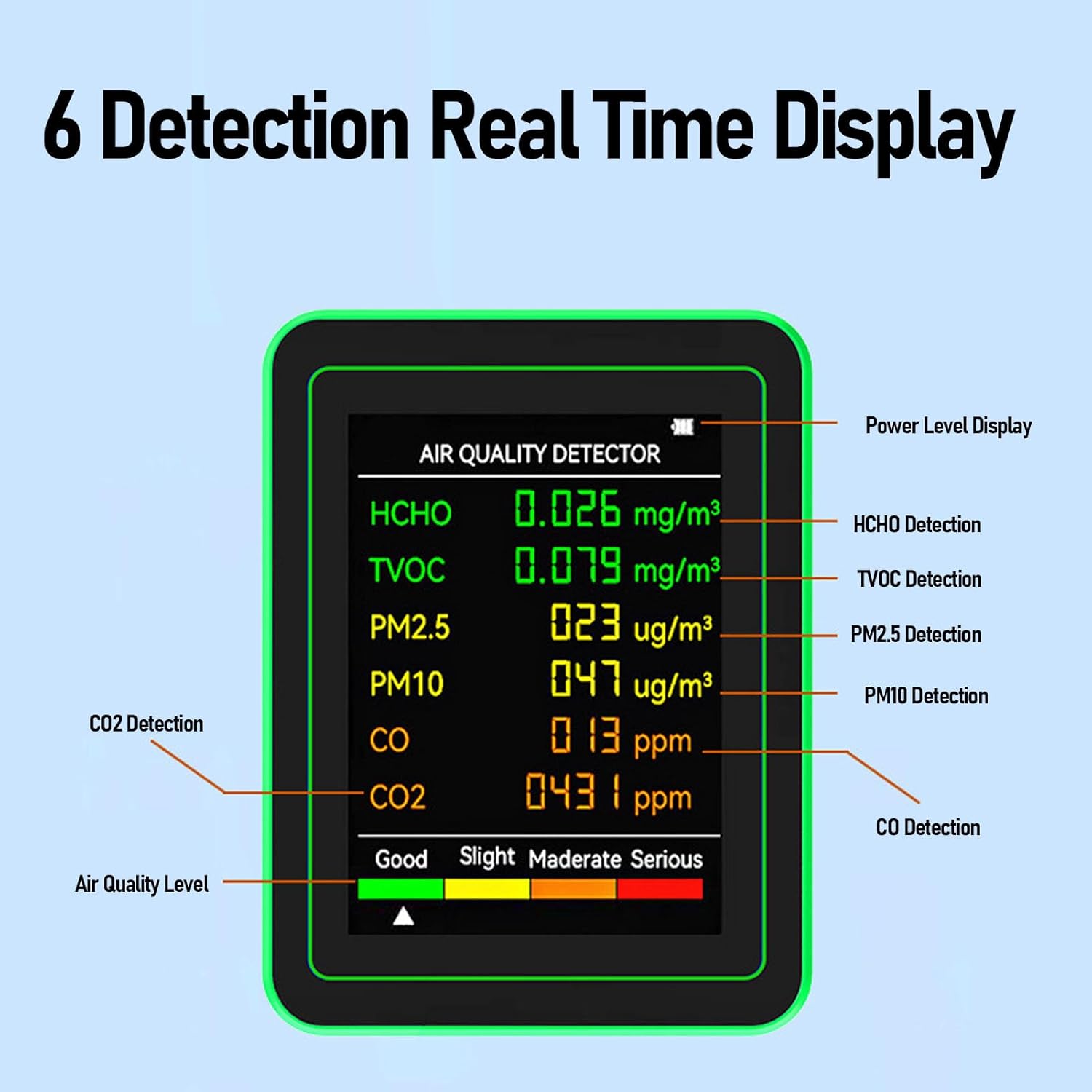
Сүрөт: деталдуу view of the monitor's display, labeling each detection parameter and the air quality level indicator.
3.2. Detected Parameters
The monitor provides readings for the following air quality indicators:
- HCHO (формальдегид): Measured in mg/m³.
- TVOC (жалпы учуучу органикалык бирикмелер): Measured in mg/m³.
- PM2.5 (бөлүкчөлөр 2.5): Measured in ug/m³.
- PM10 (бөлүкчөлөр 10): Measured in ug/m³.
- CO (көмүртек кычкылы): Measured in ppm.
- CO2 (көмүр кычкыл газы): Measured in ppm.

Image: The monitor's display showing various air quality readings and the overall air quality status.
3.3. Электр энергиясын башкаруу
The device can be used continuously while connected to a power supply via the USB Type-C port. The battery icon on the display indicates the current charge level. To conserve battery, the screen may dim or turn off after a period of inactivity, but detection continues in the background.

Image: The monitor displaying battery information and air quality data, emphasizing its large capacity battery.
4. Техникалык тейлөө
4.1. Тазалоо
To maintain optimal performance, regularly clean the exterior of the device with a soft, dry cloth. Do not use abrasive cleaners, solvents, or immerse the device in water. Ensure the ventilation openings are free from dust and debris.
4.2. Батареяга кам көрүү
For long-term battery health, avoid completely discharging the battery frequently. If storing the device for an extended period, charge it to approximately 50% and recharge every few months.
5. Кыйынчылыктарды
| Көйгөй | Мүмкүн себеп | Чечим |
|---|---|---|
| Түзмөк күйбөйт. | Low battery or power cable issue. | Charge the device using the provided USB-C cable. Ensure the cable and power source are functional. |
| Readings appear inaccurate or fluctuate wildly. | Improper placement, blocked ventilation, or environmental interference. | Relocate the device to an area with stable air circulation. Ensure ventilation holes are clear. Avoid placing near strong air currents or chemical sources. Allow device to stabilize for a few minutes after moving. |
| Экран бош же жооп бербей жатат. | Device is off, battery is depleted, or a software glitch. | Press the power button to turn on. Charge the device. If unresponsive, try a soft reset by holding the power button for 10-15 seconds. |
6. Техникалык шарттар
| Өзгөчөлүк | Деталь |
|---|---|
| Модель номери | Jectsesw3ip1nxzy-12 |
| Аныктоо параметрлери | CO2, TVOC, HCHO, PM2.5, PM10 |
| аныктоо технологиясы | Semiconductor, Infrared, Electrochemical |
| Дисплей | 2.8 дюймдук HD ЖК |
| Батарея сыйымдуулугу | 1200mAh кайра заряддоого болот |
| Үзгүлтүксүз иштөө убактысы | 300-360 minutes (5-6 hours) |
| Заряддоо порту | USB Type-C |
| Материал | ABS |
| Элемент Салмагы | 10.1 унция (болжол менен 286 г) |
| Пакеттин өлчөмдөрү | 5.91 x 4.33 x 3.54 дюйм (болжол менен 15 x 11 x 9 см) |

Image: Dimensions of the Jectse Air Quality Monitor.
7. Кепилдик жана колдоо
For warranty information and technical support, please refer to the documentation included with your purchase or contact the manufacturer, Jectse, directly through their official channels. Specific warranty terms may vary by region and retailer.