Продукт бүттүview
The MIKIBY AK980 is a versatile 98% layout mechanical keyboard designed for enhanced productivity and gaming. It features tri-mode connectivity (Bluetooth, 2.4G wireless, and USB-C wired), a smart TFT display, a multi-function knob, hot-swappable switches, and vibrant RGB backlighting. Its gasket-mounted design ensures a comfortable and quiet typing experience.

Image: The MIKIBY AK980 keyboard, showcasing its 98% layout, smart display, and knob. The keyboard features a grey and yellow keycap color scheme with RGB backlighting.
Кутуда эмне бар
- AK980 keyboard
- Баскыч капкагын тарткыч
- USB кабели
- User Manual
Жайгашуу
Байланыш режимдери
The AK980 keyboard supports three connection modes: Bluetooth (BT5.0), 2.4G wireless, and USB-C wired. A switch on the back of the keyboard allows you to select between MAC and WIN layouts, and between 2.4G, USB, and BT connection modes.

Image: The MIKIBY AK980 keyboard demonstrating its tri-mode connectivity options: Bluetooth, 2.4GHz Wireless, and Type-C wired. The image shows the keyboard connected to a desktop computer, a tablet, and a smartphone, highlighting its multi-device compatibility.
2.4G зымсыз туташуу
- Locate the 2.4G USB dongle, typically stored in a slot on the keyboard.
- Plug the 2.4G USB dongle into an available USB port on your computer.
- Switch the keyboard's mode selector to "2.4G". The keyboard will automatically connect.

Сүрөт: Жакын план view of the MIKIBY AK980's metal knob and smart display. The image illustrates how to adjust volume (default), press down to enter the menu, rotate to select sections, and press to confirm selections.
Bluetooth туташуу
- Баскычтоптун режим тандагычын "BT" абалына которуңуз.
- Түзмөгүңүздө (компьютер, планшет, смартфон) Bluetooth'ду иштетиңиз жана жаңы түзмөктөрдү издеңиз.
- Select "AK980" from the list of available devices to pair.
- The smart display will indicate successful pairing.
Video: This video demonstrates the Bluetooth connection process for the MIKIBY AK980 wireless keyboard. It shows how to switch the keyboard to Bluetooth mode and pair it with a device, with the smart display confirming the successful connection.
USB-C зымдуу туташуу
- Берилген USB-C кабелин клавиатуранын USB-C портуна туташтырыңыз.
- USB-C кабелинин экинчи учун компьютериңиздеги жеткиликтүү USB портуна туташтырыңыз.
- Switch the keyboard's mode selector to "USB". The keyboard will be recognized automatically.
Иштөө нускамалары
TFT Smart Display & Knob Functions
The 1.49-inch TFT smart display provides real-time information such as date, time, battery level, and connection mode. The multi-function knob allows for quick adjustments.

Image: A close-up of the MIKIBY AK980's metal knob and smart display. The image illustrates how to adjust volume (default), press down to enter the menu, rotate to select sections, and press to confirm selections.
- Adjust Volume (Default): Rotate the knob to increase or decrease the system volume.
- Менюга кириңиз: Press down on the knob to enter the smart display's menu.
- Менюга өтүү: Rotate the knob to scroll through menu options (Home, RGB Modes, RGB Colors, RGB Speed, Language Settings, GIF Image display).
- Опцияны тандоо: Press down on the knob to select a highlighted menu option.
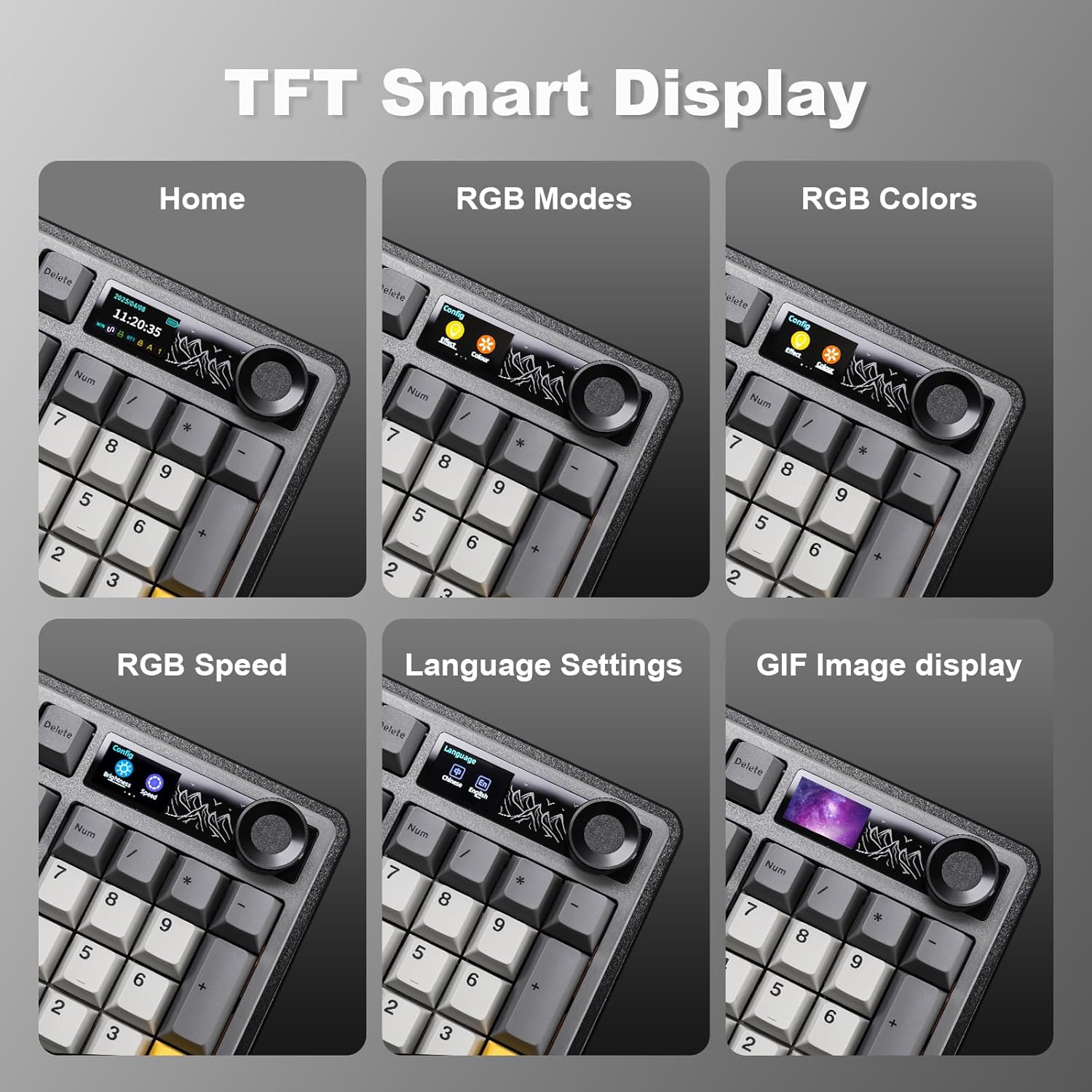
Image: Screenshots of the MIKIBY AK980's TFT Smart Display showing various menu options: Home screen with date/time/battery, RGB Modes, RGB Colors, RGB Speed, Language Settings, and GIF Image display.
RGB жарыктандыруу
The keyboard features 20 pre-programmed RGB lighting effects. You can also customize effects via the web айдоочу.
- Change Light Effect: Басыңыз FN + \ (backslash)
- Жарыктыкты жөндөө: Басыңыз FN + + (көбөйтүү) же FN + - (азайтуу)
- Change Direction Light: Басыңыз FN + ← (left arrow) or FN + → (right arrow)
- Жарыктын түсүн тууралоо: Басыңыз FN + ↑ (өйдө жебе) же FN + ↓ (down arrow)
- Adjust Keyboard Light Speed: Басыңыз FN + [ (көбөйтүү) же FN + ] (азайтуу)
- Арткы жарыкты күйгүзүү/өчүрүү: Басыңыз FN + X

Image: The MIKIBY AK980 keyboard displaying various RGB lighting effects. The image also provides a guide to function key combinations for adjusting light effects, brightness, direction, color, and speed, as well as turning the backlight on/off.
Ыкчам алмаштыруучу которгучтар
The AK980 supports 3/5-pin hot-swappable mechanical switches, allowing for easy customization without soldering. Use the included keycap puller and switch puller to replace switches.

Image: A demonstration of the MIKIBY AK980's hot-swappable feature, showing a switch being removed with a switch puller. Insets highlight PBT keycaps, Murad switches, mounted stabilizers, and south-facing LEDs.
Батареянын иштөө мөөнөтү жана заряддоо
The keyboard is equipped with an 8000mAh battery. It offers up to 28 hours of use with RGB lighting on and up to 110 hours in sleeping mode (backlight off). Use the provided USB-C cable for charging.

Image: The MIKIBY AK980 keyboard highlighting its 8000mAh battery capacity. The image indicates 28 hours of endurance with RGB on and 110 hours in sleeping mode.
Техникалык тейлөө
- Тазалоо: Use a soft, dry cloth to wipe the keyboard surface. For deeper cleaning, remove keycaps using the keycap puller and use compressed air to clear debris.
- Батареяга кам көрүү: To prolong battery life, avoid fully discharging the battery frequently. Charge the keyboard regularly.
- Сактагыч: Клавиатураны күн нурунан жана экстремалдык температурадан алыс, салкын, кургак жерде сактаңыз.
Проблемаларды чечүү
| Көйгөй | Мүмкүн себеп | Чечим |
|---|---|---|
| Баскычтоп жооп бербей жатат | Low battery; Incorrect connection mode; Loose cable/dongle; Driver issue. | Charge the keyboard; Ensure correct mode (BT/2.4G/USB) is selected; Reconnect cable/dongle; Reinstall keyboard drivers on your computer. |
| Bluetooth байланышы туруксуз | Interference; Distance from device; Low keyboard battery. | Move closer to the device; Ensure no strong interference sources nearby; Charge the keyboard; Re-pair the Bluetooth connection. |
| RGB lights not working/customizing | Backlight turned off; Incorrect settings; Software issue. | Басыңыз FN + X to toggle backlight; Use the knob menu or web driver to adjust settings; Ensure web driver is installed and updated. |
| Smart display not showing correct time/date | Time/date not synchronized. | менен туташуу web driver software to calibrate date and time. |
Техникалык шарттар
| Өзгөчөлүк | Деталь |
|---|---|
| Бренд | МИКИБЫ |
| Модел | AK980 |
| Байланыш технологиясы | Bluetooth (BT5.0), 2.4G Wireless, USB-C Wired |
| Keyboard Description | Механикалык |
| Ачкычтардын саны | 97 (98% Layout) |
| Баскыч капкактары | PBT Keycaps |
| Которгучтар | Hot-Swappable (3/5-pin support), Murad Switch (default) |
| Монтаждоо стили | Прокладка орнотулган |
| Арткы жарыктандыруу | RGB (20 pre-programmed effects, web driver customization) |
| Өзгөчөлүктөр | TFT Smart Display, Multi-function Knob, Ergonomic Design, 2-Level Feet |
| Батарея сыйымдуулугу | 8000mAh |
| Батареянын иштөө мөөнөтү | Up to 28 hours (RGB on), Up to 110 hours (backlight off) |
| Элемент Салмагы | 3.19 фунт |
| Пакеттин өлчөмдөрү | 17.99 x 7.76 x 2.32 дюйм |
| Шайкеш түзмөктөр | Оюн консолу, ноутбук, компьютер, смартфон, планшет |

Сүрөт: жарылган view of the MIKIBY AK980 keyboard, illustrating its 5 silencer layers and internal components for sound dampening and improved typing feel. Components include TFT Color Screen, Metal volume knob, PBT keycaps, Upper keyboard case, Mechanical Switches, Stabilizers, FR4 Positioning Plate, Gaskets, PO sound-absorbing pad, PCB Plate, IXPE switch pad, PET sound foam, PO base sound foam, Silicone pad, Battery, Bottom keyboard case, and Anti-slip silicone pads.
Кепилдик жана колдоо
For warranty information and technical support, please refer to the official MIKIBY webсайтка же түздөн-түз кардарларды тейлөөгө кайрылыңыз. Кепилдик дооматтар үчүн сатып алуу дүмүрчөгүңүздү сактаңыз.
Official MIKIBY Store: MIKIBY Amazon Store