1. Киришүү
This user manual provides detailed instructions for the proper setup, programming, operation, and maintenance of your Generic Nice Era One ON2E/ON4E/ON9E 2-Channel Remote Control Transmitter. Please read this manual thoroughly before using the device to ensure safe and efficient operation. Keep this manual for future reference.
2. Продукт бүтүп калдыview
The Nice Era One remote control is a compact 2-channel transmitter designed for controlling compatible devices such as garage doors. It features a simple two-button design for ease of use.
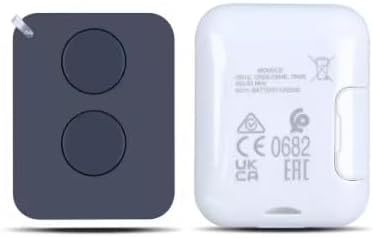
Сүрөт 1: Алдыңкы жана арткы view of the Nice Era One remote control. The left side shows the front with two distinct circular buttons. The right side shows the back, which includes regulatory marks such as CE 0682, UK CA, and EAC, along with model information.

Image 2: The Nice Era One remote control displayed with its retail packaging and an included keychain. The remote is black with two buttons, and the packaging box indicates 'Era One Transmitter 433.92 MHz' and 'Nice' branding.
3. Шайкештик
This remote control is compatible with the following Nice ERA systems:
- Nice ERA ONE
- Nice ERA inti
- Nice FLOR-S
- Nice Inti
- Nice One
- Nice Era Flor
Маанилүү эскертүү: This remote operates at a frequency of 433.92 MHz (USA ONLY) жана does not support copying old remote controls.
4. Орнотуу
4.1 Батареяны орнотуу
Your remote control comes with a battery pre-installed. If the battery needs replacement in the future, it requires 1 AAA батарейка. Батарейканы алмаштыруу үчүн:
- Алыстан башкаруу пультун c этияттык менен ачыңызasing.
- Remove the old AAA battery.
- Insert a new AAA battery, ensuring correct polarity (+/-).
- Алыстан башкаруу пультун c жабыңызasing коопсуз.
5. Программалоо боюнча көрсөтмөлөр
Follow these steps to program your new remote control to your radio receiver or door opener:
- Окуу режимин баштоо: Briefly press and hold the learning button on your radio receiver or door opener. The LED indicator on the operator will turn on, indicating it is in learning mode.
- Өткөрүү коду: While the operator's LED is on, press the desired button on your new remote control. The LED of the receiver will flash and then remain steadily lit.
- Программалоону ырастоо: Continue holding the remote button until the LED of the receiver turns off. This indicates that the remote is now successfully coded to the operator.
6. Операция
Once programmed, operating your Nice Era One remote control is straightforward:
- Баскыч функциясы: Each of the two buttons on the remote control can be programmed to control a specific function or device (e.g., open/close a garage door, activate a gate).
- Жандандыруу: Press the programmed button firmly for a brief moment to send the signal to the receiver.
- Диапазон: Ensure you are within the operational range of your receiver for the remote control to function correctly.
7. Кыйынчылыктарды
7.1 Deleting Codes
To delete existing codes from the receiver:
- Press and hold the learning button on the receiver.
- The LED on the receiver will turn on. Continue holding the button.
- Release the button when the LED of the receiver flashes for the үчүнчү жолу. All previously stored codes should now be deleted.
7.2 Жалпы маселелер жана чечимдер
- Пульт жооп бербей жатат:
- Батарея туура орнотулганын жана жетиштүү заряддалганын текшериңиз. Зарыл болсо, алмаштырыңыз.
- Ensure the remote is properly programmed to the receiver (refer to Section 5).
- Verify that the receiver is powered on and functioning correctly.
- Чектелген диапазон:
- Пульт менен ресивердин ортосунда эч кандай тоскоолдуктар жок экенин текшериңиз.
- Check for sources of radio interference (e.g., other wireless devices).
- Пульттун батареясын алмаштырыңыз.
- Туура эмес иш:
- Confirm that the correct button on the remote is being pressed for the desired function.
- If multiple remotes are in use, ensure there is no signal conflict.
8. Техникалык шарттар
| Модель номери | ERA ONE |
| Бренд | Жалпы |
| Жыштык | 433.92 MHz (USA ONLY) |
| Каналдардын саны | 2 |
| Шайкеш түзмөктөр | Garage Door, Gate Openers (Nice ERA systems) |
| Power Source | 1 AAA Батарея |
| Продукциянын өлчөмдөрү | 3.18 x 1.75 x 0.6 дюйм |
| Элемент Салмагы | 1.76 унция |
| Түс | КАРА |
9. Техникалык тейлөө
Алыстан башкаруу пультуңуздун узак мөөнөттүү иштешин жана оптималдуу иштешин камсыз кылуу үчүн:
- Тазалоо: Wipe the remote with a soft, dry cloth. Avoid using harsh chemicals or abrasive cleaners.
- Сактагыч: Пультту салкын, кургак жерде, күндүн түз нурунан жана өтө жогорку температурадан алыс сактаңыз.
- Батарея: Replace the battery when the remote's performance degrades or if it stops working. Remove the battery if the remote will not be used for an extended period.
- Таасирден качуу: Protect the remote from drops and impacts, which can damage internal components.
10. Кепилдик жана колдоо
For information regarding warranty coverage or technical support, please refer to the documentation provided at the time of purchase or contact your retailer. Keep your purchase receipt as proof of purchase.


