1. Киришүү
This manual provides detailed instructions for the installation, operation, and maintenance of the QUASAR X99 H5 Motherboard. The X99 H5 is a robust solution designed for workstations and servers, supporting LGA 2011-3 socket processors, including Intel Xeon V3/V4 series. It features DDR4 REG ECC memory support in a Dual Channel configuration, ensuring reliable stability and high performance for demanding applications such as rendering, virtualization, and intensive data processing.
Key features include PCIe 16X slots for expansion, an M.2 NVMe slot for high-speed storage, and multiple SATA 3.0 ports for additional drives. High-speed USB 3.0 ports are also integrated for rapid data transfer and peripheral connectivity. Its well-planned layout simplifies system assembly and maintenance, while quality components contribute to operational longevity and stability.
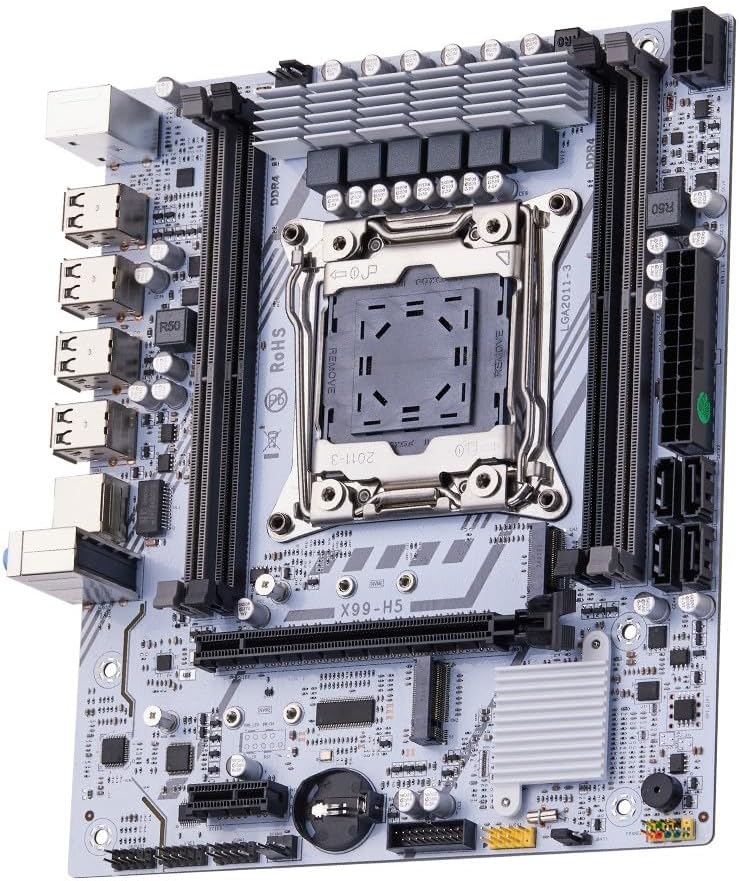
Figure 1.1: ашыкview of the QUASAR X99 H5 Motherboard. This image displays the full motherboard, highlighting its compact and efficient design, including the CPU socket, memory slots, and various expansion ports.
2. Коопсуздук маалыматы
Please read all safety instructions carefully before installing or operating the motherboard. Failure to follow these guidelines may result in personal injury, damage to the product, or damage to other components.
- Компоненттерди орнотуудан же алып салуудан мурун ар дайым кубат менен жабдууну розеткадан ажыратыңыз.
- Аналык платаны же башка тетиктерди кармаардан мурун статикалык электр энергиясын чыгаруу үчүн антистатикалык билек боонун тагыныңыз же жерге туташтырылган металл нерсеге тез-тез тийип туруңуз.
- Сезимтал компоненттерге тийбеш үчүн, энелик платаны четтеринен кармаңыз.
- Ашыкча ысып кетүүнүн алдын алуу үчүн компьютердин корпусунун ичинде туура желдетүүнү камсыз кылыңыз.
- Motherboard нымга же экстремалдык температурага дуушар кылбаңыз.
- Балдар жетпеген жерде сактаңыз.
3. Орнотуу жана орнотуу
3.1. Компонентти идентификациялоо
Familiarize yourself with the various components and connectors on the motherboard before beginning installation.

Figure 3.1: Labeled diagram of the QUASAR X99 H5 Motherboard. This image indicates the location of key components such as the CPU socket, DDR4 memory slots, PCIe slots, M.2 NVMe slot, SATA ports, USB ports, and power connectors.
- LGA 2011-3 CPU Socket: For Intel Xeon V3/V4 processors.
- DDR4 Memory Slots (4x): Supports DDR4 REG ECC memory up to 128GB.
- PCIe 16X Slots: For graphics cards and other expansion cards.
- M.2 NVMe уячасы: For high-speed solid-state drives.
- SATA 3.0 порттору: For connecting traditional hard drives and SSDs.
- 24-пин ATX Power Connector: Негизги кубат киргизүү.
- 8-пин CPU Power Connector: CPU үчүн кошумча күч.
- USB 3.0/2.0 порттору: Перифериялык байланыш үчүн.
- Гигабит Ethernet порту: Тармак байланышы үчүн.
- Аудио уячалары: Аудио киргизүү/чыгаруу үчүн.
- PS/2 порттору: Эски клавиатура жана чычкан үчүн.
3.2. Орнотууга чейинки текшерүү тизмеси
- Compatible CPU (Intel Xeon V3/V4 series, LGA 2011-3 socket).
- Compatible DDR4 REG ECC memory modules.
- ATX power supply unit.
- Computer case with ATX form factor support.
- Storage devices (M.2 NVMe SSD, SATA SSD/HDD).
- Graphics card (if CPU does not have integrated graphics or for dedicated performance).
- Screwdriver set, anti-static wrist strap.
3.3. Орнотуу кадамдары
- Ишти даярдоо: Компьютериңиздин корпусунун арткы тешигине I/O калкан орнотуңуз.
- CPU орнотуу:
- CPU розеткасын кармоо механизмин ачыңыз.
- Процессордун үч бурчтук белгиси розеткадагы белгиге дал келишин камсыз кылып, CPU менен розеткага кылдат тууралаңыз.
- Процессорду мажбурлабастан акырын розеткага салыңыз.
- CPU камсыз кылуу үчүн кармап туруу механизмин жабуу.
- CPU муздаткычын орнотуу: Термикалык пастаны сүйкөңүз (эгер алдын ала сүйкөлбөсө) жана процессордун муздаткычын өндүрүүчүнүн көрсөтмөлөрүнө ылайык орнотуңуз. Процессордун желдеткич кабелин энелик платадагы CPU_FAN колонкасына туташтырыңыз.
- Эстутум модулдарын орнотуу:
- DDR4 эс тутум уячаларындагы клиптерди ачыңыз.
- Эстутум модулундагы оюкту уячадагы ачкыч менен тегиздеңиз.
- Press down firmly on both ends of the module until the clips snap into place. For Dual Channel configuration, refer to the motherboard's silkscreen for recommended slot pairing (e.g., A1 and B1).
- Motherboard орнотуу: Carefully place the motherboard into the computer case, aligning it with the standoffs. Secure the motherboard with screws.
- Сактагыч түзмөктөрдү орнотуу:
- For M.2 NVMe SSDs: Insert the M.2 SSD into the M.2 slot and secure it with the provided screw.
- For SATA drives: Connect SATA data cables from the motherboard's SATA ports to your drives. Connect power cables from the PSU to your drives.
- Кеңейтүү карталарын орнотуу: Графикалык карталарды же башка PCIe кеңейтүү карталарын тиешелүү PCIe уячаларына салып, аларды корпустун кармоо механизми менен бекитиңиз.
- Кубат булагына туташтыруу:
- 24-пиндүү ATX кубат кабелин кубат булагынан энелик платага туташтырыңыз.
- Connect the 8-pin CPU power cable from the PSU to the motherboard.
- Алдыңкы панелдик кабелдерди туташтыруу: Connect the power button, reset button, HDD LED, power LED, and front panel USB/audio cables to their respective headers on the motherboard. Refer to the motherboard's silkscreen or a detailed diagram for correct pin assignments.
- Перифериялык түзүлүштөрдү туташтыруу: Мониторуңузду, клавиатураңызды, чычканыңызды жана башка перифериялык түзүлүштөрдү арткы киргизүү/чыгаруу портторуна туташтырыңыз.

Сүрөт 3.2: Жакын пландан view of the rear I/O panel of the QUASAR X99 H5 Motherboard. This image shows the PS/2 ports for keyboard and mouse, multiple USB ports, the Ethernet port, and the audio jacks.
4. Иштөө нускамалары
4.1. Биринчи жүктөө жана BIOS орнотуу
- After connecting all components and power, press the power button on your computer case.
- Жүктөө процессинде баскычты кайра-кайра басыңыз DEL or F2 key (common BIOS entry keys) to enter the BIOS/UEFI setup utility. The exact key may vary; check your screen for prompts.
- In the BIOS, verify that all installed components (CPU, RAM, storage drives) are detected correctly.
- Операциялык тутумуңузду орнотуучу медианы (USB диск же DVD) артыкчылыктуу кылуу үчүн жүктөө тартибин конфигурациялаңыз.
- Өзгөртүүлөрдү сактап, BIOSтон чыгыңыз. Система кайра жүктөлөт.
4.2. Операциялық системаны орнотуу
Follow the instructions provided with your operating system (e.g., Windows, Linux) to complete the installation process. Ensure you install all necessary drivers for the motherboard's chipsets, network adapter, audio, and any other integrated components. Drivers are typically available on the manufacturer's website or included on a driver disc.
4.3. Драйверди орнотуу
For optimal performance and stability, install the latest drivers for your motherboard. These typically include:
- Chipset Drivers
- LAN (Ethernet) драйверлери
- Аудио драйверлери
- USB Drivers (if specific ones are required)
- SATA/NVMe Storage Drivers
Visit the manufacturer's support website for the X99 H5 motherboard to download the most current drivers.
5. Техникалык тейлөө
Үзгүлтүксүз тейлөө сиздин энелик платаңыздын жана тутумуңуздун узак иштөөсүн жана оптималдуу иштешин камсыз кылууга жардам берет.
- Чаңды тазалоо: Periodically clean dust from inside your computer case, especially from fans, heatsinks, and the motherboard surface. Use compressed air or a soft brush. Ensure the system is powered off and unplugged before cleaning.
- BIOS/UEFI жаңыртуулары: Өндүрүүчүнү текшериңиз website for BIOS/UEFI updates. Updates can improve compatibility, stability, and performance. Follow the update instructions carefully to avoid damaging the motherboard.
- Драйвер жаңыртуулары: Keep your system drivers updated to the latest versions.
- Кабелдик башкаруу: Аба агымын жакшыртуу жана тоскоолдуктарды болтурбоо үчүн ички кабелдердин тыкан өткөрүлүшүн текшериңиз.
- Экологиялык көзөмөл: Operate the system in a clean, dry, and well-ventilated environment. Avoid extreme temperatures and humidity.
6. Кыйынчылыктарды
Бул бөлүмдө сиз кабылышы мүмкүн болгон жалпы маселелерди чечүү жолдору каралган.
| Көйгөй | Мүмкүн себеп | Чечим |
|---|---|---|
| Система күйбөйт. | No power, loose connections, faulty PSU. | Check power cable, 24-pin and 8-pin power connectors. Ensure PSU switch is ON. Test PSU if possible. |
| Монитордо дисплей жок. | Loose graphics card, faulty RAM, incorrect monitor input. | Reseat graphics card and RAM modules. Check monitor cable and input source. Test with one RAM stick. |
| Система күтүлбөгөн жерден кайра жүктөлөт. | Ашыкча ысып кетүү, туруксуз кубаттуулук, бузулган компоненттер. | Check CPU cooler installation. Ensure adequate case ventilation. Verify PSU stability. Run memory diagnostic. |
| Операциялык система табылган жок. | Incorrect boot order, unformatted drive, faulty drive. | Check BIOS boot order. Ensure storage drive is properly connected and formatted with an OS. |
| USB түзмөктөрү таанылган жок. | Missing drivers, faulty port, device issue. | Install/update USB drivers. Try different USB ports. Test device on another system. |
If issues persist, consult the manufacturer's support resources or a qualified technician.
7. Техникалык шарттар
| Өзгөчөлүк | Деталь |
|---|---|
| Бренд | Generic (Manufactured by Machinist) |
| Моделдер сериясы | X99 H5 |
| CPU розетка | LGA 2011-3 |
| Шайкеш процессорлор | Intel Xeon V3/V4 series |
| Эс тутум технологиясы | DDR4 REG ECC |
| Memory Slots | 4 x DDR4 DIMM slots (Dual Channel) |
| Колдоого алынган максималдуу эс тутум | 128 ГБ |
| Memory Clock Speed | Up to 3200 MHz (actual speed depends on CPU and memory modules) |
| Сактагыч интерфейстери | 1 x M.2 NVMe slot, Multiple SATA 3.0 ports |
| Кеңейтүү уячалары | PCIe 16X slots (number not specified, but typically at least one) |
| Networking | 1 x Gigabit Ethernet порту |
| USB порттору | USB 3.0 and USB 2.0 ports (number not specified, but typically multiple) |
| Аудио | Интеграцияланган аудио уячалар |
| Форма фактору | ATX (Dimensions: 30.5 x 24.4 cm) |
| Продукт Салмагы | 1 килограмм |
8. Кепилдик жана колдоо
For warranty information and technical support, please refer to the documentation provided with your purchase or visit the manufacturer's official webсайт. Кепилдик дооматтар үчүн сатып алганыңыздын далилин сактаңыз.
Typical support resources include:
- Online FAQs and Knowledge Base
- Driver and BIOS Download Section
- Customer Service Contact Information (Email/Phone)
When contacting support, please have your motherboard model (X99 H5) and any relevant error messages or system configurations ready.


