
Flamma
FLAMMA FF01 Looper Pedal and FF02 Drum Guitar Pedal User Manual
Бренд: FLAMMA
Introduction
This manual provides comprehensive instructions for the operation and maintenance of your FLAMMA FF01 Looper Pedal and FF02 Drum Guitar Pedal. Please read this manual thoroughly before use to ensure proper functionality and to maximize your experience with these devices.
Коопсуздук маалыматы
Always observe the following basic precautions when operating these devices:
- Do not expose the units to water or excessive moisture.
- жылуулук булактарынын жанына же күн нуру түз тийген жерге койбоңуз.
- Белгиленген кубат адаптерин гана колдонуңуз.
- Do not attempt to disassemble or repair the units yourself. Refer all servicing to qualified personnel.
- Балдар жетпеген жерде сактаңыз.
Пакеттин мазмуну
Пакетиңизде бардык буюмдар бар экенин текшериңиз:
- FLAMMA FF01 Looper Pedal
- FLAMMA FF02 Drum Guitar Pedal
- Кубат адаптери (аймакка жараша)
- USB кабели
- Колдонуучунун Колдонмосу (бул документ)
Продукт өзгөчөлүктөрү
FLAMMA FF01 Looper Pedal Features:
- Large Capacity Looper: 40 storage slots, 160 minutes total recording time.
- Dual-Footswitch Operation: For recording, overdubbing, playback, and track clearing.
- LED Feedback: Real-time LED strip for loop progress indication.
- Жогорку сапаттагы аудио: Supports 44.1kHz 16-bit WAV files.
- USB туташуу: Seamless import, export, and deletion of tracks.
FLAMMA FF02 Drum Guitar Pedal Features:
- Extensive Drum Grooves: 121 rhythms across 11 styles (rock, jazz, blues, metal, funk, etc.).
- Customizable Rhythms: 66 slots in 11 groups (6 per group) for quick switching.
- Tap Tempo Functionality.
- Stereo I/O ар тараптуу байланыш үчүн.
Продукциянын жайгашуусу жана башкаруу элементтери
FLAMMA FF01 Looper Pedal

Image: The FLAMMA FF01 Looper Pedal (green) and FF02 Drum Guitar Pedal (blue) shown together, highlighting their displays and footswitches.

Image: Close-up of the FF01 Looper Pedal's display, showing options for 'Slot', '1 Shot', and 'Fade out'.
The FF01 Looper Pedal features a clear display screen, two main footswitches for operation, and two rotary knobs for 'Select/Save' and 'Volume/Delete'. An LED strip indicates loop progress.
FLAMMA FF02 Drum Guitar Pedal
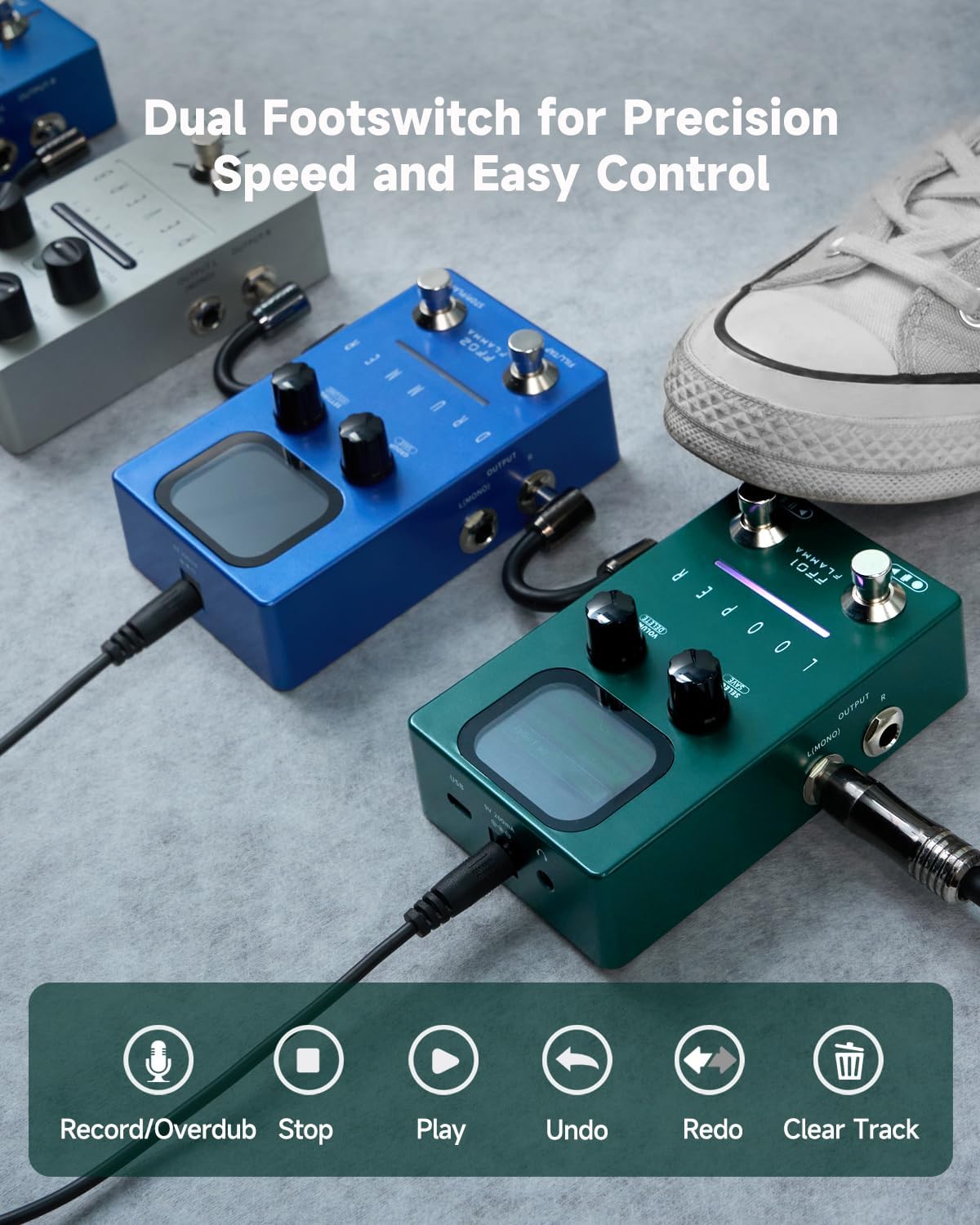
Image: Close-up of the FF02 Drum Guitar Pedal's display, showing 'Global' settings including 'L-Cut', 'H-Shelf', and 'Volume'.
The FF02 Drum Guitar Pedal also has a display screen, two footswitches ('Fill/Tap' and 'Stop/Play'), and two rotary knobs for 'Group/Save' and 'Setting/Volume'.
Орнотуу жана Байланыштар
Follow these steps to connect your FLAMMA pedals:
- Кубат туташуу: Connect the provided power adapter to the DC IN jack on each pedal and then to a suitable power outlet.
- Аспап киргизүү: Connect your guitar or other instrument to the INPUT (L/MONO) jack of the FF01 Looper Pedal using a standard 1/4-inch instrument cable.
- чыгаруу үчүн Ampкөтөргүч/Кийинки педаль:
- FF01 Looper to FF02 Drum Pedal: Connect the OUTPUT (L/MONO) of the FF01 Looper to the INPUT (L/MONO) of the FF02 Drum Pedal.
- FF02 Drum Pedal to Ampөмүр берүүчү: Connect the OUTPUT (L/MONO) of the FF02 Drum Pedal to your amplifier or audio interface. For stereo output, use both L and R outputs from the FF02.
- USB Connection (FF01 only): For data management, connect the FF01 Looper Pedal to your computer using the supplied USB cable.

Image: The FF01 Looper and FF02 Drummer pedals connected in a signal chain, demonstrating typical setup with a guitar and ampөмүрлүү.
Иштөө нускамалары
FLAMMA FF01 Looper Pedal Operation
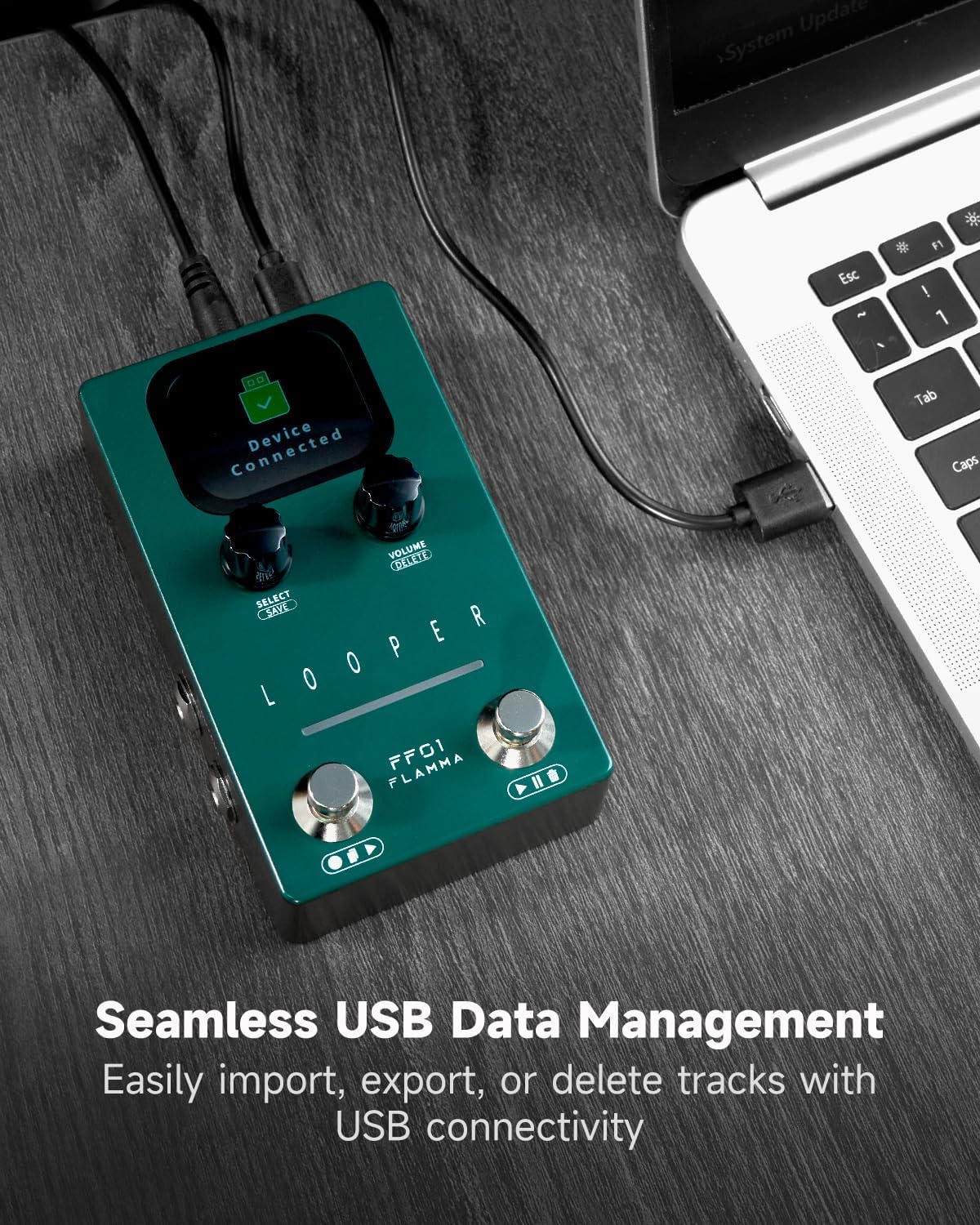
Image: The FF01 Looper Pedal with visual cues for its dual footswitch functions: Record/Overdub, Stop, Play, Undo, Redo, and Clear Track.
- Recording a Loop: Press the left footswitch once to start recording. The LED strip will indicate recording progress.
- Stopping Recording/Playing Loop: Press the left footswitch again to stop recording and immediately play back the loop.
- Overdubbing: While a loop is playing, press the left footswitch once to begin overdubbing. Press again to stop overdubbing.
- Ойнотууну токтотуу: Press the right footswitch once to stop playback.
- Clearing a Loop: Press and hold the right footswitch to clear the current loop.
- Артка кайтаруу/кайталоо: Use specific footswitch combinations (refer to on-screen prompts or detailed manual) for undoing or redoing the last overdub.
- Saving Loops: Use the 'Select/Save' knob to navigate to the save option on the display and confirm.
- Үндү тууралоо: Use the 'Volume/Delete' knob to adjust the playback volume of the loop.

Image: The FF01 Looper Pedal demonstrating its real-time LED feedback for loop status and the on-screen prompt for saving a loop.
FLAMMA FF02 Drum Guitar Pedal Operation

Image: The FF02 Drum Guitar Pedal with visual cues for its dual footswitch functions: Record/Overdub, Stop/Play, Switch Slot, Clear Track, Fill, and Tap Tempo.
- Selecting Drum Grooves: Use the 'Group/Save' knob to navigate through the 11 drum styles and 121 groove patterns on the display.
- Starting/Stopping Drum Groove: Press the right footswitch ('Stop/Play') to start or stop the selected drum groove.
- Темпти таптаңыз: Repeatedly tap the left footswitch ('Fill/Tap') to set the tempo of the drum groove.
- Adding Fills: Press the left footswitch ('Fill/Tap') once during playback to insert a drum fill.
- Saving Custom Rhythms: Use the 'Group/Save' knob to select a slot and save your customized rhythm settings.
- Үндү тууралоо: Use the 'Setting/Volume' knob to adjust the volume of the drum groove.

Image: The FF02 Drum Guitar Pedal's display showing the selection of drum styles and groove patterns, indicating 11 unique music styles and 121 different drum grooves.

Сүрөт: эки views of the FF02 Drum Guitar Pedal, illustrating how to quickly select slots and adjust volume using the rotary knobs.
Data Management (FF01 Looper)
Image: The FF01 Looper Pedal connected to a laptop via a USB cable, with the pedal's screen displaying "Device Connected".
The FF01 Looper Pedal supports seamless data management via USB. Connect the pedal to your computer using the provided USB cable. The pedal will appear as a removable storage device.
- Importing Tracks: Drag and drop WAV files (44.1kHz, 16-bit) into the pedal's storage folders.
- Exporting Tracks: Copy WAV files from the pedal's storage folders to your computer.
- Deleting Tracks: Delete unwanted WAV files directly from the pedal's storage folders on your computer.
Note: Ensure the pedal is disconnected safely from your computer after data transfer to prevent data corruption.
Проблемаларды чечүү
| Көйгөй | Мүмкүн себеп | Чечим |
|---|---|---|
| Күч жок | Incorrect power adapter; loose connection; power outlet issue. | Ensure correct power adapter is used and securely connected. Test power outlet. |
| Үн чыгышы жок | Incorrect cable connection; volume too low; ampөмүр бою өчүрүлгөн. | Check all audio cable connections. Increase pedal and ampкөтөргүчтүн көлөмү. Камсыз кылыңыз ampкөтөргүч күйгүзүлгөн. |
| Цикл жаздырылбай/ойнотулбай жатат | Incorrect footswitch operation; memory full. | Refer to "Operating Instructions" for correct footswitch usage. Delete old loops or transfer to computer. |
| Drum pedal not playing rhythms | Rhythm not selected; volume too low. | Select a drum groove using the 'Group/Save' knob. Increase volume. |
| USB туташуу маселелери | Faulty USB cable; driver issue; pedal not in data mode. | Try a different USB cable. Ensure pedal is powered on and connected correctly. Restart computer. |
Техникалык шарттар
FLAMMA FF01 Looper Pedal
- Укук сактагыч: 40 слот
- Жаздыруу убактысы: Up to 4 minutes per loop, 160 minutes total
- Аудио формат: 44.1kHz, 16-bit WAV
- Байланыш: 1/4" Mono Input/Output, USB Type-B
- Кубаттуулугу: DC 9V (center negative)
FLAMMA FF02 Drum Guitar Pedal
- Барабан ойуктары: 121 үлгү
- Музыка стилдери: 11 genres
- Custom Slots: 66 slots (11 groups x 6 per group)
- Байланыш: 1/4" Stereo Input/Output
- Кубаттуулугу: DC 9V (center negative)
Эскертүү: Техникалык мүнөздөмөлөр эскертүүсүз өзгөртүлүшү мүмкүн.
Техникалык тейлөө
- Тазалоо: Use a soft, dry cloth to clean the exterior of the pedals. Do not use abrasive cleaners or solvents.
- Сактагыч: Store the pedals in a cool, dry place away from direct sunlight and extreme temperatures when not in use.
- Кабельге кам көрүү: Кабелдерди ашыкча ийүүдөн же алардын үстүнө оор буюмдарды коюудан алыс болуңуз.
Кепилдик жана колдоо
FLAMMA products are designed for reliability and performance. For warranty information, technical support, or service inquiries, please visit the official FLAMMA webсайтка кайрылыңыз же жергиликтүү дистрибьютериңиз менен байланышыңыз. Кепилдик дооматтары үчүн сатып алганыңыздын далилин сактап коюңуз.
Онлайн ресурстар: For the latest updates, firmware, and additional resources, please visit: www.flamma.com
Ask a question about this manual
Ask about setup, troubleshooting, compatibility, parts, safety, or missing instructions. Manuals+ will review the question and use this page’s manual context to help answer it.