
Introduction
Thank you for choosing the SEAOURA SR-653 LED Aquarium Light. This manual provides essential information for the proper setup, operation, and maintenance of your new aquarium light. Please read it thoroughly before use to ensure optimal performance and longevity of the product.
Продукт өзгөчөлүктөрү
- Smart Timer & Auto On/Off: Features 3 preset timers (6H/8H/12H) with a 15-minute brightness gradient for smooth transitions.
- WRB 3 Channel Customization: Allows mixing red, blue, and white LEDs for tailored lighting with 11 preset colors and 10 brightness levels.
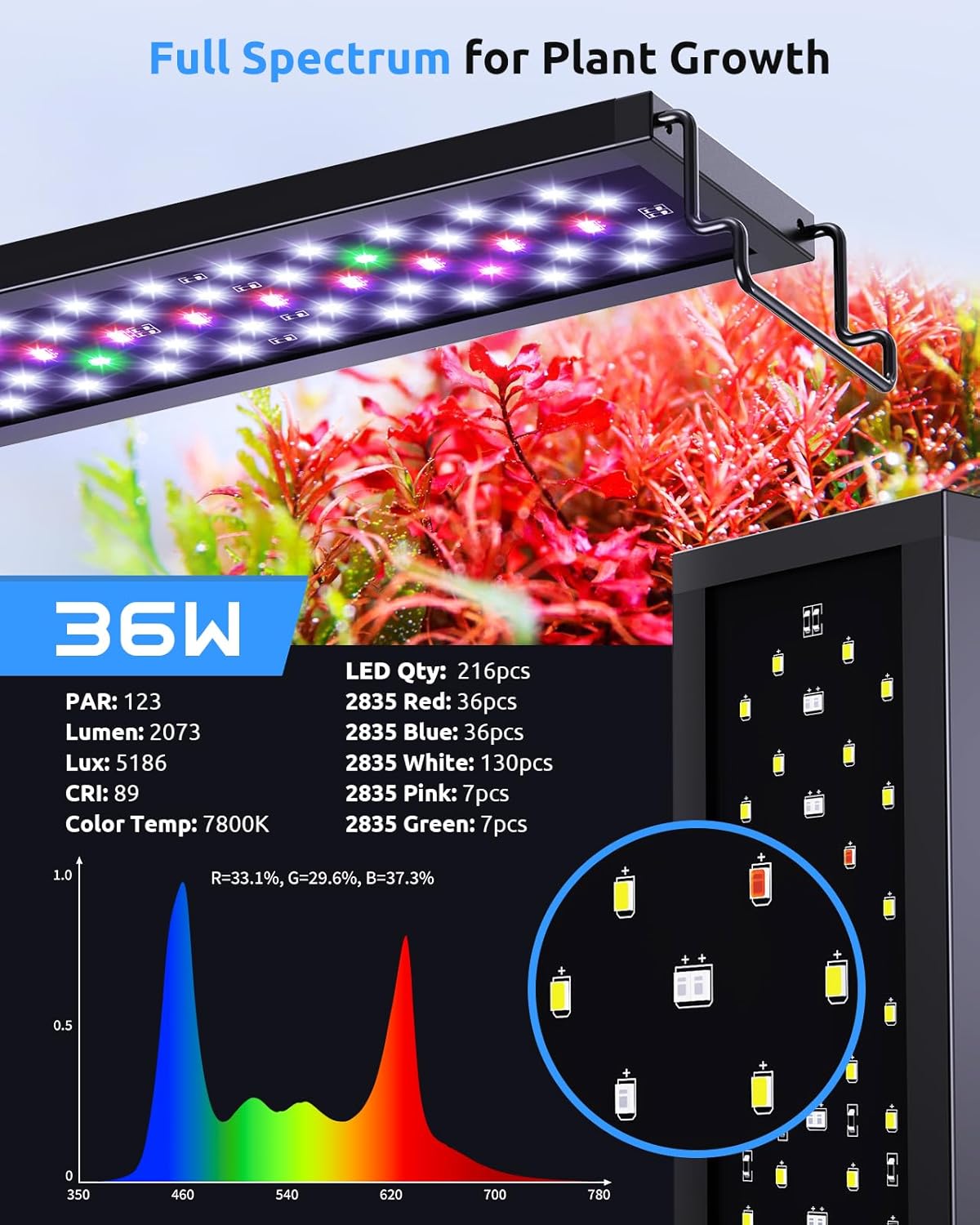
- Full Spectrum for Plant Growth: High-quality 2835 LED chips (White:130pcs/Red:36pcs/Blue:36pcs/Green:7pcs/Pink:7pcs) optimized for freshwater tanks (90-117cm) to promote photosynthesis.
- Adjustable Taller Bracket: Extendable bracket (90-106cm fish tank fit) for even light coverage and improved heat dissipation.
- Туруктуу курулуш: ABS housing for efficient heat dissipation and stable performance.
Орнотуу нускамалары
1. Таңгактан чыгаруу жана текшерүү
Carefully remove all components from the packaging. Inspect the light fixture, power adapter, and adjustable brackets for any signs of damage. If any parts are damaged or missing, do not proceed with installation and contact customer support.
2. Attaching the Adjustable Brackets
Slide the adjustable brackets onto each end of the light fixture. Ensure they are securely attached. The brackets are designed to extend, allowing the light to fit tanks between 90cm and 106cm.

3. Жарыкты жайгаштыруу
Place the light fixture with the attached brackets onto the rim of your aquarium. Adjust the brackets to fit your tank size, ensuring the light is centered and stable. The taller design of the brackets helps illuminate every corner of the tank.
4. Power Connection
Connect the power adapter to the light fixture and then plug it into a suitable power outlet. Ensure your hands are dry before handling electrical connections.
Иштөө нускамалары
1. Controller Overview
The light is controlled via an inline controller with a digital display and several buttons for setting time, brightness, and color modes.

2. Setting the 24/7 Mode (Sunrise/Daylight/Sunset/Moonlight)
The 24/7 mode simulates natural light cycles with gradual transitions. This mode is programmable for specific start and end times for different light phases.
Video: A guide on setting up the 24/7 mode for a SEAOURA aquarium light controller (model SR-657 shown, but similar functionality applies to SR-653). The video demonstrates how to long-press the 24/7 button to enter settings, adjust start and end times for sunrise, daytime, sunset, and night modes using up/down arrows, and save settings by pressing the mode button. It highlights the gradual light changes between phases.
3. Preset Timer Modes
The light offers 3 preset timer options: 6 hours, 8 hours, and 12 hours. These timers automatically turn the light on and off daily at the specified duration, maintaining a consistent cycle.
4. WRB 3-Channel Customization
You can customize the intensity of the White (W), Red (R), and Blue (B) LED channels independently. This allows for fine-tuning the light spectrum to suit specific plant growth needs or to enhance fish coloration.

5. Preset Color Options & Brightness Adjustment
The light offers 11 preset color options and 10 levels of brightness adjustment. You can cycle through these options to find the ideal aesthetic for your aquarium.

Video: A demonstration of the SEAOURA Bright Programmable Aquarium Light with Timer. The video showcases various color options and brightness levels, including day mode, night mode, and different color cycles, highlighting the light's versatility for enhancing aquarium aesthetics.
Video: A short clip demonstrating the SEAOURA Aquarium Light with Daylight-Moonlight feature. The video quickly transitions between bright daylight and soft moonlight settings, illustrating the automatic cycle.
Техникалык тейлөө
The SEAOURA SR-653 is built with durable ABS housing designed for efficient heat dissipation, ensuring stable performance and prolonging LED life. Regular cleaning of the light fixture's exterior with a soft, damp cloth is recommended to prevent dust and mineral buildup, which can affect light output. Always unplug the light before cleaning.
Temperature Monitoring and Alarm
The controller includes a temperature monitoring feature with an alarm. This allows you to set high and low temperature thresholds for your aquarium. If the water temperature exceeds these thresholds, an alarm will sound, alerting you to potential issues.
Video: A demonstration of the SR-659 controller's temperature monitor and alarm setup (similar functionality to SR-653). The video shows how to access the temperature display, switch between Celsius and Fahrenheit, enable/disable the alarm, and set high and low temperature thresholds. It also demonstrates how the alarm triggers when the temperature exceeds the set limits and how to silence it.
Проблемаларды чечүү
For common issues, please refer to the following table. If the problem persists, contact customer support.
| Көйгөй | Мүмкүн себеп | Чечим |
|---|---|---|
| Жарык күйбөйт | No power supply; Faulty connection | Check power outlet and connections; Ensure adapter is securely plugged in. |
| Таймер туура иштебей жатат | Incorrect timer settings; Power interruption | Re-program the timer settings as per operating instructions; Ensure continuous power supply. |
| LED жарыктары күңүрт же жымыңдап турат | Low brightness setting; Power fluctuation; Unit malfunction | Adjust brightness level; Check power source stability; Contact support if issue persists. |
| Temperature alarm triggers frequently | Water temperature outside set thresholds; Sensor issue | Check aquarium water temperature and adjust if necessary; Verify temperature sensor placement; Re-calibrate or adjust alarm thresholds. |
Техникалык шарттар
| Өзгөчөлүк | Деталь |
|---|---|
| Модель номери | SR-653 |
| Продукциянын өлчөмдөрү | 87.5 x 8.5 x 1.34 см |
| Салмагы | 1.3 кг |
| Түс | Кара |
| Материал | Акрилонитрил бутадиен стирол (ABS) |
| Жарык булагы түрү | Жарык чыгаруучу диод (LED) |
| Power Source | Электр зымдары |
| Максималдуу туура келген жарык булагы Wattage | 36 Ватт |
| Монтаж түрү | Adjustable Bracket Mount |
| Жарык булагы өзгөчөлүктөрү | 10 Level Dimmable, 10 Preset Light + Cycle, 6H/8H/12H Timer, WRB 3-Channel Customizable |
| Түс температурасы | 7800 Келвин |
| Түстөрдү көрсөтүү индекси (CRI) | 89 |
| Жарык булактарынын саны | 216 |
| Камтылган компоненттер | Adapter Cable, Aquarium Light, Extendable Mount, User Manual |

Кепилдик жана колдоо
Кепилдик маалымат
The SEAOURA SR-653 LED Aquarium Light comes with a 1 жылдык өндүрүүчүнүн кепилдиги. Бул кепилдик нормалдуу колдонуудагы материалдардагы жана жасалгадагы кемчиликтерди камтыйт. Кепилдик дооматтары үчүн сатып алганыңыздын далилин сактап коюңуз.
Кардарларды колдоо
For any questions, technical assistance, or warranty claims, please contact the seller, DDMark, or visit the official SEAOURA store. SEAOURA is committed to making fish keeping easier and more enjoyable, focusing on the well-being of aquatic life.