
1. Продукт бүтүп калдыview
The Pknight DMX-S6RT is a 6-channel DMX signal splitter and amplifier designed to distribute a single DMX input signal to six independent output channels. This device is engineered to meet the control needs of multiple DMX-compatible lighting fixtures, making it ideal for stage lighting and performance control applications. Its robust design incorporates optical isolation for signal stability and a built-in terminal resistor to prevent signal reflection, ensuring reliable and clean DMX signal transmission.
The compact cylindrical form factor, coupled with Velcro mounting straps and a safety rope, allows for versatile and flexible installation in various environments, including tight spaces or hanging on poles. Power is supplied via a secure PowerCON input, with a daisy-chain output feature to simplify power distribution across multiple units, reducing cable clutter and enhancing system integration.
2. Негизги өзгөчөлүктөрү
- 6-Channel DMX Signal Ampжашоо: Distributes one DMX input signal to six independent outputs.
- Оптикалык изоляция: Each output channel is optically isolated to prevent signal interference and protect connected equipment from high-voltagэ токтар.
- PowerCON Daisy-Chain: Features a secure, lockable PowerCON input and output for easy power linking of multiple units, reducing cable management complexity.
- Terminal Resistor: Built-in functionality ensures proper DMX signal termination, preventing signal reflection and improving overall system stability and signal quality.
- Компакттуу жана ар тараптуу дизайн: Cylindrical shape with integrated Velcro mounting straps (40cm / 15.7 inches each end) and a safety rope (60cm / 23.6 inches with safety clips) for flexible installation options.
- Туруктуу курулуш: Made from robust materials for reliable performance in demanding environments.
3. Продукциянын компоненттери
The Pknight DMX-S6RT package typically includes the following items:
- Pknight DMX-S6RT 6-Channel DMX Signal Splitter
- Power Adapter (AC plug)
- Instruction Manual
- Velcro Mounting Straps (pre-attached)
- Safety Rope with Safety Clips (pre-attached)
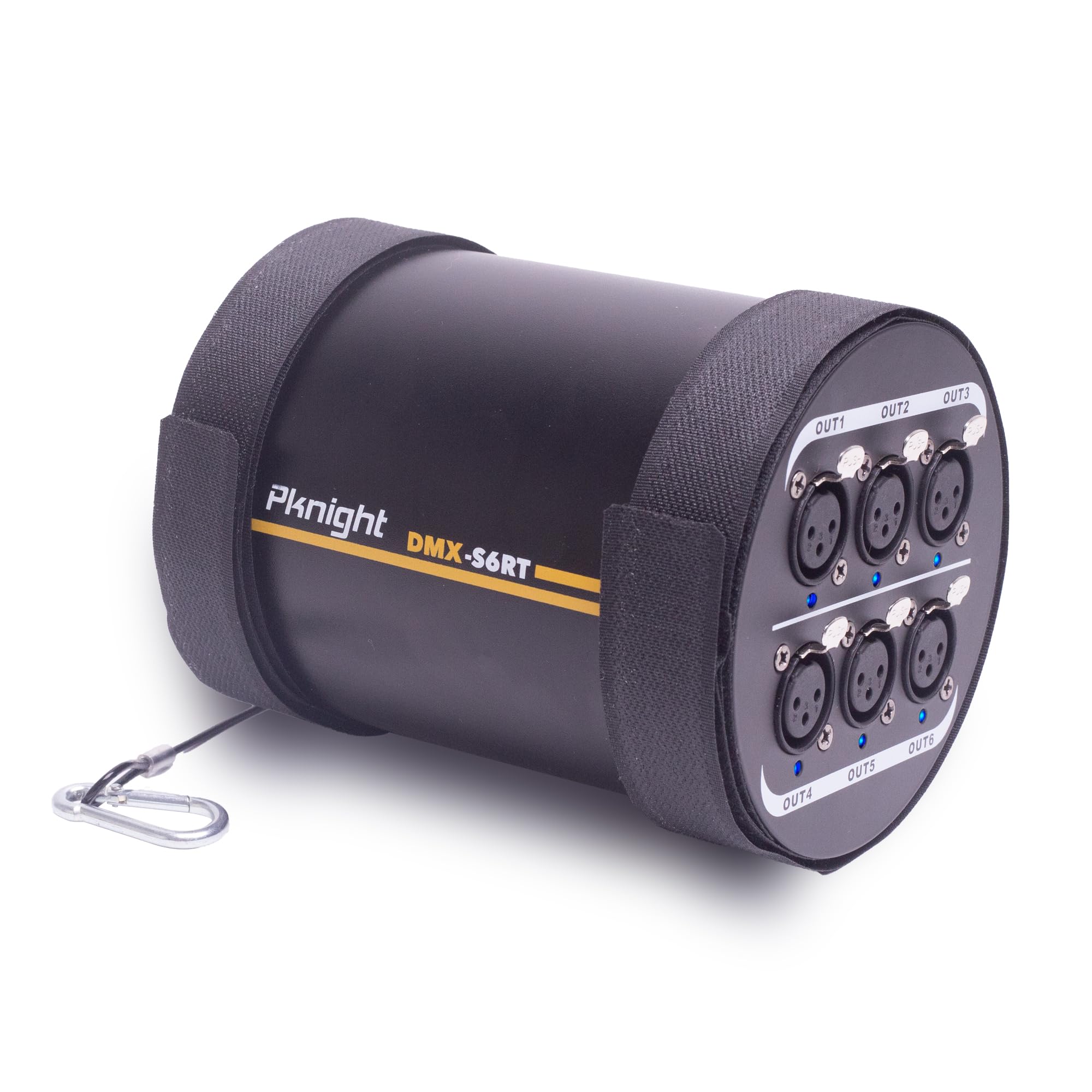
Figure 3.1: Pknight DMX-S6RT 6-Channel DMX Signal Splitter. This image shows the compact cylindrical design of the DMX splitter with its input/output ports and mounting straps.
4. Орнотуу нускамалары
Follow these steps to set up your Pknight DMX-S6RT signal splitter:
- Монтаждоо: Utilize the integrated Velcro straps to secure the splitter to a truss, pole, or other suitable structure. For added security, attach the safety rope to a reliable anchor point.
- Кубат туташуу: Connect the provided PowerCON cable to the 'POWER IN' port on the splitter. If daisy-chaining multiple units, connect a PowerCON cable from the 'POWER OUT' port of this unit to the 'POWER IN' port of the next unit. Ensure the power adapter is connected to a suitable power outlet (AC90-240V, 50/60Hz).
- DMX киргизүү: Connect your DMX controller's output to the 'DMX INPUT' port on the splitter using a standard DMX cable.
- DMX Outputs: Connect your DMX-compatible lighting fixtures to the 'DMX OUTPUT 1' through 'DMX OUTPUT 6' ports using DMX cables. Each output is optically isolated.
- Terminal Resistor: Ensure the terminal resistor switch is set to 'ON' if this is the last device in your DMX chain to prevent signal reflection.
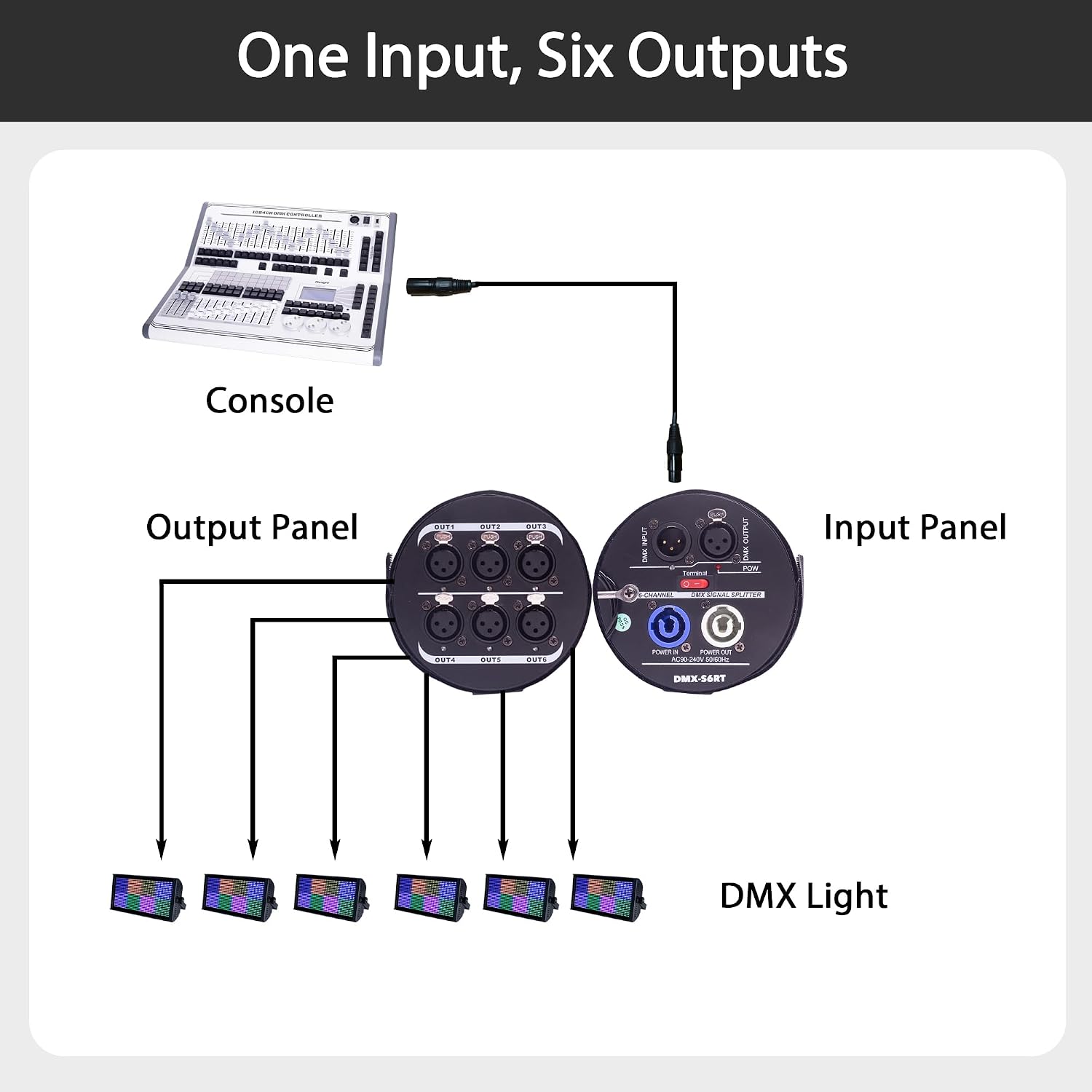
Figure 4.1: DMX Signal Flow Diagram. This diagram illustrates how a DMX console connects to the splitter's input, and how the six outputs distribute the signal to multiple DMX lights.

Figure 4.2: Front and Rear Panel Connections. This image details the DMX input/output (thru), safety tether, termination resistor, power indicator, PowerCON daisy-chain (in & out), and DMX output ports with their respective power indicators.
5. Иштөө нускамалары
The Pknight DMX-S6RT is designed for straightforward operation:
- Күйгүзүү: Once all connections are made, ensure the power switch is in the 'ON' position. The power indicator light will illuminate.
- Сигнал берүү: The splitter will automatically receive the DMX signal from your controller and distribute it to all connected output channels. The signal indicator lights for each active output will illuminate, confirming signal presence.
- Мониторинг: Observe the signal indicator lights for each DMX output. A lit indicator confirms that a DMX signal is being transmitted through that specific channel.
- Өчүрүү: To power down the unit, switch the power button to the 'OFF' position and then disconnect the power cable from the outlet.
Video 5.1: Pknight 6-Channel DMX Signal Splitter Overview. Бул видео визуалдык көрүнүштү камсыз кылатview of the Pknight 6-Channel DMX Signal Splitter, demonstrating its physical features and basic connectivity.
6. Техникалык тейлөө
To ensure the longevity and optimal performance of your DMX-S6RT splitter, follow these maintenance guidelines:
- Тазалоо: Түзмөктүн сыртын жумшак, кургак чүпүрөк менен үзгүлтүксүз тазалап туруңуз. Абразивдүү тазалоочу каражаттарды же эриткичтерди колдонуудан алыс болуңуз.
- Текшерүү: Periodically inspect all cables and connections for any signs of wear or damage. Replace damaged cables immediately.
- Сактагыч: When not in use, store the splitter in a cool, dry place away from direct sunlight and extreme temperatures.
- Вентиляция: Ашыкча ысып кетүүнүн алдын алуу үчүн түзмөктүн айланасында жетиштүү аба айланышын камсыз кылыңыз. Желдетүүчү тешиктерди жаппаңыз.
7. Кыйынчылыктарды
If you encounter issues with your DMX-S6RT splitter, refer to the following troubleshooting tips:
- Кубат жок:
- Check if the power adapter is securely connected to both the splitter and a working power outlet.
- Ensure the power switch on the splitter is in the 'ON' position.
- Башка аспапка сайып, розетка иштеп жатканын текшериңиз.
- DMX сигналынын чыгышы жок:
- Confirm that the DMX controller is powered on and sending a signal.
- Check the DMX input cable connection to the splitter.
- Ensure DMX output cables are securely connected to both the splitter and the lighting fixtures.
- Verify that the lighting fixtures are correctly addressed and configured for DMX control.
- If using the terminal resistor, ensure it is correctly engaged if the splitter is the last device in the chain.
- Intermittent Signal or Flickering Lights:
- Check all DMX cable connections for looseness or damage.
- Ensure DMX cables are of appropriate quality and length for your setup.
- Verify that the terminal resistor is correctly used at the end of the DMX chain.
- Minimize electromagnetic interference by keeping DMX cables away from power cables.
8. Техникалык шарттар
| Өзгөчөлүк | Спецификация |
|---|---|
| Модель номери | DMX-S6RT |
| Киргизүү көлөмүtage | AC90-240V, 50/60Hz |
| DMX каналдары | 6 Чыгуу каналдары |
| Изоляция | Optical Isolation per Output |
| Туташтыргычтар | 3-pin XLR (Input, Thru, Outputs), PowerCON (In, Out) |
| Өлчөмдөр | 67.56 x 54.36 x 54.36 дюйм (Өнүмдүн өлчөмдөрү) |
| Салмагы | 1.98 фунт |
| Монтаждоо | Velcro Straps, Safety Rope |
| Өзгөчөлүктөрү | Built-in Terminal Resistor, PowerCON Daisy-Chain |
9. Кепилдик жана колдоо
Pknight products are designed for reliability and performance. For warranty information, technical support, or service inquiries, please refer to the contact details provided on the product packaging or visit the official Pknight webсайт. Сатып алуу квитанциясын кепилдик дооматтары үчүн сатып алуунун далили катары сактаңыз.