
1. Киришүү
Thank you for choosing the Protec Advance 650 Portable Power Station. This device is designed to provide a reliable and versatile power source for various applications, including camping, travel, and emergency home use. With a 600W output and a 634Wh battery capacity, it ensures stable performance for your electronic devices. This manual provides essential information for safe operation, setup, maintenance, and troubleshooting.
2. Коопсуздук нускамалары
- Read all instructions before using the power station.
- Түзмөктү бөлүктөргө бөлбөңүз, оңдобоңуз же өзгөртпөңүз. Туура эмес кайра чогултуу өрткө же жаракатка алып келиши мүмкүн.
- Түзмөктү отко же жогорку температурага (60°C/140°F жогору) дуушар кылбаңыз.
- Аппаратты күн нуру түз тийген жерде, жылуулук булактарынын жанында же жогорку нымдуулуктагы чөйрөдө колдонбоңуз же сактабаңыз.
- Агрегатты суудан жана башка суюктуктардан алыс кармаңыз.
- Do not drop, strike, or subject the unit to strong impacts.
- Балдар жетпеген жерде сактаңыз.
- Колдонуу жана кубаттоо учурунда туура желдетүүнү камсыз кылыңыз.
- Use only recommended accessories and chargers.
- In case of leakage from the battery, avoid contact with skin and eyes. If contact occurs, rinse with water and seek medical attention.
3. Продукт бүтүп калдыview
3.1 Компоненттери жана өзгөчөлүктөрү
The Protec Advance 650 is equipped with multiple ports and features for versatile power delivery and charging:
- Чыгуу кубаттуулугу: 600W continuous, 634Wh battery capacity.
- AC розеткалары: Two 230V pure sine wave AC outlets for sensitive electronics.
- USB порттору: One USB-C PD 60W port and three USB-A QC 3.0 ports (54W total).
- DC чыгаруу: One 12V DC car charger port.
- Зымсыз кубаттоо: Integrated 10W Qi wireless charging pad.
- Дисплей: Real-time LCD screen showing charge level and remaining runtime.
- Жарыктандыруу: Emergency lighting (side and handle).
- Узактыгы: IP54 rating for dust and splash resistance.
- Заряддоо параметрлери: AC wall charger (100W included), compatible with Protec solar panels.

Фронт view of the Protec Advance 650 Portable Power Station, showing the main display, power button, AC outlets, DC car port, and USB ports.

Diagram illustrating the output capabilities of the Protec Advance 650, including two 500W AC outlets, a 1W torch, and three 18W USB-A ports.

Diagram highlighting the display features, a 60W USB-C Quick Charge port, and a 12V DC 10A car charger port on the Protec Advance 650.
4. Орнотуу
4.1 Алгачкы заряддоо
Before first use, fully charge the Protec Advance 650. This ensures optimal battery performance and extends its lifespan.
- Connect the included AC wall charger to the power station's input port.
- Заряддагычты стандарттуу розеткага сайыңыз.
- Дисплейде заряддоо абалы көрсөтүлөт. Батареянын индикатору 100% көрсөтүлгөнгө чейин заряддаңыз.
4.2 Орнотуу
Place the power station on a stable, flat surface in a well-ventilated area. Avoid placing it near heat sources or in direct sunlight.
5. Иштөө нускамалары
5.1 Күйгүзүү/өчүрүү
Press and hold the main power button for a few seconds to turn the unit on or off. The LCD display will illuminate when the unit is on.
5.2 Электр станциясын заряддоо
The Advance 650 can be recharged using multiple methods:
- AC дубал кубаттагычы: Use the included 100W AC adapter. Connect it to the input port and a wall outlet.
- Күн панелдери: Connect compatible Protec solar panels (sold separately) to the DC input port. Ensure the solar panels are placed in direct sunlight for efficient charging.
- Унаа заряддагыч: Use a 12V car charger adapter (not specified if included, typically sold separately) to charge from your vehicle's cigarette lighter port.
5.3 AC чыгарууларды колдонуу
The power station features two 230V pure sine wave AC outlets, suitable for powering sensitive electronics up to 600W total.
- Press the AC power button to activate the AC outlets. The AC indicator on the display will light up.
- Plug your device into one of the AC outlets.
- Түзмөктөрүңүздүн жалпы кубаттуулугу 600 Вт ашпаганын текшериңиз.
- When finished, press the AC power button again to turn off the AC outlets and conserve battery.
5.4 Using DC Outputs (USB-A, USB-C, Car Port)
The DC outputs are ideal for charging smartphones, tablets, laptops, and other 12V devices.
- Press the DC power button to activate the DC outputs. The DC indicator on the display will light up.
- Connect your device to the appropriate USB-A, USB-C, or 12V car charger port.
- The USB-C port supports Power Delivery (PD) up to 60W, and USB-A ports support Quick Charge (QC 3.0) up to 54W total.
- When finished, press the DC power button again to turn off the DC outputs.
5.5 Using Wireless Charging
The top of the power station features a 10W Qi wireless charging pad.
- Электр станциясы күйгүзүлгөнүн текшериңиз.
- Place your Qi-compatible device directly onto the wireless charging pad.
- Түзмөк автоматтык түрдө кубаттала башташы керек.
5.6 Дисплейди колдонуу
LCD дисплей реалдуу убакыт режиминде маалымат берет:
- Батарея деңгээли: Shows the current charge percentage.
- Input/Output Power: Displays the current power input (charging) or output (discharging) in watts.
- Remaining Runtime: Estimates the remaining operating time based on current power consumption.
- Көрсөткүчтөр: Icons for AC, DC, and fan status.
5.7 Using the Emergency Light
The power station includes integrated emergency lighting.
- Press the light button to turn on the emergency light.
- Press again to cycle through different brightness modes or turn off.

Examples of domestic use for the Protec Advance 650, showing estimated runtimes for a 60W TV (9h), a 50W PC (approx. 10 recharges), a 10W smartphone (53 recharges), and a 12W fan (45h).

Examples of professional use for the Protec Advance 650, showing estimated runtimes for a 500W lawnmower (1h), a 500W power tool (1h), and recharges for an 18V battery (4 recharges) and a double 18V battery (2 recharges).
6. Техникалык тейлөө
6.1 Тазалоо
Wipe the exterior of the power station with a soft, dry cloth. Do not use abrasive cleaners or solvents. Ensure all ports are free of dust and debris.
6.2 Сактоо
If storing the unit for an extended period, charge it to approximately 50-80% every 3-6 months to maintain battery health. Store in a cool, dry place, away from direct sunlight and extreme temperatures.
6.3 Батареяга кам көрүү
The Protec Advance 650 uses a Lithium-phosphate battery. To maximize its lifespan:
- Батареяны бат-баттан толук кубаттап калуудан алыс болуңуз.
- Жогорку температуранын узакка созулган таасиринен алыс болуңуз.
- Charge the unit fully before long periods of inactivity.
7. Кыйынчылыктарды
- Түзмөк күйбөй жатат: Батарея заряддалганын текшериңиз. Болбосо, кубат булагына туташыңыз.
- Порттардан чыгуу жок: Check if the respective AC or DC output buttons are activated. Ensure the device is properly connected and within the power station's output limits.
- Жай кубаттоо: Verify that the charger is correctly connected and functioning. For solar charging, ensure panels are in direct sunlight and free of obstructions.
- Ашыкча жүктөн коргоо: If the unit shuts down, it may be due to an overload. Disconnect some devices and restart the power station.
- Ашыкча ысып кетүү: If the unit feels excessively hot, disconnect all devices and allow it to cool down in a well-ventilated area.
8. Техникалык шарттар
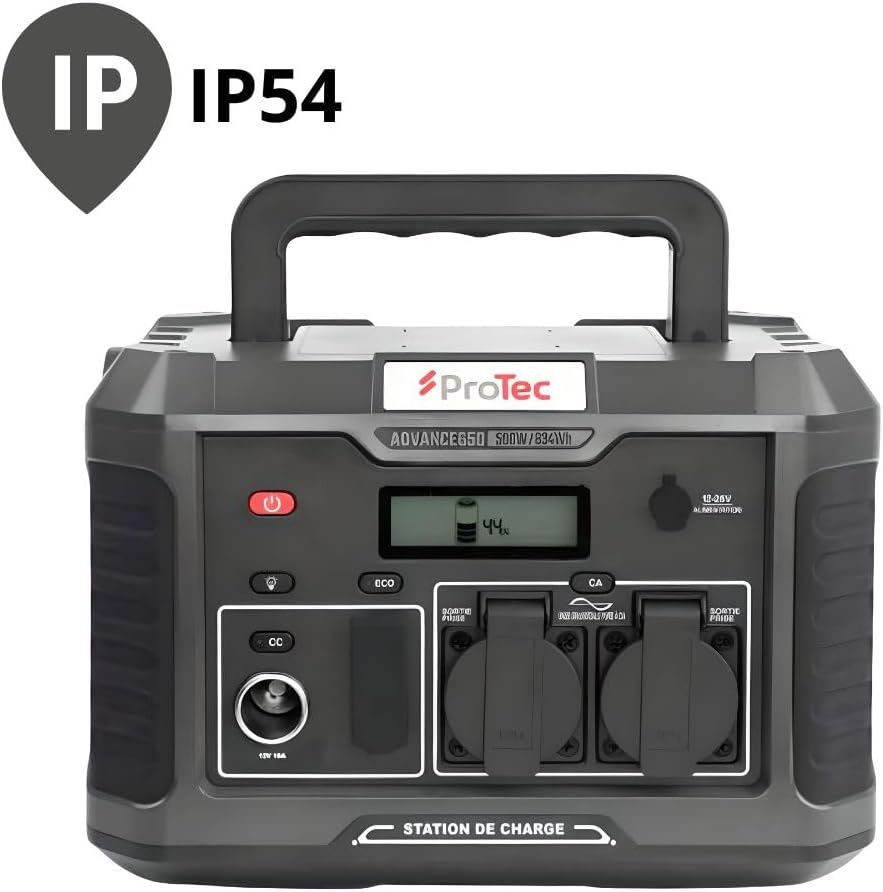
The Protec Advance 650 is rated IP54 for dust and splash resistance.
| Өзгөчөлүк | Спецификация |
|---|---|
| Модель номери | 798720 |
| Бренд | Protec |
| Батарея түрү | Lithium-phosphate |
| Батарея сыйымдуулугу | 634Wh |
| AC чыгаруу күчү | 600 Вт (таза синус толкуну) |
| AC Output Voltage | 230V |
| USB-C чыгышы | 1 x PD 60W |
| USB-A чыгаруу | 3 x QC 3.0 (54W total) |
| DC унаа портунун чыгышы | 1 x 12V 10A |
| Зымсыз заряддоо | 10W Qi |
| AC Input (Charger) | 100 Вт |
| Өлчөмдөрү (L x W x Y) | 1 x 20 x 29 cm (approx. 10L x 200W x 290H mm) |
| Салмагы | 9.36 кг |
| Түс | Кара |
| IP рейтинги | IP54 (чаңга жана чачыратууга туруктуу) |
9. Кепилдик жана колдоо
9.1 Кепилдик маалыматы
The Protec Advance 650 Portable Power Station comes with a 2-year availability for spare parts within the EU. For specific warranty terms and conditions, please refer to the documentation provided at the time of purchase or contact Protec customer service.
9.2 Кардарларды колдоо
For technical assistance, troubleshooting, or warranty claims, please contact Protec customer support through their official webпродукт сатылып алынган сайт же сатуучу.

The Protec Advance 650 Portable Power Station is suitable for various outdoor activities.