
1. Киришүү
Thank you for choosing the TNICER T4X Motorcycle Intercom. This device is designed to enhance your riding experience by providing clear communication, music playback, and navigation audio while on the road. Featuring advanced ENC (Environmental Noise Cancellation) technology, Bluetooth 5.2 connectivity, and IP67 waterproof rating, the T4X ensures reliable performance in various conditions. Please read this manual thoroughly before use to ensure proper operation and to maximize the product's potential.
2. Коопсуздук маалыматы
- Жол коопсуздугун ар дайым биринчи орунга коюңуз. Түзмөктү сизди алаксытып, унаа айдагандан алыстата тургандай жол менен иштетпеңиз.
- Айдоодон мурун аппарат туулгаңызга бекем орнотулганын текшериңиз.
- Adjust volume to a level that allows you to hear ambient traffic sounds. Excessive volume can damage hearing and impair awareness.
- Түзмөктү бөлүктөргө бөлүүгө же өзгөртүүгө аракет кылбаңыз. Бул кепилдикти жокко чыгарып, зыян келтириши мүмкүн.
- Keep the device away from extreme temperatures, open flames, and corrosive substances.
- Батареяларды жергиликтүү эрежелерге ылайык жок кылыңыз.
3. Пакеттин мазмуну
Пакетиңизде бардык буюмдар бар экенин текшериңиз:
- T4X Main Unit
- Hard Microphone & Speaker Set
- Жумшак микрофон
- Колдонуучунун колдонмосу (жапонча)
- USB-C заряддоо кабели
- 3M Adhesive Pads (for main unit and speakers)
- Катуу микрофон бекитилген велкро
- Монтаждык кронштейн негизи
- Тегерек Velcro (колонкалар үчүн)
- Speaker Foam Pads
- Металл клип
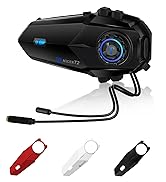
Image: All components included in the TNICER T4X package, laid out for identification.
4. Продукт бүтүп калдыview
The TNICER T4X features a sleek design with intuitive controls. Familiarize yourself with the main unit's buttons and ports:
- Кубат/домофон баскычы: Used for powering on/off, initiating/ending intercom calls.
- Үнүн жогорулатуу баскычы: Increases volume, navigates menus.
- Үнүн төмөндөтүү баскычы: Decreases volume, navigates menus.
- Көп функциялуу баскыч: Controls music playback, phone calls, and voice assistant.
- Заряддоо порту: Заряддоо үчүн USB-C порту.
- Гарнитура порту: Connects speakers and microphone.

Сүрөт: алдыңкы view of the TNICER T4X main unit, highlighting its buttons and indicator light.
5. Орнотуу
5.1. Аппаратты заряддоо
Before first use, fully charge the T4X unit.
- Connect the provided USB-C charging cable to the T4X charging port.
- Кабелдин экинчи учун USB кубат адаптерине (кошумча эмес) же компьютердин USB портуна туташтырыңыз.
- LED индикатору кубаттоо абалын көрсөтөт (мисалы, кубаттоо үчүн кызыл, толук заряддалган үчүн көк).
- Толук кубаттоо болжол менен 1.5 саатты талап кылат.

Image: The TNICER T4X unit connected to a USB-C charging cable, illustrating its 1000mAh battery capacity and usage times (40 hours talk/music, 1.5 hours charge, 600 hours standby).
5.2. Туулга орнотуу
Choose between the metal clip or adhesive mount for securing the T4X to your helmet.
- Mounting the Intercom Unit:
- Металл клип: Slide the metal clip between the helmet shell and inner padding. Secure the T4X main unit to the clip.
- Жабышкак орнотуу: Clean the desired area on the helmet surface. Attach the 3M adhesive pad to the mounting bracket base, then firmly press the base onto the helmet. Secure the T4X main unit to the bracket.
- Динамик орнотуу:
- Attach the round Velcro pads to the inside of your helmet, aligning them with your ears.
- Attach the speakers to the Velcro pads. Ensure speakers are positioned directly over your ears for optimal sound.
- Микрофонду орнотуу:
- Катуу микрофон: Suitable for open-face or modular helmets. Attach the hard mic to the helmet's chin bar using the rigid mic fixed Velcro. Position it close to your mouth.
- Жумшак микрофон: Suitable for full-face helmets. Route the soft mic inside the helmet, positioning it near your mouth.
- Гарнитураны туташтыруу: Plug the speaker and microphone cable into the headset port on the T4X main unit. Ensure it is firmly inserted.
6. Иштөө нускамалары
6.1. Күйгүзүү/өчүрүү
- Күйгүзүү: Press and hold the Power/Intercom Button for approximately 3 seconds until the LED indicator lights up and you hear a voice prompt.
- Өчүрүү: Press and hold the Power/Intercom Button for approximately 3 seconds until the LED indicator turns off and you hear a voice prompt.
6.2. Үндү башкаруу
- Көлөмүн жогорулатуу: Press the Volume Up Button.
- Көлөмдү азайтуу: Press the Volume Down Button.
6.3. Bluetooth жупташтыруу (смартфон)
- Ensure the T4X is powered off.
- Press and hold the Power/Intercom Button for approximately 5-7 seconds until the LED indicator flashes red and blue alternately, indicating pairing mode.
- Смартфонуңузда Bluetooth иштетип, жаңы түзмөктөрдү издеңиз.
- Select "TNICER T4X" from the list of available devices.
- Once paired, the LED indicator will flash blue slowly, and you will hear a confirmation voice prompt.
6.4. Intercom Pairing (Multi-Unit)
The T4X supports one-touch automatic pairing for up to 8 riders within a 1000m range.

Image: A visual representation of multiple T4X units automatically pairing for group communication over a bridge, illustrating the one-touch pairing feature for up to 8 devices.
- Ensure all T4X units are powered off.
- On the first unit (Unit A), press and hold the Power/Intercom Button for 5-7 seconds to enter pairing mode (red and blue flashing).
- On the second unit (Unit B), press and hold the Power/Intercom Button for 5-7 seconds to enter pairing mode.
- Briefly press the Power/Intercom Button on Unit A. It will search for Unit B. Once connected, both units will flash blue slowly.
- To add more units (Unit C, D, etc.), repeat steps 2-4, pairing each new unit to an already connected unit.
- Автоматтык кайра туташуу: If communication is interrupted due to distance or obstacles, the T4X will automatically reconnect when units are back within range.
6.5. Домофон байланышы
- Домофонду баштоо: Briefly press the Power/Intercom Button on any paired unit.
- Домофондун аягы: Briefly press the Power/Intercom Button again.
6.6. Телефондун функциялары
- Чакырууга жооп берүү: Көп функциялуу баскычты кыскача басыңыз.
- Чакырууну аяктоо: Чалуу учурунда көп функциялуу баскычты кыскача басыңыз.
- Чакырууну четке кагуу: Press and hold the Multi-function Button for 2 seconds when a call comes in.
- Акыркы номерди кайра терүү: Көп функциялуу баскычты эки жолу басыңыз.
6.7. Музыканы ойнотуу
- Ойнотуу/тындыруу: Көп функциялуу баскычты кыскача басыңыз.
- Кийинки трек: Press the Volume Up Button for 2 seconds.
- Мурунку трек: Press the Volume Down Button for 2 seconds.
- Музыка бөлүшүү: While playing music, briefly press the Multi-function Button and Volume Up Button simultaneously to share music with a connected intercom unit.
6.8. FM радиосу

Image: A rider on a motorcycle, with graphics indicating FM radio functionality (76.0MHz to 108.0MHz) and voice command support (Siri, Google Assistant).
- FMди күйгүзүү/өчүрүү: Press and hold the Volume Down Button for 2 seconds.
- Каналдарды сканерлөө: Briefly press the Multi-function Button while FM is on.
- Каналды өзгөртүү: Press the Volume Up or Volume Down Button briefly.
6.9. Үн жардамчысы
- Үн Жардамчысын жандыруу: Double-press the Volume Up Button. This will activate your smartphone's voice assistant (e.g., Siri, Google Assistant).
6.10. Үндү тууралоо (эквалайзер)
T4X үч үн про сунуштайтfiles:

Image: A motorcycle rider with a helmet, overlaid with a graphic showing three distinct sound profiles: Bass Boost, Mid-range Boost, and Treble Boost, indicating customizable audio experience.
- Switch Sound Modes: Triple-press the Multi-function Button to cycle through Bass Boost, Mid-range Boost, and Treble Boost.
6.11. Ambient Sound Reception
This feature allows you to hear your surroundings without removing your helmet.
- Activate/Deactivate Ambient Sound: Press and hold the Volume Up Button for 2 seconds.
7. Техникалык тейлөө
- Тазалоо: Аппаратты жумшак менен сүртүңүз, гamp кездеме. Катуу химиялык заттарды же абразивдүү тазалагычтарды колдонбоңуз.
- Сактагыч: Түзмөктү колдонбогон учурда салкын, кургак жерде сактаңыз. Түз күн нурунан жана өтө жогорку температурадан алыс кармаңыз.
- Батареяга кам көрүү: Батареянын иштөө мөөнөтүн оптималдаштыруу үчүн, эгерде үзгүлтүксүз колдонулбаса, түзмөктү жок дегенде үч айда бир жолу кубаттаңыз.
8. Кыйынчылыктарды
8.1. No Sound from Earphones or Microphone
If you experience issues with audio output or input:
- Чечим 1: Ensure the cable connector is fully inserted into the main unit's jack. The earphone jack may be tight, requiring firm insertion.
- Чечим 2: Try unplugging and re-plugging the earphone cable several times to ensure a secure connection.
- Чечим 3: Check if the volume is turned up on both the intercom and your connected smartphone.
- Чечим 4: Test with another headset if available to rule out a faulty headset.
8.2. Intercom Not Connecting
- Ensure both units are in pairing mode (red and blue flashing) before initiating pairing.
- Make sure units are within the 1000m communication range.
- Try resetting both units to factory settings (refer to the full manual for specific steps) and re-pairing.
8.3. Түзмөк күйбөй жатат
- Ensure the battery is charged. Connect to a charger and check the LED indicator.
- If the device is completely unresponsive, try a hard reset by holding the Power/Intercom button for an extended period (e.g., 10-15 seconds).
9. Техникалык шарттар
| Өзгөчөлүк | Деталь |
|---|---|
| Модель номери | T4X |
| Bluetooth версиясы | 5.2 |
| Noise Cancellation | ENC (Экологиялык чууну жокко чыгаруу) |
| Max Intercom колдонуучулары | 8 чабандес |
| Max Intercom Range | 1000 метр |
| Батарея сыйымдуулугу | 1000 мАч литий полимери |
| Музыканы ойнотуу убактысы | 40 саатка чейин |
| Talk Time | 40 саатка чейин |
| Күтүү убактысы | 700 саатка чейин |
| Заряддоо убактысы | Болжол менен 1.5 саат |
| Суу өткөрбөйт рейтинги | IP67 |
| Салмагы | 44 грамм |
| Өлчөмдөрү (пакет) | 20.5 x 10.9 x 8.9 см |
| Наушник уясы | Мини USB |
| Түс | Ак/Кара |
10. Кепилдик жана колдоо
10.1. Кепилдик маалыматы
The TNICER T4X comes with a standard manufacturer's warranty. Please retain your proof of purchase for warranty claims. The warranty covers defects in materials and workmanship under normal use. It does not cover damage caused by misuse, accidents, unauthorized modifications, or natural disasters.
10.2. Кардарларды колдоо кызматы
For any questions, issues, or support needs regarding your TNICER T4X intercom, please contact our customer service team. You can typically find contact information on the product packaging or the official TNICER webсайт.
If purchased through Amazon, you can also contact the seller directly:
- Go to "Your Account" > "Your Orders".
- Find your order for the TNICER T4X.
- Click "Contact Seller" to send a message.
Alternatively, you may contact us via email at: tnicerservice@tognicer.com (Please include your order number in the email).