
1. Киришүү
The VCOROS VR1 Motorcycle Helmet Headset is engineered to provide a high-quality audio experience for single riders. It integrates seamlessly into most full-face and open-face helmets, offering clear sound for music, navigation, and phone calls. Key features include dual noise cancellation, AI voice assistant compatibility, and IPX6 waterproofing, ensuring reliable performance in various riding conditions.
2. Кутуда эмне бар
- VR1 Device (1)
- Speakers & Microphone (1)
- Clip-on Base (1)
- Velcro Package (1)
- Type-C заряддоо кабели (1)
- Колдонуучунун колдонмосу (1)
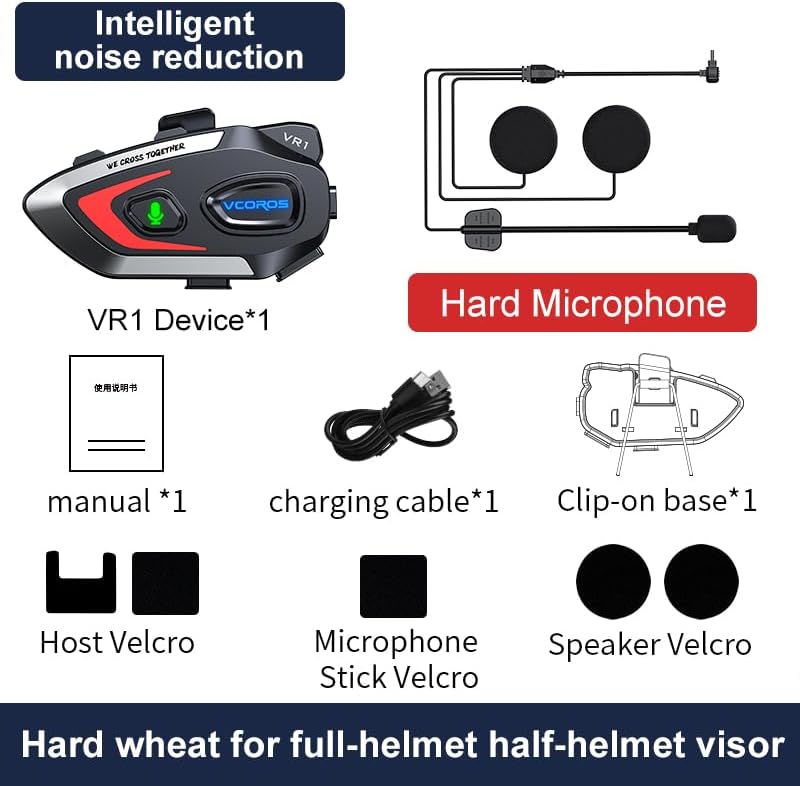
Figure 2.1: Package Contents for the VCOROS VR1 Hard Microphone model.
3. Продукт бүтүп калдыview
The VCOROS VR1 headset features an intuitive design for easy operation while riding. Familiarize yourself with the main unit and its components.

Figure 3.1: VCOROS VR1 Headset Controls and Ports.
Негизги өзгөчөлүктөрү:
- Батареянын узак иштөө мөөнөтү: Built-in 1000mAh battery provides up to 25 hours of music playback and 20 hours of talk time.
- Кош ызы-чууну азайтуу: CVC + DSP system for clear audio by reducing wind and road noise.
- AI үн жардамчысы: Чалууларды, музыканы жана навигацияны кол менен башкаруу.
- IPX6 Суу өткөрбөйт: Designed to withstand rain, dust, and splashes.
- Bluetooth 5.3: Stable connection, low latency, and improved sound quality.

3.2-сүрөт: Батареянын иштөө мөөнөтү бүттүview.

Figure 3.3: Audio Components and Noise Cancellation.

Figure 3.4: Bluetooth 5.3 Wireless Chip.
4. Орнотуу жана орнотуу
Follow these steps to install your VCOROS VR1 headset into your motorcycle helmet. The installation process is designed for ease and a secure fit.
Орнотуу кадамдары:
- Туулганы даярдаңыз: Ensure the helmet's interior is clean and dry where the headset and speakers will be placed.
- Attach Velcro for Main Unit: Peel the backing from the large Velcro pad and firmly attach it to the side of your helmet where the main unit will be mounted.
- Attach Main Unit to Clip: Secure the VR1 main unit to the clip-on base.
- Тоо негизги бирдиги: Slide the clip-on base onto the edge of your helmet, ensuring it is securely fastened. Alternatively, use the adhesive Velcro for direct attachment to the helmet surface.
- Динамиктерди орнотуу: Identify the ear pockets inside your helmet. Attach the smaller circular Velcro pads to these areas. Peel the backing from the speaker Velcro and firmly press the speakers onto the helmet's interior, aligning them with your ears.
- Микрофондун орду: For the hard microphone, position it so that the microphone head is close to your mouth, typically along the chin bar of a full-face helmet. Use the provided Velcro to secure the microphone boom.
- Туташуу компоненттери: Plug the speaker and microphone cables into the corresponding ports on the main VR1 unit.
- Маршруттук кабелдер: Carefully tuck all excess cables under the helmet's padding to prevent interference and ensure comfort.
Video 4.1: Detailed installation guide for the VCOROS VR1 Motorcycle Helmet Headset.
5. Иштөө нускамалары
Күйгүзүү/өчүрүү:
- Күйгүзүү: Күйгүзүү баскычын индикатор күйгүчө басып туруңуз.
- Өчүрүү: Индикатор жарыгы өчкөнчө Кубат баскычын басып, кармап туруңуз.
Bluetooth жупташууда:
- Гарнитура өчүрүлгөнүн текшериңиз.
- Индикатор жарыгы жупташтыруу режимин көрсөткөн көк жана кызыл күйгүчө Күч баскычын басып, кармап туруңуз.
- On your smartphone, enable Bluetooth and search for "VCOROS VR1".
- Select "VCOROS VR1" to connect. The indicator light will turn solid blue once paired.
Музыка ойнотуу:
- Ойнотуу/тындыруу: Play/Pause баскычын кыска басыңыз.
- Кийинки ыр: Үндү жогорулатуу (+) баскычын кыска басыңыз.
- Мурунку ыр: Үндү азайтуу (-) баскычын кыска басыңыз.
- Үндү тууралоо: Long press the Volume Up (+) or Volume Down (-) button to increase or decrease volume.
Телефон чалуулар:
- Чакырууга жооп берүү: Play/Pause баскычын кыска басыңыз.
- Чакырууну аяктоо: Чалуу учурунда Play/Pause баскычын кыска басыңыз.
- Чакырууну четке кагуу: Кирүүчү чалуу шыңгыраганда Ойнотуу/Тыным баскычын көпкө басып туруңуз.
- Акыркы номерди кайра терүү: Play/Pause баскычын эки жолу басыңыз.
- Автоматтык жооп: The headset supports automatic call answering after a few rings. This feature can typically be toggled on/off via your phone's Bluetooth settings or specific headset commands (refer to the included user manual for specific toggling instructions if available).
AI үн жардамчысы:
The VR1 supports AI voice assistants (e.g., Siri, Google Assistant) for hands-free control.
- Үн Жардамчысын жандыруу: Short press the AI Assistant button (microphone icon).

Figure 5.1: AI Voice Assistant Functionality.
6. Техникалык тейлөө
- Тазалоо: Гарнитураны жумшак менен сүртүңүз, damp кездеме. Катуу химиялык заттарды же абразивдүү тазалагычтарды колдонбоңуз.
- Сактагыч: Колдонбогондо гарнитураны күн тийбеген жана өтө температурадан алыс салкын, кургак жерде сактаңыз.
- Заряддоо: Use only the provided Type-C charging cable. Avoid overcharging the battery.
- Суу каршылык: While IPX6 waterproof, avoid submerging the device in water. Ensure the charging port cover is securely closed during wet conditions.

6.1-сүрөт: IPX6 суу өткөрбөөчүлүк рейтинги.
7. Кыйынчылыктарды
| Көйгөй | Мүмкүн себеп | Чечим |
|---|---|---|
| Гарнитура күйбөйт. | Батарея аз. | Гарнитураны кеминде 2.5 саат кубаттаңыз. |
| Смартфон менен жупташтыруу мүмкүн эмес. | Headset not in pairing mode; Bluetooth off on phone; too far from phone. | Ensure headset is in pairing mode (flashing blue/red). Turn on phone's Bluetooth. Keep devices within 1 meter during pairing. |
| Динамиктерден үн жок. | Speakers not connected; volume too low; incorrect audio output selected on phone. | Check speaker connection to main unit. Increase volume. Ensure phone's audio is routed to the headset. |
| Poor sound quality/noise. | Microphone/speakers improperly positioned; high wind noise; interference. | Adjust speaker and microphone position. Ensure microphone is not obstructed. Move away from sources of strong electromagnetic interference. |
| Үн жардамчысы жооп бербей жатат. | Feature not enabled on phone; poor microphone connection. | Ensure voice assistant is enabled on your smartphone. Check microphone connection. |
8. Техникалык шарттар
| Өзгөчөлүк | Деталь |
|---|---|
| Модель аты | VR1 |
| Байланыш технологиясы | Зымсыз (Bluetooth 5.3) |
| Батарея сыйымдуулугу | 1000mAh |
| Музыка ойнотуу убактысы | 25 саатка чейин |
| Talk Time | 20 саатка чейин |
| Күтүү убактысы | 270 саат |
| Заряддоо убактысы | Болжол менен 2.5 саат (С түрү) |
| Noise Reduction | CVC + DSP Dual Noise Cancellation |
| Суу өткөрбөйт рейтинги | IPX6 |
| Динамик өлчөмү | 93mm x 35mm x 51mm (unit dimensions) |
| Салмагы (жылаңач бирдик) | 52г |
| Микрофон түрү | Катуу микрофон |
9. Кепилдик жана колдоо
VCOROS products are manufactured to high standards and undergo rigorous quality control. For detailed warranty information, product registration, or technical support, please refer to the warranty card included in your product packaging or visit the official VCOROS webсайт. Сатып алуу квитанциясын кепилдик дооматтары үчүн сатып алуунун далили катары сактаңыз.
For further assistance, you may contact VCOROS customer service through the contact information provided on their official webсайты же продуктуну сатып алган сатуучу аркылуу.