
1. Киришүү
The JIGUUN 1500W Pure Sine Wave Inverter is designed to convert 12V DC power from batteries into high-quality 230V AC power, suitable for a wide range of electronic equipment and household appliances. With a continuous output of 1500W and a peak power of 3000W, this inverter features advanced pure sine wave technology for stable and efficient operation. It also includes an integrated 30A charger, mains priority circuit, and UPS (Uninterruptible Power Supply) function to ensure continuous power supply during outages. A wireless remote control and an intelligent LCD display provide convenient monitoring and control.
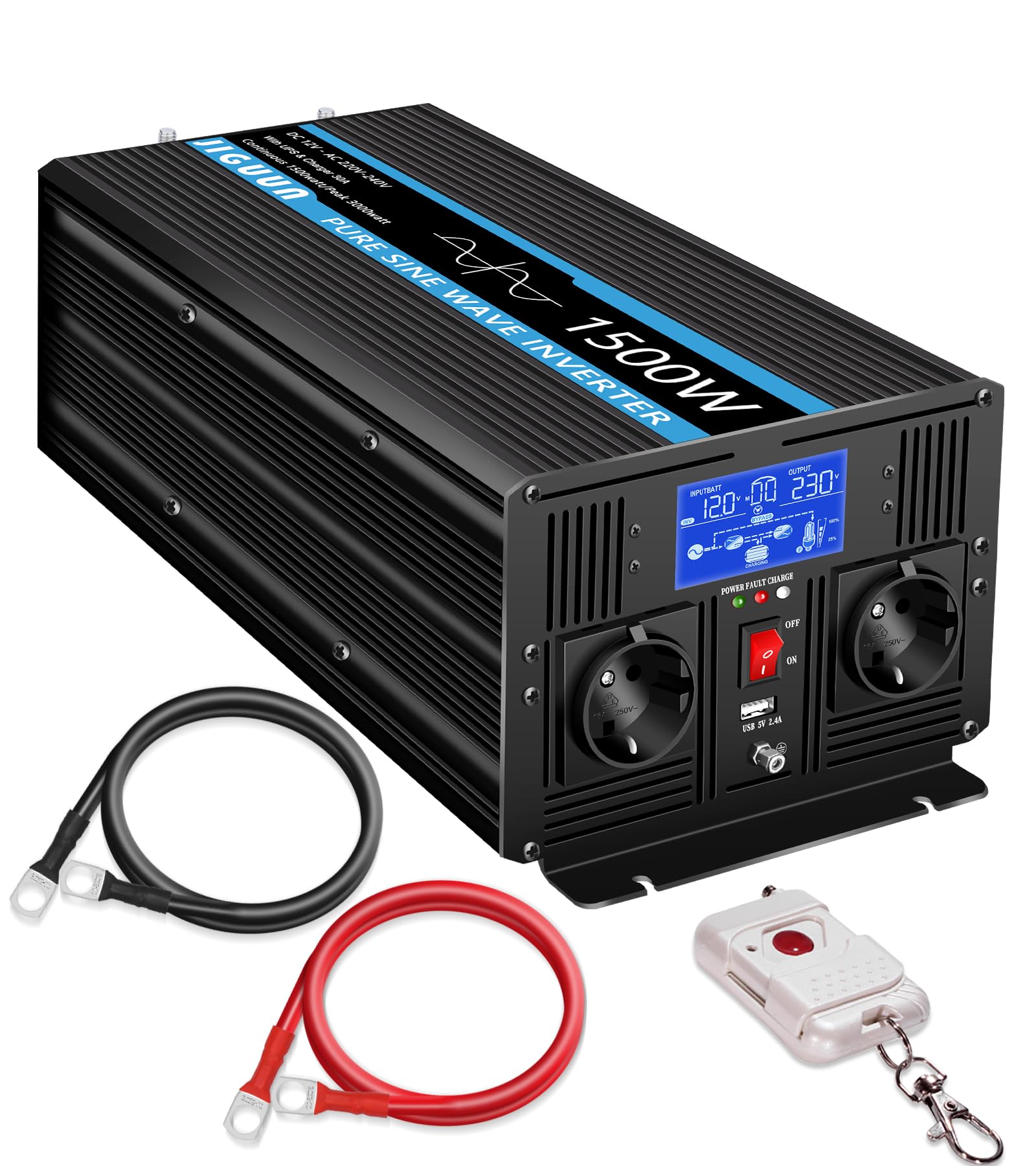
Image 1.1: JIGUUN 1500W Pure Sine Wave Inverter in an outdoor setting.
2. Коопсуздук нускамалары
Инверторду орнотуудан же иштетүүдөн мурун бардык коопсуздук көрсөтмөлөрүн окуп чыгып, түшүнүп алыңыз. Бул көрсөтмөлөрдү аткарбоо электр тогуна урунууга, өрткө же олуттуу жаракат алууга алып келиши мүмкүн.
- Вентиляция: Ашыкча ысып кетпеши үчүн инверторду жакшы желдетилген жерге орнотуңуз. Желдетүүчү тешиктерди жаппаңыз.
- Курчап турган чөйрө: Avoid exposure to water, moisture, direct sunlight, heat sources, or flammable materials. Operate the inverter in a dry, cool environment.
- Электр байланыштары: All wiring must comply with local electrical codes and regulations. Use appropriate gauge cables for DC and AC connections. Ensure all connections are tight and secure to prevent loose contacts and overheating.
- Негиздөө: The inverter must be properly grounded. Connect the ground terminal to an appropriate earth ground.
- Батареянын коопсуздугу: Батареялар менен жакшы желдетилген жерде иштеңиз. Көздү коргоочу каражаттарды жана кол каптарды кийиңиз. Батарея терминалдарынын кыска туташуусунан алыс болуңуз.
- Тейлөө: Disconnect all power sources before performing any maintenance or cleaning. Do not attempt to open or service the inverter yourself; refer to qualified service personnel.
- Балдар: Keep the inverter and its components out of reach of children.

Image 2.1: Inverter protection features.
3. Продукциянын өзгөчөлүктөрү
The JIGUUN 1500W Pure Sine Wave Inverter offers a range of advanced features for reliable power conversion and management:
- Таза синус толкунунун чыгышы: Converts 12V DC to 230V AC with a pure sine wave, ensuring compatibility with sensitive electronics and reducing harmonic distortion. Continuous output of 1500W, with a peak power of 3000W.
- Integrated 30A Charger: Features an advanced Power Factor Correction (PFC) charging function with a maximum charging current of 30A, providing efficient battery charging.
- Mains Priority & UPS Function: Automatically switches to inverter power within 20 milliseconds during a power outage, ensuring an uninterrupted power supply for connected devices. Prioritizes mains power when available.
- Зымсыз алыстан башкаруу: Allows convenient control of the inverter from a distance, enhancing usability in various setups.
- Акылдуу LCD дисплей: Киргизүү/чыгаруу көлөмүн реалдуу убакыт режиминде көзөмөлдөөнү камсыз кылатtage, input/output frequency, load voltage, operating time, and error messages.
- Көптөгөн коргоо механизмдери: Built-in safeguards against overload, overvoltage, undervolvoltage, overheating, and short circuits to protect both the inverter and connected devices.
- Ар тараптуу натыйжа: Equipped with two EU standard AC outlets and a 2.4A USB charging port for various power needs.

Image 3.1: Key features including intelligent chip and battery compatibility.

Image 3.2: Smart charging process diagram.
4. Пакеттин мазмуну
Upon unpacking, please verify that all items listed below are included in your package:
- 1 × JIGUUN 1500W Pure Sine Wave Inverter (12V to 230V)
- 1 × Колдонуучунун колдонмосу
- 1 × Battery Cable Set (1 red, 1 black)
- 1 × Зымсыз алыстан башкаруу
- 1 × Earth Ground Cable
- 2 × Protective Covers
- 4 × Fuses

Image 4.1: What's in the Box.
5. Продукт бүтүп калдыview
Familiarize yourself with the various parts and connections of your JIGUUN 1500W Inverter.

Image 5.1: Front and Rear Panel Overview.
Алдыңкы панелдин компоненттери:
- LCD дисплей: Shows operational status and error codes.
- Күч көрсөткүчү: Кубаттуулуктун абалын көрсөткөн LED индикатору.
- ON/OFF которуу: Инвертор үчүн негизги кубат которгучу.
- AC розеткалары (x2): Standard EU sockets for connecting AC appliances.
- USB порт: 2.4A USB output for charging devices.
- Жерге туташуу: Terminal for connecting the earth ground cable.
Арткы панелдин компоненттери:
- DC Negative Terminal: Батареянын терс терминалына туташат.
- DC Positive Terminal: Батареянын оң терминалына туташат.
- AC киргизүү: For connecting to mains power when using the charger and UPS functions.
- Input AC Fuse: Protection for the AC input circuit.
- Муздатуучу желдеткичтер (x2): Иштөө учурунда жылуулукту кетирүү үчүн автоматтык түрдө иштетилет.
6. Орнотуу жана орнотуу
Follow these steps for proper installation of your inverter:
- Монтаждоо: Choose a dry, cool, and well-ventilated location for mounting the inverter. Ensure there is sufficient space around the unit for airflow.
- Батарея туташуу:
- туташтыруу кызыл батареянын кабелин оң (+) DC terminal on the inverter and the positive terminal of your 12V battery.
- туташтыруу кара батареянын кабелин терс (-) DC terminal on the inverter and the negative terminal of your 12V battery.
- Туташуулардын бекем жана коопсуз экенин текшериңиз. Туура эмес полярдуулук инверторду бузуп алат.
- Негиздөө: Connect the included earth ground cable from the inverter's ground terminal to a reliable earth ground point.
- AC Input Connection (Optional, for Charger/UPS): If using the integrated charger and UPS function, connect the inverter's AC input port to a standard 230V AC mains power outlet using a suitable power cord.
- AC жүктөө туташуусу: Plug your 230V AC appliances into the AC outlets on the front panel of the inverter. Do not exceed the inverter's continuous power rating of 1500W.

Image 6.1: Inverter connection example.
7. Иштөө нускамалары
7.1 Күйгүзүү/өчүрүү
- Күйгүзүү үчүн: Ensure all connections are secure. Press the ON/OFF switch on the front panel. The LCD display will illuminate, and the inverter will begin operating.
- Өчүрүү үчүн: Disconnect all AC loads. Press the ON/OFF switch. The LCD display will turn off.
7.2 Зымсыз алыстан башкаруу пультун колдонуу
The wireless remote control allows you to power the inverter on or off from a convenient distance.
- Press the power button on the remote control to toggle the inverter's power state.
- Ensure the remote control has fresh batteries and is within range of the inverter.

Image 7.1: Wireless remote control in use.
7.3 ЖК дисплей маалымат
The intelligent LCD display provides critical operational data:
- Киргизүү көлөмүtage: DC көлөмүн көрсөтөтtage батареядан.
- Output Voltage: AC чыгышынын көлөмүн көрсөтөтtage (мисалы, 230V).
- Киргизүү жыштыгы: Relevant when AC input is connected.
- Чыгуу жыштыгы: Displays the AC output frequency (e.g., 50Hz).
- Load Voltage: Инвертордогу учурдагы жүктөмдү көрсөтөт.
- Иштөө убактысы: Shows how long the inverter has been operating.
- Ката билдирүүсү: Displays specific error codes if a fault occurs.

Image 7.2: Intelligent LCD display.
7.4 UPS and Mains Priority Function
When the inverter is connected to both a battery and an AC mains input, it operates in mains priority mode. It will use mains power to supply loads and charge the battery. If mains power fails, the inverter will automatically switch to battery power within 20 milliseconds, providing an uninterrupted power supply to connected devices.

Image 7.3: Uninterrupted power supply in action.
8. Техникалык тейлөө
Үзгүлтүксүз техникалык тейлөө сиздин инверторуңуздун оптималдуу иштешин жана узак мөөнөттүү иштешин камсыз кылат:
- Тазалоо: Инвертордун сыртын мезгил-мезгили менен кургак, жумшак чүпүрөк менен тазалап туруңуз. Желдетүүчү тешиктердин чаңдан жана таштандылардан тазаланганын текшериңиз. Суюк тазалоочу каражаттарды колдонбоңуз.
- Туташуу текшерүүлөрү: Regularly inspect all DC and AC connections for tightness. Loose connections can cause overheating and damage.
- Батареянын ден соолугу: Monitor your battery's health and charge level, especially if the inverter is used in an off-grid or backup power system.
- Сактагычты алмаштыруу: If a fuse blows, replace it with a fuse of the same type and rating as specified in the manual or on the inverter. Always disconnect power before replacing fuses.
9. Кыйынчылыктарды
The LCD display provides error codes to help diagnose issues. Refer to the table below for common error codes and troubleshooting steps.

Image 9.1: LCD display with error codes.
| Ката коду | Error Message | Мүмкүн себеп | Чечим |
|---|---|---|---|
| 01 | Output Overload | Connected load exceeds inverter's continuous or peak power rating. | Reduce the connected load. Disconnect some appliances. |
| 02 | Батарея Undervoltage | Батарея көлөмүtage is too low. Battery is discharged or faulty. | Recharge the battery. Check battery connections and health. |
| 03 | Output Short Circuit, Overtemperature | Short circuit at the AC output or inverter is overheating. | Check AC output wiring for short circuits. Ensure adequate ventilation. Allow inverter to cool down. |
| 04 | Батарея Overvoltage | Батарея көлөмүtage өтө жогору. | Check charging source (e.g., solar charger, mains charger) and battery voltage. Disconnect charging source if necessary. |
Кыйынчылыктарды жоюу боюнча жалпы кеңештер:
- If the inverter does not turn on, check battery connections and ensure the battery is charged.
- If there is no AC output, check the ON/OFF switch, AC load connections, and for any error codes on the LCD.
- If the remote control is not working, check its batteries and ensure it is within range.
10. Техникалык шарттар
| Спецификация | Нарк |
|---|---|
| Бренд | ЖИГУН |
| Модель аты | 1500W12V |
| Үзгүлтүксүз чыгаруу кубаты | 1500 Ватт |
| Чокусу чыгаруу күчү | 3000 Ватт |
| Киргизүү көлөмүtage | 12 вольт (ток) |
| Output Voltage | 220 вольт (AC) |
| Output Waveform | Таза синус толкуну |
| Жыштык | 50 Гц |
| Кубаттоо тогу (Max) | 30A (PFC function) |
| UPS которуштуруу убактысы | <20 мс |
| Натыйжалуулук | ≥90% |
| Дисплей түрү | LCD |
| Элемент Салмагы | 4 килограмм |
| Сертификаттар | CE |
| Сунушталган Колдонуулар | Boats, Camping, RVs, Off-grid systems, Outdoor work |
| UPC | 784847722768 |
| ASIN | B0F4JSFFWT |
11. Кепилдик жана колдоо
JIGUUN stands behind the quality of its products.
- Кепилдик: This product comes with a one-year free replacement warranty from the date of purchase. This warranty covers manufacturing defects and malfunctions under normal use.
- Кардарларды тейлөө: For any questions regarding the use, performance, or troubleshooting of your JIGUUN inverter, please contact our friendly 24-hour customer service team.
- Байланыш маалыматы: Please refer to the contact details provided on our official website or your purchase documentation for support.