
1. Бүттүview
The VAIO SX-R Laptop is a high-performance portable computer designed for productivity and creative tasks. It features an Intel Core Ultra 7 processor, a vibrant 14-inch WQXGA touch display, ample memory, and fast storage, all running on Windows 11 Pro.

Figure 1: VAIO SX-R Laptop, open view.
2. Продукциянын өзгөчөлүктөрү
- Intel Core Ultra 7 процессору: Equipped with 16 cores and AI-enhanced performance for speed and intelligent task management.
- 14" WQXGA Touch Display (2560x1600): High-resolution screen with wide color gamut and touch capability.
- 32 ГБ LPDDR5 RAM: Provides superior multitasking capabilities with instant responsiveness.
- 1TB PCIe NVMe SSD: Offers massive storage with ultra-fast read/write speeds.
- Windows 11 Pro: Includes enterprise-grade security and productivity features.
- IR Camera & Fingerprint Reader: Enhanced security and convenient login options.
- Көмүртек буласынан жасалган шасси: Жеңил жана бышык конструкция.
- Water Resistant Keyboard: Designed to withstand accidental spills.

Figure 2: Key features of the VAIO SX-R Laptop.
3. Физикалык бүтүрүүview
3.1 Порттор жана туташтыргычтар
The VAIO SX-R Laptop is equipped with a variety of ports for connectivity. Refer to the diagram below for port locations and types.
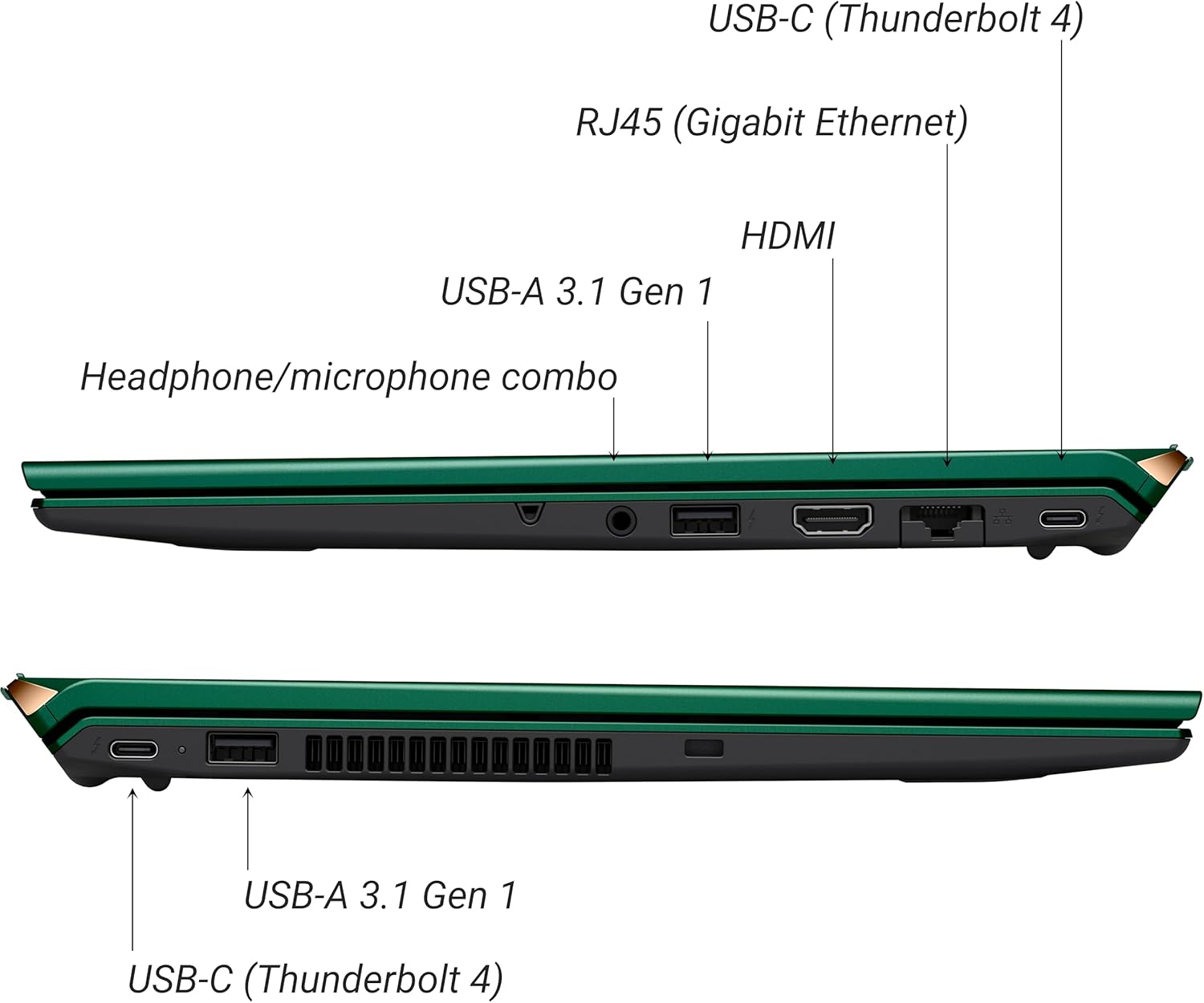
3-сүрөт: Каптал view of VAIO SX-R Laptop ports.
- USB-C (Thunderbolt 4): Жогорку ылдамдыктагы маалыматтарды берүү, видео чыгаруу жана кубаттуулукту жеткирүү.
- RJ45 (Гигабиттик Ethernet): Зымдуу тармак байланыштары үчүн.
- HDMI: Тышкы дисплейлерге туташуу үчүн.
- USB-A 3.1 Gen 1: USB түзмөктөрүн туташтыруу үчүн.
- Наушник/микрофон айкалыштырылган уяча: Аудио киргизүү жана чыгаруу үчүн.
3.2 Баскычтоп жана сенсордук такта
The laptop features a full-sized keyboard and a responsive touchpad for navigation and input.

4-сүрөт: Баскычтоптун жана сенсордук панелдин жайгашуусу.
4. Орнотуу
4.1 Баштапкы күйгүзүү
- Unpack the VAIO SX-R laptop and all accessories.
- Кубат адаптерин ноутбуктун заряддоо портуна, андан кийин розеткага туташтырыңыз.
- Open the laptop lid. The system may power on automatically or you may need to press the power button located on the top right of the keyboard.
- Windows 11 Pro орнотуусун аяктоо үчүн экрандагы нускамаларды аткарыңыз, анын ичинде тил, аймак, тармак туташуусу жана колдонуучу каттоо эсебин түзүү.
4.2 Тармакка туташуу
- Wi-Fi: During initial setup or via Windows settings, select your preferred Wi-Fi network and enter the password. The VAIO SX-R supports Wi-Fi 7 for fast and stable wireless connectivity.
- Зымдуу (Ethernet): Connect an Ethernet cable from your router or modem to the RJ45 port on the laptop.
5. Иштөө нускамалары
5.1 Күйгүзүү/өчүрүү жана уйку режими
- Күйгүзүү: Open the lid or press the power button.
- Өчүрүү: Баштоо баскычын чыкылдатып, андан кийин Кубат > Өчүрүү.
- Уйку: Капкагын жабыңыз же "Баштоо" баскычын, андан кийин "Күчүн жана Уйку режимин" чыкылдатыңыз.
5.2 Сенсордук дисплейди колдонуу
The 14-inch WQXGA display supports touch input. You can interact with the screen using gestures similar to a tablet or smartphone.
5.3 IR Camera and Fingerprint Reader
For enhanced security and convenience, the laptop includes an IR camera for Windows Hello face recognition and a fingerprint reader.
- Windows Hello Face Recognition: Configure this feature in Windows Settings > Accounts > Sign-in options. The IR camera will recognize your face to unlock the device.
- Манжа изин окугуч: Set up your fingerprint in Windows Settings > Accounts > Sign-in options for quick and secure access.
6. Техникалык тейлөө
6.1 Жалпы кам көрүү
- Keep the laptop in a clean, dry environment.
- Ноутбукка экстремалдык температурага же тике күн нуруна жол бербеңиз.
- Ноутбукка оор нерселерди койбоңуз.
6.2 Тазалоо
- Экранды жана сыртты тазалоо үчүн жумшак, түксүз чүпүрөктү колдонуңуз.
- өжөр тактар үчүн, жеңил гampчүпүрөккө суу же экранды тазалоо эритмеси.
- Do not spray cleaners directly onto the laptop.
6.3 Батареяга кам көрүү
- Батареянын иштөө мөөнөтүн узартуу үчүн, бат-баттан батарейканы толук зарядсыздандырбаңыз.
- Эгерде ноутбук көпкө чейин колдонулбаса, аны жарым-жартылай кубатталган абалда (болжол менен 50%) сактаңыз.
7. Кыйынчылыктарды
7.1 Электр энергиясы маселелери
- Ноутбук күйбөй жатат: Кубат адаптери бекем туташып турганын жана розетка иштеп турганын текшериңиз. Башка розеткадан аракет кылып көрүңүз.
- Батарея кубатталбай жатат: Кубат адаптеринин жана кабелинин бузулганын текшериңиз. Кубаттоочу порттун таза экенин текшериңиз.
7.2 Дисплей көйгөйлөрү
- Дисплей жок: Көйгөй ноутбуктун ички дисплейинде экенин текшерүү үчүн тышкы мониторду туташтырыңыз.
- Сенсордук экран жооп бербейт: Ноутбукту кайра иштетиңиз. Дисплейдин драйверлери жаңыртылганын текшериңиз.
7.3 Байланыш маселелери
- Wi-Fi байланышы жок: Check if Wi-Fi is enabled in Windows settings. Restart your router. Update wireless drivers.
- Bluetooth иштебей жатат: Ensure Bluetooth is enabled and your device is discoverable.
8. Техникалык шарттар
| Өзгөчөлүк | Деталь |
|---|---|
| Модель аты | VAIO SX-R (VJS4R1X0811G) |
| Процессор | Intel Core Ultra 7 (16-Core, AI-Boosted) |
| Операция системасы | Windows 11 Pro |
| Дисплей | 14 Inches WQXGA Touch (2560x1600) |
| RAM | 32 ГБ LPDDR5 |
| Сактагыч | 1TB PCIe NVMe SSD |
| Графика | Интеграцияланган Intel Arc Graphics |
| Зымсыз байланыш | 802.11ax (Wi-Fi 7), Bluetooth |
| Порттар | USB-C (Thunderbolt 4) x2, USB-A 3.1 Gen 1 x3, HDMI x1, RJ45 (Gigabit Ethernet) x1, Headphone/microphone combo x1 |
| Камера | IR Camera (Windows Hello compatible) |
| Коопсуздук өзгөчөлүктөрү | Fingerprint Reader, IR Camera |
| Батареянын иштөө мөөнөтү | 10 саатка чейин (орточо) |
| Салмагы | 3.1 фунт |
| Өлчөмдөрү (LxWxH) | 14.2 x 15 x 3.3 дюйм |
9. Durability and Testing
VAIO laptops are engineered with Japanese precision and undergo rigorous quality control to ensure reliability and performance. This includes various tests to withstand daily use.
9.1 Manufacturing and Quality Assurance
Video 1: VAIO Manufacturing and Durability Testing. This video demonstrates the quality control processes and durability tests performed on VAIO laptops, including keystroke testing, dust testing, LCD screen pressure testing, and opening/closure testing.
9.2 Key Durability Features
- Water Resistant Keyboard: The keyboard is designed to resist damage from accidental liquid spills.
- Экрандын бышыктыгы: The display undergoes pressure testing to ensure resilience.
- Тамчы тест: The laptop is tested to withstand drops from up to 3 feet.

Figure 5: Water resistant keyboard testing.

Figure 6: Screen durability test in progress.

Figure 7: 3-foot drop test for VAIO laptops.
10. Кепилдик жана колдоо
Your VAIO SX-R Laptop comes with a standard manufacturer's warranty. For specific warranty terms and conditions, please refer to the documentation included with your product or visit the official VAIO support webсайт.
For technical support, troubleshooting assistance, or service requests, please contact VAIO customer support. Information regarding support channels can be found on the VAIO webсайтында же продуктунун таңгагында.
Protection plans are available for purchase to extend coverage beyond the standard warranty. Options include 2-Year and 4-Year Protection Plans, as well as a Complete Protect + Norton 360 monthly plan.