
Introduction
Welcome to the user manual for your new VAIO SX-R Laptop. This document provides essential information to help you set up, operate, maintain, and troubleshoot your device. Please read this manual thoroughly to ensure optimal performance and longevity of your laptop.
Продукт бүттүview
The VAIO SX-R is a high-performance laptop designed for productivity and creative tasks. It features an Intel Core Ultra 7 processor, a vibrant 14-inch WQXGA Touch Display, ample memory, and fast storage.
Негизги өзгөчөлүктөрү
- Процессор: Intel Core Ultra 7 (16-Core, AI-Boosted) for enhanced speed and responsiveness.
- Дисплей: 14-inch WQXGA Touch Display (2560x1600) offering high resolution and wide color gamut.
- Эстутум: 32GB LPDDR5 RAM for superior multitasking.
- Сактагыч: 1TB PCIe NVMe SSD for fast data access and ample сактагыч.
- Операция системасы: Windows 11 Pro with enterprise-grade security and productivity features.
- Коопсуздук: Integrated IR Camera and Fingerprint Reader for secure login.
- Шасси: Durable Carbon Fiber construction.
Laptop Components and Ports

Figure 1: VAIO SX-R Laptop, illustrating the overall design.
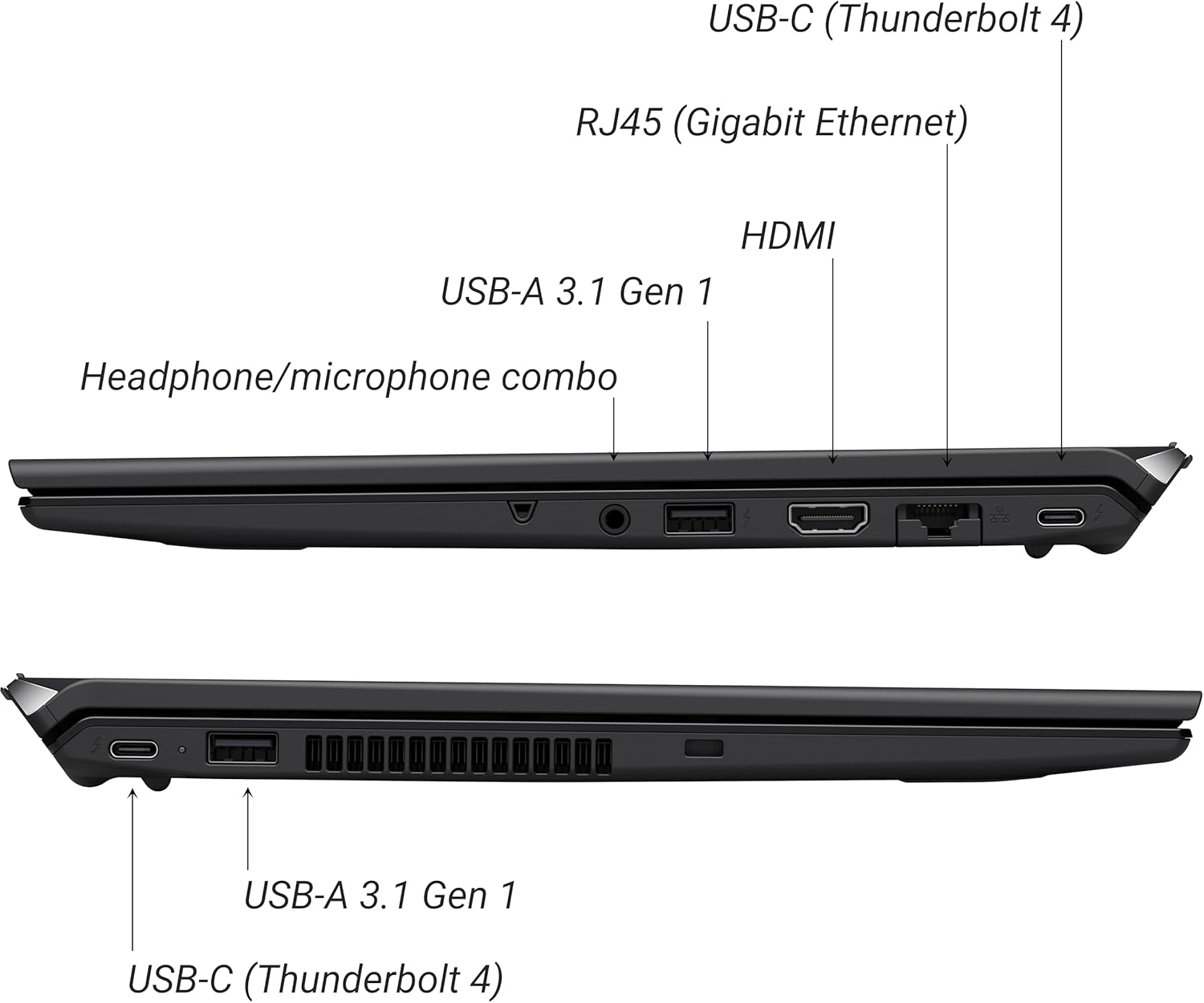
Figure 2: Port layout of the VAIO SX-R Laptop. The left side includes a headphone/microphone combo jack, USB-A 3.1 Gen 1, HDMI, RJ45 (Gigabit Ethernet), and USB-C (Thunderbolt 4). The right side features another USB-C (Thunderbolt 4) and USB-A 3.1 Gen 1 port.
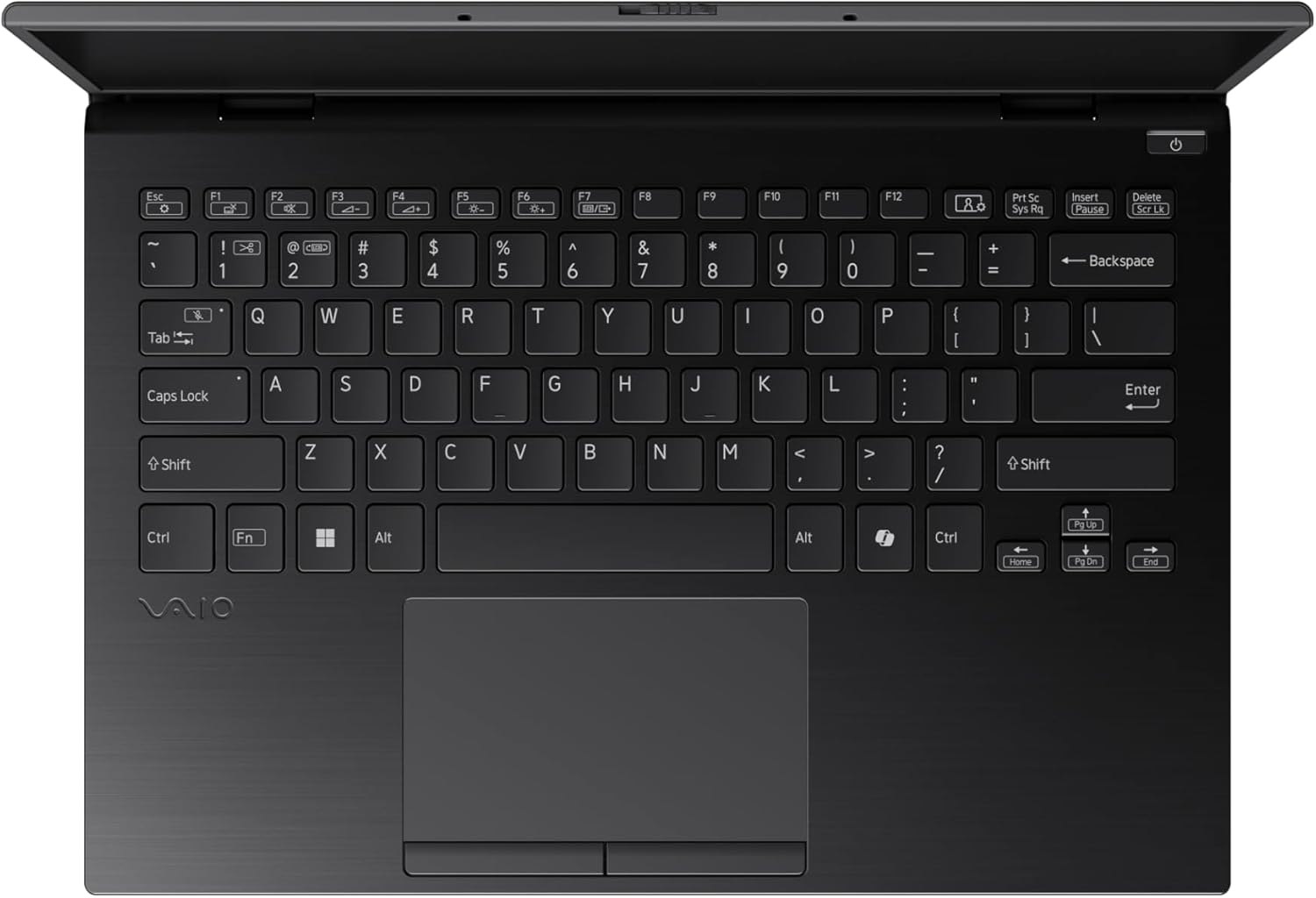
Figure 3: The VAIO SX-R Laptop keyboard and touchpad, featuring a backlit keyboard and integrated fingerprint sensor.
Жайгашуу
1. Баштапкы күйгүзүү
- Туташуу кубаты: AC адаптерин ноутбуктун кубат портуна, андан кийин розеткага сайыңыз.
- Ноутбукту ачуу: Этияттык менен ноутбуктун капкагын ачыңыз.
- Күйгүзүү: Press the power button, typically located on the top right of the keyboard deck. The power indicator light will illuminate.
2. Windows 11 Pro орнотуулары
Follow the on-screen instructions to complete the initial Windows 11 Pro setup. This includes:
- Аймагыңызды жана клавиатураңызды тандоо.
- Wi-Fi тармагына туташууда.
- Лицензиялык келишимди кабыл алуу.
- Microsoft эсеп жазуусун түзүү же кирүү.
- Setting up your PIN, fingerprint, or facial recognition (IR Camera).
3. Перифериялык түзүлүштөрдү туташтыруу
You can connect external devices such as mice, keyboards, external monitors, and USB drives to the available ports as shown in Figure 2.
Иштеп жатат
1. Негизги колдонуу
- Баскычтоп: Use the integrated backlit keyboard for typing. Function keys (F1-F12) often have secondary functions accessible via the 'Fn' key.
- Сенсордук такта: Тактык сенсордук панели навигация үчүн көп тийүү жаңсоолорун колдойт.
- Сенсордук экран: Interact directly with the 14-inch WQXGA display using touch gestures.
2. Коопсуздук өзгөчөлүктөрү
- Манжа изин окугуч: Enroll your fingerprints through Windows Settings > Accounts > Sign-in options for quick and secure login.
- Инфракызыл камера: Utilize Windows Hello facial recognition for convenient and secure access. Set this up in Windows Settings > Accounts > Sign-in options.
3. Электр энергиясын башкаруу
- Уйку режими: Close the lid or press the power button briefly to put the laptop to sleep.
- Өчүрүү: Go to Start > Power > Shut down to turn off the laptop completely.
- Кайра баштоо: Go to Start > Power > Restart to reboot the system.
Техникалык тейлөө
1. Тазалоо
- Экран: Бир аз жумшак, түксүз кездемени колдонуңуз dampсуу же экран тазалоочу менен бүттү. Катуу химиялык заттардан алыс болуңуз.
- Баскычтоп жана шасси: жумшак кездеме колдонгула. өжөр кир үчүн, бир аз гamp жумшак самындуу чүпүрөктү колдонсо болот, бул тешиктерге суюктуктун кирбешин камсыз кылат.
- Порттор: Порттордогу чаңды акырын тазалоо үчүн кысылган абаны колдонуңуз.

Figure 4: The VAIO SX-R features a water-resistant keyboard, designed to withstand minor spills.
2. Программалык камсыздоону жаңыртуу
Regularly update your Windows operating system and device drivers to ensure optimal performance, security, and compatibility. Access updates via Windows Settings > Windows Update.
3. Батареяга кам көрүү
- Ашыкча температурадан сактаныңыз.
- Батареяны бат-баттан толук зарядсыздандырбаңыз.
- Узак мөөнөттүү сактоо үчүн, батареяны болжол менен 50-60% га чейин заряддаңыз.
Проблемаларды чечүү
Бул бөлүм сиз кабылышы мүмкүн болгон жалпы көйгөйлөрдү карайт.
1. Ноутбук күйбөй жатат
- AC адаптери ноутбукка да, иштеген электр розеткасына да бекем туташып турганын текшериңиз.
- Башка аспапка туташтыруу менен электр розеткасынын иштешин текшериңиз.
- Эгер батарейка толугу менен түгөнүп калса, аны күйгүзүүгө аракет кылуудан мурун кеминде 30 мүнөт кубаттоого уруксат бериңиз.
2. Маселелерди көрсөтүү
- Дисплей жок: Маселе ноутбуктун ички дисплейинде экенин текшерүү үчүн тышкы мониторду HDMI портуна туташтырыңыз.
- Flickering/Distorted Display: Update your graphics drivers. Adjust display resolution and refresh rate in Windows Settings > System > Display.
3. Wi-Fi туташуу көйгөйлөрү
- Ensure Wi-Fi is enabled in Windows Settings > Network & internet > Wi-Fi.
- Роутериңизди жана модемиңизди өчүрүп күйгүзүңүз.
- Windows тармактык көйгөйлөрдү чечүүчү куралды иштетиңиз.
4. Жай аткаруу
- Фондо иштеп жаткан керексиз тиркемелерди жабыңыз.
- Check Task Manager (Ctrl+Shift+Esc) for resource-intensive processes.
- Ensure your system is up to date and free from malware.
Техникалык шарттар
Below are the detailed specifications for the VAIO SX-R Laptop (Model: VJS4R1X0511B).
| Өзгөчөлүк | Спецификация |
|---|---|
| Бренд | VAIO |
| Модель аты | VAIO SX-R |
| Элемент моделинин номери | VJS4R1X0511B |
| Операция системасы | Windows 11 Pro |
| Процессор | Intel Core Ultra 7 (1.4 ГГц) |
| RAM эс тутуму | 32 ГБ LPDDR5 |
| Катуу диск | 1 ТБ PCIe NVMe SSD |
| Screen Size | 14 дюйм |
| Screen Resolution | 2560 x 1600 пиксел (WQXGA) |
| Графикалык карта | Интеграцияланган Intel Graphics |
| Зымсыз түрү | 802.11bgn |
| USB 3.0 порттору | 3 |
| Батареянын орточо иштөө мөөнөтү | 10 саат |
| Элемент Салмагы | 3.1 фунт |
| Продукциянын өлчөмдөрү | 14.2 x 15 x 3.3 дюйм |
| Өзгөчөлүктөр | Backlit Keyboard, Fingerprint Reader, HD Audio, Memory Card Slot, Webcam |
Кепилдик жана колдоо
1. Кепилдик маалыматы
Your VAIO SX-R Laptop is covered by a manufacturer's warranty. Please refer to the warranty card included with your product packaging for specific terms, conditions, and duration. Keep your proof of purchase for warranty claims.
2. Техникалык колдоо
For technical assistance, troubleshooting beyond this manual, or service inquiries, please contact VAIO customer support. You can typically find contact information on the official VAIO website or in the documentation provided with your laptop.
- Онлайн колдоо: Visit the official VAIO support webКөп берилүүчү суроолор, драйверлерди жүктөп алуу жана байланыш параметрлери үчүн сайт.
- Телефондук колдоо: Региондук колдоо телефон номерлери үчүн продукт документацияңызды караңыз.