
1. Киришүү
The VCHICS V520 OBD2 Scanner is a professional diagnostic tool designed to help identify and resolve issues within your vehicle's engine system. It supports various diagnostic functions for cars, light trucks, and SUVs, providing essential information to understand and address vehicle faults. This manual provides detailed instructions for the proper setup, operation, and maintenance of your V520 scanner.

Image 1: VCHICS V520 OBD2 Scanner Overview
2. Продукциянын өзгөчөлүктөрү
The VCHICS V520 OBD2 Scanner offers a comprehensive set of features for vehicle diagnostics:
- Automotive Engine Fault Diagnosis: Quickly identify issues within the engine system.
- Clearing Engine Fault Indicator Light: Erase diagnostic trouble codes (DTCs) and turn off the Check Engine Light.
- Car Freeze Frame Data: View ката коду коюлган учурдагы унаанын иштөө шарттарынын кыскача сүрөтү.
- Реалдуу убакыттагы маалымат агымы: Monitor live sensor data from the vehicle's engine.
- Vehicle Information Reading: Унаанын идентификациялык номерине (VIN), калибрлөө IDсине жана калибрлөөнү текшерүү номерлерине (CVN) кирүү мүмкүнчүлүгү.
- Car Battery Voltage Окуу: Учурдагы томду текшерүүtagунаанын аккумуляторунун e.
- I/M даярдыгы абалы: Determine if the vehicle's emission systems are ready for an inspection/maintenance test.
- Mode 6 and Mode 8 Testing: Advanced diagnostic tests for specific components and systems.
- Oxygen Sensor Testing: Monitor and evaluate the performance of oxygen sensors.
- DTC Code Lookup Library: Built-in library with 35901 fault codes for quick reference.
- Түстүү дисплей: Clear and easy-to-read interface.

Image 2: Main Menu and Diagnostic Functions
3. Орнотуу
Follow these steps to set up your VCHICS V520 OBD2 Scanner:
- OBD2 портун табыңыз: 16-пиндүү маалымат байланыштыргычы (DLC) адатта унаанын айдоочу тарабындагы башкаруу панелинин астында жайгашкан. Эгер аны таппасаңыз, унааңыздын колдонуучунун колдонмосун караңыз.
- Сканерди туташтыруу: Plug the V520 scanner's OBD2 cable firmly into the vehicle's DLC.
- Унаанын от алдыруучу системасын күйгүзүү: Turn the vehicle's ignition key to the 'ON' position (engine off). The scanner will power on automatically.
- Language Selection (First Use): If prompted, select your preferred language from the system settings.
4. Иштөө нускамалары
Navigate the scanner using the directional buttons (up, down, left, right), 'OK' to confirm, and 'EXIT' to go back. The 'DTC', 'I/M', and 'BAT' buttons provide quick access to specific functions.
4.1. Reading Diagnostic Trouble Codes (DTC)
This function allows you to retrieve current, pending, and permanent diagnostic trouble codes from the vehicle's engine control unit (ECU).
- Негизги менюдан тандаңыз 'DTC окуу' же басыңыз 'DTC' баскычы.
- The scanner will display any stored fault codes along with their descriptions.
4.2. Clearing Diagnostic Trouble Codes (DTC)
This function clears all diagnostic trouble codes and turns off the Malfunction Indicator Lamp (MIL) or Check Engine Light. Эскертүү: Clearing codes does not fix the underlying problem. Ensure the fault has been addressed before clearing codes, otherwise, the light may reappear.
- Негизги менюдан тандаңыз 'DTC тазалоо'.
- Confirm your action when prompted. The scanner will indicate if the codes have been successfully cleared.
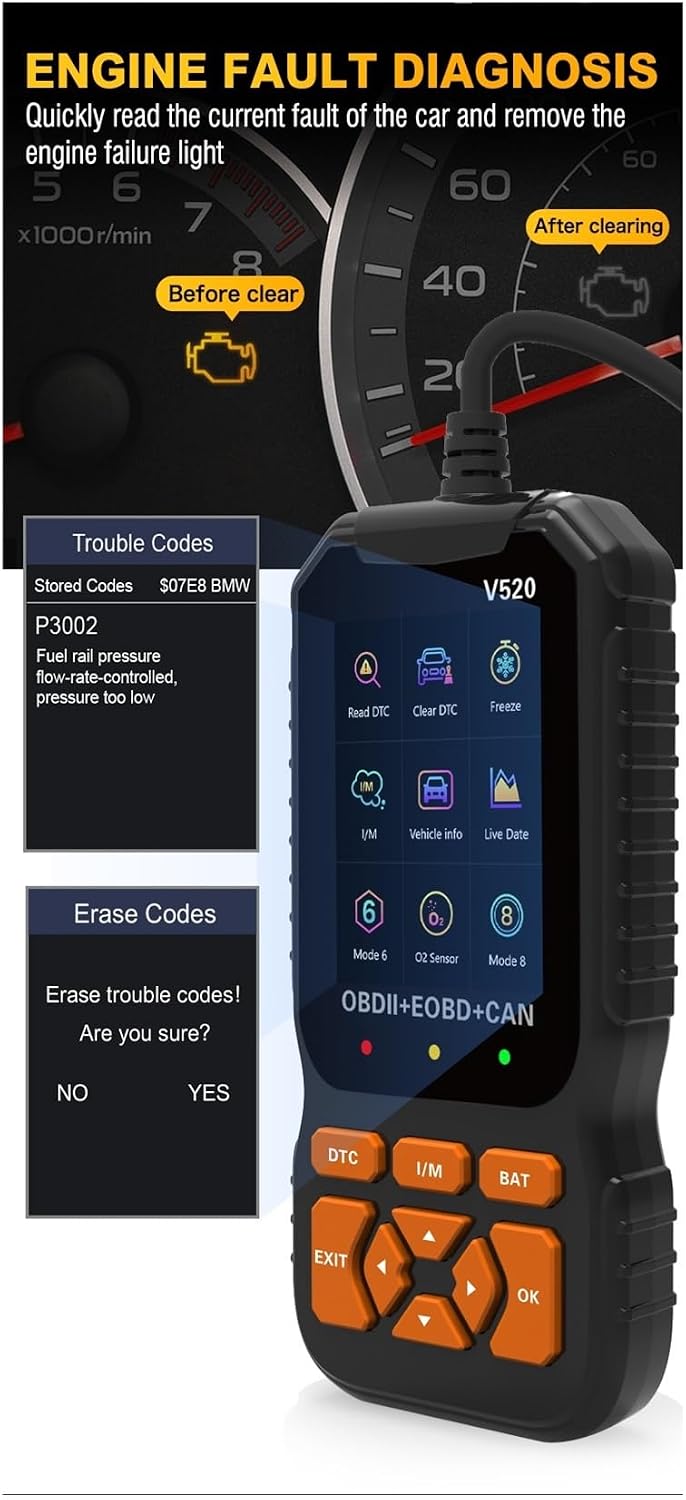
Image 3: Engine Fault Diagnosis and Code Clearing
4.3. I/M даярдык абалы
This function checks the readiness of the vehicle's emission-related monitoring systems.
- Негизги менюдан тандаңыз 'I/M' же басыңыз 'I/M' баскычы.
- The scanner will display the status of various monitors (e.g., MIL, DTC, MIS, FUE, CCM, CAT, HCAT, EGR, O2S, HRT, EVAP, AIR). A green checkmark indicates completion, while a red 'X' indicates an incomplete test.

Image 4: I/M Readiness and Function List
4.4. Live Data
View real-time operational parameters of the vehicle's engine.
- Негизги менюдан тандаңыз "Тирүү маалыматтар".
- You can scroll through various data parameters such as engine RPM, vehicle speed, coolant temperature, and more.
4.5. Freeze Frame Data
Access a snapshot of sensor readings and vehicle conditions recorded at the exact moment an emission-related fault occurred.
- Негизги менюдан тандаңыз 'Freeze'.
- Review the displayed parameters to help diagnose the fault.
4.6. Унаа маалыматы
Retrieve specific information about the vehicle.
- Негизги менюдан тандаңыз "Унаа маалыматы".
- The scanner will display information such as Vehicle ID Number (VIN), Calibration ID, and Calibration Verification Numbers (CVN).

Image 5: Vehicle Information and System Setup
4.7. Батареяны текшерүү
Quickly check the vehicle's battery voltage.
- Негизги менюдан тандаңыз 'BAT' же басыңыз 'BAT' баскычы.
- Учурдагы батареянын көлөмүtage экранда көрсөтүлөт.
5. Техникалык тейлөө
To ensure the longevity and proper functioning of your VCHICS V520 OBD2 Scanner, follow these maintenance guidelines:
- Тазалоо: Сканердин сыртын тазалоо үчүн жумшак, кургак чүпүрөктү колдонуңуз. Абразивдүү тазалоочу каражаттарды же эриткичтерди колдонуудан алыс болуңуз.
- Сактагыч: Store the device in a clean, dry environment, away from direct sunlight, extreme temperatures, and excessive moisture.
- Кабельге кам көрүү: Do not pull the cable forcefully when disconnecting. Always grasp the connector itself. Avoid bending or kinking the cable sharply.
- Программалык камсыздоо жаңыртуулары: Өндүрүүчүнү текшериңиз website periodically for any available software updates to ensure optimal performance and compatibility with newer vehicles.
6. Кыйынчылыктарды
If you encounter issues while using the VCHICS V520 OBD2 Scanner, refer to the following common problems and solutions:
| Көйгөй | Мүмкүн себеп | Чечим |
|---|---|---|
| Сканер күйбөй жатат | Loose connection; Vehicle ignition off; Vehicle battery low. | Ensure the OBD2 cable is securely connected. Turn the vehicle ignition to the 'ON' position. Check vehicle battery voltage. |
| Link error message | Faulty connection; Vehicle not OBD2 compliant; Communication protocol issue. | Verify cable connection. Confirm your vehicle is OBD2 compliant (most vehicles from 1996 onwards). Try on another OBD2 compliant vehicle if possible. |
| Cannot clear DTCs | Ignition not 'ON'; Underlying fault still present; Multiple ECUs. | Ensure ignition is 'ON' (engine off). Address the root cause of the fault before attempting to clear codes. Some vehicles may require specific procedures. |
| Экран бош же катып калган | Программанын катасы; Электр энергиянын үзгүлтүккө учурашы. | Disconnect the scanner from the vehicle, wait a few seconds, then reconnect. If the issue persists, contact support. |
7. Техникалык шарттар
Technical specifications for the VCHICS V520 OBD2 Scanner:
- Working Voltage: DC 9V~16V
- Иштөө агымы: 36mA ~ 54mA
- Күтүү учурдагы: 40мА
- Иштөө чөйрөсү: -30℃ден 70℃ге чейин (-22℉ден 158℉ге чейин)
- Сактоо температурасы: -30℃ден 70℃ге чейин (-22℉ден 158℉ге чейин)
- Өлчөмдөрү (болжол менен): 2.54 x 2.54 x 2.54 см (1 x 1 x 1 дюйм)
- Салмагы (болжол менен): 850 г (1.87 фунт)
8. Кепилдик жана колдоо
Кепилдик жөнүндө маалымат, техникалык жардам же кардарларды колдоо үчүн өндүрүүчүнүн расмий өкүлүнө кайрылыңыз website or contact your retailer directly. Keep your purchase receipt as proof of purchase for any warranty claims.