
GTRACING 114vc07
GTRACING Gaming Desk Model 114vc07 Instruction Manual
Чогултуу, иштетүү жана техникалык тейлөө боюнча комплекстүү колдонмо.
1. Киришүү
Thank you for choosing the GTRACING Gaming Desk. This manual provides essential information for the safe and efficient assembly, operation, and maintenance of your new desk. Please read these instructions carefully before beginning assembly and retain them for future reference.
2. Коопсуздук боюнча маанилүү маалымат
Always assemble the desk according to the provided instructions. Be cautious when moving the desk, as it can be heavy and may pose a risk of injury if not handled properly.
- Колдонуудан мурун бардык туташуулардын коопсуздугун камсыз кылыңыз.
- Do not overload the desk or monitor stand beyond the recommended weight capacity (300 lbs).
- Keep liquids away from electrical components (power outlets, USB ports, LED lights).
- Children should not climb on or play with the desk.
- Таңгактоочу материалдарды жоопкерчилик менен таштаңыз.
3. Пакеттин мазмуну
Verify that all components are present before assembly. If any parts are missing or damaged, please contact GTRACING customer support.
- Desk components (desktop panels, legs, monitor stand parts)
- Integrated power strip (2 AC outlets, 2 USB ports)
- LED жарык тилкеси
- Extended mouse pad
- Headphone hooks (x2)
- Монтаждоо жабдуулары (буроолор, болттар ж.
- Монтаждоо куралдары
- Колдонмо
4. Монтаждоо боюнча нускамалар
Assembly is required. Please follow the detailed step-by-step instructions provided in the separate assembly guide included with your package. All necessary tools are included.
- Бардык компоненттерди таңгактан чыгарып, пакеттин мазмунун тизме менен текшериңиз.
- Бардык жабдууларды жана шаймандарды аныктаңыз.
- Assemble the desk frame and legs.
- Иш тактага панелдерди орнотуңуз.
- Монитордун стендин орнотуңуз.
- Mount the integrated power strip.
- Attach the LED light strip.
- Install the headphone hooks.
- Place the extended mouse pad.

Image: All components of the GTRACING Gaming Desk laid out, ready for assembly. This includes the desktop pieces, legs, monitor stand, and various hardware.

Image: A fully assembled GTRACING Gaming Desk, showcasing the monitor stand, LED lighting, and carbon fiber texture.
5. Иштөө нускамалары
5.1. LED жарык системасы
The GTRACING Gaming Desk features an integrated LED light strip to enhance your gaming or work environment. The LED lights offer 16 color changes and 6 dynamic modes.
- Connect the LED light strip to the designated power source.
- Use the included remote control to power on/off, change colors, and select dynamic modes.
- Оптималдуу иштеши үчүн, алыстан башкаруу пульту иштеп жаткан батареяга ээ экенин жана LED кабыл алгычка багытталганын текшериңиз.
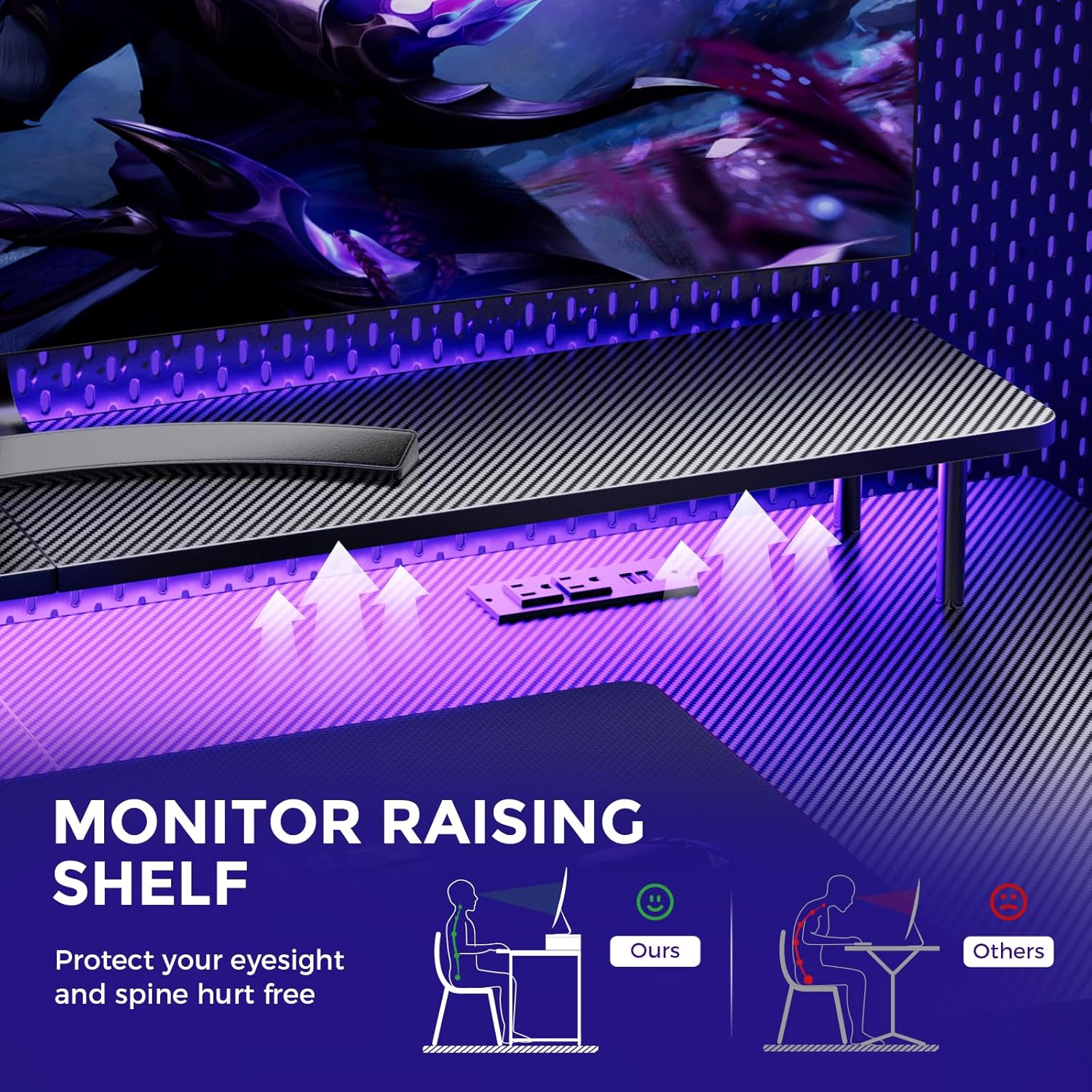
Image: A hand holding a remote control, demonstrating the control over the RGB LED light strip installed beneath the monitor stand of the desk.
Video: An official product video demonstrating the GTRACING 55 Inch Gaming Desk with LED Lights, showcasing its features and aesthetic appeal in a gaming setup.
5.2. Integrated Power Outlets & USB Ports
The desk includes a built-in power strip with 2 AC outlets (120V/12A) and 2 USB charging ports (5V/2A) for convenient device charging and power supply.
- Үстөлдүн негизги кубат шнурун розеткага сайыңыз.
- Connect your devices to the AC outlets or USB ports as needed.
- Avoid exceeding the maximum power rating of the outlets.

Сүрөт: жакын план view of the recessed power strip on the desk, showing two AC outlets and two USB charging ports in use, charging a phone and earbuds.
5.3. Эргономикалык монитор стенди
The raised monitor stand positions your screen at eye level, promoting better posture and reducing neck strain during extended use. It also provides additional storage space.

Image: A diagram comparing correct ergonomic posture achieved with the monitor stand to incorrect posture without it, highlighting benefits for eyesight and spine.
6. Техникалык тейлөө
- Тазалоо: Көмүртек буласынын бетин жумшак, d менен сүртүңүзamp кездеме. Финишке зыян келтирүүчү катаал химиялык заттардан алыс болуңуз.
- Аппараттык камсыздоо: Мезгил-мезгили менен бардык бурамалар менен болтторду текшерип туруңуз, алар бекем бойдон калууда. Керек болсо катуулатуу.
- Электр компоненттери: Keep the power outlets and USB ports free from dust and debris. Do not attempt to repair electrical components yourself.
7. Кыйынчылыктарды
7.1. LED Lights Not Working or Remote Not Responding
- кубат туташуу текшерүү: Ensure the LED light strip is securely plugged into the power source and the desk's main power cord is connected to a live wall outlet.
- Алыскы батарея: Verify that the remote control has a fresh battery and is inserted correctly.
- Көрүү сызыгы: Ensure there is a clear line of sight between the remote control and the LED receiver. Obstructions can block the signal.
- Кол менен башкаруу: If the remote is unresponsive, check if there's a manual button on the LED controller itself to cycle through modes or power on/off.
7.2. Desk Instability
- Аппаратты бекемдөө: Бардык монтаждоочу бурамаларды жана болтторду кайра текшерип, бекемдеңиз.
- Деңгээл беттик: Үстел тегиз, тегиз бетке коюлганын текшериңиз.
8. Техникалык шарттар
| Өзгөчөлүк | Деталь |
|---|---|
| Бренд | GTRACING |
| Модель номери | 114vc07 |
| Продукциянын өлчөмдөрү | 24"D x 55"W x 30"H |
| Түс | Carbon Black |
| Жогорку Материал түрү | Carbon Fiber |
| Негизги материал | Дат баспаган болот |
| Максималдуу салмак боюнча сунуш | 300 фунт |
| Интеграцияланган электр тилкеси | 2 AC розеткалары (120V/12A), 2 USB порттору (5V/2A) |
| Өзгөчөлүктөр | Built-In USB Outlet, Ergonomic, Monitor Stand, LED Lights, Headphone Hook |
| Ассамблея талап кылынат | Ооба (Куралдар камтылган) |

Image: A detailed diagram illustrating the dimensions of the GTRACING Gaming Desk, including the main desktop and the monitor stand.
9. Кепилдик жана Кардарларды колдоо
GTRACING is committed to providing high-quality products and customer satisfaction. For any questions, concerns, or missing parts, please contact our customer service team.
- Free Replacement/Refund: Сатып алгандан кийин 30 күндүн ичинде.
- Free Replacement/Repair: Сатып алгандан кийин 1 жылдын ичинде.
- Байланыш маалыматы:
- Электрондук почта: info@gtracing.com
- Phone: 1-888-660-5669 (9:00-5:30 PST Mon-Fri)
- Webсайт: www.gtracing.com

Image: GTRACING customer service representatives ready to assist with product inquiries and support.
Ask a question about this manual
Ask about setup, troubleshooting, compatibility, parts, safety, or missing instructions. Manuals+ will review the question and use this page’s manual context to help answer it.