
1. Киришүү
The FLAMMA FB200 is an intelligent bass multi-effects pedal designed to provide a comprehensive suite of effects and features for bass players. It integrates various effect modules, amplifier models, cabinet simulations, and advanced functionalities like app control, IR loading, a drum machine, and OTG recording, all within a compact and portable unit.

Figure 1.1: The FLAMMA FB200 Intelligent Bass Multi-Effects Pedal.

Figure 1.2: ашыкview of FB200 features including 2000mAh battery, Tone Editor App, and 2 Play Modes (Live & Preset).
2. Кутуда эмне бар
Сураныч, кутудан чыкканда пакеттин мазмунун текшериңиз:
- FB200 Pedal
- Quick Start Guide
- USB Data Cable (USB-C to USB-A)
3. Продукт бүтүп калдыview
3.1 Башкаруу элементтери жана интерфейс
The FB200 features a user-friendly interface with dedicated knobs and footswitches for intuitive control over your sound.
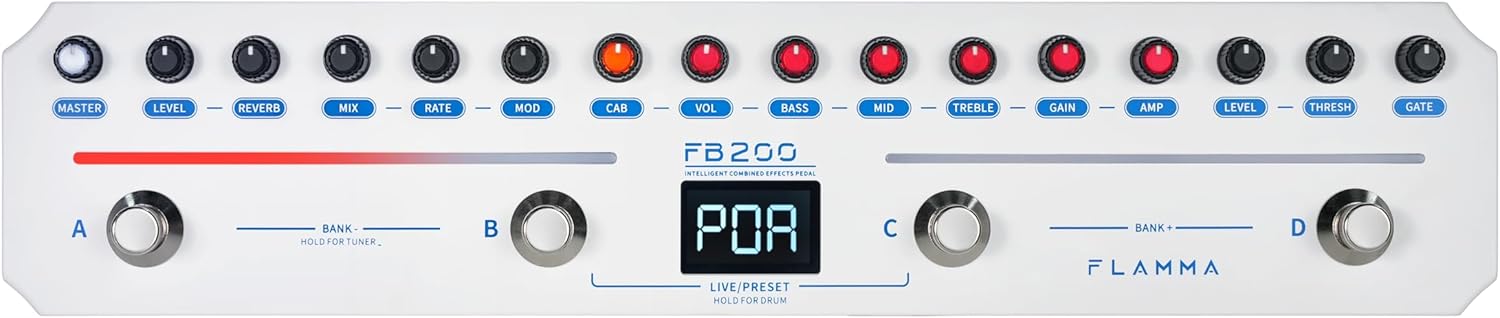
Figure 3.1: Top panel controls including Master, Level, Reverb, Mix, Rate, Mod, Cab, Vol, Bass, Mid, Treble, Gain, Amp, Level, Thresh, Gate knobs, and footswitches A, B, C, D.
- Баскычтар: Dedicated controls for Master volume, various effect parameters (Level, Reverb, Mix, Rate, Mod, Cab, Vol, Bass, Mid, Treble, Gain, Amp, Level, Thresh, Gate).
- Footswitches (A, B, C, D): Used for bank switching, preset selection, tuner activation, drum machine control, and Live/Preset mode toggling.
- Дисплей: A central LED display shows current preset numbers, tuner information, and other operational statuses.

Figure 3.2: Close-up of the FB200's digital display, indicating the current preset or mode.
3.2 Байланыштар
The FB200 offers essential connectivity for various setups.

Figure 3.3: Rear panel connections including Input, Output, Phones, USB-C port, and Power switch.
- Input (6.35mm): Бас-гитараны бул жерге туташтырыңыз.
- Output (6.35mm): а туташуу ampкөтөргүч, аралаштыргыч же аудио интерфейси.
- Гарнитуранын чыгышы (3.5 мм): For silent practice or monitoring.
- USB-C порту: Used for charging, OTG recording, and connecting to a PC for firmware updates or IR loading.
- Кубат которгучу: Аппаратты күйгүзүү же өчүрүү үчүн.

Figure 3.4: Connection diagram illustrating how to connect the FB200 to a bass, sound console, speaker box, or sound card, and headphones or a smartphone.
4. Орнотуу жана негизги иштетүү
4.1 Күйгүзүү/өчүрүү жана кубаттоо
The FB200 is equipped with a built-in 2000mAh lithium battery, providing up to 6 hours of continuous use. Charging takes approximately 2.5 hours.
- Күйгүзүү үчүн, кубат которгучун "ON" абалына жылдырыңыз.
- Өчүрүү үчүн, кубат которгучун "OFF" абалына жылдырыңыз.
- Connect the supplied USB-C to USB-A cable to the USB-C port on the FB200 and a DC 5V/2A power adapter (not included) for charging.

Figure 4.1: The FB200 offers 6 hours of battery life and a 2.5-hour quick charge time.

Figure 4.2: The display indicates battery charge level.
4.2 Аспапты туташтыруу
Бас-гитараңызды туташтырыңыз Киргизүү jack. Connect the Чыгуу джек сиздин amplifier, mixer, or audio interface. For silent practice, connect headphones to the Телефондор джек.
4.3 Operating Modes: LIVE and PRESET
The FB200 offers two primary operating modes:
- ТҮЗ ЭФИРДЕГИ РЕЖИМ: Allows direct control over individual effect parameters using the physical knobs. Changes are applied in real-time.
- PRESET Mode: Accesses and recalls saved effect configurations. The FB200 has 40 preset slots. Use footswitches to navigate through presets.
To switch between LIVE and PRESET modes, press footswitches B and C simultaneously.

Figure 4.3: Pressing footswitches B and C simultaneously to switch between Live and Preset modes.
5. Effect Modules
The FB200 is preloaded with a variety of effect modules, including Noise Gate, Compressor, Amplifier Models, Cabinet Simulations, Modulation, and Reverb.
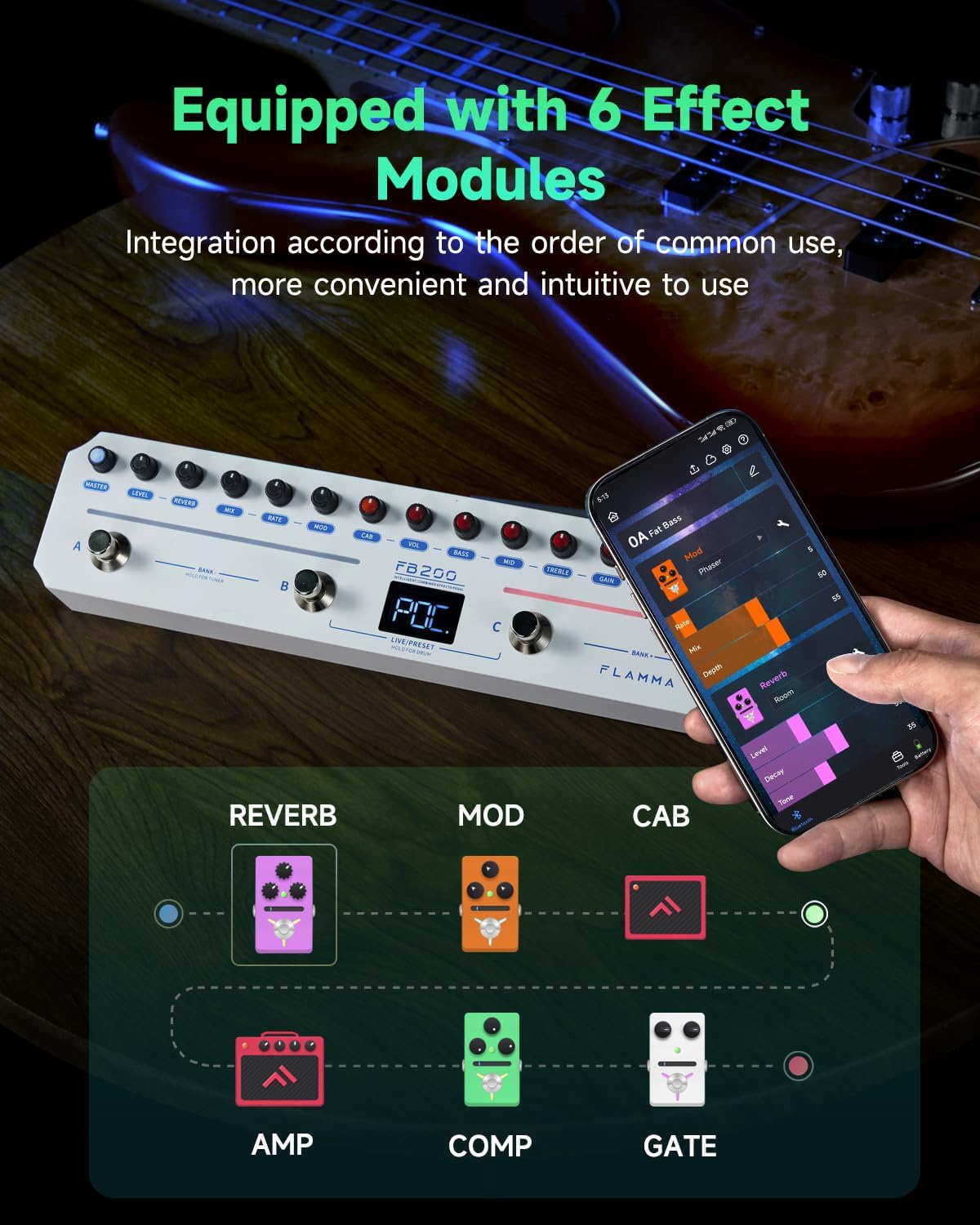
Figure 5.1: The FB200 is equipped with 6 effect modules: Reverb, Mod, Cab, Amp, Comp, and Gate.

Figure 5.2: Detailed breakdown of the FB200's effects, including 5 Reverb types, 12 Modulation effects, 20 bass-specific AMP/CAB models with 9 IR slots, and a Compressor.
- ызы-чуу дарбазасы: Reduces unwanted noise and hum.
- COMP (Compressor): Controls dynamic range for a more consistent sound.
- AMP Models (10 types): Offers a selection of 10 bass-specific ampкөтөргүч моделдер.
- CAB Simulations (10 types): Provides 10 cabinet simulations to shape your tone.
- MOD (Modulation - 12 types): Includes Phaser, Tremolo, Flanger, Chorus, and other modulation effects.
- REVERB (5 types): Features Room, Hall, Plate, Spring, and Modulated reverb effects.
Adjust parameters for each effect using the corresponding knobs on the pedal or through the mobile application.
6. Өркүндөтүлгөн функциялар
6.1 APP Control
The FB200 supports intuitive control via a dedicated mobile application (Android/iOS).
- Ыңгайлаштырылган орнотуулар: Adjust effect parameters and save presets directly from your smartphone or tablet.
- Ambient Light Bar Adjustment: Customize the color of the pedal's ambient light bars.
- Tone-Sharing: Share and download tones with other users through the app.

Figure 6.1: The FB200 supports app control for effect modules, parameters, and LED strip color adjustment.

Figure 6.2: Screenshot of the mobile app showing parameter adjustment for effects.

Figure 6.3: The app allows customization of the ambient light bar colors.

Figure 6.4: The FLAMMA Mobile App provides parameter adjustment, drum machine control, and tone sharing/downloading capabilities.
6.2 Third-Party IR Loading
The FB200 features 9 available IR loading slots, allowing you to expand your cabinet simulation options with third-party Impulse Responses.
- Connect the FB200 to a PC via the USB-C port.
- Use the dedicated software (available on the FLAMMA official website) to load WAV format IR files (44.1kHz sample rate, 24-bit, 512 sample points) into the pedal.

Figure 6.5: The FB200 supports third-party IR loading via a PC connection and dedicated software.
6.3 Built-in Drum Machine
Practice with a built-in drum machine featuring 40 common rhythm styles.
- Use footswitches A and B to switch between drum types.
- Press footswitch C twice or more to set the BPM (Beats Per Minute). The footswitch light will flash to indicate the BPM.
- Use footswitch D to turn the drum machine on or off.

Figure 6.6: Footswitches A, B, C, and D are used to control the drum machine functions.
6.4 Тюнер функциясы
The FB200 includes a built-in tuning meter for accurate instrument tuning.
- To activate the tuner, press and hold footswitches A and B simultaneously.
- The display will show tuning information.
- To exit the tuner, press any footswitch.

Figure 6.7: Press and hold footswitches A and B to activate the tuner.
6.5 OTG жаздыруу
Connect the FB200 to a smartphone or tablet using a USB cable for direct OTG recording.
- An OTG adapter may be required depending on your device's port type.
- Adjust the OTG recording volume via the mobile application.
- Monitoring is supported through the headphone or OUTPUT jack during recording.
6.6 Bluetooth аудио ойнотуу
The FB200 supports Bluetooth Version 5.0, allowing you to play backing tracks from your mobile device directly through the pedal.
- Pair your Bluetooth-enabled device with the FB200.
- Audio from your device will be routed through the FB200's output, allowing you to play along.

Figure 6.8: The FB200 supports Bluetooth audio playback for playing backing tracks.
7. Техникалык тейлөө
To ensure the longevity and optimal performance of your FB200 pedal, follow these maintenance guidelines:
- Тазалоо: Use a soft, dry cloth to clean the pedal's surface. Avoid using abrasive cleaners, solvents, or waxes.
- Сактагыч: Педальды салкын, кургак жерде, күндүн түз нурунан, өтө жогорку температурадан жана жогорку нымдуулуктан алыс сактаңыз.
- Колдонуу: Педалды түшүрүп алуудан же катуу соккуга кабылтуудан алыс болуңуз.
- Күч: Always use the specified power adapter (DC 5V/2A) for charging.
8. Кыйынчылыктарды
If you encounter issues with your FB200, refer to the following common troubleshooting tips:
- Кубат жок: Ensure the pedal is charged or connected to a working 5V/2A power source. Check the power switch position.
- Үн жок: Verify all cables (instrument, output, headphones) are securely connected. Check volume levels on the pedal, your instrument, and your amplifier/headphones. Ensure the correct preset or effect is active.
- Бурмаланган үн: Check input gain levels on the pedal and your instrument. Reduce volume if necessary.
- Колдонмонун туташуу маселелери: Ensure Bluetooth is enabled on your mobile device and the FB200. Restart both the pedal and the app if connection fails.
- IR Loading Problems: Ensure the FB200 is correctly connected to your PC and the correct software is being used. Verify IR file format (WAV, 44.1kHz, 24-bit, 512 points).
For further assistance, please visit the official FLAMMA webсайтка же кардарларды колдоо менен байланышыңыз.
9. Техникалык шарттар

Figure 9.1: Summary of technical specifications for the FB200.
| Өзгөчөлүк | Спецификация |
|---|---|
| Киргизүү | 6.35мм, 2МΩ |
| Чыгуу | 6.35мм, 100Ω |
| Наушник чыгаруу | 3.5мм, 32Ω |
| USB | USB-C, заряддоо же OTG жаздыруу үчүн |
| Bluetooth | Версия 5.0 |
| Батарея | 2000 мАч литий полимери |
| Батареянын иштөө мөөнөтү | 6 саатка чейин |
| Заряддоо убактысы | Болжол менен 2.5 саат |
| Кубаттоо стандарты | DC 5V/2A, USB-C-USB-A кабелдерин гана колдойт |
| IR Format | WAV |
| ИР Сample Rate | 44.1 кГц (толук форматтарды импорттоону колдойтample-rate IR files) |
| IR Bit Depth | 24-бит |
| ИР Сample Points | 512 упай |
| Салмагы | 576 г (болжол менен 1.27 фунт) |
| Өлчөмдөрү (L x W x Y) | 311mm × 67.5mm × 49.7mm (approximately 12.24" x 2.66" x 1.96") |
10. Кепилдик жана колдоо
For detailed warranty information, software downloads, firmware updates, and further technical support, please visit the official FLAMMA website. The complete user manual can also be downloaded from the official webсайт.
FLAMMA Official Webсайт: www.flamma.com