
1. Киришүү
This manual provides essential information for the safe and effective operation of your GEPRC MARK5 O4 Pro DC FPV Drone. Please read this manual thoroughly before operating the drone to ensure proper setup, usage, and maintenance. Retain this manual for future reference.
2. Коопсуздук боюнча көрсөтмөлөр
Operating FPV drones requires adherence to safety protocols. Failure to follow these guidelines may result in injury, damage to property, or legal consequences.
- Учуу алдында текшерүү: Always inspect the drone for any damage, loose components, or obstructions before each flight.
- Курчап турган чөйрө: Ачык жерлерде, адамдардан, жаныбарлардан, имараттардан жана электр зымдарынан алыс учуңуз. Катуу шамалда же жагымсыз аба ырайында учуудан алыс болуңуз.
- Батареянын коопсуздугу: Use only recommended batteries. Ensure batteries are fully charged and properly secured. Never overcharge or puncture batteries.
- Пропеллердин коопсуздугу: Keep hands and face clear of propellers when the drone is powered on. Propellers can cause serious injury.
- Көрүү сызыгы: Maintain visual line of sight with the drone at all times, even when using FPV goggles.
- Жергиликтүү эрежелер: Be aware of and comply with all local aviation laws and regulations regarding drone operation.
3. Пакеттин мазмуну
Төмөндө тизмеленген нерселердин баары пакетиңизге камтылганын текшериңиз:
- 1 x GEPRC MARK5 O4 Pro FPV Drone
- 1 x Gemfan 5136 Propellers (2CW, 2CCW)
- 1 x 15*250mm Battery Strap
- 2 x 20*250mm Battery Straps
- 2 x Battery Anti-slip Pads
- 1 x 3D Printouts Pack
- 1 x Spare Screw Pack (Includes M5 Flange Nylon Knurled Nut, M2 Stainless Steel Press-fit Nuts, M5*25 Stainless Steel Button Head Hex Screw, M3*10 Button Head Hex Screws, M3*8 Button Head Hex Screws, M3*8 Countersunk Hex Screws, M3*5 Countersunk Hex Screws)
- 1 x L формасындагы 1.5 мм отвертка
- 1 x L формасындагы 2 мм отвертка
- 1 x L формасындагы 3 мм отвертка
- 1 x M8 Wrench
4. Продукт бүтүп калдыview
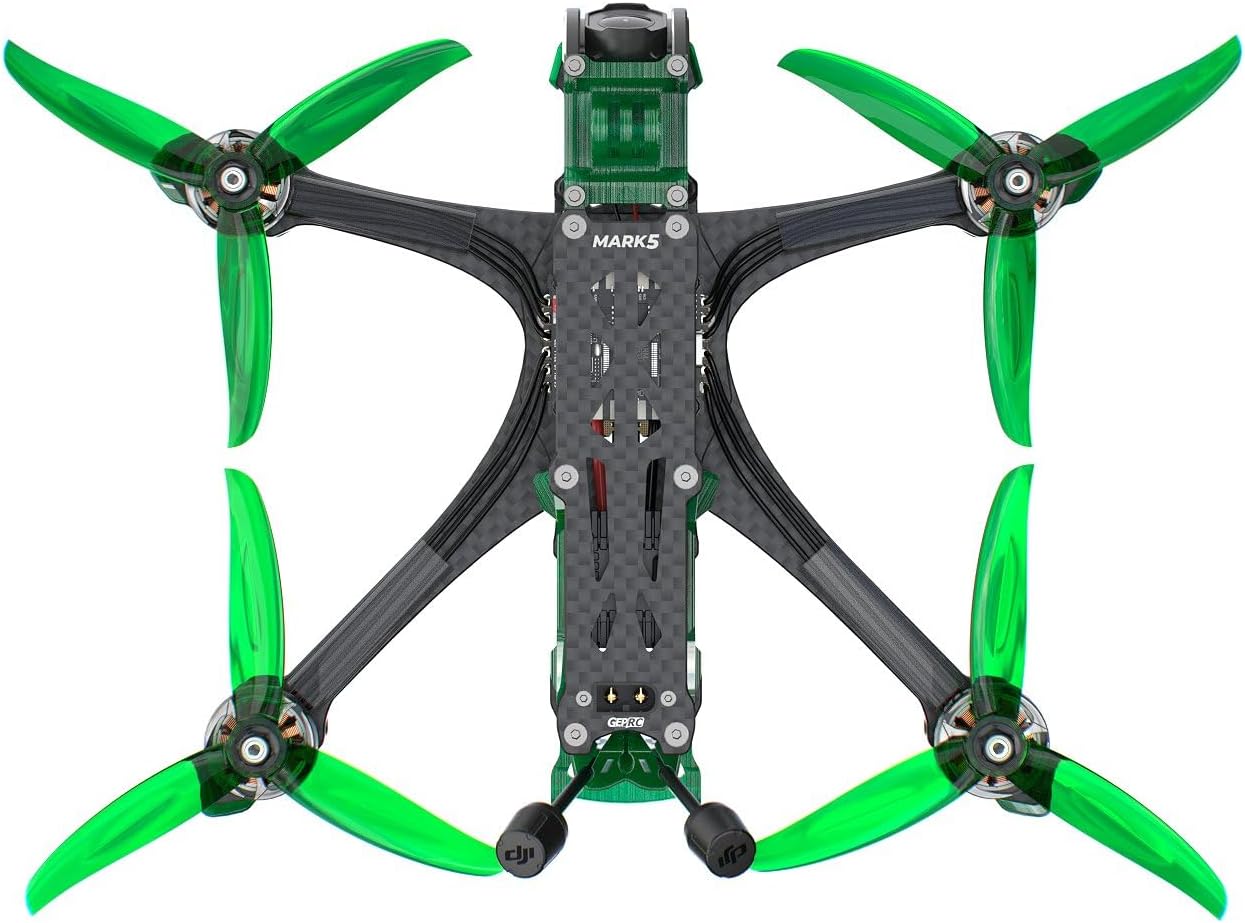
The GEPRC MARK5 O4 Pro DC FPV Drone is a high-performance quadcopter designed for FPV flight. It features an integrated O4 Air Unit Pro for video transmission and recording, a robust frame, and powerful motors.

Негизги компоненттер:
- O4 Air Unit Pro VTX Module: Integrated video transmission system.
- O4 Air Unit Pro Camera Module: High-resolution camera for recording and FPV feed.
- SPEEDX2 2107.5 1960KV Motors: High-performance brushless motors.
- GEP-F722-BT-HD V3 Flight Controller: Central processing unit for flight control, with Bluetooth connectivity.
- GEP-BL32 50A 96K 4IN1 ESC: Electronic Speed Controller for motor management.
- Optional GEP-M10 GPS: For enhanced navigation and return-to-home features.

5. Орнотуу
5.1 Пропеллерди орнотуу
Install the propellers according to the rotation direction of each motor. Ensure the correct propeller (CW or CCW) is mounted on the corresponding motor. The drone comes with Gemfan 5136 propellers.
- Identify the CW (Clockwise) and CCW (Counter-Clockwise) propellers.
- Match the propellers to the motor shafts, ensuring they sit flush.
- Secure each propeller with the provided M5 flange nylon knurled nut, tightening firmly but without excessive force.

5.2 Батареяны туташтыруу
The drone uses a 6S LiPo battery (recommended 1050mAh-1550mAh) with an XT60EW-M power connector.
- Attach the battery anti-slip pads to the bottom of the drone frame where the battery will rest.
- Place the battery on the anti-slip pads.
- Secure the battery firmly using the provided battery straps (15*250mm or 20*250mm).
- Connect the battery's XT60 connector to the drone's XT60EW-M power connector. Ensure a secure connection.
5.3 Flight Controller Configuration (BetaFlight)
The GEP-F722-BT-HD V3 Flight Controller runs BetaFlight firmware. For initial setup, calibration, and advanced tuning, connect the drone to a computer via USB and use the BetaFlight Configurator software. Bluetooth connectivity is also available for mobile app tuning.
- Download and install the latest BetaFlight Configurator from the official BetaFlight webсайт.
- Connect the drone to your computer using a USB cable.
- Follow the on-screen instructions in BetaFlight Configurator for initial setup, sensor calibration, and mode configuration.
- Ensure your receiver (PNP / ELRS 2.4G / TBS NanoRX) is properly bound to your remote control. Refer to your receiver and remote control manuals for binding procedures.
5.4 GPS Module (Optional)
If your drone includes the optional GEP-M10 GPS module, ensure it is securely mounted and connected to the flight controller. Configure the GPS settings within BetaFlight Configurator for proper functionality.
6. Иштөө
6.1 Учуу алдындагы текшерүүлөр
Ар бир учуунун алдында төмөнкү текшерүүлөрдү жүргүзүңүз:
- Verify battery is fully charged and securely attached.
- Пропеллерлердин туура орнотулганын жана бекемделгенин текшериңиз.
- Check for any loose wires or components.
- Confirm your remote control is powered on and bound to the drone.
- Check FPV goggles/monitor for clear video feed.
- Ensure GPS has a sufficient satellite lock (if applicable).
6.2 Куралдануу жана куралсыздандыруу
Arming the drone activates the motors, allowing for flight. Disarming turns them off.
- Куралдандыруу: Typically performed by moving the throttle stick to the lowest position and the yaw stick to the right (or left, depending on BetaFlight configuration). Refer to your BetaFlight setup for the exact arming sequence.
- Куралсыздандыруу: Performed by moving the throttle stick to the lowest position and the yaw stick to the left (or right). The motors will stop spinning.
- Always arm and disarm in a safe, clear area.
6.3 Учуу операциясы
Control the drone using your remote control. Familiarize yourself with the flight modes configured in BetaFlight (e.g., Acro, Angle, Horizon). Start with gentle movements and gradually increase your control as you gain experience.
6.4 O4 Air Unit Pro Camera and Recording
The integrated O4 Air Unit Pro features a 1/1.3-inch sensor for crisp 4K/120fps recording and real-time 1080P/100fps transmission. It is optimized for sharp visuals and improved performance in dim lighting.

Refer to the O4 Air Unit Pro manual for detailed instructions on video recording, settings adjustment, and file өткөрүп берүү.
7. Техникалык тейлөө
Үзгүлтүксүз тейлөө сиздин дронуңуздун узак иштөөсүн жана оптималдуу иштешин камсыздайт.
- Тазалоо: After each flight, gently clean the drone to remove dust, dirt, and debris. Use a soft brush or compressed air. Avoid using liquids directly on electronic components.
- Пропеллер текшерүү: Regularly check propellers for cracks, bends, or nicks. Replace damaged propellers immediately.
- Бурама тыгыздыгы: Periodically check all screws and nuts for tightness. Use the provided screwdrivers and wrench.
- Программалык камсыздоонун жаңыртуулары: GEPRC текшериңиз website or BetaFlight official channels for firmware updates. Keeping your flight controller and O4 Air Unit Pro firmware updated can improve performance and add new features.
- Сактагыч: Store the drone in a cool, dry place, away from direct sunlight and extreme temperatures. Remove the battery for long-term storage.
8. Кыйынчылыктарды
Бул бөлүм сиз кабылышы мүмкүн болгон жалпы көйгөйлөрдү карайт.
| Көйгөй | Мүмкүн себеп | Чечим |
|---|---|---|
| Drone does not arm | Throttle not at lowest position; Arming switch not activated; Safety features preventing arming (e.g., low battery, no receiver signal) | Ensure throttle is at zero. Check arming switch. Verify battery voltage and receiver connection. Check BetaFlight OSD for error messages. |
| Видео түрмөгү жок | O4 Air Unit Pro not powered; Antenna disconnected; Incorrect VTX channel/band; FPV goggles not powered or on wrong channel | Check power to O4 Air Unit Pro. Ensure antenna is securely connected. Verify VTX channel/band matches FPV goggles. Recharge FPV goggles. |
| Туруксуз учуу | Damaged propeller; Loose motor; Incorrect PID tuning; Flight controller not calibrated | Inspect and replace damaged propellers. Check motor mounts. Review PID settings in BetaFlight. Recalibrate accelerometer in BetaFlight. |
| GPS кулпуланбай жатат | Poor satellite visibility; GPS module not connected; Incorrect BetaFlight configuration | Ачык асманы бар ачык жерге көчүңүз view. Check GPS module connection. Verify GPS settings in BetaFlight. |
For further assistance, please refer to the GEPRC official support channels or online communities.
9. Техникалык шарттар
Detailed technical specifications for the GEPRC MARK5 O4 Pro DC FPV Drone:
- Модел: MARK5 O4 Pro DC FPV
- Дөңгөлөк базасы: 230мм
- VTX: O4 Air Unit Pro VTX module
- Камера: O4 Air Unit Pro camera module (1/1.3-inch sensor, 4K/120fps recording, 1080P/100fps transmission)
- Антенна: O4 Air Unit Pro Antenna
- Мотор: SPEEDX2 2107.5 1960KV
- Пропеллер: Gemfan 5136
- Flight Controller (FC): GEP-F722-BT-HD V3
- MCU: STM32F722
- ӨИК: ICM42688-P(SPI)
- OSD: BetaFlight OSD менен AT7456E чип
- ESC: GEP-BL32 50A 96K 4IN1 ESC
- Кубат туташтыргычы: XT60EW-M
- Кошумча GPS: GEP-M10 GPS
- Алуучу параметрлери: PNP / ELRS 2.4G / TBS NanoRX
- Сунушталган батарея: LiPo 6S 1050mAh-1550mAh
- Түсү: Изумруд жашыл
- Салмагы: 433.4г ± 5г
- Учуу убактысы: 6-8 minutes (Based on slow cruising tests; actual times may vary)
- Материал: Алюминий
- Продукциянын өлчөмдөрү: 5"L x 5"W x 5"H (болжолдуу)
10. Кепилдик жана колдоо
GEPRC products are designed and manufactured to high-quality standards. For warranty information, please refer to the official GEPRC website or contact your retailer. If you encounter any issues or require technical support, please visit the GEPRC support page or contact their customer service. Ensure you have your product model and purchase details available when seeking support.
No official product videos were found that meet the specified embedding criteria (creator_type: Seller, m3u8 format, or relevant 7-second preview videos).