
1. Киришүү
This manual provides essential information for the proper setup, operation, and maintenance of your new Generic remote control. This remote is specifically designed to work with OKIN Superiorsleep Glideaway Comforbase adjustable bed bases that utilize the Okin JLDK.37.06.06 control box. Please read these instructions carefully before use.
2. Compatibility and Verification
Бул алыстан башкаруу болуп саналат универсалдуу эмес. It is crucial to verify compatibility with your existing adjustable bed system. This remote is only compatible with control boxes bearing the model number Окина JLDK.37.06.06.
Before attempting to pair or use, ensure your control box matches the specified model. If your control box model differs, this remote will not function correctly.
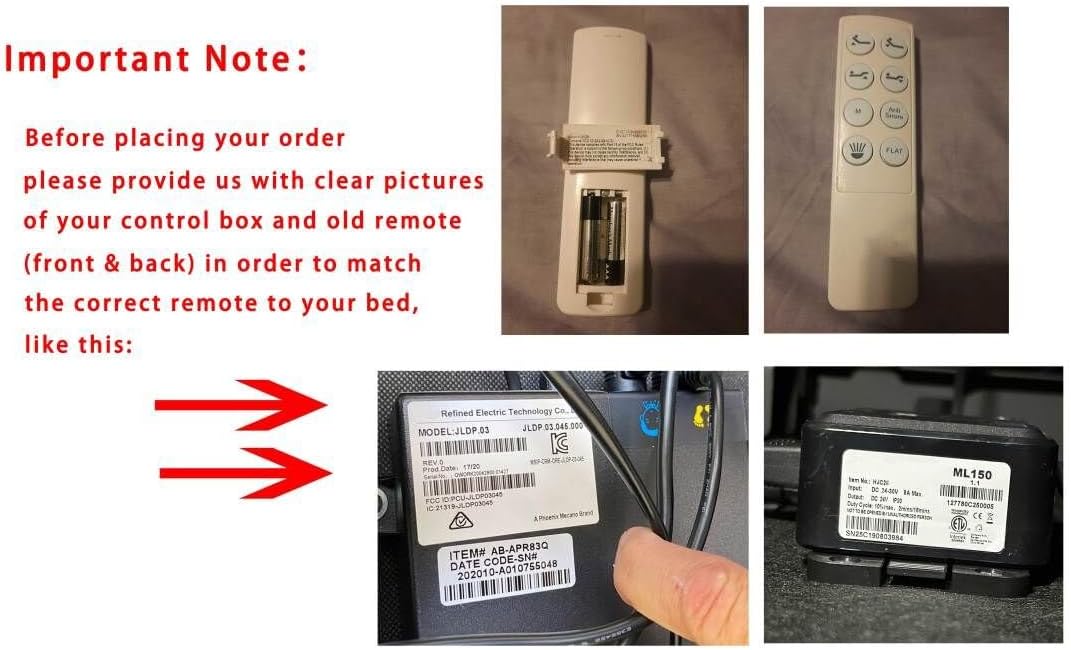
1-сүрөт: Important compatibility note. This image illustrates the necessity of verifying your control box model. It shows an example of a control box label with a model number (JLDP.03.046.000). Please note that while this image shows an example label, your control box must specifically be model Окина JLDK.37.06.06 for this remote to be compatible.
3. Орнотуу жана жупташтыруу боюнча нускамалар
Follow these steps carefully to pair your new remote control with your adjustable bed base. Ensure the bed is connected to a power source.
3.1. Алгачкы даярдоо
- Кубатты өчүрүү: Unplug the adjustable bed from the electrical outlet.
- Күтө туруңуз: Жок дегенде 5 секунд күтө туруңуз.
- Кубатты кайра туташтыруу: Plug the adjustable bed back into the electrical outlet.
- Башкаруу кутучасын табыңыз: Find the control box, typically located under the bed. This box may also contain a battery backup.
3.2. Pairing Procedure
The pairing process must be completed within 15 seconds once initiated. If 15 seconds pass, you will need to restart the process from step 3.1.
- Activate Control Box: Double-click the "reset" button on the control box twice. This button is often labeled "Learn" or "Reset Coding". Press and release the button quickly; do not press and hold.
- Алыстан жандыруу: Immediately after activating the control box (while its indicator light is on), press and hold the "head up" button and the "foot up" button on the remote control simultaneously for 10 seconds.
- Ырастоо: You will hear a series of beeps, indicating that the remote control has successfully synced with the bed base.
Эскертүү: Ensure the indicator light on the control box is active during the remote activation step. If the light goes out before pairing is complete, restart the process.
4. Иштөө нускамалары
Your remote control features intuitive buttons for adjusting your bed's position. The specific layout may vary slightly, but the functions are standard.

2-сүрөт: Фронт view of the remote control. This image displays the button layout, including controls for adjusting the head and foot sections of the bed, as well as a "Flat" button to return the bed to a level position.
- Башты өйдө/ылдый: Use these buttons to raise or lower the head section of the bed.
- Бутту өйдө/ылдый: Use these buttons to raise or lower the foot section of the bed.
- Батир: Press this button to return the bed to a completely flat position.
- (Other buttons may be present depending on your specific remote model, such as massage or memory presets. Refer to your original bed base manual for details on these functions.)
5. Техникалык тейлөө
5.1. Батареяны алмаштыруу
The remote control requires 2 AAA batteries (not included). Replace batteries when the remote's performance diminishes or it stops responding.

3-сүрөт: Remote control with battery compartment open. This image shows where to insert the two AAA batteries, ensuring correct polarity.
- Батарея капкагын алып салуу: Алыстан башкаруу пультунун арткы жагынан батарея капкагын жылдырып алыңыз.
- Батареяларды салыңыз: Insert two new AAA batteries, ensuring correct polarity (+/-) as indicated inside the compartment.
- Капкакты алмаштыруу: Батареянын капкагын бекем чыккыча ордуна жылдырыңыз.
Эскертүү: Эски батареяларды жергиликтүү эрежелерге ылайык таштаңыз.
6. Кыйынчылыктарды
Эгерде сиз алыстан башкаруу пультуңузда көйгөйлөргө туш болсоңуз, төмөнкү чечимдерди колдонуп көрүңүз:
- Алыстан жооп бербейт:
- Check if the batteries are correctly inserted and not depleted. Replace if necessary (refer to Section 5.1).
- Пульт менен керебеттин түбүндөгү кабыл алгычтын ортосунда эч кандай тоскоолдуктар жок экенин текшериңиз.
- Verify that the bed base is properly plugged into a working electrical outlet.
- Жупташуу катасы:
- Re-attempt the pairing procedure carefully, ensuring all steps are followed within the 15-second timeframe (refer to Section 3.2).
- Confirm that the control box indicator light is active when you press buttons on the remote during pairing.
- Double-check that your control box model is indeed Окина JLDK.37.06.06.
- Үзгүлтүксүз иштөө:
- Алсыз батареялар үзгүлтүккө учурап иштешине алып келиши мүмкүн. Аларды алмаштырыңыз.
- Ensure the remote is within the maximum operating range (8 meters).
If problems persist after following these steps, contact customer support for further assistance.
7. Техникалык шарттар
| Өзгөчөлүк | Деталь |
|---|---|
| Бренд | Жалпы |
| Модель аты | noe (Mfr Part Number: szh002) |
| Өзгөчө өзгөчөлүк | Эргономикалык |
| Түс | Боз |
| Колдоого алынган түзмөктөрдүн максималдуу саны | 1 |
| Шайкеш түзмөктөр | Жөнгө салынуучу керебет |
| Байланыш технологиясы | Инфракызыл |
| Controller Type | Control Button |
| Максималдуу диапазон | 8 метр |
| Батареялар талап кылынат | 2 AAA батарейка (киргизилген эмес) |
| Элемент Салмагы | Болжол менен 2 фунт |
| Өндүрүүчү | СЖКХХД |
8. Кепилдик маалыматы
Бул продукт менен келет 90 күндүк кепилдик from the date of purchase. This warranty covers manufacturing defects under normal use. It does not cover damage resulting from misuse, accidents, unauthorized modifications, or improper installation.
For warranty claims, please retain your proof of purchase and contact customer support.
9. Кардарларды колдоо кызматы
If you have any questions, require assistance with setup, or encounter issues not covered in this manual, please contact your retailer or the manufacturer for support.
When contacting support, please have your product model number (szh002) and a description of the issue ready.