Introduction
This manual provides detailed instructions for the setup, operation, and maintenance of your Generic 2.4G Dual Handle Gaming Controller. Please read this manual thoroughly before using the product to ensure optimal performance and longevity.
Продукт бүттүview
The Generic 2.4G Dual Handle Gaming Controller set includes two wireless gamepads and a single USB receiver, designed for a seamless two-player gaming experience. The controllers feature an ergonomic design for comfortable use during extended play sessions.
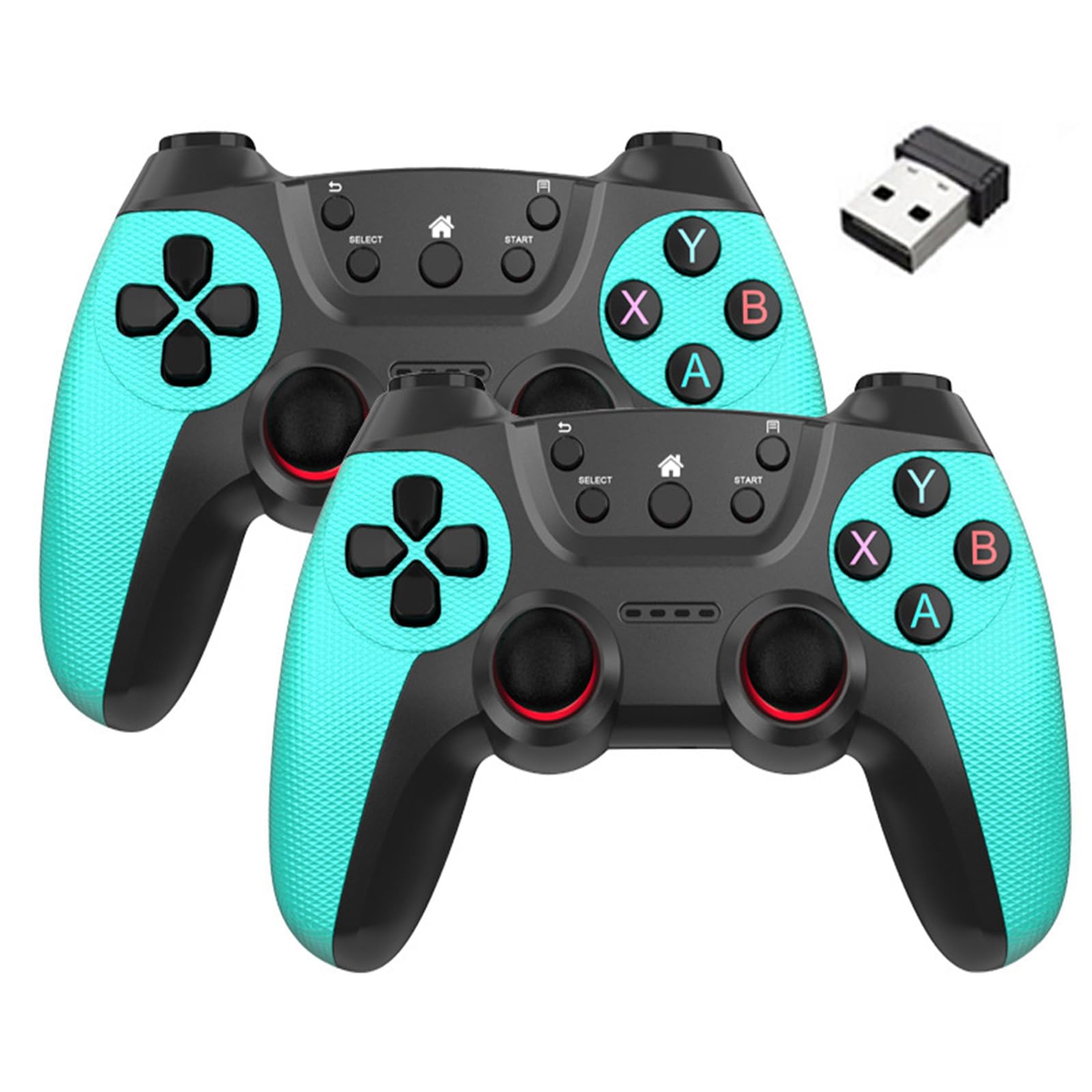
Image: Contents of the 2.4G Dual Handle Gaming Controller package, showing two controllers, one USB receiver, and two AAA batteries.
Негизги компоненттер:
- Wireless Gamepads (x2): Ergonomically designed controllers for comfortable gameplay.
- USB Receiver (x1): Provides 2.4G wireless connectivity for both gamepads to your device.
- AAA Batteries (x3 per controller, included): Power source for each gamepad.
Орнотуу нускамалары
1. Батареяны орнотуу
- Locate the battery compartment on the back of each gamepad.
- Батарея уясынын капкагын ачыңыз.
- Insert three (3) AAA batteries into each gamepad, ensuring correct polarity (+/-).
- Батарея уясынын капкагын бекем жабыңыз.

Сүрөт: Арткы view of the gamepad, indicating the location of the battery compartment.
2. USB кабылдагычты туташтыруу
- Ensure your PC, laptop, Android TV box, or console is powered on.
- Insert the USB receiver into an available USB port on your device.
- The device should automatically detect and install the necessary drivers. This is a plug-and-play device, so no manual driver installation is typically required.
- The gamepads will automatically connect to the receiver. An indicator light on the gamepad may illuminate or stop blinking to confirm connection.
Note: For some games or operating systems, you may need to configure the controller settings within the game or system preferences. Some games may require an XInput wrapper or software for full compatibility.
Иштөө нускамалары
Негизги башкаруу элементтери
The gamepads feature standard button layouts for intuitive gameplay.

Сүрөт: алдыңкы view of the cyan gamepad, highlighting the directional pad, action buttons (A, B, X, Y), analog sticks, and central function buttons (Select, Start, Home).
- Багыттоочу такта (D-Pad): Так багыт киргизүү үчүн.
- Analog Sticks (x2): 360 градустук кыймыл жана камераны башкаруу үчүн.
- Аракет баскычтары (A, B, X, Y): Оюндагы аракеттер үчүн.
- Ийин баскычтары (L1, R1) жана триггерлер (L2, R2): Located on the top of the controller for additional actions.
- START/SELECT Buttons: For pausing games, accessing menus, or other functions.
- Үй баскычы: Typically returns to the system's main menu or dashboard.
Зымсыз байланыш
The 2.4G wireless technology provides a stable connection up to 33 feet (10 meters) from the USB receiver. Ensure there are no significant obstructions between the controllers and the receiver for optimal performance.
Техникалык тейлөө
Батареяны алмаштыруу
When the controller's performance degrades or the indicator light signals low battery, replace the AAA batteries in both controllers. Always replace all three batteries in a controller at the same time with new ones to ensure consistent power.
Тазалоо
To clean the controllers, use a soft, dry cloth. For stubborn dirt, a slightly damp cloth can be used, but ensure no moisture enters the controller's openings. Do not use harsh chemicals or abrasive cleaners.
Сактагыч
Store the controllers and USB receiver in a cool, dry place away from direct sunlight and extreme temperatures. If storing for an extended period, it is recommended to remove the batteries to prevent leakage.
Проблемаларды чечүү
- Контроллер туташпай жатат:
- Батареялардын туура орнотулганын жана жетиштүү заряды бар экенин текшериңиз.
- USB кабыл алгычтын иштеп жаткан USB портуна бекем сайылганын текшериңиз.
- USB ресиверди башка USB портуна сайып көрүңүз.
- Move the controllers closer to the USB receiver.
- Restart your PC/device.
- Lag or Disconnections:
- Check for potential interference from other 2.4G wireless devices (e.g., Wi-Fi routers, cordless phones).
- Ensure the controllers are within the 33ft operating range.
- Батареялар азайып калса, алмаштырыңыз.
- Buttons/Joysticks Not Responding Correctly:
- Check in-game controller settings.
- Ensure the controller is clean and free from debris.
- For PC games, some titles may require specific controller input types (e.g., XInput). You might need to use third-party software to emulate XInput if the game does not natively support DirectInput.
- Only One Controller Working:
- Ensure both controllers have fresh batteries.
- Confirm both controllers are powered on and attempting to connect.
- The single USB receiver supports both controllers simultaneously. If one is not connecting, try the troubleshooting steps for "Controller Not Connecting" for that specific gamepad.
Техникалык шарттар
| Модел | B0F5WWZYYT |
| Байланыш | 2.4G зымсыз |
| Зымсыз диапазон | 33 фут (10 метр) чейин |
| Power Source | 3 x AAA Batteries per controller (included) |
| Болжолдуу ойноо убактысы | 20+ hours per set of batteries |
| Шайкештик | Windows PCs, Laptops, Android TV Boxes, Consoles (with USB receiver support) |
| Материал | Shock-resistant ABS construction |
| Элемент Салмагы | 12.8 унция (жалпы пакет) |
| Пакеттин өлчөмдөрү | 9 x 7 x 3 дюйм |