
1. Продукт бүтүп калдыview
The Attoe AK680 is a wired mechanical gaming keyboard designed for performance and customization. It features a compact 60% layout, RGB backlighting, hot-swappable switches, and durable double-shot PBT keycaps. This manual provides essential information for setting up, operating, and maintaining your keyboard.

Figure 1: Attoe AK680 Mechanical Gaming Keyboard.
2. Пакеттин мазмуну
Пакетте бардык буюмдар бар экенин текшериңиз:
- Attoe AK680 Mechanical Gaming Keyboard
- USB-C Cable
- Баскыч капкагын тарткыч
- Switch Puller (often integrated with keycap puller or separate)
- Колдонуучунун Колдонмосу (бул документ)
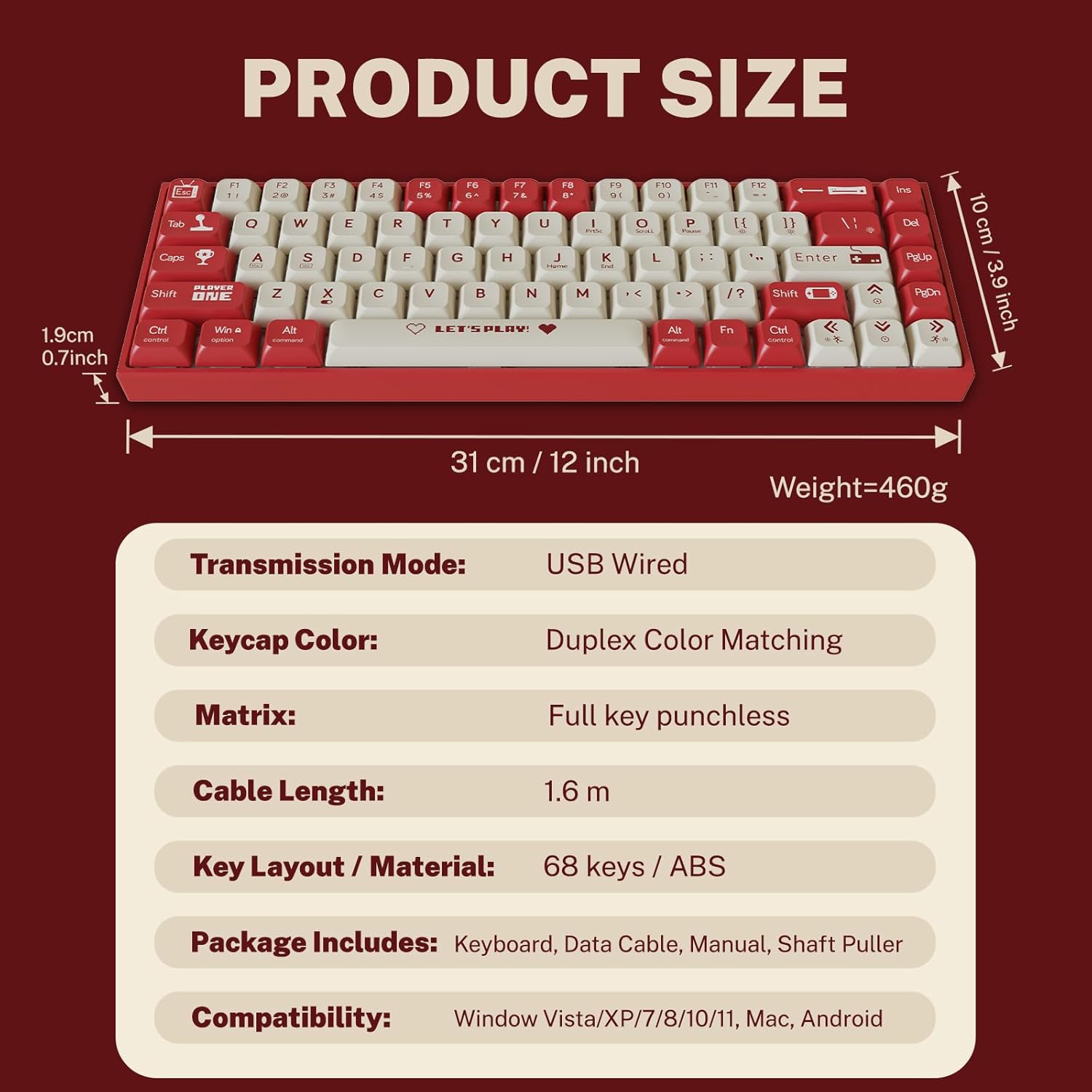
2-сүрөт: Таңгактын курамы жана продуктунун өлчөмдөрү.
3. Орнотуу нускамалары
3.1 Баскычтопту туташтыруу
- Баскычтоптун арткы же капталындагы USB-C портун табыңыз.
- Берилген USB-C кабелинин бир учун клавиатуранын USB-C портуна туташтырыңыз.
- Connect the other end of the USB-A connector to an available USB port on your computer.
- Баскычтоп сиздин операциялык тутумуңуз тарабынан автоматтык түрдө таанылат. Негизги функциялар үчүн, адатта, кошумча драйверлер талап кылынбайт.
3.2 Системанын шайкештиги
The Attoe AK680 keyboard is compatible with the following operating systems:
- Windows Vista / XP / 7 / 8 / 10 / 11
- macOS
- Android

Figure 3: Multi-system compatibility of the keyboard.
4. Иштөө нускамалары
4.1 Негизги баскычтоп функциялары
The AK680 features a 68-key layout, providing essential keys while maintaining a compact form factor. All keys support anti-ghosting, ensuring accurate input even during rapid key presses.

Figure 4: The 68-key layout for efficient use.
4.2 RGB арткы жарыктандыруу
The keyboard features 16.8 million color RGB backlighting with various effects. Specific key combinations (often involving the Fn key) are used to cycle through lighting modes, adjust brightness, and change colors. Refer to the quick start guide or product page for detailed key combinations for lighting control.

Figure 5: RGB Backlighting in operation.
4.3 Ыкчам алмаштыруучу которгучтар
The AK680 supports hot-swappable 3-pin and 5-pin mechanical switches. This allows you to easily change switches without soldering, customizing the typing feel to your preference. Use the included switch puller for safe removal and installation.
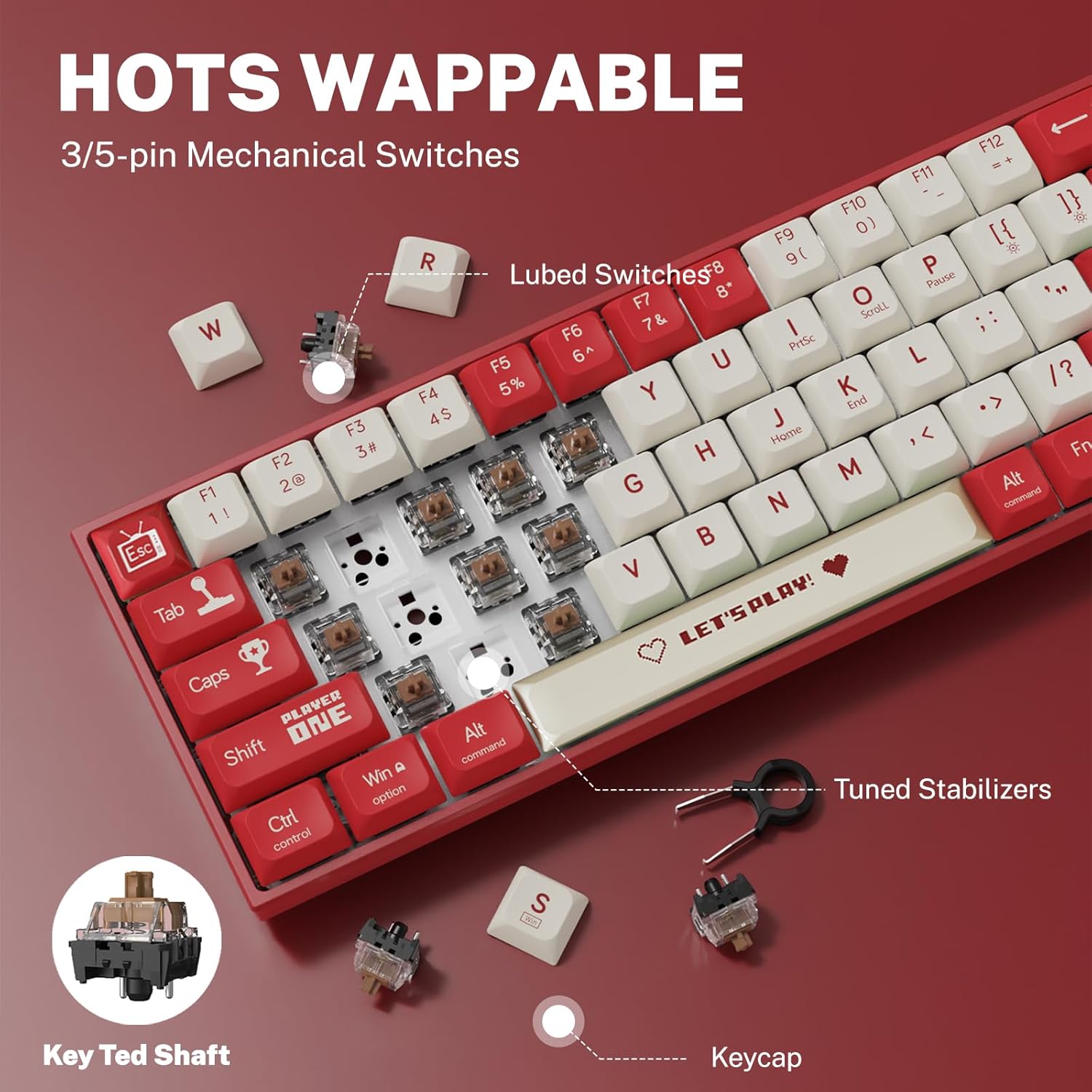
Figure 6: Hot-swappable switch mechanism.
5. Техникалык тейлөө
5.1 Баскычтопту тазалоо
- Жалпы тазалоо: Баскычтоптун бетин сүртүү үчүн жумшак, кургак чүпүрөктү колдонуңуз. өжөр кир үчүн, бир аз гampчүпүрөктү суу же жумшак, абразивдүү тазалагыч менен жууп салыңыз.
- Баскычтоптордун ортосунда: Баскыч капкактарынын ортосундагы чаңды жана калдыктарды тазалоо үчүн кысылган абаны колдонуңуз.
- Клавиатураны тазалоо: For thorough cleaning, remove keycaps using the provided keycap puller. Wash keycaps with mild soap and water, rinse thoroughly, and ensure they are completely dry before reattaching.
5.2 Баскыч капкактарын жана которгучтарды алмаштыруу
The AK680's hot-swappable design allows for easy replacement of keycaps and switches.
- Баскыч капкактарын алып салуу: Use the keycap puller to gently grip and lift keycaps straight up.
- Которгучтарды алып салуу: After removing the keycap, use the switch puller to carefully grip the top and bottom clips of the switch and pull it straight out.
- Которгучтарды орнотуу: Align the new switch's pins with the holes on the PCB. Press down firmly until the switch clicks into place. Ensure pins are not bent.
- Баскыч капкактарын орнотуу: Align the keycap with the switch stem and press down gently until it is seated securely.

Figure 7: Components of a mechanical switch and tools for maintenance.
6. Кыйынчылыктарды
- Баскычтоп жооп бербейт:
- USB-C кабели клавиатурага жана компьютерге бекем туташып турганын текшериңиз.
- Баскычтопту компьютериңиздин башка USB портуна туташтырууга аракет кылыңыз.
- Системага тиешелүү маселелерди жокко чыгаруу үчүн баскычтопту башка компьютерде сынап көрүңүз.
- Катталбаган ачкычтар:
- Remove the keycap and switch for the affected key. Reinstall the switch, ensuring it is properly seated and its pins are not bent.
- Clean any debris that might be obstructing the switch mechanism.
- RGB Backlighting Not Working:
- Check if the backlighting is turned off or set to minimum brightness using the keyboard's function keys.
- Баскычтоп USB портунан жетиштүү кубат алып жатканын текшериңиз.
7. Техникалык шарттар
| Өзгөчөлүк | Деталь |
|---|---|
| Модель номери | AK680 |
| Бренд | Attoe |
| Туташуу түрү | Зымдуу (USB-C) |
| Ачкычтардын саны | 68 ачкыч |
| Негизги технология | Mechanical Shaft (Red/Teal Shaft), Hot-Swappable (3-pin/5-pin) |
| Клавиатура материалы | Double-Shot PBT |
| Арткы жарыктандыруу | RGB (16.8 миллион түс) |
| Anti-Ghosting | Full Keys Anti-Ghosting |
| Кабелдин узундугу | 1.6 метр |
| Продукциянын өлчөмдөрү | 12 x 3.9 x 0.7 дюйм (31 x 10 x 1.9 см) |
| Элемент Салмагы | 1.01 фунт (460 г) |
| Шайкештик | Windows Vista/XP/7/8/10/11, macOS, Android |
| Суу өткөрбөйт функциясы | IPX4 rated protection (splash resistant) |
8. Кепилдик жана колдоо
Attoe provides a 12 айлык кепилдик for the AK680 Mechanical Gaming Keyboard from the date of purchase.
If you encounter any problems or have questions regarding your product, please contact Attoe customer service. We are committed to providing the best service and will respond within 24 hours to assist you.
For support, please refer to the contact information provided with your purchase or visit the official Attoe webсайт.