
1. Киришүү
The DOOGEE Blade 10 Ultra Energy is a rugged smartphone designed for durability and high performance. It features the latest Android 15 OS, a powerful octa-core processor, and extensive memory for smooth operation. This device is built to withstand challenging environments while providing advanced camera capabilities, a long-lasting battery, and secure access features.
Негизги өзгөчөлүктөр төмөнкүлөрдү камтыйт:
- Android 15 OS with Octa-Core Processor and 36GB RAM (8GB physical + 28GB virtual) and 256GB internal storage.
- Ultra-slim 10.7mm design with a 6.56" HD+ 90Hz display.
- 64MP AI Main Camera and 8MP Front Camera, including an Underwater Camera Mode.
- 6150mAh battery with 18W fast charging and OTG reverse charging.
- Dual 4.5G SIM support, NFC, Fingerprint and Face ID unlock.
- IP68/IP69K water and dust resistance, MIL-STD-810H drop protection, and extreme temperature resilience.
2. Кутуда эмне бар
Пакетти ачканда, төмөндө көрсөтүлгөн бардык буюмдардын бар экендигин текшериңиз:
- 1 x DOOGEE Blade 10 Ultra Energy Rugged Phone
- 1 x Type-C кабели
- 1 x 18W кубаттагыч
- 1 x Thicken Protective Film (Pre-applied or separate)
- 1 x коргоочу куту
- 1 x Phone Strap
- 1 x User Manual
- 1 кызматы карта х

Figure 2.1: Packaging Contents of the DOOGEE Blade 10 Ultra Energy.
3. Орнотуу
3.1 SIM картаны жана MicroSD картасын орнотуу
The device supports Dual SIM cards (Nano SIM size) and a MicroSD card for expanded storage up to 2TB. Ensure the phone is powered off before inserting or removing cards.
- Телефондун капталындагы SIM карта салгычын табыңыз.
- Салгычты ачуу үчүн берилген SIM чыгаруучу куралды колдонуңуз.
- Carefully place your Nano SIM cards and/or MicroSD card into the designated slots on the tray. Ensure they are correctly oriented.
- Лотокту түзмөктүн капталы менен тегиз болгонго чейин акырын телефондун ичине түртүңүз.

Figure 3.1: Inserting SIM and MicroSD cards into the tray.
3.2 Баштапкы күйгүзүү жана негизги орнотуу
- DOOGEE логотиби пайда болгонго чейин Кубат баскычын (капталында жайгашкан) басып, кармап туруңуз.
- Тилиңизди тандоо, Wi-Fi тармагына туташуу жана Google аккаунтуңузду орнотуу үчүн экрандагы көрсөтмөлөрдү аткарыңыз.
- Configure security features such as Fingerprint Recognition and Face ID for secure and convenient access.
4. Аппаратыңызды иштетүү
4.1 Дисплей жана колдонуучу интерфейси
The DOOGEE Blade 10 Ultra Energy features a 6.56-inch HD+ display with a 90Hz refresh rate, providing vivid colors and smooth visuals. The device runs on Android 15, offering a clean and user-friendly interface with enhanced security and privacy controls.

Figure 4.1: The 6.56" HD+ 90Hz display for fluid streaming experience.

Figure 4.2: Android 15 OS provides a secure, fluid, and fast user experience.
4.2 Аткаруу жана сактоо
Equipped with an UNISOC T7250 Octa-Core Processor and 36GB of RAM (8GB physical + 28GB virtual), the device ensures ultra-fast performance and efficient multitasking. It comes with 256GB of internal storage, expandable up to 2TB with a MicroSD card (sold separately).
Video 4.1: Demonstrating the UNISOC T7250 Octa-Core Processor for smooth performance.

Figure 4.3: The UNISOC T7250 4.5G Octa-Core Processor for enhanced performance.

Figure 4.4: 36GB RAM and 256GB ROM for ample сактоо жана жылмакай иштөө.
4.3 Камеранын өзгөчөлүктөрү
Capture high-quality photos and videos with the 64MP AI main camera and 8MP front camera. The device also features an Underwater Camera Mode, allowing you to take pictures and record videos while submerged.
Video 4.2: Highlighting the 64MP AI Camera capabilities of the DOOGEE Blade 10 Ultra Energy.

Figure 4.5: Capture more details with the 64MP main camera and 8MP front camera, including underwater shots.
4.4 Батарея жана заряддоо
The device is powered by a large 6150mAh silicone-negative battery, providing extended usage. It supports 18W fast charging for quick power-ups and OTG reverse charging, allowing the phone to act as a power bank for other devices.
Видео 4.3: Бүттүview of the 6150mAh Battery in the DOOGEE Blade 10 Ultra Energy.

Figure 4.6: The 6150mAh battery offers extended duration and 18W fast charging.
4.5 Security and Connectivity
The device offers secure access via fingerprint recognition and Face ID, even in challenging conditions or while wearing gloves (Glove Mode 2.0). Dual 4.5G SIM slots provide seamless global connectivity, while built-in NFC enables secure contactless payments. High-precision GPS ensures accurate navigation.

Figure 4.7: Glove Mode 2.0 allows easy operation while wearing gloves.

Figure 4.8: Advanced security and connectivity features including NFC and biometric unlock.
5. Узактыгы жана коргоо
The DOOGEE Blade 10 Ultra Energy is built to endure harsh conditions, certified with IP68/IP69K ratings for water and dust resistance, and MIL-STD-810H for drop protection. It can withstand submersion in 1.5 meters of water for up to 30 minutes and operates reliably in extreme temperatures from -4°F to 131°F (-20°C to 55°C).
Video 5.1: Demonstrating the IP68 and IP69K water and dust resistance of the DOOGEE Blade 10 Ultra Energy.

Figure 5.1: IP68/IP69K/MIL-STD-810H certifications ensure high quality and durability.
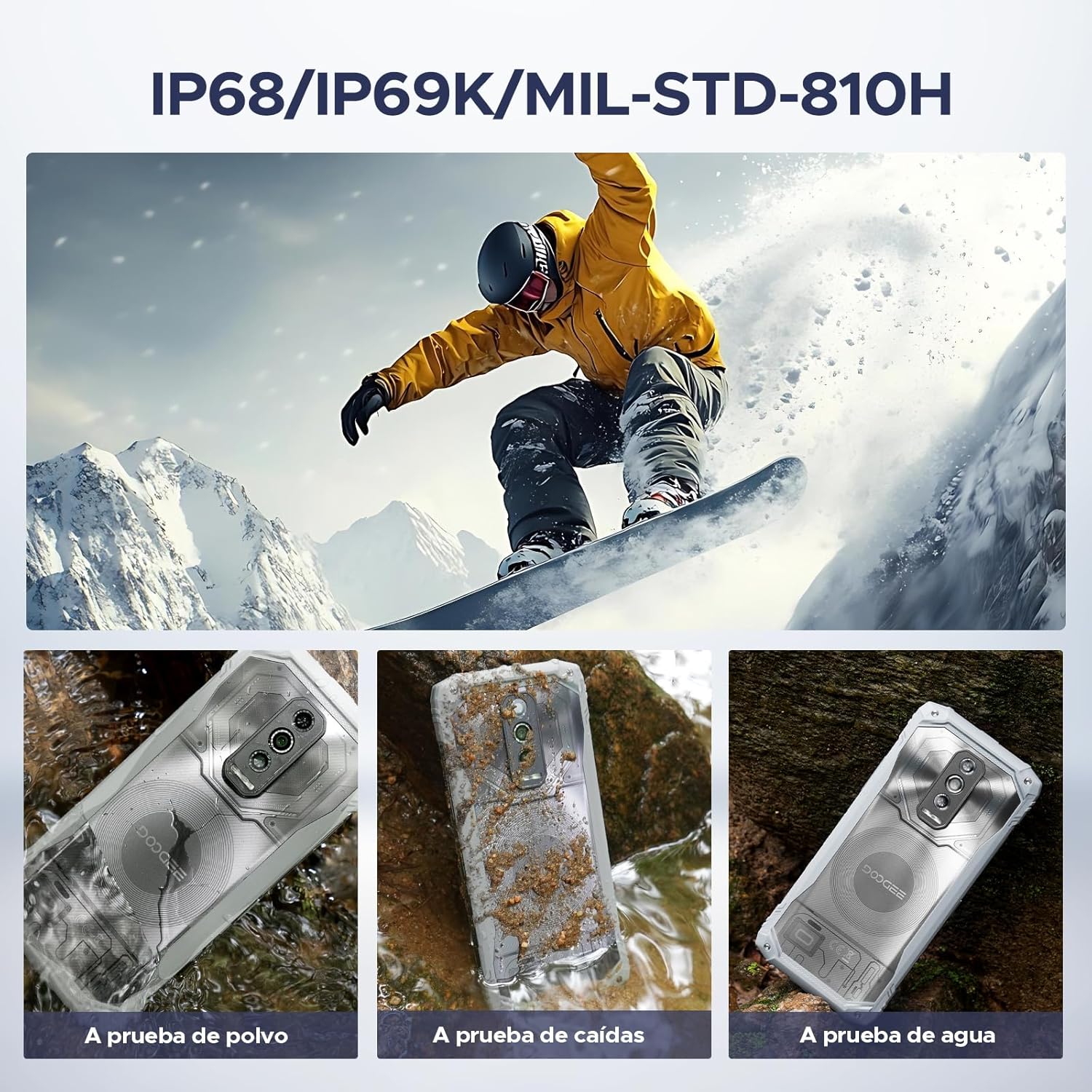
Figure 5.2: The phone is waterproof, drop-proof, and dust-proof.
6. Техникалык шарттар
| Өзгөчөлүк | Деталь |
|---|---|
| Бренд | DOOGEE |
| Модель аты | Blade 10 Ultra Energy |
| Операция системасы | Android 15 |
| RAM эстутум орнотулган өлчөмү | 36 ГБ (8 ГБ физикалык + 28 ГБ виртуалдык) |
| Эстутум сактоо сыйымдуулугу | 256 ГБ (2 ТБ чейин кеңейтүүгө болот) |
| Screen Size | 6.56 дюйм |
| Резолюция | 720 x 1612 HD+ |
| Жаңыртуу ылдамдыгы | 90 Гц |
| Процессор | UNISOC T7250 сегиз ядролуу |
| Башкы камера | 64 MP AI |
| Алдыңкы камера | 8 депутат |
| Батарея сыйымдуулугу | 6150 мАч |
| Заряддоо | 18W тез заряддоо, OTG тескери заряддоо |
| Уюлдук технология | 4.5G Dual SIM (Unlocked for All Carriers) |
| Биометрикалык коопсуздук | Манжа изин таануу, бетти таануу |
| Сууга туруктуулук деңгээли | IP68/IP69K Суу өткөрбөйт |
| Бышыктык стандарты | MIL-STD-810H |
| Байланыш | NFC, GPS |
| Элементтин өлчөмдөрү | 3.15 x 4.8 x 6.8 дюйм |
7. Техникалык тейлөө
To ensure the longevity and optimal performance of your DOOGEE Blade 10 Ultra Energy, follow these maintenance guidelines:
- Тазалоо: Use a soft, lint-free cloth to clean the screen and body. For stubborn dirt, especially after exposure to mud or saltwater, rinse the phone under fresh water and dry thoroughly. Do not use harsh chemicals or abrasive materials.
- Портка кам көрүү: Ensure the charging port and headphone jack (if applicable) are free from dust, dirt, or moisture before charging or connecting accessories. The device's waterproof seals require clean ports to maintain integrity.
- Программалык камсыздоо жаңыртуулары: Regularly check for and install software updates to benefit from improved performance, security patches, and new features.
- Батареяга кам көрүү: Avoid exposing the phone to extreme heat or cold for prolonged periods, as this can degrade battery life. Use only the provided charger or a certified compatible charger.
- Сактагычты башкаруу: Мезгил-мезгили менен ачык-айкын керексиз fileОптималдуу иштөөнү сактоо үчүн колдонмолор жана колдонмолор. Чоң медиа файлдар үчүн кеңейтилүүчү сактагычты колдонуңуз files.
8. Кыйынчылыктарды
This section addresses common issues you might encounter with your device. If you experience problems not covered here, please refer to the support section.
| Көйгөй | Чечим |
|---|---|
| Түзмөк күйгүзүлбөйт. | Ensure the battery is charged. Connect the phone to the charger and wait a few minutes before attempting to power on again. If unresponsive, perform a forced restart by holding the Power button for 10-15 seconds. |
| Сигналдын кабыл алынышы начар. | Check if your SIM card is correctly inserted. Move to an area with better network coverage. Contact your carrier to verify service in your location. |
| Батарея бат эле түгөнөт. | Reduce screen brightness, close unused apps running in the background, disable Wi-Fi/Bluetooth/GPS when not in use. Check battery usage in settings to identify power-hungry apps. |
| Сенсордук экран жооп бербейт. | Restart the device. If the issue persists, ensure the screen is clean and dry. Remove any screen protectors that might be interfering. |
| Wi-Fi'га туташпай жатат. | Restart your Wi-Fi router and the phone. Forget the network in your phone's Wi-Fi settings and reconnect. Ensure you are entering the correct password. |
9. Кепилдик жана колдоо
DOOGEE provides comprehensive customer service for your Blade 10 Ultra Energy rugged phone.
- 30 күндүк акчаны кайтарып берүү кепилдиги жана акысыз кайтарып берүү: Эгерде сиз сатып алган товарыңызга канааттанбасаңыз, аны 30 күндүн ичинде кайтарып берип, толук акчаңызды кайтарып алсаңыз болот.
- 2 жылдык чектелген кепилдик: Your device is covered by a 2-year limited warranty against manufacturing defects. Please refer to the included Service Card for detailed terms and conditions.
- Күнү-түнү жеке онлайн колдоо: For any technical assistance or inquiries, dedicated online support is available around the clock.

Figure 9.1: DOOGEE's customer service commitment.
Көбүрөөк жардам алуу үчүн, расмий DOOGEE сайтына кириңиз website or contact their customer support team using the information provided in your Service Card.