
Introduction
Сатып алганыңыз үчүн рахматasing the UPXNBOR Wireless LED Table Lamp. This manual provides important information for the safe and efficient use of your new lamp. Please read it thoroughly before first use and keep it for future reference.
Бул ар тараптуу лamp features a durable all-metal casing, touch control, three warm light levels, and IP54 waterproofing, making it suitable for various indoor and outdoor settings.
Коопсуздук нускамалары
- Бардык нускамаларды окуңуз: Иштетуунун алдында лamp, read and understand all safety and operating instructions.
- Заряддоо: Use only the provided USB-C cable for charging. Do not use fast chargers, as this may reduce battery lifespan. Ensure the lamp is fully charged before its first use.
- Суу каршылык: лamp is IP54 waterproof, meaning it is protected against dust ingress and splashing water from any direction. It is not designed for submersion in water.
- Температура: l ачыкка чыгарбооamp to extreme temperatures. For optimal battery performance, use and charge the lamp within recommended temperature ranges.
- Тазалоо: lamp from the power source before cleaning. Use a soft, dry cloth. Do not use abrasive cleaners or solvents.
- Демонтаж: l-ди ажыратууга же өзгөртүүгө аракет кылбаңызamp. Бул кепилдикти жокко чыгарат жана зыянга же жаракатка алып келиши мүмкүн.
- Балдар: l сактаңызamp балдар жетпеген жерде.
Пакеттин мазмуну
Сураныч, пакетте төмөнкү нерселерди текшериңиз:
- UPXNBOR Wireless LED Table Lamp (Model UP-WSA)
- USB-C Power Cable (80cm)
- User Manual
Продукт бүттүview
The UPXNBOR Wireless LED Table Lamp is designed for convenience and durability. It features a robust all-metal construction and a sleek, minimalist design.
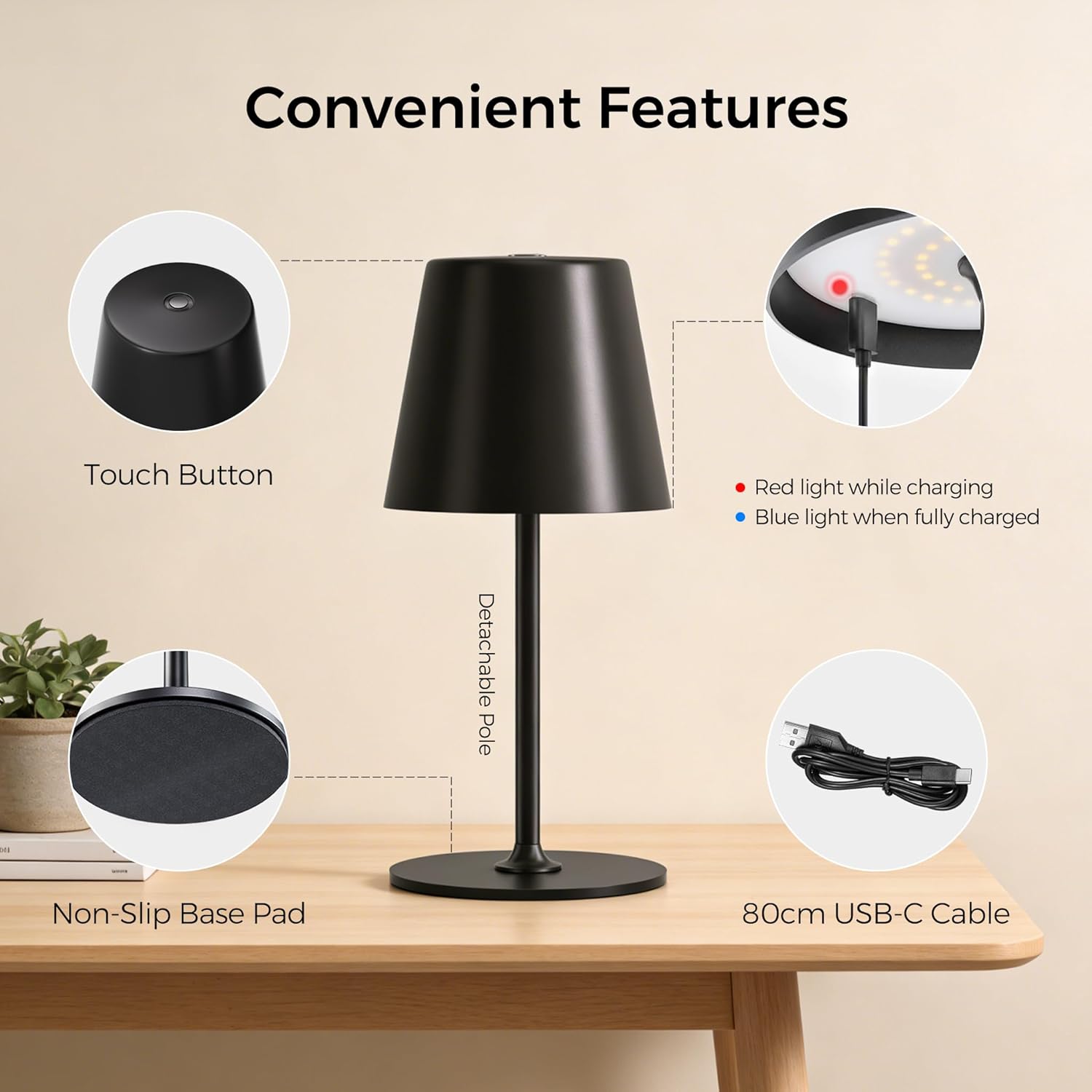
Image: Convenient Features. This image highlights the key components of the lamp, including the touch button on top, the charging indicator light (red for charging, blue for fully charged), the detachable pole for easy assembly, the non-slip base pad for stability, and the included 80cm USB-C charging cable.
Негизги өзгөчөлүктөрү:
- All-Metal Casing: High-quality metal construction for durability and stability.
- 48 LED: Provides uniform illumination with 20 internal and 28 external LEDs.
- 3 жарыктык деңгээли: Easily adjust light intensity to suit different environments and needs.
- Dual Battery Design: Узак мөөнөттүү пайдалануу үчүн батареянын иштөө мөөнөтүн узартуу.
- Сенсордук башкаруу: Simple and intuitive operation via a touch-sensitive button on the top.
- IP54 Суу өткөрбөйт: Suitable for both indoor and outdoor use, resistant to splashing water.
- Тайгаланбаган база: Ар кандай беттерде туруктуулукту камсыз кылат.
- Detachable Pole: Allows for compact storage and easy assembly.

Image: All-New Upgrade. This graphic illustrates the product's enhancements, including an upgrade from single-ring to dual-ring LEDs for improved brightness, a transition from a single-battery to a dual-battery design for extended runtime (6-16 hours), and an upgrade from a plastic top to an all-metal top for enhanced material quality.
Жайгашуу
Your UPXNBOR lamp is designed for easy assembly.
- Таңылганын ачуу: Бардык компоненттерди таңгактан кылдаттык менен алып салыңыз.
- Уюлду чогултуу: лamp pole may come in two parts. Gently screw the upper part of the pole into the lower part, then screw the assembled pole into the lamp base. Ensure it is securely fastened.
- Баштапкы төлөм: Биринчи колдонуудан мурун lamp берилген USB-C кабелин колдонуп. Кененирээк маалымат алуу үчүн "Кубаттоо" бөлүмүн караңыз.
Иштөө нускамалары
лamp features simple touch control for power and brightness adjustment.
- Күйгүзүү/өчүрүү: Lightly touch the center of the top surface of the lamp to turn it on. Touch it again to turn it off.
- Жарыктыкты жөндөө: Ал эми лamp is on, tap the touch button repeatedly to cycle through the three brightness levels (Low, Medium, High).

Image: 3 Brightness Levels and Battery Life. This image illustrates the three available brightness settings and their approximate battery runtimes: Level 1 provides 14-16 hours, Level 2 provides 8-9 hours, and Level 3 provides 6-7 hours. Note that in cold conditions (0-5°C), battery capacity may drop to around 70-80%.
Заряддоо
To charge your UPXNBOR Wireless LED Table Lamp:
- Locate the USB-C charging port, typically on the side or base of the lamp.
- Берилген USB-C кабелин lampзаряддоо порту.
- USB-C кабелинин экинчи учун стандарттуу USB кубат адаптерине (кошулмада жок) же кубатталган USB портуна туташтырыңыз.
- The charging indicator light (refer to Product Overview image) will illuminate кызыл заряддоо учурунда.
- Толук заряддалгандан кийин, индикатор жарыгы күйөт көк.
- Заряддоо аяктагандан кийин заряддоо кабелин ажыратыңыз.
Маанилүү: Сураныч, l. толугу менен заряддаңызamp before its first use. Do not use a fast charger to ensure the long-term health and lifespan of the battery.
Техникалык тейлөө
Proper maintenance ensures the longevity of your lamp.
- Тазалоо: л сүртamp with a soft, dry cloth. For stubborn marks, a slightly damp cloth can be used, but ensure the lamp is completely dry before use or charging. Do not use harsh chemicals or abrasive materials.
- Сактагыч: Эгерде лamp for an extended period, ensure it is fully charged and store it in a cool, dry place. Recharge it every 3-6 months to maintain battery health.
- Батареяга кам көрүү: To maximize battery life, avoid completely draining the battery frequently. Charge the lamp when the light output becomes noticeably dim.
Проблемаларды чечүү
Эгерде сиз l менен көйгөйлөргө туш болсоңузamp, төмөнкү жалпы көйгөйлөрдү жана чечимдерди караңыз:
| Көйгөй | Мүмкүн себеп | Чечим |
|---|---|---|
| Lamp күйбөйт. | Батарея түгөнүп калды. | l заряддооamp толугу менен. |
| Lamp төлөбөйт. | Заряддоо кабели же адаптер туура эмес. Кубаттоо порту кир. | Башка USB-C кабелин жана кубат адаптерин колдонуп көрүңүз. Кубаттоочу портту кургак, жумшак щетка менен акырын тазалаңыз. |
| Жарыктын чыгышы күңүрт. | Батарея аз. Incorrect brightness level selected. | l заряддооamp. Tap the touch button to cycle to a brighter setting. |
| Сенсордук башкаруу жооп бербей жатат. | Surface is wet or dirty. Убактылуу программалык ката. | Ensure the touch surface is clean and dry. Try turning the lamp off and on again (if possible) or let the battery drain and recharge. |
Техникалык шарттар
| Модель номери | UP-WSA |
| Бренд | UPXNBOR |
| Өлчөмдөрү (L x W x Y) | 10.5 x 37.8 x 10.5 см |
| Элемент Салмагы | 650 грамм |
| Материал | Металл |
| Көлөкө материалы | Металл |
| Түс | Кара |
| Жарык булагы түрү | LED |
| LED саны | 48 |
| Ватtage | 10 Ватт |
| Power Source | Battery Powered (2 Non-standard batteries included) |
| Которуу түрү | тийүү |
| Өзгөчөлүктөрү | Өнүгүү, Зымсыз |
| Суу өткөрбөйт рейтинги | IP54 |
| Колдонуу чөйрөсү | Ички, сырткы |
| Келип чыккан өлкө | Кытай |

Image: Two Height Options. This image displays the lamp in two different configurations, illustrating its adjustable height. One configuration shows a height of 23.5 cm (9.3 inches), and the other shows a height of 37.8 cm (14.9 inches).
Жок кылуу маалыматы
This product contains a built-in rechargeable battery. Do not dispose of this product with general household waste. Please follow local regulations for the disposal of electronic products and batteries. Proper disposal helps prevent potential negative consequences for the environment and human health.
Кепилдик жана колдоо
Кепилдик жөнүндө маалымат же техникалык колдоо алуу үчүн, сатып алуу учурунда берилген документтерди караңыз же сатуучуга кайрылыңыз. Кепилдик боюнча дооматтар үчүн сатып алууну тастыктаган документти сактап коюңуз.