
RASTKY RASTKYxhm9bnta1g
RASTKY Smart Voice Translator User Manual
Model: RASTKYxhm9bnta1g
1. Киришүү
Thank you for choosing the RASTKY Smart Voice Translator. This device is designed to facilitate seamless communication across language barriers, offering high-accuracy online, offline, and photo translation capabilities. Its portable design and intuitive interface make it an ideal companion for travelers, language learners, and anyone needing quick and reliable translation.
This manual provides detailed instructions on how to set up, operate, and maintain your translator to ensure optimal performance and longevity.
2. Коопсуздук маалыматы
Please read all safety instructions carefully before using the device to prevent damage or injury.
- Аппаратты экстремалдык температурага, түз күндүн нуруна же жогорку нымдуулукка дуушар кылбаңыз.
- Аппаратты түшүрүүдөн же катуу таасирлерден сактаныңыз.
- Аппаратты өз алдынча бөлүүгө же оңдоого аракет кылбаңыз. Квалификациялуу тейлөө кызматкерлерине кайрылыңыз.
- Аппаратты суудан жана башка суюктуктардан алыс кармаңыз.
- Use only the provided or approved charging cable and adapter.
- Аппаратты жана анын батареясын жергиликтүү эрежелерге ылайык таштаңыз.
3. Продукт бүтүп калдыview
Familiarize yourself with the components and controls of your RASTKY Smart Voice Translator.

Сүрөт 3.1: Алдыңкы View
This image shows the front of the RASTKY Smart Voice Translator, featuring the 2.4-inch touch screen, the "YOU" button (left), the camera button (center), and the "ME" button (right). Below the buttons is the speaker grille.
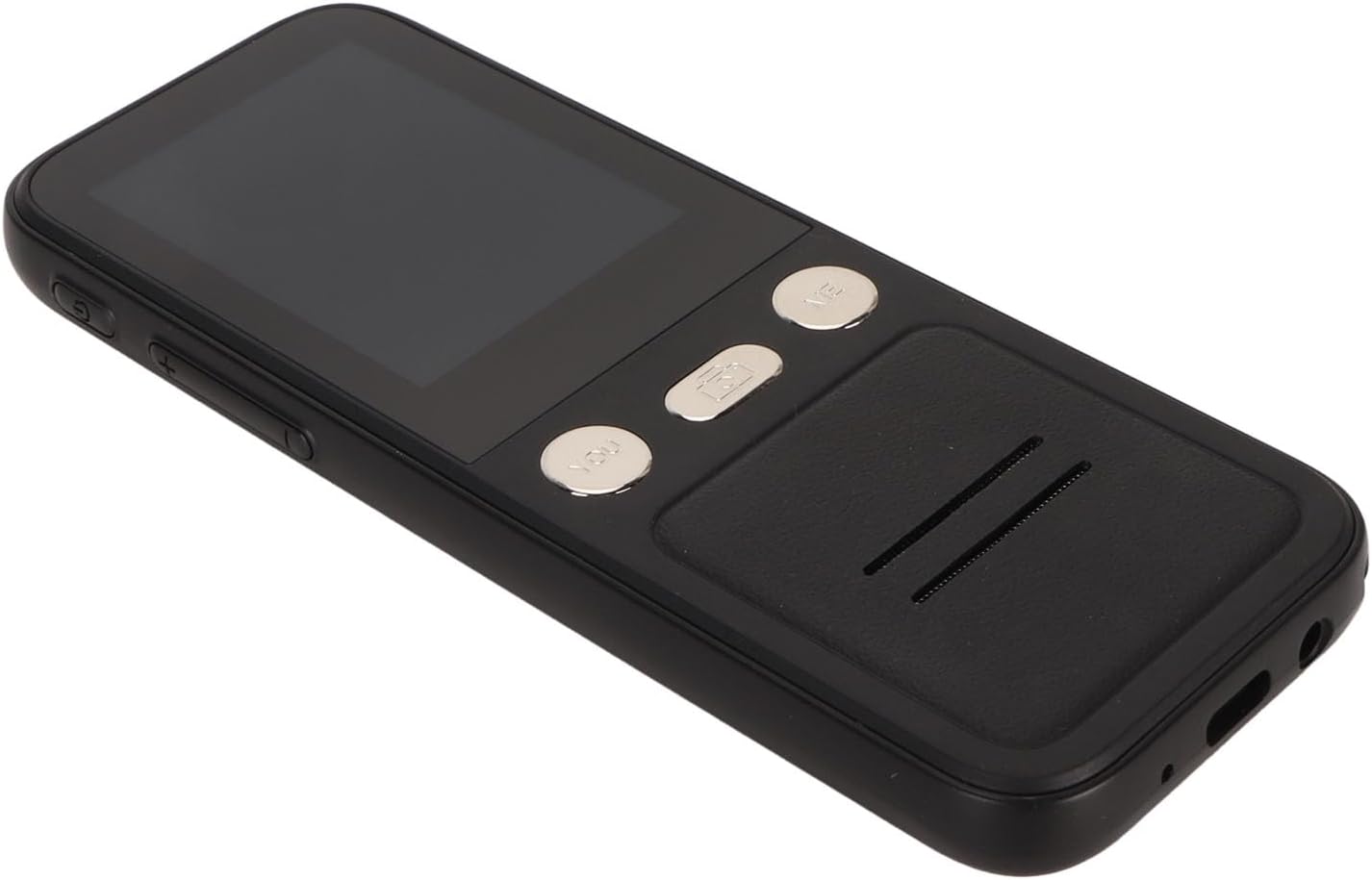
3.2-сүрөт: Каптал View
This image displays the side of the translator, highlighting the power button and volume control buttons located on the left side of the device.

3.3-сүрөт: Алдыңкы жана арткы View
This image presents both the front and back of the translator. The back shows the "SMART CAMERA" lens and text indicating "charge Type-c USB=1.0Amax", along with compliance markings.

Figure 3.4: Bottom Ports
Жакын план view of the bottom of the device, showing the USB Type-C charging port and a 3.5mm headphone jack.
3.1. Аппараттын компоненттери
- 2.4 дюймдук сенсордук экран: For navigation and displaying translations.
- "YOU" Button: Press and hold to speak your language for translation.
- "ME" Button: Press and hold for the other person to speak their language for translation.
- Камера баскычы: Activates the 5MP camera for photo translation.
- Кубат баскычы: Аппаратты күйгүзөт/өчүрүп, экранды кулпулайт/кулпусун ачат.
- Үн баскычтары: Аудио чыгаруунун үнүн тууралайт.
- Баяндамачы: Которулган аудиону чыгарат.
- Микрофон: Captures speech for translation.
- USB Type-C порту: Аппаратты заряддоо үчүн.
- 3.5 мм гарнитура уячасы: For private listening of translations.
4. Орнотуу
4.1. Аппаратты заряддоо
Before first use, fully charge your translator. A full charge typically takes approximately 2-3 hours.
- Connect the provided USB Type-C cable to the charging port at the bottom of the device.
- USB кабелинин экинчи учун туура келген USB кубат адаптерине (кошумча эмес) же компьютердин USB портуна туташтырыңыз.
- Экрандагы заряддоо индикатору заряддоо абалын көрсөтөт.

Figure 4.1: Device and Charging Cable
This image shows the RASTKY Smart Voice Translator alongside its USB Type-C charging cable, illustrating the components included for charging.
4.2. Күйгүзүү / Өчүрүү
- Күйгүзүү үчүн: Press and hold the Power button (located on the side) for approximately 3 seconds until the screen lights up.
- Өчүрүү үчүн: Press and hold the Power button for approximately 3 seconds. A power-off menu will appear on the screen. Select "Power Off" to shut down the device.
- Экранды кулпулоо/кулпусун ачуу: Экранды кулпулоо же кулпусун ачуу үчүн Кубат баскычын кыскача басыңыз.
4.3. Баштапкы орнотуу жана Wi-Fi туташуусу
Upon first power-on, you may be prompted to select your preferred language and connect to a Wi-Fi network. A Wi-Fi connection is recommended for the most accurate and comprehensive translation services, including access to 112 online languages.
- Follow the on-screen prompts to select your system language.
- багыттоо Орнотуулар > Wi-Fi.
- Select your desired Wi-Fi network from the list and enter the password if required.
- Туташкандан кийин, абал тилкесинде Wi-Fi сөлөкөтү пайда болот.
5. Иштөө нускамалары
5.1. Online Voice Translation (112 Languages)
This mode provides the highest accuracy and widest range of languages.
- Түзмөктүн Wi-Fi тармагына туташканын текшериңиз.
- On the main translation screen, select the source language (your language) and the target language (the language you want to translate to) by tapping on the language names at the top of the screen.
- Өз тилиңизде сүйлөө үчүн, баскычын басып кармап туруңуз "YOU" button (left button). Speak clearly into the microphone. Release the button when you finish speaking.
- The device will display and speak the translation in the target language.
- To have the other person speak, press and hold the "ME" button (right button). They should speak clearly into the microphone. Release the button when they finish speaking.
- The device will display and speak the translation in your language.
5.2. Offline Voice Translation (10 Languages)
The device supports 10 default offline languages. Additional offline language packs can be downloaded via Wi-Fi for use without an internet connection.
- Default Offline Languages: Simplified Chinese, Traditional Chinese, English, German, Spanish, French, Japanese, Korean, Russian, and Thai.
- To Download More Offline Languages: Connect to Wi-Fi, navigate to Орнотуулар > Оффлайн котормо, and select the language packs you wish to download.
- Once downloaded, the offline translation process is similar to online translation, using the "YOU" and "ME" buttons.
5.3. Photo Translation (43 Languages)
The 5MP camera allows you to translate text from images, such as signs, menus, or documents.
- Ensure the device is connected to Wi-Fi for optimal photo translation accuracy.
- басыңыз Камера баскычы on the device's front panel or select the Photo Translation option from the main menu on the screen.
- Камераны которгуңуз келген текстке багыттаңыз. Тексттин жакшы жарыктандырылганын жана кадрдын ичинде даана экенин текшериңиз.
- Tap the capture button on the screen to take a photo.
- The device will process the image and display the translated text on the screen. You can select the source and target languages for photo translation.
5.4. Тил тандоо
To change the translation languages:
- On the main translation screen, tap on the language displayed for "YOU" (your language) to open the language list. Select your desired language.
- Tap on the language displayed for "ME" (the other person's language) to open the language list. Select their desired language.
- For photo translation, language selection options will appear within the photo translation interface.
6. Техникалык тейлөө
Proper care will extend the life of your RASTKY Smart Voice Translator.
- Тазалоо: Use a soft, dry, lint-free cloth to clean the device. For stubborn smudges on the screen, slightly dampen the cloth with water or a screen cleaner. Do not use harsh chemicals or abrasive materials.
- Сактагыч: Түзмөктү узак убакыт бою колдонбогон учурда, аны салкын, кургак жерде, күндүн түз нурунан жана өтө жогорку температурадан алыс сактаңыз.
- Батареяга кам көрүү: Батареянын иштөө мөөнөтүн сактоо үчүн, батареянын тез-тез толук зарядын жоготуп албаңыз. Түзмөктү үзгүлтүксүз кубаттап туруңуз, ал тургай тынымсыз колдонулбаса да.
7. Кыйынчылыктарды
If you encounter issues with your translator, refer to the following common problems and solutions.
| Көйгөй | Мүмкүн себеп | Чечим |
|---|---|---|
| Түзмөк күйбөйт. | Батареянын аздыгы; аппарат катып калган. | Charge the device for at least 30 minutes. If still unresponsive, press and hold the Power button for 10-15 seconds to force a restart. |
| Котормо туура эмес же жай. | Poor Wi-Fi connection; unclear speech; incorrect language selection. | Ensure a stable Wi-Fi connection. Speak clearly and at a moderate pace. Verify that the correct source and target languages are selected. |
| Сүрөттөрдү которуу иштебей жатат. | Poor lighting; blurry image; text not recognized. | Ensure adequate lighting. Hold the device steady to avoid blur. Make sure the text is within the camera frame and clearly legible. |
| Динамиктен үн жок. | Үнү өтө төмөн; динамик жабык. | Increase the volume using the volume buttons. Check if anything is blocking the speaker grille. |
| Wi-Fi'га туташпай жатат. | Туура эмес сырсөз; диапазондон тышкары; тармак маселеси. | Double-check the Wi-Fi password. Move closer to the Wi-Fi router. Restart your router and the translator. |
8. Техникалык шарттар
Technical specifications for the RASTKY Smart Voice Translator.
- Модел: RASTKYxhm9bnta1g
- Экрандын өлчөмү: 2.4 дюймдук сенсордук экран
- Чечим: 240 x 320
- Батарея сыйымдуулугу: 1500 мАч (орнотулган)
- Үзгүлтүксүз ойнотуу: 6 саат же андан көп
- RAM: 1 ГБ
- ROM: 8 ГБ
- Камера: 5MP Pixels
- Тармак ыкмасы: WIFI Networking
- Маалымат интерфейси: Type C Interface
- Кепти таануу: For Google SR
- Translation Engine: For Google, for iFlytek
- Online Supported Languages: 112
- Offline Supported Languages: 10 (Simplified Chinese, Traditional Chinese, English, German, Spanish, French, Japanese, Korean, Russian, Thai)
- Photo Translation Languages: 43
- Өлчөмдөрү: Болжол менен 6.69 x 3.15 x 1.57 дюйм
- Салмагы: Болжол менен 8 унция
9. Кепилдик жана колдоо
RASTKY products are manufactured to the highest quality standards. For warranty information and customer support, please refer to the warranty card included with your purchase or visit the official RASTKY website. Please have your model number (RASTKYxhm9bnta1g) and purchase details ready when contacting support.
Көбүрөөк жардам алуу үчүн, сиз өзүңүздүн сатуучуңузга кайрылсаңыз болот.
Ask a question about this manual
Ask about setup, troubleshooting, compatibility, parts, safety, or missing instructions. Manuals+ will review the question and use this page’s manual context to help answer it.