
1. Киришүү
The FREEWOLF M75 is a versatile 75% layout wireless gaming keyboard designed for various operating systems and devices. It features dual-mode connectivity (Bluetooth and 2.4GHz wireless), a multi-functional knob, an OLED display, and gradient PBT keycaps. This manual provides detailed instructions for setting up, operating, and maintaining your M75 keyboard.
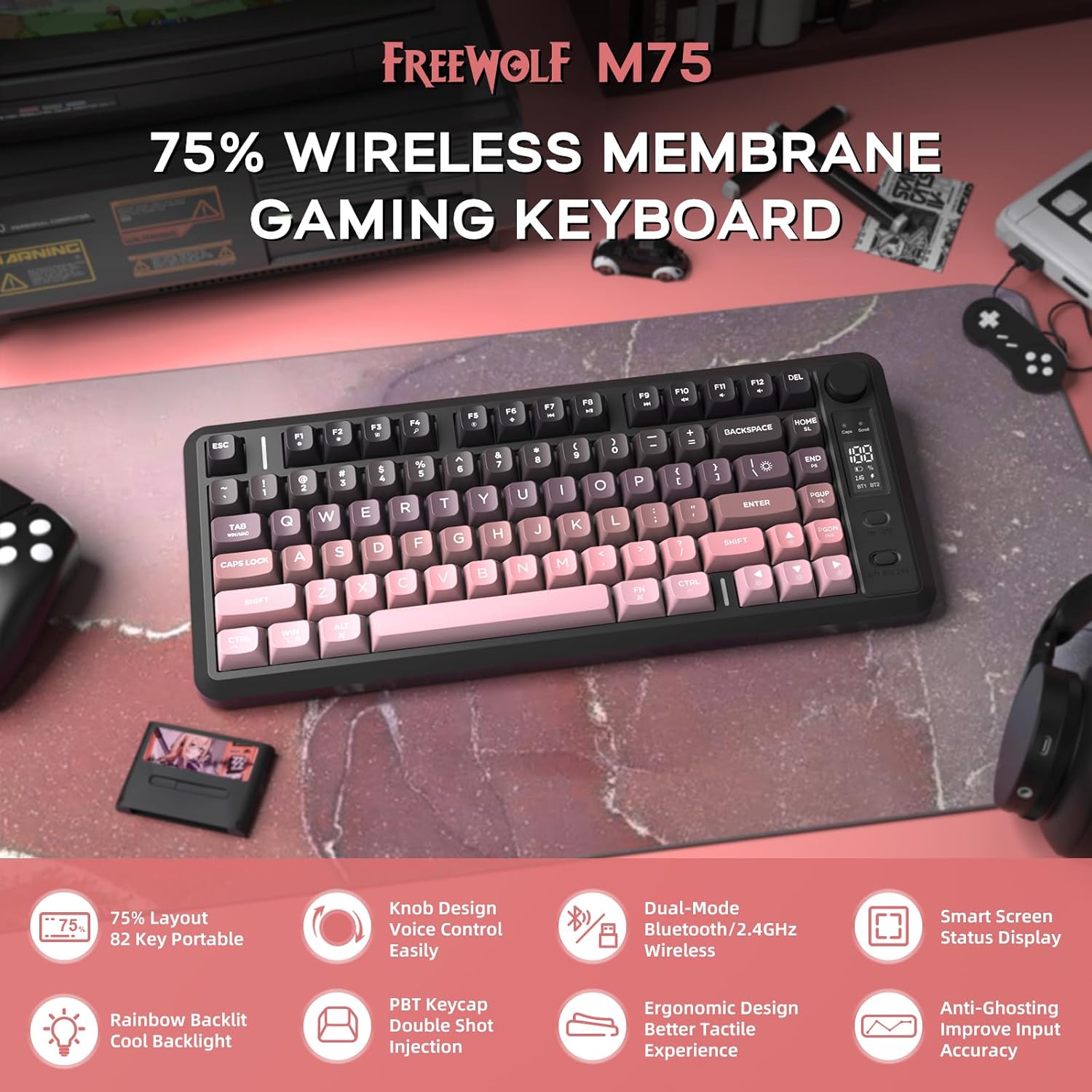
Сүрөт 1: Бүттүview of the FREEWOLF M75 Wireless Gaming Keyboard.
2. Пакеттин мазмуну
Сураныч, пакетте төмөнкү нерселерди текшериңиз:
- M75 Keyboard x 1
- USB-C кабели x 1
- 2.4GHz Receiver x 1
- Колдонуучунун колдонмосу x 1
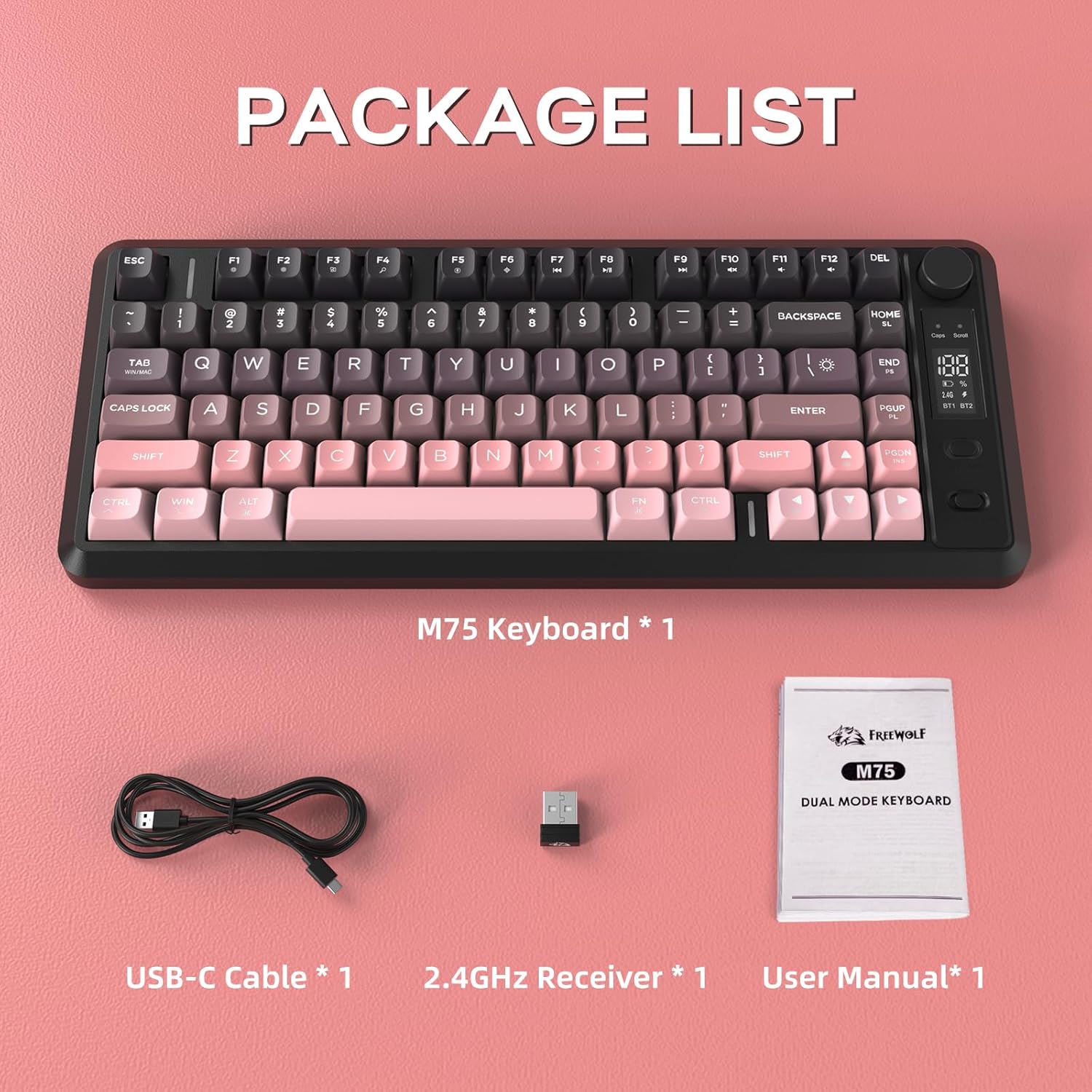
Image 2: Contents included in the FREEWOLF M75 keyboard package.
3. Техникалык шарттар
| Модел | M75 |
| Макет | 75% (82-Key Compact Layout) |
| Байланыш | Bluetooth 5.1/5.2, 2.4 ГГц зымсыз байланыш |
| Баскыч капкактары | Gradient PBT Double-Shot |
| Арткы жарык | Rainbow Backlit |
| Батарея сыйымдуулугу | 2000mAh |
| Anti-Ghosting | 26-Кайрылуу |
| Шайкеш түзмөктөр | Laptop, PC, Tablet (Windows, macOS, Linux) |
| Өзгөчөлүктөр | OLED Display, Multi-functional Knob, Ergonomic Design |

Image 3: The 75% compact layout and 26-key anti-ghosting feature of the M75 keyboard.
4. Орнотуу
4.1 Баскычтопту заряддоо
Before first use, or when the OLED display indicates low battery, connect the keyboard to a power source using the provided USB-C cable. The OLED display will show the charging status.

Image 4: The M75 keyboard features a 2000mAh rechargeable battery.
4.2 Баскычтопту туташтыруу
The M75 keyboard supports two wireless connection modes:
- 2.4 ГГц зымсыз режими:
- Insert the 2.4GHz USB receiver into an available USB port on your computer or device.
- Turn on the keyboard. The keyboard should automatically connect. The OLED display will indicate the 2.4G connection status.
- Bluetooth режими (BT1/BT2):
- Баскычтопту күйгүзүңүз.
- Press the dedicated Bluetooth button (usually marked BT1 or BT2) to select a Bluetooth channel.
- Түзмөгүңүздө (компьютер, ноутбук, планшет) Bluetooth иштетип, жаңы түзмөктөрдү издеңиз.
- Select "FREEWOLF M75" from the list of available devices to pair. The OLED display will show the Bluetooth connection status.
- To switch between paired Bluetooth devices, press the corresponding BT1 or BT2 button.
The keyboard is compatible with Windows PC, MacBook, and Linux systems. For gaming consoles like Switch, Xbox, or PlayStation, an adapter may be required for connectivity.

Image 5: The M75 keyboard supports both 2.4GHz wireless and Bluetooth modes for multi-device compatibility.
5. Иштөө нускамалары
5.1 Multi-functional Knob and OLED Display
The M75 keyboard features a multi-functional knob and an OLED display for enhanced control and information.
- Баскыч функциялары:
- Press the knob: Play/Pause media.
- Rotate right: Increase volume.
- Rotate left: Decrease volume.
- Press and hold the knob for 5 seconds: Adjust backlight settings.
- OLED дисплей: Shows real-time information including battery level, current connection mode (2.4G, BT1, BT2), charging status, and low battery warnings.
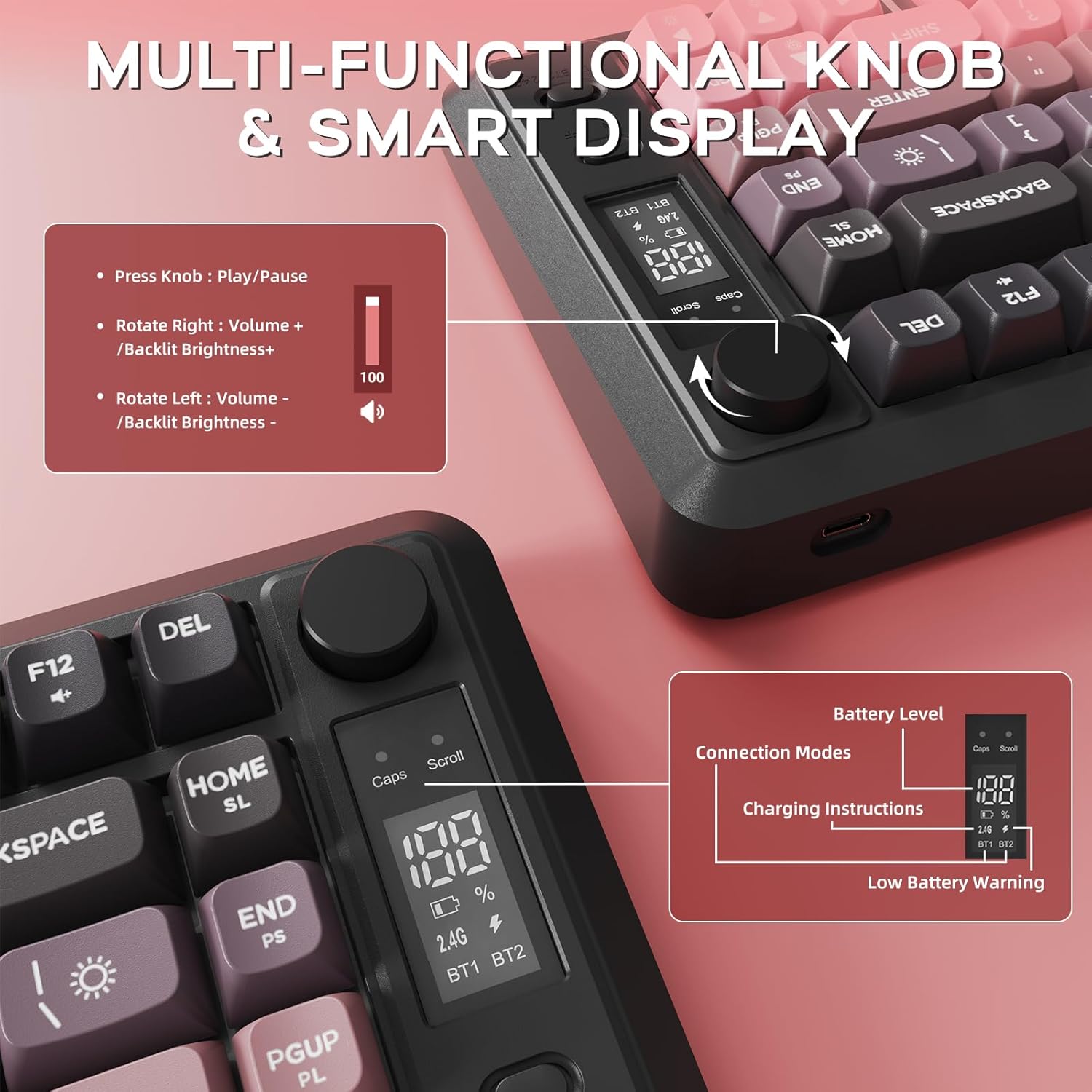
Сүрөт 6: Детальдуу view of the multi-functional knob and OLED display on the M75 keyboard.
5.2 Жарыкты башкаруу
The M75 keyboard features a rainbow backlight. Note that the keycaps themselves are opaque, meaning the light illuminates around and beneath the keys, not through the legends.
- Жарык режимдерин которуштуруу: Басыңыз Fn + I ар кандай арткы жарык режимдери аркылуу айлануу үчүн.
- Жарыктыкты жөндөө: Басыңыз Fn + ↑ (Жогору жебе) жарыктыкты жогорулатуу үчүн жана Fn + ↓ (Төмөн жебе) жарыкты азайтуу үчүн.
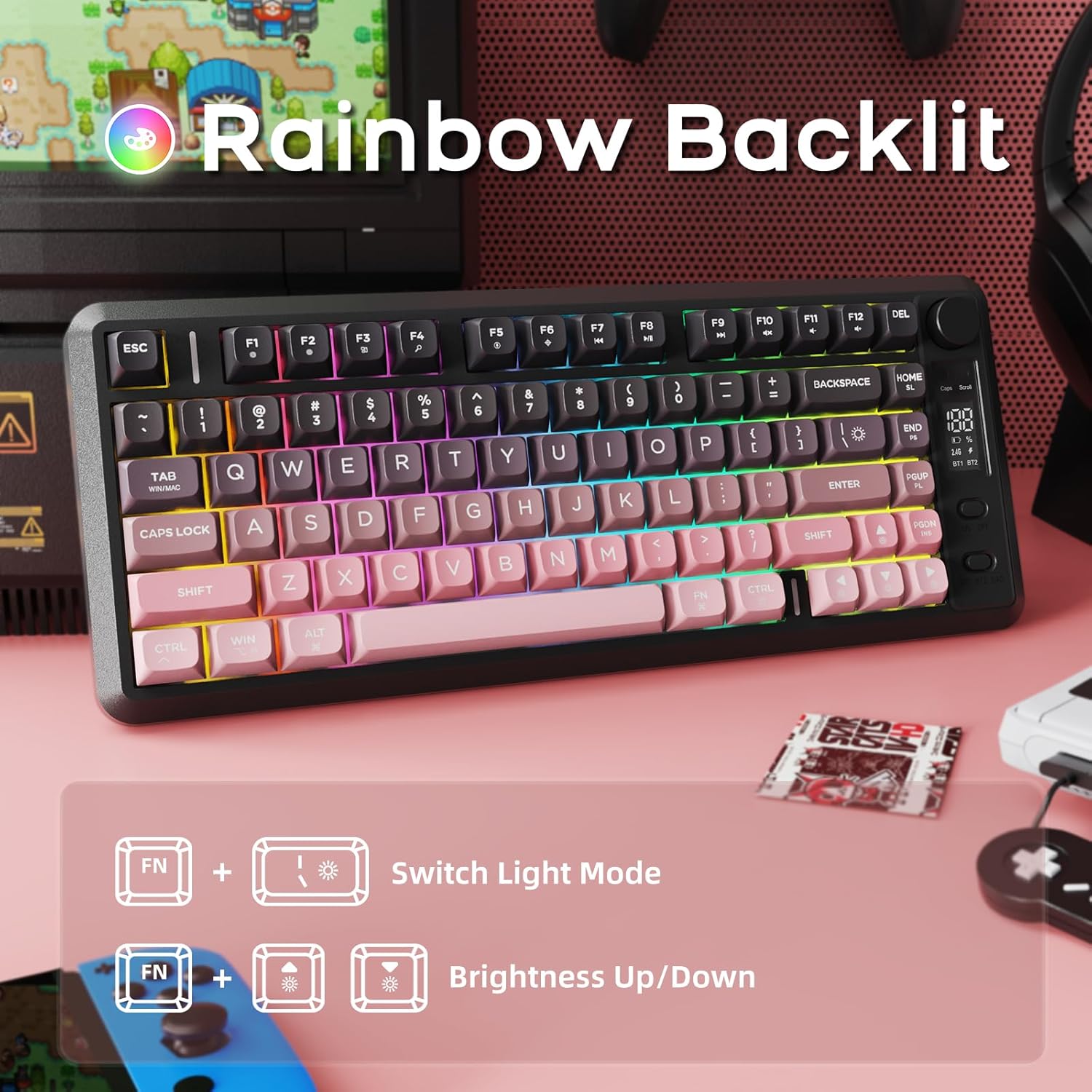
Image 7: The M75 keyboard features a vibrant rainbow backlight.
5.3 Арбактарга каршы
The keyboard is equipped with 26-key rollover technology, ensuring that multiple key presses are registered accurately and simultaneously. This prevents 'ghosting' or missed inputs during fast typing or complex gaming commands.
6. Техникалык тейлөө
6.1 Баскычтопту тазалоо
- Тазалоодон мурун клавиатураны бардык түзмөктөрдөн ажыратыңыз.
- Баскычтоптун бетин сүртүү үчүн жумшак, кургак чүпүрөктү колдонуңуз.
- өжөр кир үчүн, жеңил гampчүпүрөктү суу же жумшак тазалоо эритмеси менен жууп салыңыз. Ашыкча нымдуулуктан сактаныңыз.
- Баскыч капкактарынын ортосундагы чаңды жана калдыктарды тазалоо үчүн кысылган абаны колдонуңуз.
6.2 PBT Keycaps Care
The M75 keyboard features durable double-shot PBT keycaps, which are resistant to oils, fading, and yellowing. Regular cleaning as described above will help maintain their appearance and longevity.

Image 8: The M75 keyboard is equipped with durable double-shot PBT keycaps.
6.3 Батареяга кам көрүү
- Клавиатураны экстремалдык температурага тийгизүүдөн сактаңыз.
- Charge the keyboard regularly to maintain battery health, especially if it will not be used for an extended period.
7. Кыйынчылыктарды
- Баскычтоп туташпай жатат:
- Баскычтоп күйгүзүлгөнүн текшериңиз.
- Check the battery level on the OLED display and charge if necessary.
- For 2.4GHz mode, ensure the USB receiver is securely plugged in.
- For Bluetooth mode, ensure Bluetooth is enabled on your device and the correct channel (BT1/BT2) is selected on the keyboard. Try re-pairing the device.
- Try connecting the keyboard via USB-C cable to check if it functions in wired mode.
- Ачкычтар жооп бербейт:
- Баскычтоптун капкактарынын астындагы таштандыларды текшериңиз.
- Клавиатура туура туташтырылганын текшериңиз.
- Компьютериңизди/түзмөгүңүздү өчүрүп күйгүзүңүз.
- Арткы жарык иштебейт же күңүрт:
- жардамы менен жарыктыгын тууралаңыз Fn + ↑/↓.
- Батареянын жетиштүү заряды бар экенин текшериңиз.
- OLED display not showing information:
- Баскычтоп күйгүзүлгөнүн текшериңиз.
- Батареянын деңгээлин текшериңиз.
8. Кепилдик жана колдоо
For warranty information and technical support, please refer to the documentation provided with your purchase or contact FREEWOLF customer service through their official webпродукт сатылып алынган сайт же сатуучу.