Продукт бүттүview
The Twotrees TS2-40 Max is a high-power laser engraver and cutter machine designed for precision and versatility. Featuring a 40W laser module, it is capable of engraving and cutting a wide range of materials including wood, acrylic, glass, metal, and more. Its large working area of 35.43" x 17.72" (900mm x 450mm) accommodates diverse creative and industrial projects. The machine incorporates advanced LD+FAC+C lens technology for ultra-fine compression, achieving an engraving accuracy of 0.01mm and a maximum engraving speed of 6000mm/min.
Key features include a one-click power shift between 20W and 40W, multiple safety protection devices such as flame detection, tilt protection, and a safety cover for UV filtration, and an emergency stop button. It supports various operation methods including APP, offline, and online control, and is compatible with MacOS and Windows systems. The TS2-40 Max is engineered for ease of use, offering automatic laser lift and touch auto-focus functions.

Image: The Twotrees TS2-40 Max laser engraver, showcasing its large bed size and the laser module. Various finished products like engraved wood, a scorpion model, and customized drinkware are displayed in the foreground, illustrating the machine's versatility.

Image: A visual comparison highlighting the significantly larger engraving area of the TS2-40 Max (17.72" x 35.43" or 450x900mm) compared to typical smaller engravers (15.75" x 15.75" or 400x400mm), indicating a 153.1% increase in size.
Орнотуу колдонмосу
1. Таңгактан чыгаруу жана текшерүү
Carefully unpack all components from the packaging. Verify that all parts listed in the packing list are present and undamaged. Report any missing or damaged parts to customer support immediately.
2. Ассамблея
Follow the detailed assembly instructions provided in the separate assembly manual. Key steps typically include:
- Assemble the main frame components, ensuring all screws are securely tightened.
- Install the X and Y axis belts. Ensure proper tensioning using the belt tension adjustment mechanism.
- Лазер модулун порталга орнотуңуз.
- Connect all necessary cables, utilizing the shifting chains for organized cable management.
- Ensure the Y-axis motors are independently secured for stability and synchronization.
3. Программалык камсыздоону орнотуу
The TS2-40 Max supports popular laser engraving software such as LaserGRBL (for Windows) and LightBurn (common for both MacOS and Windows). Download and install the recommended software from the official Twotrees website or the software provider's webсайт.
- Install the necessary drivers for your operating system (MacOS/Windows).
- Connect the machine to your computer via USB, or configure Wi-Fi connectivity if available.

Image: The laser engraver connected to a desktop computer running LightBurn software, a laptop, and mobile devices, illustrating its multi-platform compatibility and various control options (WiFi, TF card, USB).
4. Initial Calibration and Focus
Before first use, perform initial calibration and focus adjustments:
- Place a test material on the working bed.
- Utilize the automatic laser lift module to adjust the laser distance.
- Engage the laser touch auto-focus function for precise focal length setting.
Иштөө нускамалары
1. Күйгүзүү/өчүрүү
Connect the power adapter to the machine and a suitable power outlet. Press the main power button to turn on the machine. The emergency stop button is prominently located for immediate power cut-off in case of an emergency.
2. Материалды даярдоо
Ensure the material to be engraved or cut is clean, flat, and securely placed on the honeycomb working bed. The TS2-40 Max can process a wide variety of materials, including:
- Wood (plywood, bamboo)
- Acrylic (black, clear)
- Glass (blackened surface required for engraving)
- Metal (stainless steel)
- Ceramic, Stone, Food, Plastic, Leather, Cardboard
- Round objects (requires additional roller accessory, sold separately)

Image: A collage of various items demonstrating the machine's capability to engrave and cut different materials, including a wooden model, phone cases, tumblers, a dog tag, glass cups, and a decorative wooden gnome.
3. Лазердик кубаттуулукту жөндөө
The TS2-40 Max features a one-click power shift function, allowing seamless switching between 20W and 40W laser power. Select the appropriate power setting based on the material type and desired engraving/cutting depth.

Image: A close-up of the laser module showing a switch for one-click power shifting between 20W and 40W, indicating the machine's dual power capability.
4. Engraving/Cutting Process
- Дизайнды даярдоо: Create or import your design in the chosen software (e.g., LightBurn).
- Параметр орнотуулары: Adjust engraving/cutting parameters such as speed, power, and passes according to the material and desired outcome. Refer to material test guides for optimal settings.
- Позициялоо: Use the software to position your design on the virtual workspace, aligning it with the physical material on the machine bed.
- Ишти баштоо: Initiate the engraving or cutting process from the software interface. The machine will begin executing the design.

Image: Demonstrates the cutting power of the 40W laser head, showing clean cuts through 20mm thick plywood, 12mm thick black acrylic, and 0.1mm thick stainless steel in a single pass.
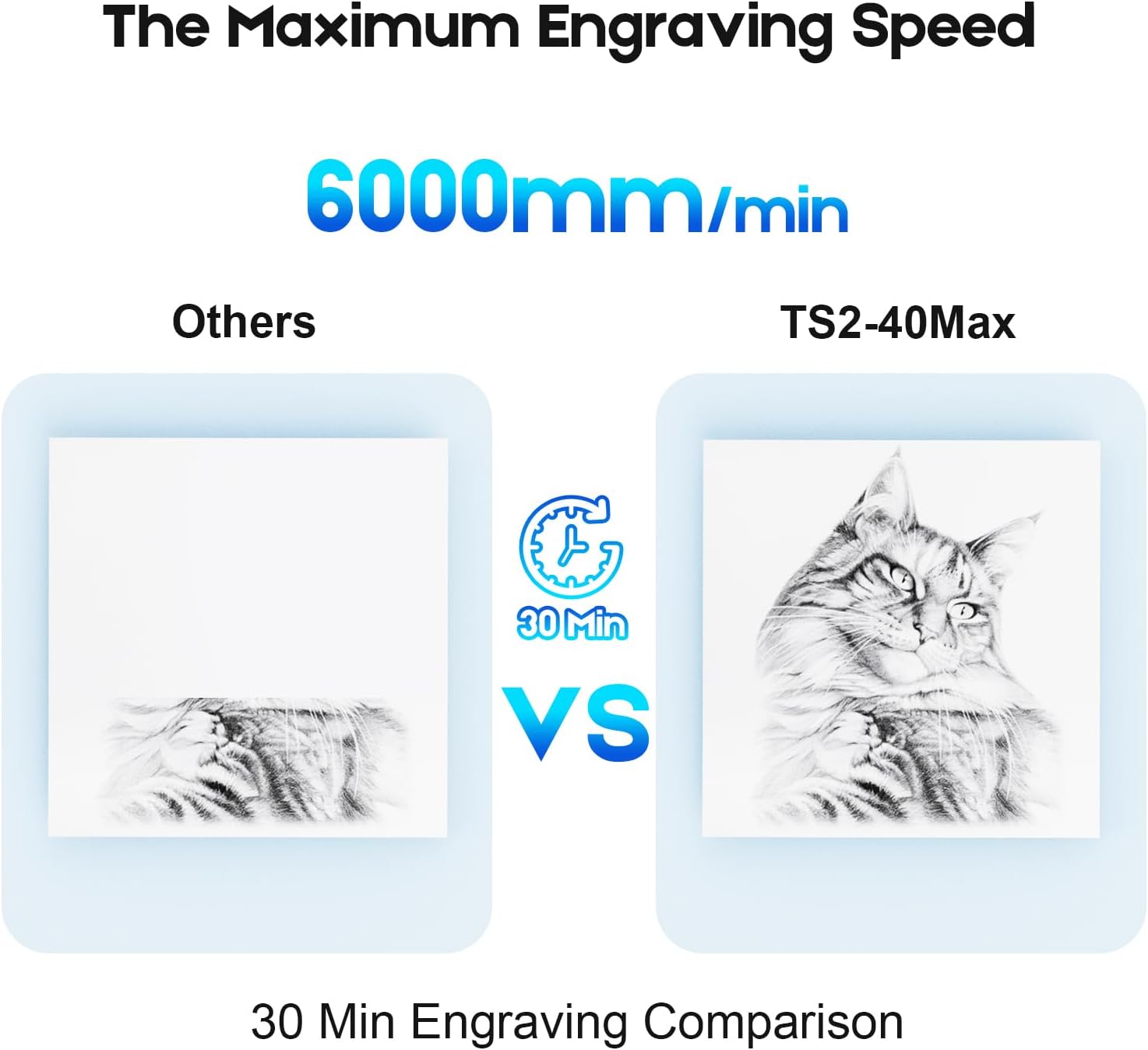
Image: A visual comparison showing the engraving speed, with the TS2-40 Max completing a detailed cat engraving in 30 minutes, significantly faster than other machines for the same task, highlighting its 6000mm/min maximum engraving speed.
5. Safety Precautions During Operation
Always prioritize safety when operating the laser engraver:
- Көздү коргоо: Always wear the provided safety goggles to protect your eyes from laser radiation. The laser safety cover filters 97% of UV rays.
- Жалынды аныктоо: The machine is equipped with a flame detection alarm system. If a flame is detected, the machine will alarm and stop operation.
- Trigger Protection: If the machine measures trigger protection within 10 seconds of running, the laser light will stop to prevent burning objects.
- Tilt/Drop Protection: If the machine tilts, turns over, or drops more than 15 degrees, the laser head will automatically stop to prevent accidents.
- Вентиляция: Ensure adequate ventilation in your workspace to dissipate fumes and smoke generated during engraving/cutting.
- Көзөмөл: Иш учурунда машинаны эч качан кароосуз калтырбаңыз.
Техникалык тейлөө
Regular maintenance ensures optimal performance and extends the lifespan of your Twotrees TS2-40 Max.
1. Лазердик линзаны тазалоо
Periodically inspect and clean the laser lens to ensure clear laser beam transmission. Use a lint-free cloth and a specialized lens cleaning solution. Avoid abrasive materials that could scratch the lens.
2. Belt Tension Adjustment
The X/Y axes are equipped with belt tension mechanisms. Over time, belts may stretch or loosen. Check belt tension regularly and adjust as needed to maintain engraving accuracy and smooth movement. Belts should be taut but not overly tight.
3. Жалпы тазалоо
Keep the machine free from dust, debris, and material residue. Use a soft brush or compressed air to clean the rails, motors, and working bed. Accumulated debris can affect machine movement and performance.
Проблемаларды чечүү
This section addresses common issues you might encounter with your TS2-40 Max laser engraver.
1. Laser Not Firing or Weak Output
- Күчтү текшерүү: Ensure the machine is powered on and connected correctly.
- Линзанын тазалыгы: A dirty laser lens can significantly reduce output. Clean the lens as described in the Maintenance section.
- Фокус: Incorrect focus will result in weak or no engraving. Re-focus the laser using the auto-focus function.
- Программалык камсыздоонун жөндөөлөрү: Verify that laser power settings in your software are appropriate for the material.
2. Engraving/Cutting Inaccuracy or Skipping
- Кур чыңалуу: Loose X or Y axis belts can cause inaccurate movement. Adjust belt tension.
- Material Secureness: Ensure the material is firmly secured and does not shift during operation.
- Машинанын туруктуулугу: The machine should be placed on a stable, level surface.
- Программалык камсыздоо/Драйвер маселелери: Ensure your software and drivers are up to date.
3. Machine Not Connecting to Computer/App
- USB туташуу: Башка USB портун же кабелин колдонуп көрүңүз.
- Wi-Fi/Тармак: Verify network settings and ensure the machine and device are on the same network.
- Айдоочулар: Керектүү драйверлерди кайра орнотуңуз же жаңыртыңыз.
- Программалык камсыздоо: Restart the engraving software and the machine.
4. Safety Alarm Triggered
- Жалынды аныктоо: Check for any signs of fire or excessive smoke. Immediately stop operation and address the cause.
- Tilt/Drop Sensor: Ensure the machine is stable and has not been moved or tilted beyond its operational limits.
- Шашылыш токтотуу: If the emergency button was pressed, reset it before attempting to restart.
Техникалык шарттар
| Өзгөчөлүк | Деталь |
|---|
| Модель № | TS2-40 Max |
| Түс | Кара & Кызыл |
| Машина материалы | Sheet Metal + Aluminium Profile + Acrylic |
| Продукттун таза салмагы | 7.6 кг |
| Дүң салмак | 11.0 кг |
| Packaging Dimensions | 1255 x 321 x 220 мм |
| Продукциянын өлчөмдөрү | 735 x 1230 x 190 мм (28.94 x 48.43 x 7.48 дюйм) |
| Иштөө диапазону | 450 x 900 мм (17.7" x 35.4") |
| Программалоо программасы | LaserGRBL (Windows), Lightburn (Common), etc. |
| X/Y-axis Positioning Accuracy | 0.1мм |
| Гравюра тактыгы | 0.01мм |
| Максималдуу оюу ылдамдыгы | 6000мм/мин |
| Максималдуу ылдамдатуу | 1000мм/с² |
| Колдоого алынган системалар | MacOS / Windows |
| Программалык камсыздоо тилдери | Chinese/English/Italian/French/German |
| TF Memory Card / USB Port | Колдоого алынган |
Кепилдик жана колдоо
Кепилдик маалымат
Specific warranty terms and conditions for the Twotrees TS2-40 Max laser engraver are provided by the manufacturer, Shenzhen TwoTrees Technology Co., Ltd., or the authorized seller at the time of purchase. Please refer to your purchase documentation or contact the seller directly for detailed warranty coverage, duration, and claim procedures.
Кардарларды колдоо
For technical assistance, troubleshooting, or any inquiries regarding your Twotrees TS2-40 Max, please contact Twotrees customer support. Contact information can typically be found on the official Twotrees webсайт же сатып алуу платформасы аркылуу.
Өндүрүүчү: Shenzhen TwoTrees Technology Co., Ltd.
Онлайн ресурстар: Visit the official Twotrees website for FAQs, software downloads, and additional resources.
