
Twotrees TTS-20 Max
Twotrees TTS-20 Max 20W Laser Engraver and Cutter Machine User Manual
Model: TTS-20 Max
1. Коопсуздук боюнча маанилүү маалымат
Operating a laser engraver involves potential hazards. Please read and understand all safety instructions before operating the Twotrees TTS-20 Max. Failure to follow these instructions may result in injury, property damage, or poor performance.
- Көздү коргоо: Always wear appropriate laser safety goggles (OD4+ for 450nm blue laser) when the laser is active. Never look directly at the laser beam or its reflection.
- Вентиляция: Operate the machine in a well-ventilated area to dissipate fumes and smoke produced during engraving and cutting. Consider using an exhaust fan or air purifier.
- Өрт коркунучу: Laser engraving and cutting can ignite flammable materials. Keep a fire extinguisher nearby and never leave the machine unattended during operation.
- Материалдык шайкештик: Only engrave or cut materials suitable for laser processing. Avoid PVC, vinyl, or other materials that produce toxic fumes when burned.
- Балдар жана үй жаныбарлары: Иш учурунда балдарды жана үй жаныбарларын машинадан алыс кармаңыз.
- Электр коопсуздугу: Ensure the machine is properly grounded and connected to a stable power supply. Do not operate with wet hands or in damp шарттар.
- Шашылыш токтотуу: Авариялык токтотуу баскычынын жайгашкан жери жана иштеши менен таанышыңыз.
2. Продукт бүтүп калдыview
The Twotrees TTS-20 Max is a powerful 20W diode laser engraver and cutter machine designed for a wide range of materials including wood, acrylic, metal, glass, and leather. It features a large 600x600mm working area and high-speed engraving capabilities.

Figure 2.1: The Twotrees TTS-20 Max laser engraver shown with a large engraved wood piece and various sample items like mugs, tumblers, and a wine glass, demonstrating its versatility.
Негизги өзгөчөлүктөрү:
- Powerful 20W Laser Module: Equipped with a 20000mW laser module utilizing FAC lens technology for concentrated beam and higher power density.
- Upgraded Mainboard: Features a high-speed ESP32 smart module with integrated WiFi and Bluetooth for convenient app connectivity.
- Dual Y-axis Stepper Motors: Ensures accurate positioning and smooth engraving lines.
- Кеңири шайкештик: Supports popular engraving software like LaserGRBL, LightBurn, Benbox, GrblController, LiteFire, and various file formats (JPG, PNG, DXF, SVG, G-code, NC, BMP). Compatible with Windows and Mac systems.
- Robust Aluminum Alloy Structure: Durable modular design with a large 600x600mm working area.
- High Engraving Speed: Capable of 500mm/s engraving speed, significantly reducing processing time.
- Ultra-fine Laser Spot: 0.08*0.08mm compressed laser spot for impeccable detail.
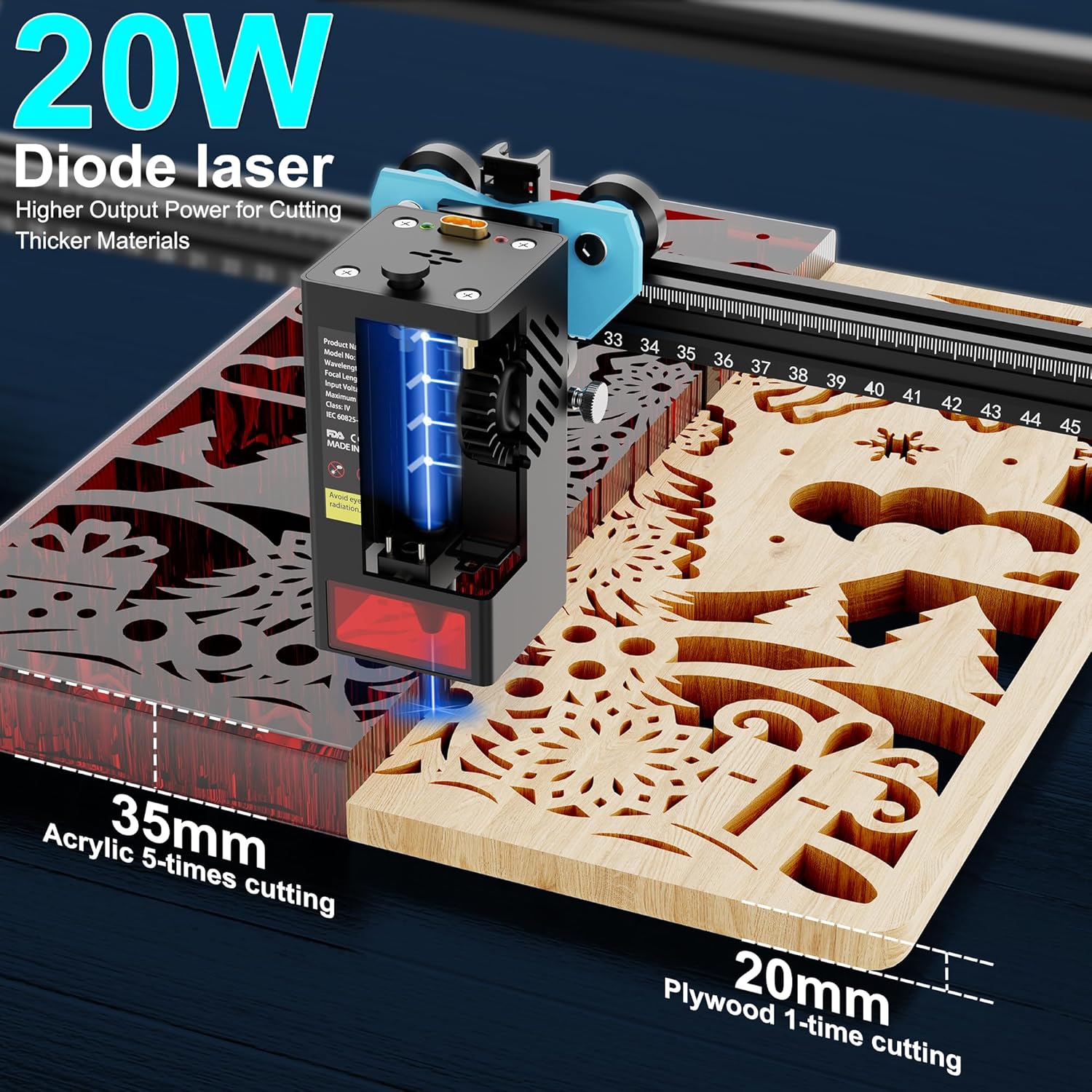
Figure 2.2: The 20W diode laser demonstrating its cutting capability, showing it can cut 35mm acrylic (in 5 passes) and 20mm plywood (in 1 pass).

Figure 2.3: Visual comparison highlighting the TTS-20 Max's smaller 0.130mm laser spot compared to others (0.5mm), and its faster engraving speed (30 min vs. 60 min for a similar task).
3. Орнотуу колдонмосу
3.1 Таңгактан чыгаруу жана текшерүү
- Бардык компоненттерди таңгактан кылдаттык менен алып салыңыз.
- Таңгактоо тизмесинде көрсөтүлгөн бардык тетиктердин бар экенин жана бузулбаганын текшериңиз. Эгерде кандайдыр бир тетиктер жок болсо же бузулган болсо, дароо кардарларды колдоо кызматына кайрылыңыз.
- Түпнуска таңгагын келечекте сактоо же ташуу үчүн сактаңыз.
3.2 Ассамблея
The TTS-20 Max features a modular design for easier assembly. Refer to the included assembly diagram for detailed steps. General steps include:
- Assemble the frame components (X and Y axes).
- Лазер модулун порталга орнотуңуз.
- Connect all necessary cables (power, data).
- Бардык бурамалар бекем бекемделгенин текшериңиз.

Figure 3.1: Illustration comparing the large 600mm x 600mm working area of the TTS-20 Max to a smaller 418mm x 418mm area of other machines, highlighting the increased creative space.
3.3 Программалык камсыздоону орнотуу жана туташтыруу
The TTS-20 Max is compatible with various engraving software. It is recommended to use LaserGRBL (free) or LightBurn (paid, highly recommended for advanced features).
- Download the latest version of your chosen software from its official webсайт.
- Install the software on your Windows or Mac computer.
- Connect the laser engraver to your computer via USB cable or establish a Wi-Fi connection as per software instructions.
- Install any required drivers (often included with the software or available from the manufacturer's webсайт).
- Configure the software settings for the TTS-20 Max, including working area dimensions and laser power settings.
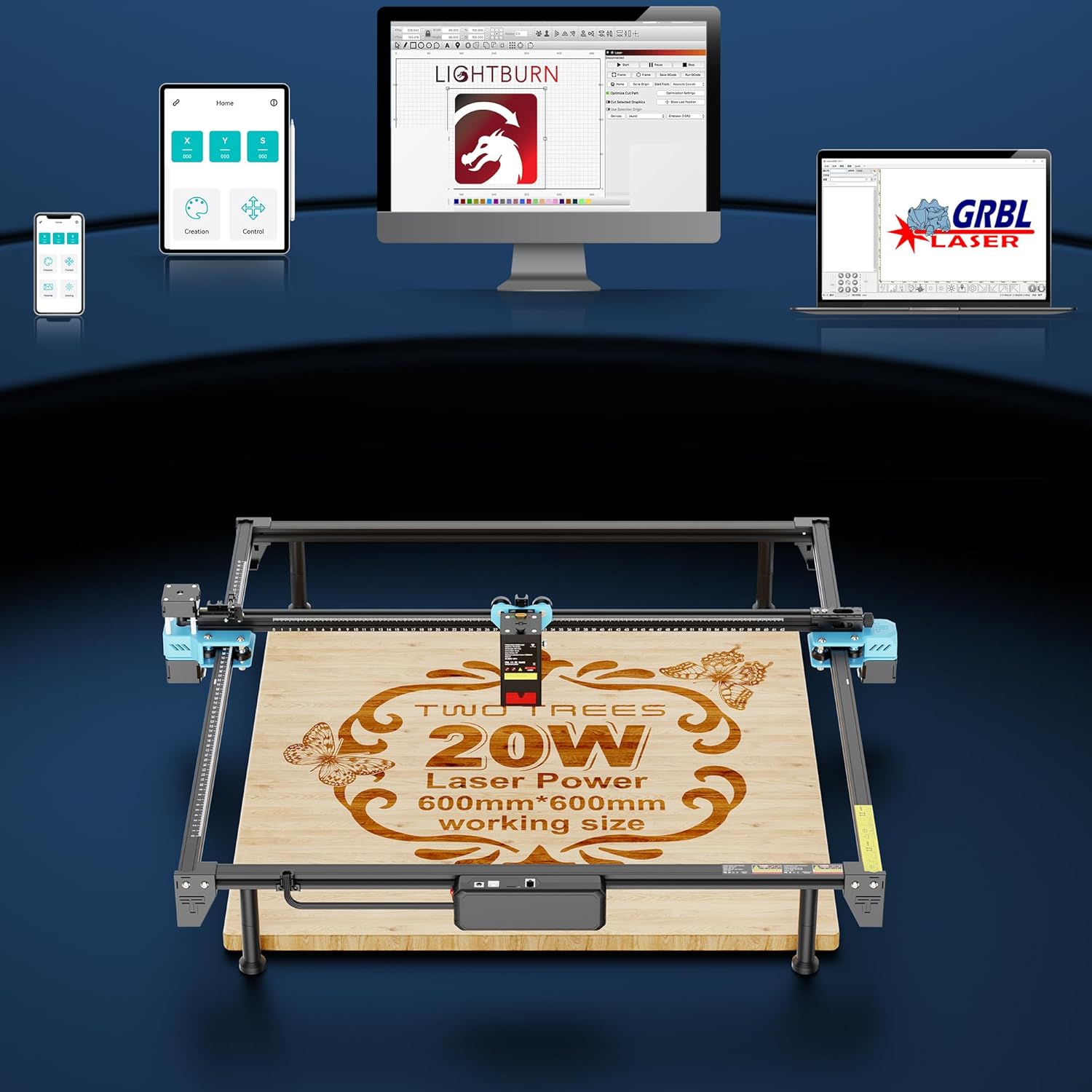
Figure 3.2: The TTS-20 Max supports various control methods including mobile app, tablet, and desktop software like LightBurn and LaserGRBL, offering flexible connectivity options.
4. Иштөө нускамалары
4.1 Материалды даярдоо
- Ensure your material is flat and securely placed on the working bed. Use clampкерек болсо.
- Clean the material surface to remove dust or debris.
- For certain materials (e.g., clear acrylic, glass), a layer of dark paint or masking tape may be required to improve laser absorption.
4.2 Лазерди фокустоо
Proper laser focus is crucial for optimal engraving and cutting results. The TTS-20 Max typically uses a fixed focus or a manual adjustment mechanism. Follow the manufacturer's specific instructions for focusing, which usually involves adjusting the laser module height until the laser spot is at its smallest point on the material surface.
4.3 Программалык камсыздоонун иштеши
- Импорттук дизайн: Open your chosen software and import your design file (e.g., JPG, PNG, SVG, DXF).
- Орнотууларды тууралоо: Set the appropriate laser power, speed, and number of passes based on your material and desired outcome. Refer to material settings guides available online or through experimentation.
- Позициялоо: Position your design on the virtual workspace to match the physical placement of your material. Use the framing function to preview the laser path without firing the laser at full power.
- Гравюраны/кесүүнү баштоо: Once all settings are confirmed and safety precautions are in place, initiate the engraving or cutting process from the software.
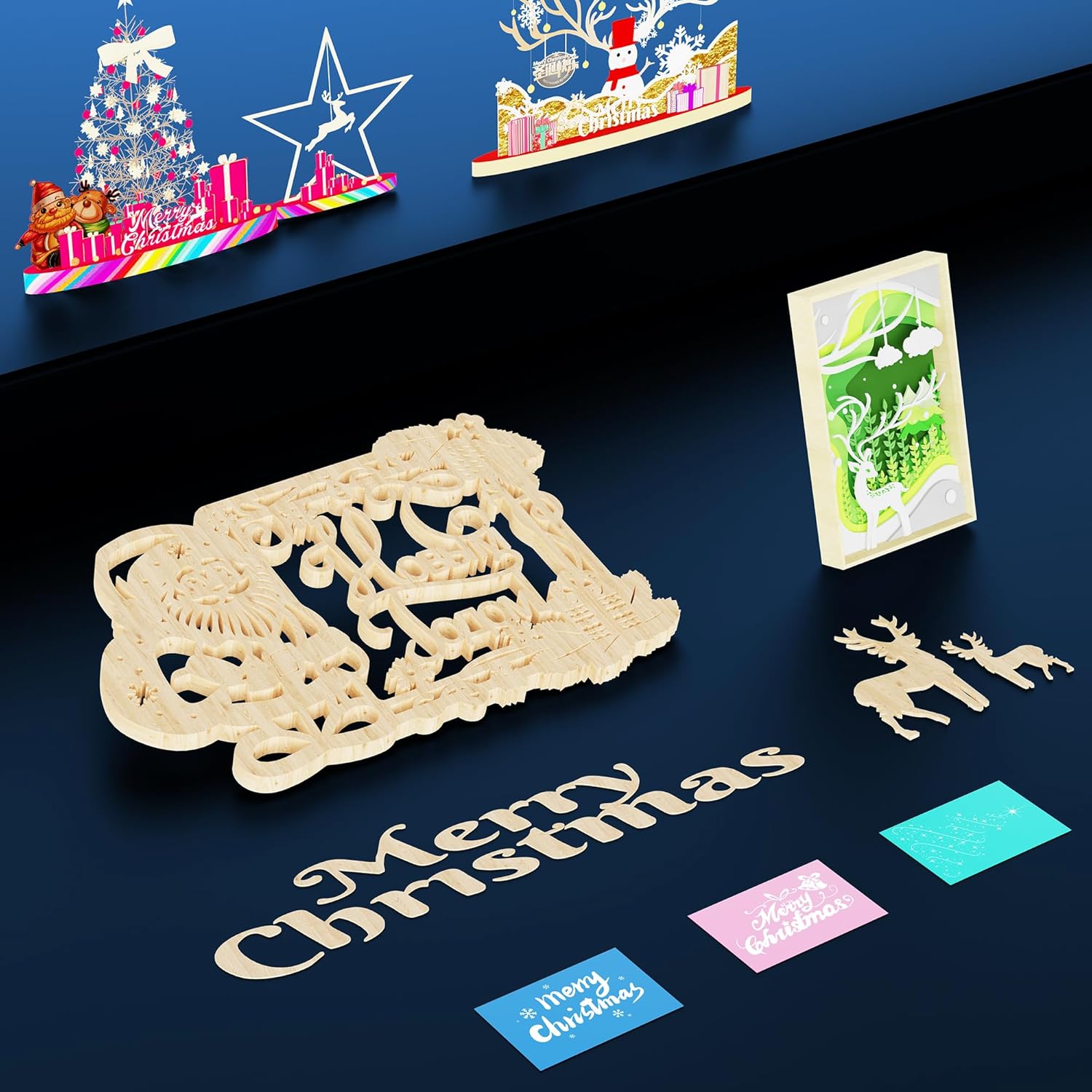
4.1-сүрөт: Мисamples of intricate designs created with the TTS-20 Max, including detailed Christmas-themed cutouts and engravings, showcasing the machine's precision.
5. Техникалык тейлөө
Regular maintenance ensures the longevity and optimal performance of your Twotrees TTS-20 Max.
- Линзаны тазалоо: Periodically clean the laser lens with a specialized lens cleaning solution and lint-free cloth to prevent smoke and debris buildup, which can reduce laser power.
- Clean the Working Area: Remove debris, dust, and small material scraps from the working bed and surrounding areas after each use.
- Кыймылдуу бөлүктөрүн майлоо: Жылмакай кыймылды камсыз кылуу үчүн өндүрүүчү сунуштагандай, жетектөөчү рельстерге жана коргошун бурамаларга бир аз өлчөмдө майлоочу май сүйкөңүз.
- Текшерүүчү курлар: Inspect the timing belts for tension and wear. Adjust or replace if necessary.
- Программалык камсыздоонун жаңыртуулары: Check the Twotrees official website for any available firmware updates for your machine to ensure you have the latest features and bug fixes.
6. Кыйынчылыктарды
This section addresses common issues you might encounter with your TTS-20 Max.
| Көйгөй | Мүмкүн себеп | Чечим |
|---|---|---|
| Лазер иштебейт же алсыз чыгаруу. | Loose connection, dirty lens, incorrect power setting, laser module failure. | Check all cable connections. Clean the laser lens. Verify power settings in software. Contact support if issue persists. |
| Engraving/cutting results are blurry or inconsistent. | Improper focus, material not flat, machine vibration, worn belts. | Re-focus the laser. Ensure material is flat and secured. Check machine stability. Inspect and adjust belts. |
| Machine not connecting to computer/software. | Incorrect port selection, missing drivers, faulty USB cable, Wi-Fi issue. | Select correct COM port in software. Install/reinstall drivers. Try a different USB cable. Check Wi-Fi connection and network settings. |
| Машина иштөө учурунда токтоп калат. | Overheating, software crash, power interruption, loose connection. | Ensure adequate ventilation. Restart software and machine. Check power supply. Verify cable connections. |
7. Техникалык шарттар
Detailed technical specifications for the Twotrees TTS-20 Max laser engraver.

Figure 7.1: Comprehensive table outlining the technical specifications of the TTS-20 Max, including model number, laser power, working area, and software compatibility.
| Өзгөчөлүк | Спецификация |
|---|---|
| Модель № | TTS-20 Max |
| Лазердик күч | 20 Вт (20000 мВт) |
| Лазердик толкун узундугу | 450нм ± 5нм |
| Spot Size | 0.08*0.08мм |
| Гравюра өлчөмү | 600x600мм |
| Гравюра ылдамдыгы | 30000mm/min (500mm/s) |
| Машинанын өлчөмү | 787x770x124мм |
| Машинанын салмагы | 3.6 кг (болжол менен 7.9 фунт) |
| Байланыш | USB Connection, App, Wireless Computer Web Терминал |
| Колдоого алынган программалык камсыздоо | LaserGRBL, LightBurn, Benbox, GrblController, LiteFire |
| Колдоого алынган File Форматтар | JPG, PNG, DXF, SVG, G-code, NC, BMP, etc. |
| Операция системасы | Windows, Mac |
| Электр камсыздоо | 24V4A DC |
| Иштөө чөйрөсү | Temperature 5-40 Degrees Celsius, Humidity 20-60%Rh |
8. Кепилдик жана колдоо
For specific warranty terms and conditions, please refer to the documentation included with your product or visit the official Twotrees website. Warranty coverage typically includes manufacturing defects for a specified period.
Кардарларды колдоо:
If you encounter any issues not covered in this manual or require further assistance, please contact Twotrees customer support. Contact information can usually be found on the manufacturer's webсайтында же сатып алуу дүмүрчөгүндө.
Колдоо кызматына кайрылганда, төмөнкү маалыматты даярдаңыз:
- Product Model: TTS-20 Max
- Serial Number (if applicable, usually found on a sticker on the machine)
- Сатып алуу күнү
- маселенин толук сүрөттөлүшү
9. Расмий продукт Videos
No official product videos from the seller were provided in the available data for this product. Please check the product listing page or the manufacturer's official webбардык жеткиликтүү видео ресурстар үчүн сайт.
Ask a question about this manual
Ask about setup, troubleshooting, compatibility, parts, safety, or missing instructions. Manuals+ will review the question and use this page’s manual context to help answer it.