
DigiLand DigiLand-S10
DigiLand Android Tablet S10 User Manual
Model: DigiLand-S10
1. Киришүү
This manual provides essential information for the proper use and maintenance of your DigiLand Android Tablet S10. Please read it thoroughly before operating the device to ensure optimal performance and longevity. The DigiLand S10 is a 10.1-inch Android 14 tablet designed for versatile use, featuring an Octa-Core processor, ample memory, and a high-definition display.
2. Коопсуздук маалыматы
- Планшетти экстремалдык температурага, тике күн нуруна же жогорку нымдуулукка тийгизбеңиз.
- Планшетті түшүрүп алуудан же катуу соккуга кабылтуудан алыс болуңуз.
- Use only the original charger and accessories provided with the tablet.
- Планшетти өз алдынча бөлүүгө же оңдоого аракет кылбаңыз. Квалификациялуу тейлөө кызматкерлерине кайрылыңыз.
- Планшетти суудан жана башка суюктуктардан алыс кармаңыз.
- Планшетти жана анын батареясын жергиликтүү эрежелерге ылайык таштаңыз.
3. Пакеттин мазмуну
Пакетти ачкандан кийин, төмөндө көрсөтүлгөн нерселердин бардыгы бар экенин жана жакшы абалда экендигин текшериңиз:
- DigiLand Android Tablet S10 (Blue)
- USB Type-C кубаттоочу кабель
- Кубаттуу адаптер
- Quick Start Guide

Figure 3.1: Items included in the DigiLand Tablet S10 package. This image displays the tablet itself, its packaging box, a USB Type-C charging cable, a power adapter, and a quick start guide, ensuring users can confirm all components are present.
4. Продукт бүтүп калдыview
The DigiLand S10 tablet features a sleek design with essential ports and controls for user convenience.
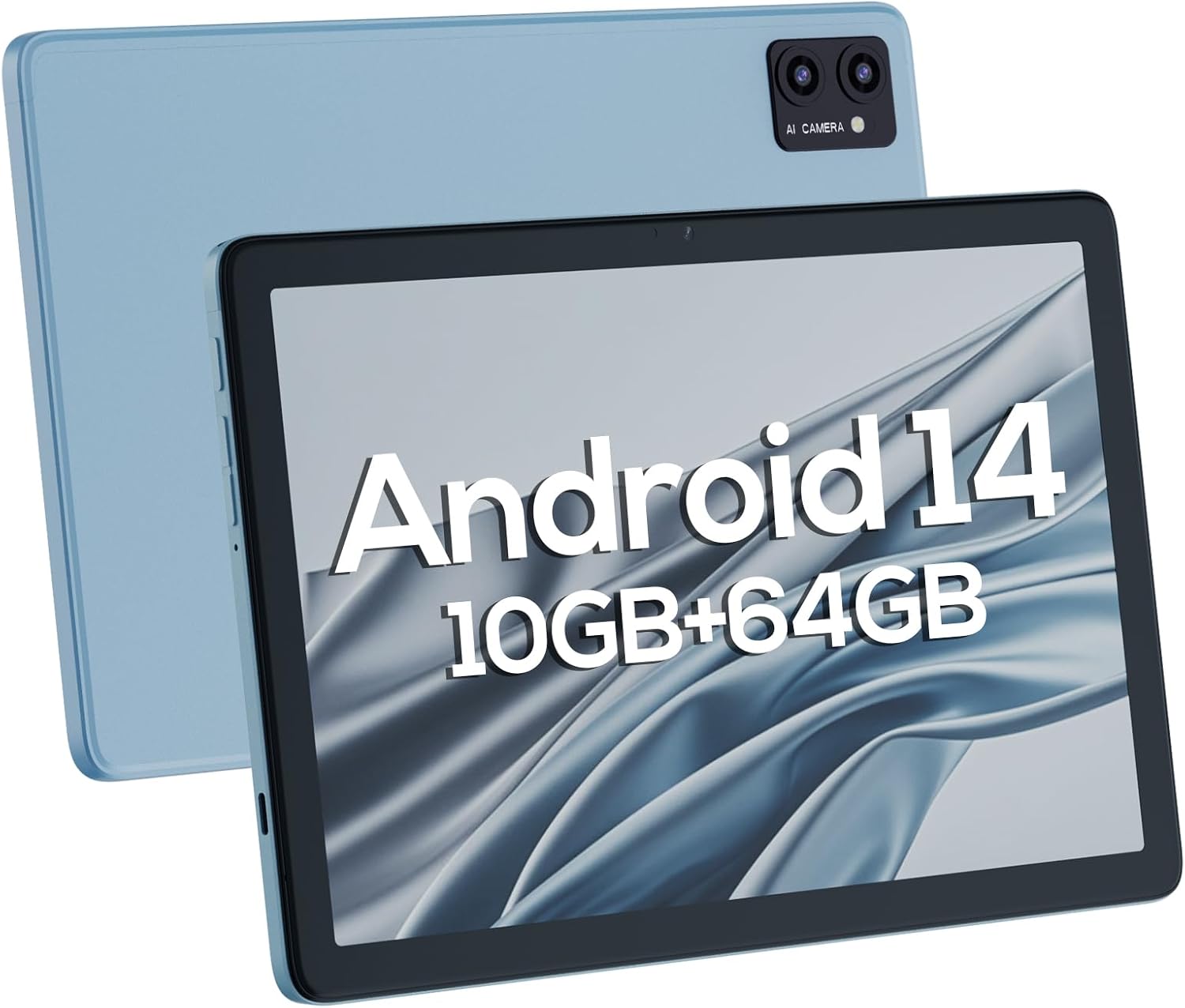
Сүрөт 4.1: Алдыңкы жана арткы views of the DigiLand Android Tablet S10. The image highlights the tablet's 10.1-inch display on the front and the dual camera module on the blue-colored back panel.
Негизги компоненттер:
- 10.1 дюймдук IPS HD дисплей: Provides vibrant visuals with 800x1280 resolution.
- Алдыңкы камера (5 мегапиксел): Алдыңкы рамкада жайгашкан, видео чалуулар жана селфилер үчүн ылайыктуу.
- Арткы камера (8MP): Located on the back, for capturing photos and videos.
- Кубат баскычы: Used to turn the tablet on/off or put it to sleep/wake.
- Үн баскычтары: Аудионун үнүн тууралаңыз.
- USB Type-C порту: Заряддоо жана маалыматтарды өткөрүү үчүн.
- 3.5 мм гарнитура уячасы: Зымдуу кулакчындарды туташтыруу үчүн.
- MicroSD картасынын уячасы: Сактоо көлөмүн 256 ГБ чейин кеңейтүү үчүн.
- Кош сүйлөөчүлөр: Аудио чыгарууну камсыз кылуу.
5. Орнотуу
5.1 Алгачкы заряддоо
Before first use, fully charge your tablet. Connect the USB Type-C cable to the tablet's charging port and the power adapter to a wall outlet. The battery indicator on the screen will show charging status. A full charge typically takes several hours.
5.2 Күйгүзүү/өчүрүү
- Күйгүзүү үчүн: Press and hold the Power button until the DigiLand logo appears.
- Өчүрүү үчүн: Өчүрүү менюсу пайда болгонго чейин Күйгүзүү баскычын басып, кармап туруңуз. "Өчүрүү" дегенди тандап, ырастаңыз.
- Уйку/ойгонуу үчүн: Кубат баскычын кыскача басыңыз.
5.3 Баштапкы орнотуу устасы
Upon first power-on, the Android 14 setup wizard will guide you through basic configurations:
- Тилиңизди тандаңыз.
- Wi-Fi тармагына туташыңыз.
- Google аккаунтуңуз менен кириңиз же жаңысын түзүңүз.
- Review жана шарттарды кабыл алуу.
- Экран кулпусун орнотуу (PIN, үлгү же сырсөз).
- Суралгандай башка жөндөөлөрдү конфигурациялаңыз.
5.4 Сактагычты кеңейтүү
The tablet supports MicroSD cards up to 256GB for additional storage. Locate the MicroSD card slot (often near the headphone jack or power button, as shown in Figure 4.1) and insert the card gently until it clicks into place. You may need to format the card via the tablet's settings for optimal use.
6. Планшетти иштетүү
6.1 Негизги навигация
- Башкы экран: Колдонмолорго жана виджеттерге кире турган негизги экран.
- Колдонмо тартмасы: Үй экранынан өйдө сүрүңүз view бардык орнотулган колдонмолор.
- Эскертмелер панели: Эскертмелерге жана тез жөндөөлөргө жетүү үчүн экрандын өйдө жагынан ылдый сүрүңүз.
- Акыркы колдонмолор: Tap the square navigation button (or swipe up and hold from the bottom if using gestures) to see recently opened applications.
6.2 Wi-Fi жана Bluetooth туташуу
- Wi-Fi: барыңыз Орнотуулар > Тармак жана интернет > Wi-FiWi-Fi'ды күйгүзүп, каалаган тармагыңызды тандаңыз. Керек болсо, сырсөздү киргизиңиз.
- Bluetooth: барыңыз Орнотуулар> Туташкан түзмөктөр> Байланыштын каалоолору> BluetoothBluetooth'ту күйгүзүп, жеткиликтүү түзмөктөр менен жупташтырыңыз.
6.3 Камераларды колдонуу
Планшеттин алдыңкы камерасы 5 МП жана арткы камерасы 8 МП.
- Камера колдонмосун ачыңыз.
- Алдыңкы жана арткы камералардын ортосунда которулуу үчүн камераны которуштуруу сүрөтчөсүн таптаңыз.
- Сүрөткө тартуу же видео жазууну баштоо/токтоо үчүн жапкычты таптаңыз.

Figure 6.1: Visual representation of the tablet's camera capabilities, showing sample images captured by both the 5MP front and 8MP rear cameras.
6.4 Батареяны башкаруу
6000 мАч батарея узак убакытка чейин колдонууга мүмкүндүк берет. Батареянын иштөө мөөнөтүн оптималдаштыруу үчүн:
- Экран жарыктыгын азайтыңыз.
- Колдонулбай турган учурда Wi-Fi жана Bluetooth'ду өчүрүп коюңуз.
- Фондо иштеп жаткан колдонулбаган колдонмолорду жабуу.
- Жөндөөлөрдөн Батареяны үнөмдөгүч режимин иштетиңиз.

Figure 6.2: Battery performance details for the DigiLand Tablet S10. This graphic illustrates the 6000mAh battery capacity and provides estimated usage durations for various activities like video playback (9 hours), music (14 hours), and browsing (15 hours).
7. Техникалык тейлөө
- Тазалоо: Use a soft, lint-free cloth to clean the screen and body. Avoid abrasive cleaners.
- Программалык камсыздоо жаңыртуулары: Оптималдуу аткарууну жана коопсуздукту камсыз кылуу үчүн системанын жаңыртууларын дайыма текшерип, орнотуңуз. барыңыз Орнотуулар > Система > Системаны жаңыртуу.
- Сактагычты башкаруу: Кэшти мезгил-мезгили менен тазалап, керексиз жок кылуу fileжана сактагыч орунду бошотуу үчүн колдонулбаган колдонмолорду чыгарып салыңыз.
- Маалыматтын камдык көчүрмөсү: Regularly back up important data to a cloud service or external storage device to prevent data loss.
8. Кыйынчылыктарды
| Көйгөй | Мүмкүн чечим |
|---|---|
| Планшет күйбөйт | Батарея заряддалганын текшериңиз. Күчтүү түрдө кайра иштетүү үчүн кубат баскычын 10-15 секунд басып туруңуз. |
| Жай аткаруу | Close unused apps, clear cache, restart the tablet. Consider a factory reset if issues persist (backup data first). |
| Wi-Fi туташуу маселелери | Планшетти жана роутерди өчүрүп-күйгүзүңүз. Тармакты унутуп, кайра туташтырыңыз. Wi-Fi иштетилгенин текшериңиз. |
| Колдонмолор бузулуп жатат | Clear app cache/data (Settings > Apps), update the app, or reinstall it. |
| Экран жооп бербейт | Force restart the tablet. If issue persists, contact support. |
9. Техникалык шарттар
Below are the detailed technical specifications for the DigiLand Android Tablet S10:
| Өзгөчөлүк | Деталь |
|---|---|
| Бренд | DigiLand |
| Модель аты | DigiLand-S10 |
| Операция системасы | Android 14 |
| Screen Size | 10.1 дюйм |
| Screen Resolution | 800 x 1280 (IPS HD Display) |
| Процессор | A523, Octa core, Cortex A55@1.8 GHz, 22nm |
| RAM | 10GB (4+6GB) |
| Ички сактагыч | 64 ГБ |
| Кеңейтүүчү сактагыч | Up to 256GB via TF card (MicroSD) |
| Алдыңкы камера | 5MP |
| Арткы камера | 8MP |
| Батарея сыйымдуулугу | 6000mAh |
| Байланыш | Wi-Fi (2.4G+5G), Bluetooth 5.0, USB Type-C, 3.5mm Headphone Jack |
| Өлчөмдөрү (LxWxH) | 7 x 4 x 0.5 дюйм |
| Элемент Салмагы | 2.42 фунт (болжол менен 510 г) |
| Түс | Көк |

Figure 9.1: ашыкview of the DigiLand Tablet S10's core specifications. This graphic highlights features such as Android 14, MTK Helio A523 Octa-Core Processor, 10GB RAM, 64GB ROM (expandable to 256GB), 10.1-inch HD display, 6000mAh battery, 5MP front camera, 8MP rear camera, 510g weight, and 8.8mm thickness.
10. Кепилдик жана колдоо
10.1 Кепилдик маалыматы
DigiLand products typically come with a limited manufacturer's warranty. Please refer to the warranty card included in your product packaging or visit the official DigiLand website for detailed terms and conditions regarding warranty coverage, duration, and limitations. Keep your proof of purchase for warranty claims.
10.2 Кардарларды колдоо
For technical assistance, troubleshooting, or any inquiries regarding your DigiLand Android Tablet S10, please contact DigiLand customer support. Contact information can usually be found in the Quick Start Guide or on the official DigiLand website. When contacting support, please have your product model (DigiLand-S10) and purchase details ready.
Thank you for choosing DigiLand. We hope you enjoy your new tablet!
Ask a question about this manual
Ask about setup, troubleshooting, compatibility, parts, safety, or missing instructions. Manuals+ will review the question and use this page’s manual context to help answer it.