
1. Маанилүү коопсуздук нускамалары
Please read these instructions carefully before using the Audizio Canzo DAB+ Internet Radio. Keep this manual for future reference.
- Өрт же электр тогуна урунуп калбаш үчүн аппаратты жамгырга же нымдуулукка дуушар кылбаңыз.
- в ачпагылаasinг. Ичинде колдонуучу тейлей турган бөлүктөр жок. Бардык тейлөөлөрдү квалификациялуу кызматкерлерге тапшырыңыз.
- Аппарат менен берилген кубат адаптерин гана колдонуңуз.
- Агрегаттын айланасын туура желдетүүнү камсыз кылыңыз. Вентиляция тешиктерин жаап албаңыз.
- Аппаратты жылуулук булактарынын жанына же тике күн нуруна коюудан алыс болуңуз.
- Clean the unit only with a dry, soft cloth. Do not use liquid cleaners.
2. Продукт бүтүп калдыview
The Audizio Canzo is a versatile DAB+ Internet Radio designed for high-quality audio reception and playback. It features multiple connectivity options including Wi-Fi, Bluetooth 5.3, AUX, and USB, along with a remote control for convenient operation. The elegant wooden finish and clear display make it suitable for various home environments.
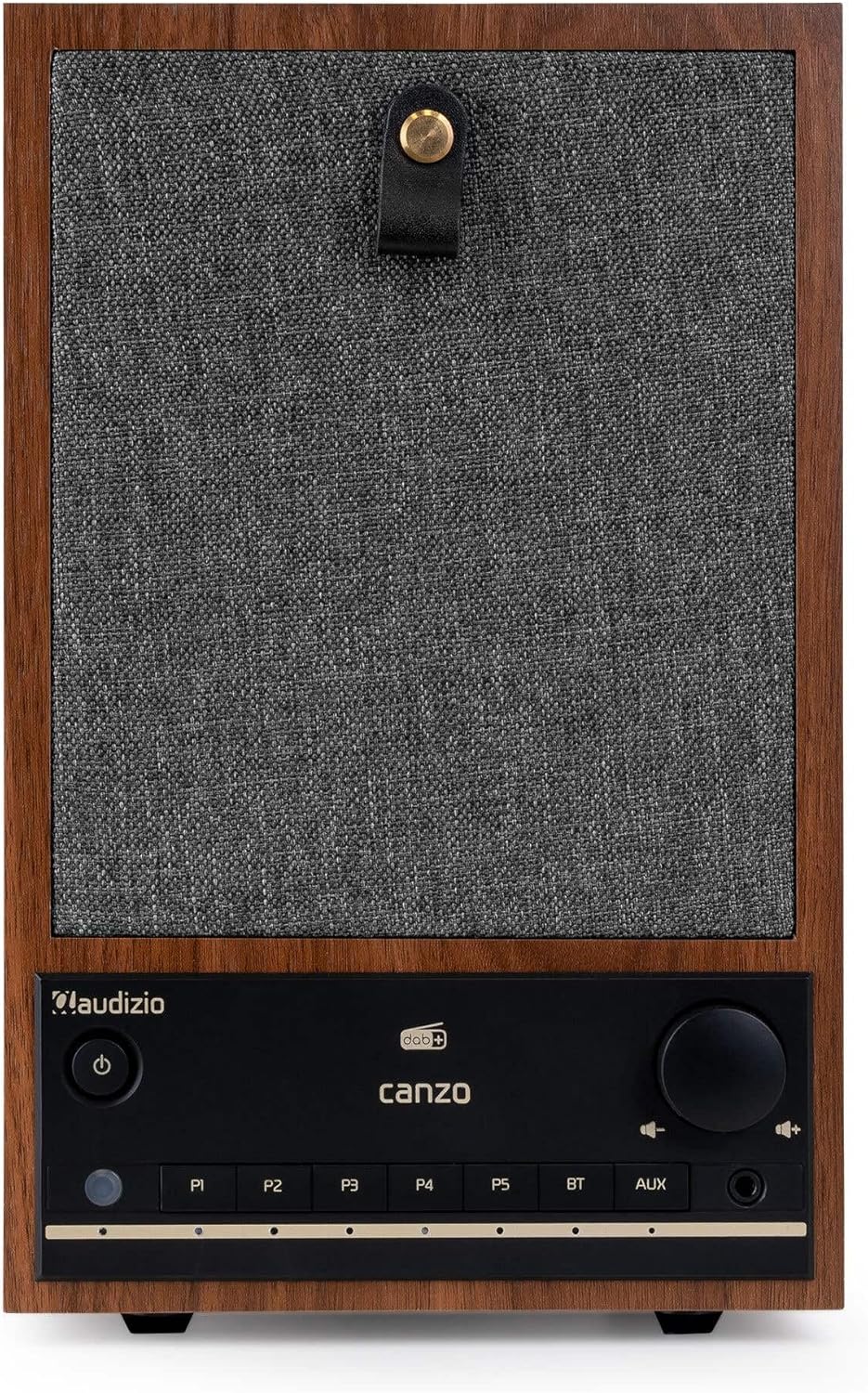
Сүрөт 2.1: Алдыңкы view of the Audizio Canzo DAB+ Internet Radio in walnut finish.

Сүрөт 2.2: Алдыңкы view with speaker grille removed, highlighting the speaker, display, and control panel.
3. Кутуда эмне бар
Кутучаны кылдаттык менен ачып, бардык буюмдардын бар экенин текшериңиз:
- Audizio Canzo DAB+ Internet Radio
- Кубаттуу адаптер
- Алыстан башкаруу
- Quick Start Guide
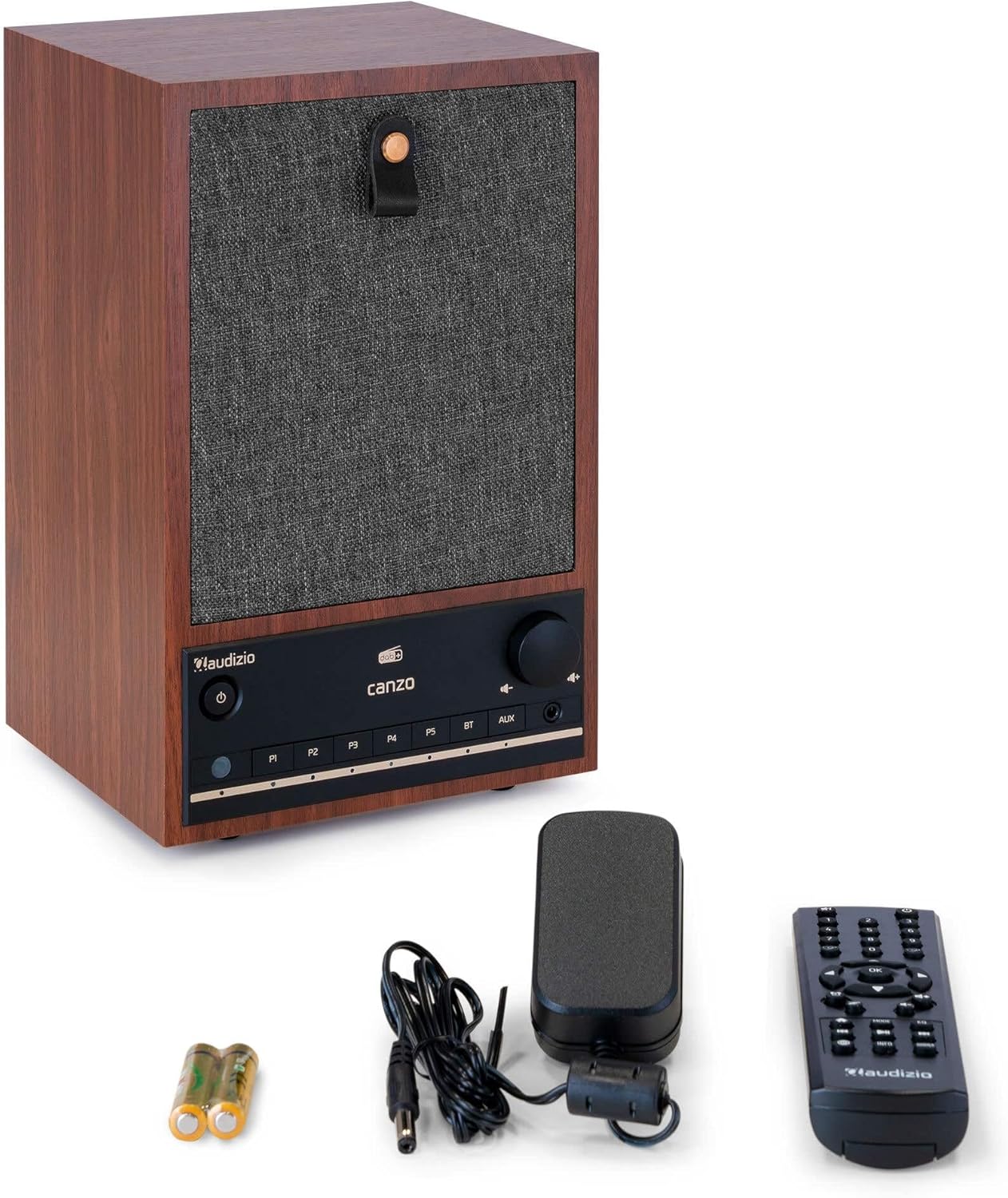
Figure 3.1: Audizio Canzo radio with its accessories.
4. Орнотуу
4.1 Кубатты туташтыруу
- Кубат адаптеринин туруктуу ток сайгычын розеткага сайыңыз DC IN port on the back of the radio.
- Plug the power adapter into a standard wall outlet (220V).
- Flip the КҮЙГҮЗҮҮ/ӨЧҮРҮҮ switch on the back of the unit to the ON позиция.
4.2 Антеннаны туташтыруу
For optimal DAB+ and FM reception, extend the telescopic antenna located on the back of the unit. Adjust its position for the best signal.

Figure 4.1: Rear panel with power input, audio ports, USB, LAN, and antenna.
4.3 Баштапкы күйгүзүү жана тармакты орнотуу
- басыңыз Күч button on the front panel or remote control to turn on the radio.
- The display will show the Audizio logo and then guide you through the initial setup wizard.
- Каалаган тилиңизди тандаңыз.
- The radio will prompt you to connect to a network. Choose Wi-Fi or LAN.
- Wi-Fi үчүн: Select your Wi-Fi network from the list and enter the password using the navigation buttons and OK баскычы.
- For LAN: Роутериңизден Ethernet кабелин туташтырыңыз LAN port on the back of the radio. The connection should be established automatically.
- Once connected, the radio will update the time and date automatically.
5. Иштөө нускамалары
5.1 Негизги башкаруу каражаттары
The front panel features a power button, preset buttons (P1-P5), Bluetooth (BT) and AUX input buttons, a volume knob, and navigation controls. The remote control provides full access to all functions.
5.2 Режимди тандоо
басыңыз РЕЖИМ button on the radio or remote control to cycle through available modes: Internet Radio, DAB+, FM, Bluetooth, AUX, and USB Playback.
5.3 Интернет радиосу
- Тандоо Интернет радио режими.
- Use the navigation buttons to browse stations by location, genre, or search.
- Басыңыз OK бекет тандоо.
- Станцияны алдын ала коюлган жөндөөлөр катары сактоо үчүн, алардын бирин басып кармап туруңуз P1-P5 buttons until the display confirms.
5.4 DAB+ радиосу
- Тандоо DAB+ режими.
- Радио автоматтык түрдө жеткиликтүү DAB+ станцияларын издейт.
- Use the navigation buttons to scroll through the list of found stations.
- Басыңыз OK бекет тандоо.
- Станцияны алдын ала коюлган жөндөөлөр катары сактоо үчүн, алардын бирин басып кармап туруңуз P1-P5 баскычтар.
5.5 FM радиосу
- Тандоо FM режими.
- басып, кармап туруңуз Скандоо button (usually on the remote or via menu) to auto-scan for FM stations.
- Use the navigation buttons to tune manually or select from scanned stations.
- Станцияны алдын ала коюлган жөндөөлөр катары сактоо үчүн, алардын бирин басып кармап туруңуз P1-P5 баскычтар.
5.6 Bluetooth ойнотуу
- Тандоо Bluetooth mode. The radio will enter pairing mode, indicated on the display.
- Смартфонуңузда же планшетиңизде Bluetooth'ду иштетиңиз жана жеткиликтүү түзмөктөрдү издеңиз.
- Select "Audizio Canzo" from the list to pair.
- Жупташкандан кийин, түзмөгүңүздөгү аудиону радио аркылуу ойнотсоңуз болот.
5.7 AUX киргизүү
- Тышкы аудио аспапты (мисалы, MP3 ойноткуч) туташтыруу AUX IN port on the back of the radio using a 3.5mm audio cable.
- Тандоо AUX режими.
- Audio from the connected device will now play through the radio.
5.8 USB ойнотуу
- Аудио камтыган USB флэш-дискти салыңыз fileс ичине USB ОЙНОО port on the back of the radio.
- Тандоо USB режими.
- Use the navigation buttons to browse and select audio fileойнотуу үчүн.
5.9 Ойготкуч саат жана уйку таймери
- Ойготкуч: Access the Alarm settings via the menu. Set up to two alarms with desired time, source (buzzer, radio), and volume.
- Уйку таймери: Access the Sleep Timer settings via the menu. Set a duration (e.g., 15, 30, 60 minutes) after which the radio will automatically turn off.
- Чырым: Ойготкуч чыкканда, басыңыз Тындыр button on the remote or radio to temporarily silence it.
6. Техникалык тейлөө
6.1 Тазалоо
To clean the radio, use a soft, dry, lint-free cloth. Do not use abrasive cleaners, waxes, or solvents as they may damage the finish or internal components.
6.2 Сактоо
Эгерде түзмөктү көпкө сактасаңыз, аны розеткадан сууруп, салкын, кургак жерде, күн нуру түз тийбеген жана өтө жогорку температурадан алыс сактаңыз.
7. Кыйынчылыктарды
| Көйгөй | Мүмкүн себеп | Чечим |
|---|---|---|
| Күч жок | Power adapter not connected; ON/OFF switch is OFF. | Ensure power adapter is securely connected and ON/OFF switch is ON. |
| Үн жок | Volume too low; incorrect source selected; headphones connected. | Үндү катуулатыңыз; туура киргизүү режимин тандаңыз; кулакчындарды ажыратыңыз. |
| Wi-Fi'га туташпай жатат | Incorrect password; router too far; network issue. | Wi-Fi сырсөзүн текшериңиз; радиону роутерге жакындатыңыз; роутерди өчүрүп-күйгүзүңүз. |
| DAB+/FM кабыл алуу начар | Антенна узартылган эмес; начар сигнал аймак. | Fully extend and adjust the telescopic antenna; try repositioning the radio. |
| Пульт иштебей жатат | Батареялар түгөнгөн; пульт менен радионун ортосундагы тоскоолдук. | Replace remote control batteries; ensure clear line of sight to the radio's sensor. |
8. Техникалык шарттар
| Өзгөчөлүк | Спецификация |
|---|---|
| Модель номери | Canzo |
| Продукциянын өлчөмдөрү | 22.5 x 20.5 x 34 см |
| Элемент Салмагы | 2.9 килограмм |
| Түс | Жаңгак |
| Screen Size | 2.4 дюйм |
| Байланыш технологиясы | Aux, Bluetooth, Wi-Fi, LAN |
| Bluetooth версиясы | 5.3 |
| Колдоого алынган радио тилкелери | DAB+, FM, интернет радиосу |
| Power Source | Зымдуу электр (220 вольт) |
| Өзгөчөлүктөр | Integrated Clock, Sleep Timer, Alarm, Remote Control, Preset Stations |
| Шайкеш түзмөктөр | Smartphone, Tablet, Headphones, MP3 Player, USB Storage Device |
9. Кепилдик жана колдоо
Кепилдик жөнүндө маалымат жана техникалык колдоо алуу үчүн, өнүмүңүз менен кошо берилген кепилдик картасын караңыз же сатуучуга кайрылыңыз. Кепилдик боюнча дооматтар үчүн сатып алганыңызды тастыктаган документти сактап коюңуз.


