
1. Киришүү
This manual provides essential information for setting up, operating, and maintaining your NIMO 15.6-inch FHD Laptop. Please read this guide thoroughly to ensure optimal performance and longevity of your device. Keep this manual for future reference.
2. Кутуда эмне бар
- 1 x NIMO N155 Laptop
- 1 x Type-C 65W PD Fast Charger
- 1 x User Manual
- Windows 11 Home (Pre-installed)
- 2 Years Warranty, 90 Days Return Information
3. Продукт бүтүп калдыview
The NIMO 15.6-inch FHD Laptop is designed for efficiency and convenience, featuring a robust AMD Ryzen 5 processor, ample memory, and fast storage. Its sleek design and comprehensive connectivity options make it suitable for various tasks.
3.1. Ноутбук компоненттери

Figure 1: NIMO 15.6-inch FHD Laptop (Rose Gold variant)
This image displays the NIMO 15.6-inch FHD Laptop in Rose Gold, showcasing its full-size keyboard, large touchpad, and the vibrant display. Key features like fingerprint sensor, Type-C PD charger, and backlit keyboard are highlighted on the screen.
3.2. Порттор жана туташтыргычтар

Figure 2: NIMO Laptop Ports Diagram
This diagram illustrates the available ports on the NIMO laptop, including Micro SD card reader, USB 2.0, USB 3.2 Gen1, Audio Jack, Kensington Lock on one side, and Type-C, USB 3.2 Gen1 Full-function, HDMI 1.4, and a Charge LED on the other side.
- USB 3.0 порттору: For high-speed data transfer and connecting peripherals.
- USB 2.0 порт: Стандарттык USB түзмөктөрүн туташтыруу үчүн.
- Тип-C Port: Supports 65W Power Delivery (PD) for fast charging and data transfer.
- HDMI1.4: Тышкы дисплейлерге туташуу үчүн.
- Микро SD картаны окугуч: Сактагычты кеңейтүү же өткөрүп берүү үчүн fileэстутум карталарынан.
- Аудио Jack: Наушниктерди же тышкы динамиктерди туташтыруу үчүн.
- Kensington Lock Slot: Түзмөктүн физикалык коопсуздугу үчүн.
4. Орнотуу
4.1. Баштапкы күйгүзүү
- Ноутбукту жана бардык аксессуарларды кутудан чыгарыңыз.
- Connect the 65W Type-C PD Fast Charger to the laptop's Type-C port and a power outlet.
- Ноутбуктун капкагын ачыңыз. Ноутбук автоматтык түрдө күйүшү мүмкүн. Эгер күйбөсө, клавиатуранын жогорку оң бурчунда жайгашкан күйгүзүү баскычын басыңыз.
- Windows 11 Home орнотуусун аяктоо үчүн экрандагы нускамаларды аткарыңыз, анын ичинде тил, аймак, тармак туташуусу жана колдонуучу каттоо эсебин түзүү.
4.2. Тармакка туташуу
During the initial setup or at any time, you can connect your NIMO laptop to a Wi-Fi network:
- Системалык лотоктогу Wi-Fi сөлөкөтүн чыкылдатыңыз (экрандын төмөнкү оң бурчунда).
- Тизмеден каалаган Wi-Fi тармагын тандаңыз.
- Эгер суралса, тармак сырсөзүн киргизип, "Туташуу" баскычын чыкылдатыңыз.
5. Иштөө нускамалары
5.1. Электр энергиясын башкаруу
- Күйгүзүү: Кубат баскычын басыңыз.
- Уйку режими: Капкакты жабыңыз же кубат баскычын кыскача басыңыз.
- Өчүрүү: Баштоо баскычын чыкылдатып, андан кийин Кубат > Өчүрүү.
- Кайра баштоо: Баштоо баскычын чыкылдатып, андан кийин Кубат > Кайра иштетүү.
5.2. Баскычтоп жана сенсордук такта
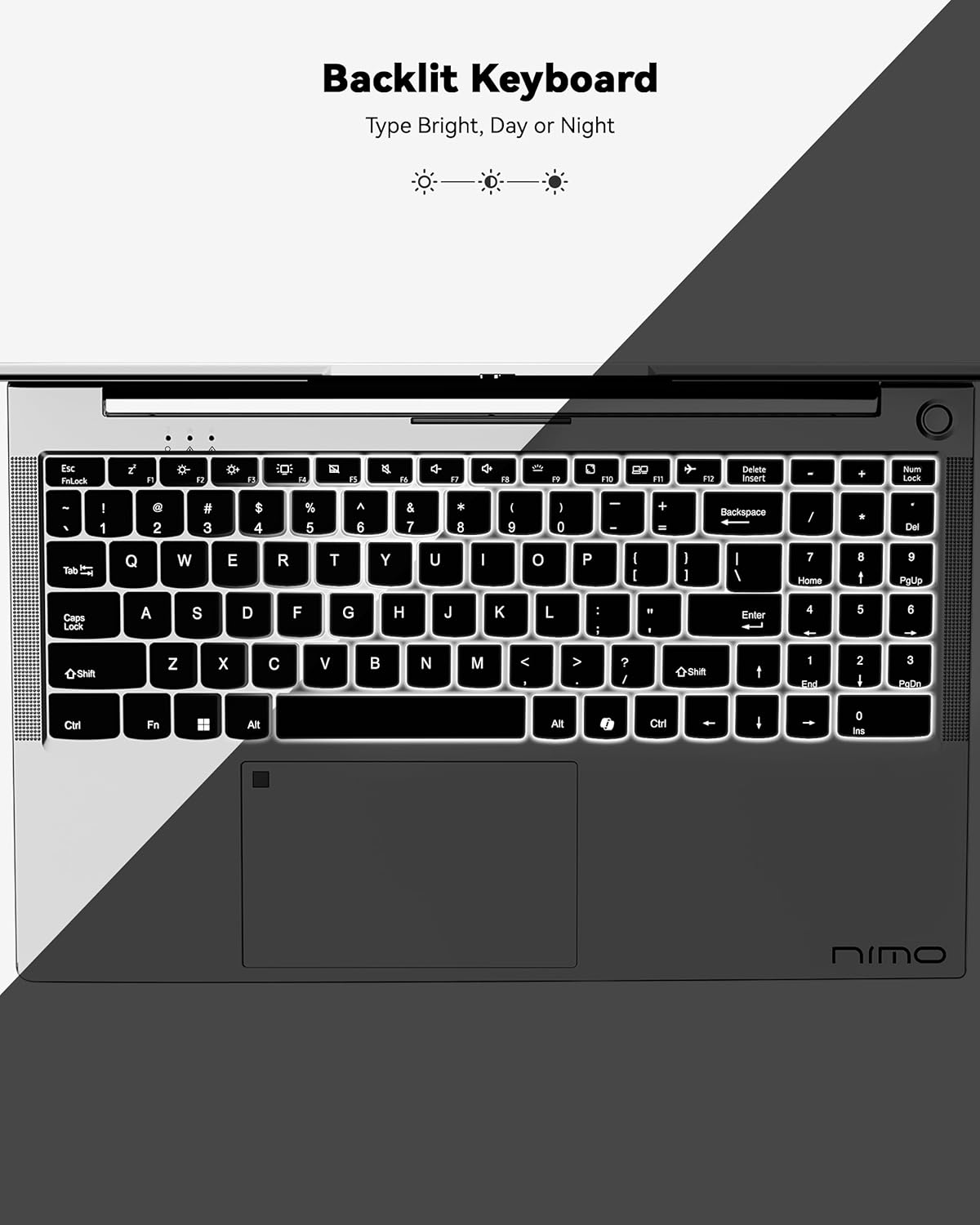
Figure 3: Backlit Keyboard
This image highlights the backlit keyboard feature of the NIMO laptop, demonstrating how the keys illuminate for typing in low-light conditions.
- Арткы жарык клавиатура: Басыңыз Fn + F5 (or the key with the keyboard backlight icon) to toggle the backlight on/off or adjust brightness.
- Сенсордук такта: Supports multi-touch gestures for scrolling, zooming, and navigation. Refer to Windows settings for customization.
- Манжа сенсор: Located on the touchpad for secure and instant login. Set up your fingerprint in Windows Settings > Accounts > Sign-in options.

Figure 4: Fingerprint Sensor on Touchpad
This image shows a close-up of the NIMO laptop's touchpad, clearly indicating the integrated fingerprint sensor for quick and secure access.
5.3. Webcam
The laptop features a 2MP webcam for video calls and conferences. Ensure proper lighting for best image quality.
5.4. Аудио
The integrated speakers provide clear audio. You can also connect headphones or external speakers via the audio jack.
6. Негизги өзгөчөлүктөрү
- Vivid 15.6" Full HD Display: Enjoy stunning visuals with the 15.6" Full HD (1920x1080) IPS anti-glare display, featuring an 85% screen-to-body ratio and micro-edge design.
- Күчтүү аткаруу: Equipped with an AMD Ryzen 5 processor, 16GB DDR4 RAM, and a 1TB PCIe SSD for fast boot-ups, seamless multitasking, and efficient handling of applications.
- Upgradable Components: The RAM and SSD slots are expandable, allowing for future memory and storage upgrades.
- 65W USB-C PD Fast Charger: The included charger provides rapid power delivery, offering 2 hours of use from just 15 minutes of charging. It is also versatile for charging other compatible devices.
- Secure & Instant Login: Integrated fingerprint reader on the touchpad ensures quick and secure access to your device.
- Ergonomic Backlit Keyboard: Work comfortably in any environment with the backlit keyboard, featuring adjustable brightness.
- Үзгүлтүксүз туташуу: Features Wi-Fi 6 and Bluetooth 5.2 for stable, high-speed wireless connections, along with multiple USB 3.0 ports and HDMI for versatile peripheral connections.
Video 1: NIMO Laptop - Perfect for Work and Study, Anytime, Anywhere
This video demonstrates the NIMO laptop's versatility for various tasks, highlighting its portability and performance for work, study, and entertainment in different settings.
Video 2: NIMO 15.6 FHD Laptop for Students Home Work
This video showcases the NIMO 15.6 FHD laptop as an ideal device for students, home users, and professionals, emphasizing its suitability for educational and work-related tasks.
7. Техникалык тейлөө
- Тазалоо: Экранды жана сыртты тазалоо үчүн жумшак, түксүз чүпүрөктү колдонуңуз. Катуу химиялык заттардан алыс болуңуз.
- Батареяга кам көрүү: To prolong battery life, avoid fully discharging the battery frequently. Store the laptop in a cool, dry place.
- Программалык камсыздоо жаңыртуулары: Оптималдуу иштөө жана коопсуздукту камсыз кылуу үчүн Windows операциялык тутумуңузду жана драйверлериңизди үзгүлтүксүз жаңыртып туруңуз.
- Вентиляция: Ensure the laptop's ventilation openings are not blocked to prevent overheating. Use on a hard, flat surface.
8. Кыйынчылыктарды
- Ноутбук күйбөй жатат: Ensure the charger is securely connected and the battery has sufficient charge. Try a different power outlet.
- Экран бош: Connect to an external monitor to check if the display is the issue. Restart the laptop.
- Wi-Fi туташуу көйгөйлөрү: Restart your router and the laptop. Check Wi-Fi settings and ensure airplane mode is off.
- Жай аткаруу: Close unnecessary applications, check for malware, and ensure sufficient free storage space. Consider upgrading RAM or SSD if performance remains an issue.
- Баскычтоп же сенсордук такта жооп бербей жатат: Ноутбукту өчүрүп-күйгүзүңүз. Түзмөк башкаргычында драйвер жаңыртууларын текшериңиз.
For persistent issues, please refer to the support section or contact NIMO customer service.
9. Техникалык шарттар
| Өзгөчөлүк | Спецификация |
|---|---|
| Туруктуу экран дисплей өлчөмү | 15.6 дюйм |
| Screen Resolution | 1920 x 1080 пиксел (Full HD) |
| Процессор | AMD Ryzen 5 (3.7 ГГц) |
| RAM | 16 GB DDR4 (Upgradable) |
| Memory Speed | 4800 МГц |
| Катуу диск | 1024 GB SSD (Upgradable) |
| Графикалык сопроцессор | AMD Integrated graphics |
| Операция системасы | Windows 11 Home |
| Зымсыз түрү | 802.11a/b/g/n/ac (Wi-Fi 6) |
| Bluetooth | Bluetooth 5.2 |
| USB 2.0 порттордун саны | 1 |
| USB 3.0 порттордун саны | 3 |
| Батареянын орточо иштөө мөөнөтү | 9 саат |
| Элемент Салмагы | 5 фунт |
| Продукциянын өлчөмдөрү | 14.07 x 8.98 x 0.76 дюйм |
| Арткы Webcam Resolution | 2 депутат |
| Өзгөчөлүктөр | Арткы жарык клавиатура, манжа изин окугуч, HD аудио, сандык баскычтоп |
10. Кепилдик жана колдоо
Your NIMO laptop comes with a 2 жылдык өндүрүүчүнүн кепилдиги. Additionally, NIMO offers a 90-day hassle-free return and exchange policy. Our dedicated support team is available to assist with any issues or replacements.
10.1. Колдоо кызматы менен байланышыңыз
- For product-related questions or technical assistance, please contact NIMO customer service via their official webсайт, электрондук почта же телефон.
- Contact information can typically be found on the NIMO official webсайт же продукт барагы.
11. Коопсуздук маалыматы
- Use only original chargers and regularly inspect cables for damage.
- Handle the laptop by its base and consider using a protective case. Avoid placing heavy objects on it.
- Place the laptop on a hard, flat surface to ensure proper ventilation and prevent overheating. Keep it away from extreme temperatures and moisture.
- Do not overcharge the battery. Discontinue use if the battery swells or shows signs of damage.
- Set strong passwords, keep software updated, use antivirus protection, and regularly back up your data.
- In case of liquid spills, immediately unplug the laptop and allow it to dry completely before attempting to power it on.
- For any technical issues, consult qualified professionals. Do not attempt to disassemble or repair the device yourself.
12. Юридикалык жоопкерчиликтен баш тартуу
This laptop is provided "as is," with no express or implied warranties except for the manufacturer's limited warranty (if applicable). Implied warranties of merchantability or fitness for a specific purpose are disclaimed. NIMO is not liable for damages resulting from misuse (e.g., non-approved chargers, unauthorized repairs), physical damage, or failure to follow safety guidelines, including data loss or business interruption. Users are responsible for regularly backing up their data. This disclaimer does not exclude liability for manufacturing defects or violations of mandatory local laws. By using the NIMO laptop, you accept these terms, which are governed by applicable jurisdiction laws.