
1. Киришүү
The GEARELEC S3 is an advanced motorcycle helmet Bluetooth headset integrated with a 1080P HD camera. Designed for enhanced communication and recording during rides, it supports full-duplex intercom for up to 8 riders, features G-Sensor collision detection, and offers various audio functionalities including music sharing and FM radio. This manual provides detailed instructions for the proper setup, operation, and maintenance of your S3 unit.
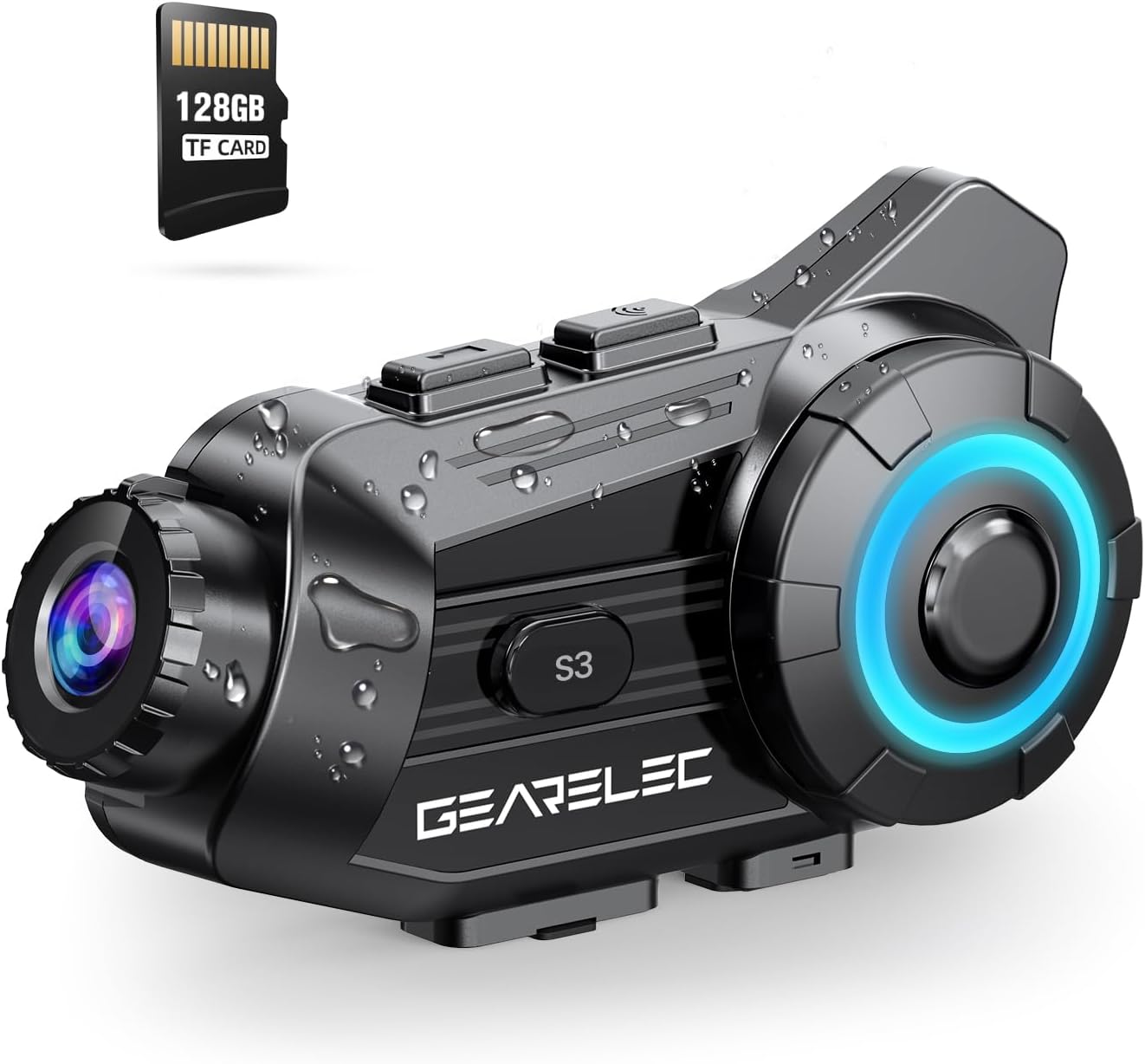
Figure 1.1: GEARELEC S3 Unit Overview. This image displays the compact design of the S3 unit, highlighting its integrated camera lens and control buttons, along with an included 128GB TF card.
2. Коопсуздук маалыматы
- Жол коопсуздугун ар дайым биринчи орунга коюңуз. Түзмөктү сизди алаксытпагандай кылып иштетпеңиз.
- Ensure the unit is securely mounted to your helmet before riding.
- Агрегатты ажыратууга же өзгөртүүгө аракет кылбаңыз. Бул кепилдикти жокко чыгарып, зыян келтириши мүмкүн.
- Аппаратты экстремалдык температурадан жана түз күн нурунан узак убакытка алыс кармаңыз.
- Берилген заряддоо кабелин жана аксессуарларды гана колдонуңуз.
3. Пакеттин мазмуну
Сураныч, кутудан чыкканда пакеттин мазмунун текшериңиз:
- GEARELEC S3 негизги блогу
- Helmet Mounting Bracket
- Speaker and Microphone Kit
- USB заряддоо кабели
- 128 ГБ TF картасы
- User Manual
4. Орнотуу
4.1 Алгачкы заряддоо
Before first use, fully charge the S3 unit. The 2000mAh battery provides extended usage times.
- Connect the provided USB charging cable to the charging port on the S3 unit.
- Кабелдин экинчи учун USB кубат адаптерине (кошумча эмес) же компьютердин USB портуна туташтырыңыз.
- Кубаттоо көрсөткүчү күйөт. Толук заряддалгандан кийин (болжол менен 3 саат), жарык өзгөрөт же өчөт.

Figure 4.1: Battery Capacity and Charging. This image illustrates the 2000mAh battery capacity, showing a 3-hour charging time and various usage durations like 100 hours music time and 7 hours video recording.
4.2 TF картасын салуу
The S3 unit supports up to 128GB TF cards for video recording. A 128GB TF card is included.
- Locate the TF card slot on the S3 unit.
- TF картасын ордуна чыкылдаган үн чыкканча акырындык менен уячага салыңыз. Картанын туура багытталганын текшериңиз.
- Алып салуу үчүн, картаны ичкери карай чыгып кеткенче басыңыз.
4.3 Mounting the Unit to Your Helmet
Securely attach the S3 unit to your helmet using the provided mounting bracket.
- Choose a suitable location on the side of your helmet for optimal camera view жана жеткиликтүүлүк.
- Attach the mounting bracket firmly to the helmet. Ensure it is stable and does not obstruct your vision.
- Slide the S3 main unit onto the mounting bracket until it locks securely.
- Connect the speaker and microphone kit to the S3 unit and position them inside your helmet for clear audio.
5. Иштөө нускамалары
5.1 Күйгүзүү/өчүрүү
- Күйгүзүү: Press and hold the Power button for approximately 3 seconds until the indicator light illuminates and you hear a power-on prompt.
- Өчүрүү: Press and hold the Power button for approximately 3 seconds until the indicator light turns off and you hear a power-off prompt.
5.2 Bluetooth жупташтыруу
Pair your S3 unit with your mobile phone or other Bluetooth devices.
- With the S3 unit powered off, press and hold the Power button for about 5-7 seconds until the indicator light flashes rapidly, indicating pairing mode.
- Уюлдук телефонуңузда Bluetooth'ду күйгүзүп, жеткиликтүү түзмөктөрдү издеңиз.
- Select "GEARELEC S3" from the list of devices to connect.
- Once connected, the indicator light will change to a slow flash.
5.3 Домофондук байланыш
The S3 supports full-duplex communication for 2-8 riders within a 2000-meter range.

Figure 5.1: Multi-Rider Intercom. This image depicts multiple riders communicating via the S3 intercom system, illustrating the 6500ft (approx. 2000m) range for group communication.
- Домофонду иштетүү: After pairing multiple S3 units, short press the Intercom button on your unit to initiate a connection with another paired unit.
- Топко кошулуу: Follow the pairing instructions for each unit to create a group intercom. The system automatically connects to available units within range.
- Домофондун аякташы: Short press the Intercom button again to end the communication.
5.4 Камеранын функциялары
The integrated 1080P HD camera offers various recording features.

Figure 5.2: 1080P HD Lens Capability. This image compares 720P and 1080P video quality, demonstrating the S3's clear shooting capabilities and its 20° lens rotation feature.
- Жазууну баштоо/Токтотуу: Press the Camera button once to start recording. Press it again to stop.
- Объективдин айлануусу: The lens supports 20° rotation for adjusting the shooting angle.
- G-сенсор кулпусу: In case of a collision, the built-in G-Sensor automatically locks the current video footagанын кайра жазылышын болтурбоо үчүн д.
- Цикл жаздыруу: TF картасы толгондо, система автоматтык түрдө эң эски корголбогон картанын үстүнөн жазат fileс, үзгүлтүксүз жаздырууну камсыз кылат.

Figure 5.3: Intelligent Gravity Sensor. This image illustrates the G-Sensor feature, showing how it automatically locks video footage in the event of a collision, securing it as evidence.
5.5 App Connection (RoadCam)
Use the "RoadCam" application to view and manage recorded videos and photos.

Figure 5.4: Built-in WiFi Hotspot and App Control. This image shows a rider using the 'RoadCam' app on a smartphone to view recorded videos and images, highlighting the convenience of the built-in WiFi hotspot.
- Download the "RoadCam" app from your device's app store (available on Google Play and App Store).
- Turn on the S3 unit's Wi-Fi hotspot (refer to the device's specific Wi-Fi activation instructions).
- Connect your smartphone to the S3 unit's Wi-Fi network.
- Open the RoadCam app to access recorded content.
5.6 Аудио өзгөчөлүктөрү
Enjoy high-quality audio for music, calls, and FM radio.

Figure 5.5: Stereo and Crystal-Clear Sound. This diagram illustrates the internal structure of the 40mm HiFi speaker, emphasizing its design for strong bass and clear audio output.
- Музыка ойнотуу: Once paired with your phone, play music through your helmet speakers.
- Музыка бөлүшүү: Share music with another S3 user within 30-50 meters.
- FM радиосу: Activate the FM radio function to listen to local stations.
- Ызы-чууну азайтуу: The S3 features DSP & CVC noise reduction and a windproof microphone for clear audio even at high speeds.

Figure 5.6: Triple Noise Reduction Technology. This image highlights the three components of the S3's noise reduction system: a windproof microphone, DSP noise reduction, and CVC noise-canceling technology, ensuring clear audio at speeds up to 80mph.
6. Техникалык тейлөө
- Тазалоо: жумшак колдонуу, damp Түзмөктүн сыртын тазалоо үчүн чүпүрөк колдонуңуз. Катуу химиялык заттарды же абразивдүү тазалоочу каражаттарды колдонбоңуз.
- Линзага кам көрүү: Gently wipe the camera lens with a microfiber cloth to avoid scratches.
- Сактагыч: Store the unit in a cool, dry place when not in use. If storing for extended periods, charge the battery to about 50% to prolong its lifespan.
- Суу каршылык: The S3 has an IP65 protection level, making it suitable for outdoor use in rain or snow. However, avoid submerging the unit in water.
7. Кыйынчылыктарды
Жалпы маселелер жана аларды чечүү үчүн төмөнкү таблицага кайрылыңыз.
| Көйгөй | Мүмкүн себеп | Чечим |
|---|---|---|
| Түзмөк күйбөйт | Батарея аз | Аппаратты толук заряддаңыз. |
| Телефон менен жупташтыруу мүмкүн эмес | Not in pairing mode / Bluetooth off on phone | Ensure S3 is in pairing mode (rapid flashing light). Turn on phone's Bluetooth and retry. |
| Домофон туташпай жатат | Units out of range / Not properly paired | Move closer to other units. Re-pair all units in the group. |
| Видео жазуу көйгөйлөрү | TF card full / TF card error | Check TF card storage. Format or replace TF card if corrupted. |
| Аудио сапаты начар | Microphone/speakers improperly positioned / High wind noise | Adjust microphone and speaker placement. Ensure microphone is not directly exposed to wind. |
8. Техникалык шарттар
| Өзгөчөлүк | Деталь |
|---|---|
| Модель аты | S3 |
| Видео тартуунун резолюциясы | 1080p |
| Видео тартуу форматы | MP4 |
| Фото сенсор технологиясы | CMOS |
| Максималдуу диафрагма | 1.8 миллиметр |
| Lens Angle | 135° кең бурч |
| Объективдин айлануусу | 20° |
| Домофон диапазону | Up to 2000 meters (2-8 riders) |
| Батарея сыйымдуулугу | 2000mAh |
| Заряддоо убактысы | Болжол менен 3 саат |
| Музыка убактысы | 100 саатка чейин |
| Видео жаздыруу убактысы | 7 саатка чейин |
| Суу өткөрбөйт рейтинги | IP65 |
| Байланыш технологиясы | Wireless (Bluetooth 5.1, Wi-Fi) |
| Өзгөчөлүктөр | G-Sensor Lock, Loop Recording, Music Sharing, FM Radio, DSP & CVC Noise Reduction |
| Элемент Салмагы | 15.2 унция |
9. Кепилдик жана колдоо
GEARELEC products are designed for reliability and performance. For any questions or assistance, please contact our customer support team.
- Кардарларды колдоо: If you have any questions or require technical support, please reach out to "RuiSi Elctric" via the Amazon platform's "ASK A QUESTION" feature. Our team aims to reply within 6 hours.
- Кепилдик маалыматы: Please refer to the product packaging or your purchase receipt for specific warranty terms and conditions.