1. Киришүү
This manual provides essential information for the installation, operation, and maintenance of the Generic BN44-00871A L40E1_KDY Power Supply Board. This board is designed as a replacement component for specific television models, ensuring proper power distribution to various internal circuits. Please read this manual thoroughly before attempting any installation or repair.

Сүрөт 1.1: Жогорудан төмөн view of the BN44-00871A L40E1_KDY Power Supply Board, showing its various components and circuit layout. This board is a critical component for power management within compatible television sets.
2. Шайкештик
The BN44-00871A L40E1_KDY Power Supply Board is compatible with a range of television models. It is crucial to verify that this board matches your existing power supply board and TV model before purchase and installation. Refer to the model numbers printed on your original board and your television's service label.
Known Compatible TV Models:
- UN40K6250AFXZA
- UE40K5600AK
- UE40K6300AK
- UE40K5510AKXXU
- UE40K5500AKXXU
- UN49K6250AF
- UE40K5500AWXXH
- UE40K6300
- UE40K55OOAK
- UE40K5600AKXXU
- HG40EE690DBXXU
Compatible Board Numbers:
- BN44-00871A
- BN44-00871
- BN4400871A
- BN4400871
- L40E1_KDY
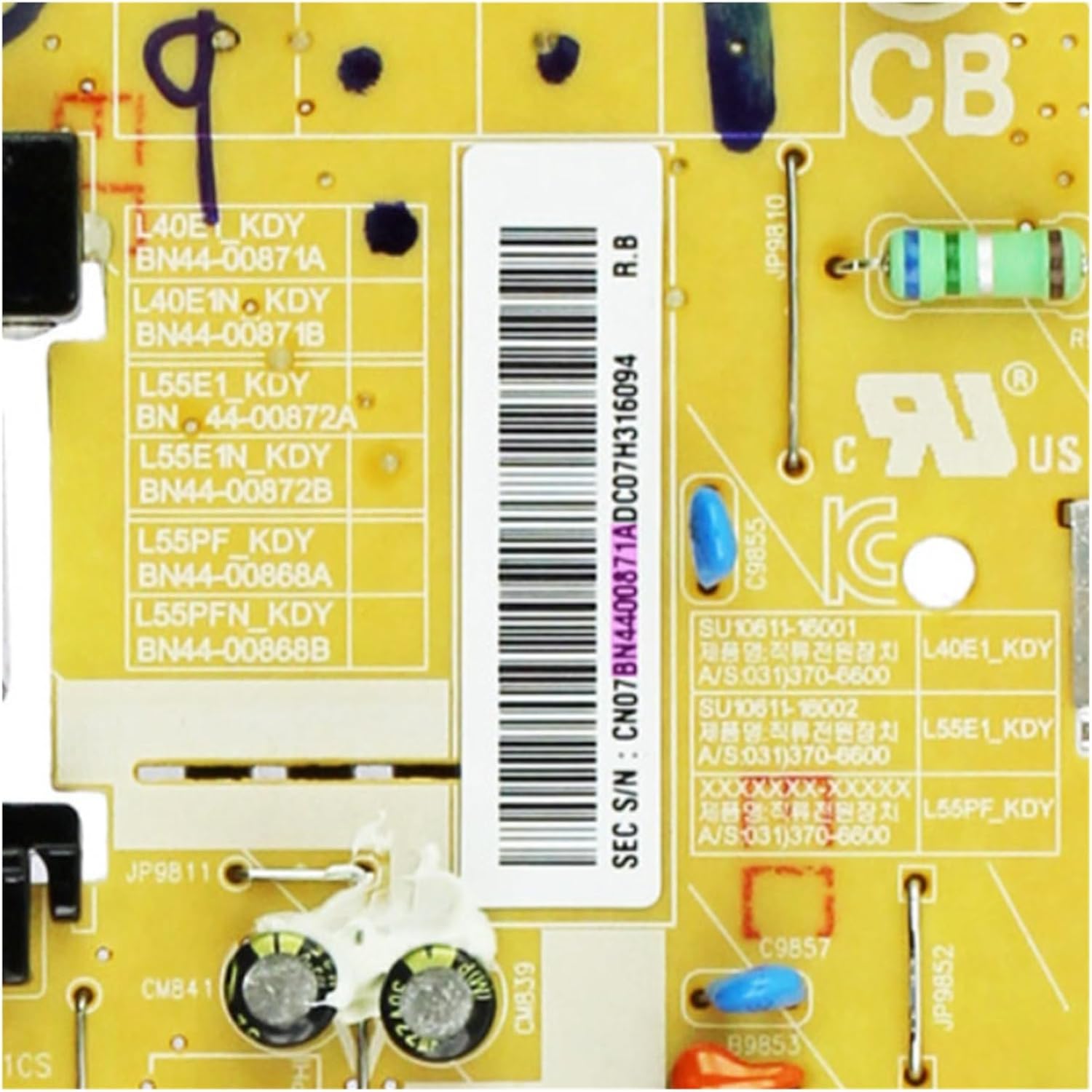
Сүрөт 2.1: А деталдуу view of the label on the power supply board, indicating various model and serial numbers, including BN44-00871A and L40E1_KDY, which are crucial for compatibility verification.
3. Коопсуздук маалыматы
Working with electronic components, especially power supply units, carries inherent risks. Adhere to the following safety guidelines to prevent injury or damage to equipment:
- Кубатты өчүрүү: Always unplug the television from the main power outlet before beginning any repair or installation.
- Разряд конденсаторлору: Электр менен камсыздоо такталарында жогорку вольттогу конденсаторлорду сактоого жөндөмдүү чоң конденсаторлор барtage even after being unplugged. Allow sufficient time for capacitors to discharge or safely discharge them using appropriate tools.
- Статикалык электр: Use an anti-static wrist strap and work on an anti-static mat to prevent electrostatic discharge (ESD), which can damage sensitive electronic components.
- Кесиптик орнотуу сунушталат: If you are not experienced in electronics repair, it is highly recommended to seek assistance from a qualified technician.
- Этияттык менен мамиле кылуу: Avoid touching components directly with bare hands. Hold the board by its edges.
- Вентиляция: Ашыкча ысып кетүүнүн алдын алуу үчүн орнотулгандан кийин телевизордун желдетүү тешиктери жабылбагандыгын текшериңиз.
4. Орнотуу жана орнотуу
This section outlines the general steps for replacing a power supply board. Specific procedures may vary depending on your television model. Always refer to your TV's service manual for detailed instructions.
- Даярдоо:
- Ensure the television is unplugged from all power sources.
- Экранды коргоо үчүн телевизорду жумшак, таза бетке ылдый каратып коюңуз.
- Remove the back cover of the television, typically secured by screws.
- Locate the Old Power Supply Board:
- Identify the existing power supply board. It is usually the largest board connected directly to the AC power inlet.
- Observe and photograph all cable connections for reference during reassembly.
- Кабелдерди ажыратыңыз:
- Carefully disconnect all cables connected to the old power supply board. These typically include AC input, DC output to the main board, and possibly connections to the backlight inverter.
- Be gentle to avoid damaging connectors or cables.
- Remove the Old Board:
- Unscrew the mounting screws securing the old power supply board to the TV chassis.
- Carefully lift and remove the old board.
- Жаңы тактаны орнотуу:
- Position the new BN44-00871A L40E1_KDY Power Supply Board in the same location.
- Secure it with the mounting screws, ensuring it is firmly in place.
- Кабелдерди кайра туташтыруу:
- Reconnect all cables to the new board, referring to your photographs or the TV's service manual. Ensure all connections are secure and correctly oriented.
- Акыркы текшерүүлөр:
- Double-check all connections and ensure no tools or loose screws are left inside the TV.
- Before replacing the back cover, you may perform a preliminary power-on test (with extreme caution) to verify functionality.
- Кайра чогултуу:
- Replace the TV's back cover and secure it with screws.

Сүрөт 4.1: А деталдуу view of the AC power input connector (CN801S) on the power supply board, where the main power cable connects. Note the warning label regarding fuse replacement.

Сүрөт 4.2: This image highlights the "COLD" and "HOT" sections of the power supply board, indicating the separation between the primary (high voltage) and secondary (low voltage) circuits. Proper handling is essential in these areas.
5. Операция
The power supply board is an internal component responsible for converting the incoming AC power into the various DC voltages required by the television's main board, backlight, and other internal circuits. Once correctly installed, its operation is automatic and integrated with the television's power management system. There are no user-adjustable settings on the power supply board itself.

Сүрөт 5.1: Жакын план view of a transformer (L9851CS) and surrounding components on the power supply board, which are integral to the power conversion process.
6. Техникалык тейлөө
The BN44-00871A L40E1_KDY Power Supply Board is designed for long-term reliability and typically requires no routine maintenance. However, to ensure optimal performance and longevity of your television, consider the following general guidelines:
- Тазалыкты сактоо: Periodically clean the exterior of your television to prevent dust buildup, which can impede ventilation.
- Туура желдетүү: Ensure the television is placed in a location with adequate airflow and that its ventilation slots are not obstructed. Overheating can reduce the lifespan of electronic components.
- Нымдуулуктан качыңыз: Keep the television and its components away from liquids and excessive humidity.
- Туруктуу күч: Connect the television to a stable power source, ideally with surge protection, to prevent damage from power fluctuations.
7. Кыйынчылыктарды
If your television experiences issues after replacing the power supply board, consider the following troubleshooting steps. Always ensure the TV is unplugged before inspecting internal components.
- No Power / TV Does Not Turn On:
- Verify that the power cable is securely connected to both the TV and the wall outlet.
- Башка аспапка туташтыруу менен розетка иштеп жатканын текшериңиз.
- Ensure all internal cables connected to the power supply board are seated correctly and securely.
- Inspect the fuse on the power supply board (if accessible and safe to do so) for signs of being blown. (Refer to Image 4.1 for fuse location exampле)
- Intermittent Power / TV Turns Off Randomly:
- Check for any loose connections on the power supply board or other internal boards.
- Ensure the TV is not overheating due to blocked ventilation.
- Picture Issues (No Backlight, Dim Screen):
- While the power supply board provides power to the backlight, other components like the LED strips or backlight inverter board could also be at fault.
- Verify connections from the power supply to the backlight inverter.
If troubleshooting steps do not resolve the issue, it is recommended to consult a professional television repair technician.
8. Техникалык шарттар
| Өзгөчөлүк | Деталь |
|---|---|
| Модель номери | BN44-00871A L40E1_KDY (JCIBWAWZF) |
| Type | Power Supply Constant Current Integration |
| Колдонмо | Television Power Management |
| Өндүрүүчү | Жалпы |
| Пакеттин өлчөмдөрү | 0.39 x 0.39 x 0.39 дюйм |
| Элемент Салмагы | 3.53 унция |
| Origin | Материк Кытай |
| ASIN | B0F7FBPKH9 |
| Дата биринчи жеткиликтүү | 3-май, 2025-жыл |
9. Кепилдик жана колдоо
Specific warranty terms and direct manufacturer support contact information for this Generic power supply board are not provided in the product details. For any warranty claims or technical assistance, please refer to the retailer or seller from whom the product was purchased. They can provide information regarding return policies or connect you with appropriate support channels.


