
1. Киришүү
The HABOTEST HT121 is a smart pen-type digital multimeter designed for accurate and efficient electrical measurements. This device offers multiple functions including DC/AC voltage, resistance, capacitance, frequency, continuity, diode testing, live wire detection, and three-phase sequence detection. Its compact design, smart auto-recognition feature, and safety compliance make it suitable for various electrical testing applications.
This manual provides essential information for the safe and effective operation, maintenance, and troubleshooting of your HT121 multimeter. Please read it thoroughly before use.
2. Коопсуздук маалыматы
Электрдик сыноо жабдууларын колдонууда ар дайым коопсуздук чараларын сактаңыз. Муну аткарбоо электр тогуна урунууга, жаракат алууга же текшерилип жаткан эсептегичке же жабдууларга зыян келтирүүгө алып келиши мүмкүн.
- The HABOTEST HT121 conforms to IEC61010-1 CAT.III 600V overvoltagкоопсуздук стандарты жана булгануу деңгээли 2.
- Колдонбоңуз томtage же белгиленген максималдуу чектен ашкан ток.
- Ensure the test leads are in good condition and properly connected before taking measurements.
- Эгерде эсептегич бузулгандай көрүнсө же корпусу ачык болсо, аны колдонбоңуз.
- Ток чынжырлары менен иштөөдө өтө этият болуңуз.
- Батареяны так көрсөткүчтөрдү камсыз кылуу үчүн батарейка аз индикатор пайда болгондо алмаштырыңыз.
- Эсептегичти жарылуучу газ, буу же чаңдуу чөйрөдө иштетпеңиз.
3. Продукт бүтүп калдыview
The HABOTEST HT121 features a pen-type design for easy handling and portability. It includes a clear LCD display, functional buttons, and a dedicated input port for the test lead.
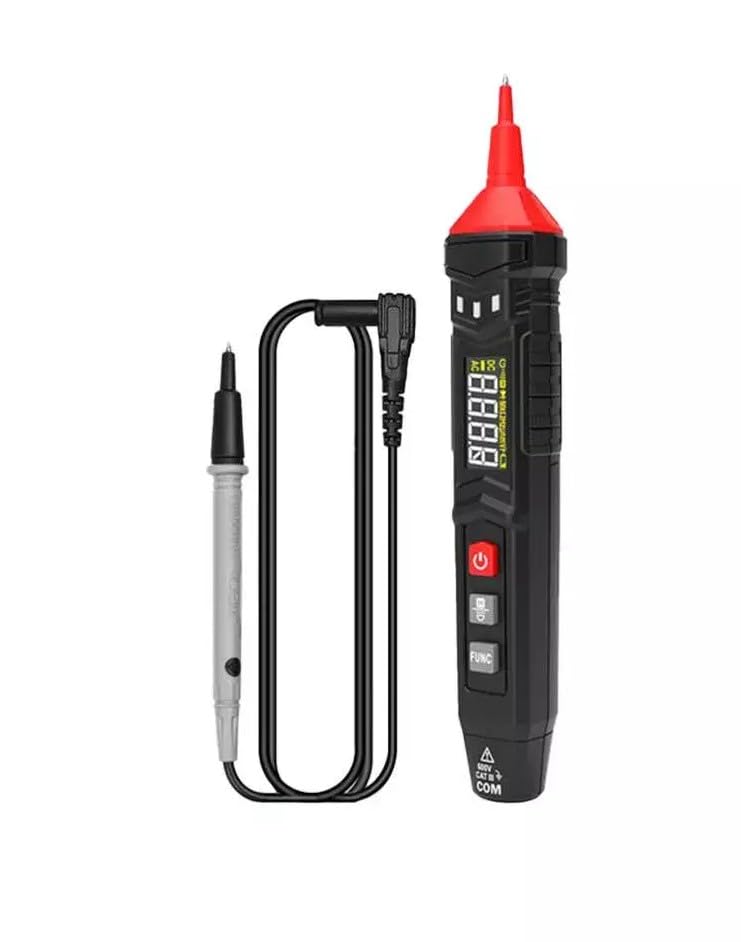
Image 3.1: The HABOTEST HT121 Pen Type Digital Multimeter shown with its accompanying test lead.
3.1 Панелдин функциялары
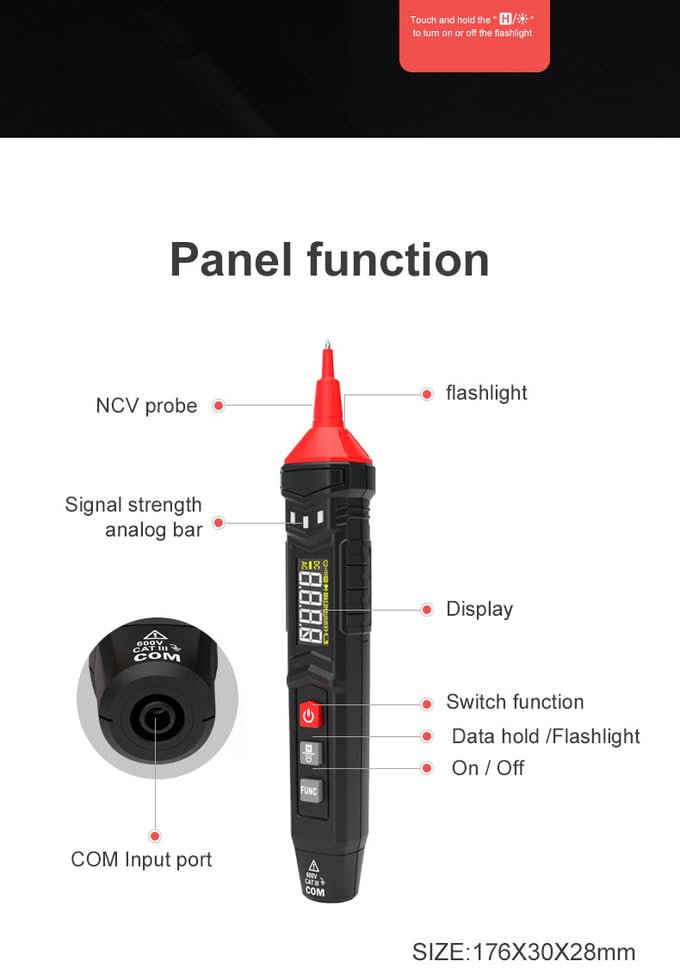
Image 3.2: Detailed diagram illustrating the various components and functions on the HT121 multimeter, including the NCV probe, flashlight, signal strength analog bar, display, switch function, data hold/flashlight button, and COM input port.
- NCV Probe: Контактсыз том үчүн колдонулатtage аныктоо.
- Кол чырак: Караңгы жумуш аймактарын жарыктандыруу үчүн интеграцияланган LED жарыгы.
- Signal Strength Analog Bar: Visual indicator for signal intensity.
- Дисплей: 1.3-inch LCD screen showing measurement readings and indicators.
- Кубат баскычы: Аппаратты күйгүзүү же өчүрүү үчүн.
- FUNC баскычы: To switch between different measurement modes (e.g., Diode, Continuity, Frequency).
- Data Hold/Flashlight Button: Short press to hold data, long press to activate/deactivate flashlight.
- COM киргизүү порту: Connection point for the test lead.
4. Орнотуу
4.1 Батареяны орнотуу
The HABOTEST HT121 is powered by two 1.5V AAA batteries. To install or replace batteries:
- Мультиметрдин өчүрүлгөнүн текшериңиз.
- Аппараттын артындагы батарея бөлүкчөсүнүн капкагын табыңыз.
- Батарея отсегин ачуу үчүн бурагычты колдонуңуз.
- Туура полярдуулукту (+/-) сактоо менен эки AAA батарейкасын салыңыз.
- Батарея бөлүгүнүн капкагын бекем жабыңыз.
The meter features a low battery indication. Replace batteries promptly when this indicator appears to maintain measurement accuracy.
5. Иштөө нускамалары
5.1 Күйгүзүү/өчүрүү
басыңыз Күч button to turn the multimeter on. Press and hold the Күч button again to turn it off. The device also features a 15-minute auto power-off function to conserve battery life.
5.2 Smart Function (Auto Recognition)
In Smart mode, the multimeter automatically identifies the measurement signal for DC/AC voltage, resistance, and continuity. This simplifies operation by eliminating the need for manual range selection.
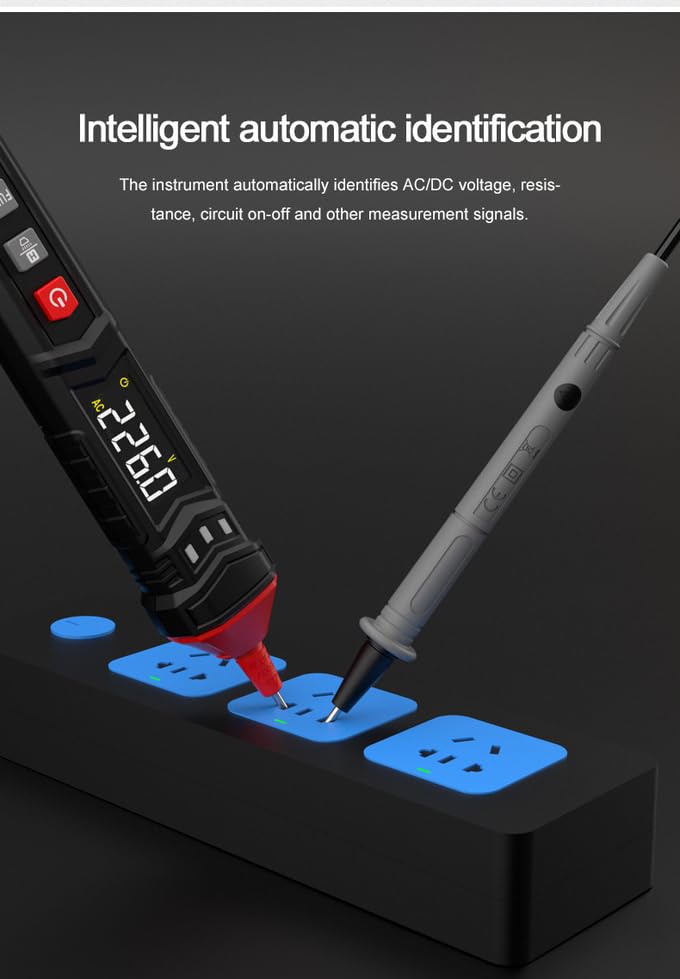
Image 5.1: The HT121 multimeter demonstrating its intelligent automatic identification feature, detecting AC voltagэлектр тилкесинен e.
5.3 Өзгөчө өлчөөлөр
For specific functions not covered by Smart mode, or to manually select a range, use the FUNC баскычы.
- DC/AC Voltage: Connect the test lead to the COM port and the probe to the circuit. The meter will automatically detect AC or DC voltage in Smart mode. For manual selection, press FUNC until the desired mode is displayed.
- Каршылык: Ensure the circuit is de-energized before measuring resistance. Connect the test lead and probe across the component.
- Сыйымдуулугу: Discharge capacitors before testing. Connect the test lead and probe across the capacitor terminals.
- Жыштыгы: Connect the test lead and probe to the signal source.
- Үзгүлтүксүздүк: Use to check for open or closed circuits. A low resistance reading (typically below 50Ω) indicates continuity, often accompanied by an audible beep.
- Диод сыноо: Use to check the forward voltagдиоддун түшүшү.
- Live Test: Detects live wires. When performing a LIVE induction test, the multimeter provides an intelligent sound and light reminder.
- NCV (контактсыз томtagд) аныктоо: Hold the NCV probe near a conductor to detect AC voltagд түз байланышсыз.
- Three-Phase Sequence Detection: Used to determine the phase sequence in three-phase systems.
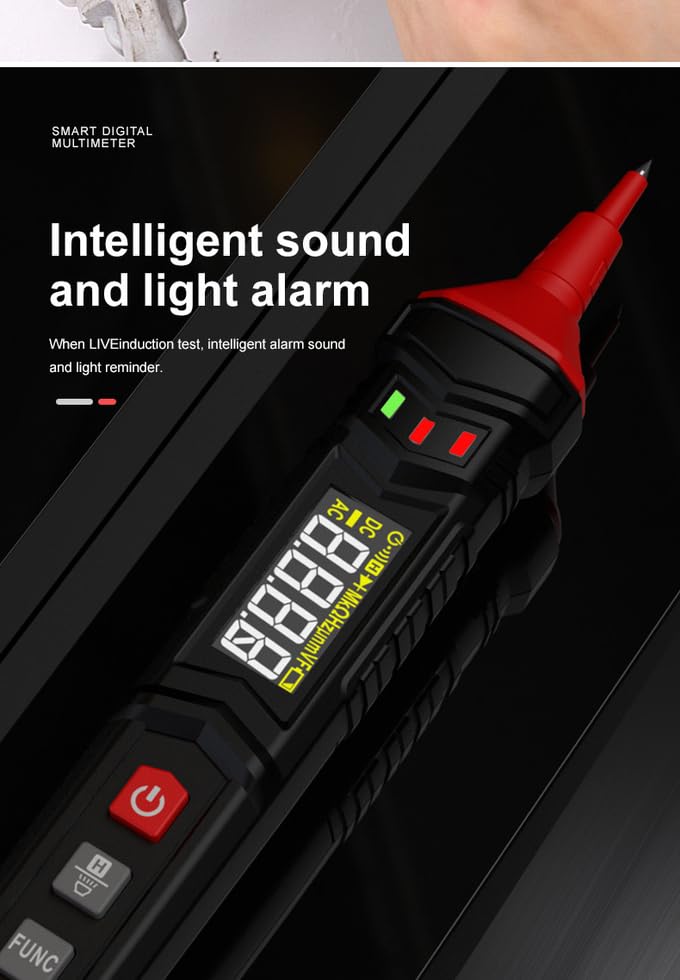
Image 5.2: The HT121 multimeter displaying its intelligent sound and light alarm feature, indicating a live circuit during testing.
5.4 Data Hold and Flashlight
- Дайындарды кармоо: баскычын кыска басыңыз Data Hold/Flashlight Учурдагы көрсөткүчтү дисплейде тоңдуруу үчүн баскычты басыңыз. Бошотуу үчүн кайра басыңыз.
- Кол чырак: көпкө басыңыз Data Hold/Flashlight button to turn the built-in LED flashlight on or off.
6. Техникалык шарттар
The following table details the technical specifications of the HABOTEST HT121 Digital Multimeter:
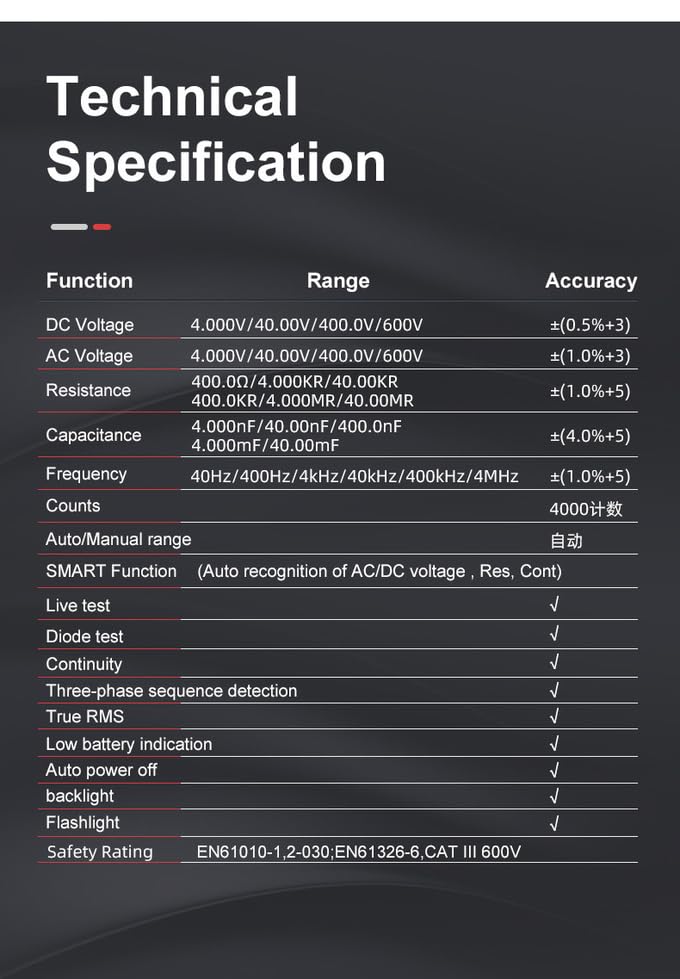
Image 6.1: A table outlining the technical specifications of the HT121 multimeter, including measurement ranges and accuracies for various functions.
| Функция | Диапазон | Тактык |
|---|---|---|
| DC Voltage | 4.000V/40.00V/400.0V/600V | ±(0.5%+3) |
| AC Voltage | 4.000V/40.00V/400.0V/600V | ±(1.0%+3) |
| Каршылык | 400.0Ω/4.000KΩ/40.00KΩ/400.0KΩ/4.000MΩ/40.00MΩ | ±(1.0%+5) |
| Сыйымдуулук | 4.000nF/40.00nF/400.0nF/4.000mF/40.00mF | ±(4.0%+5) |
| Жыштык | 40.00Hz/400.0Hz/4.000kHz/40.00kHz/400.0kHz/4.000MHz | ±(1.0%+5) |
| Санат | 4000 | |
| Auto / Manual Range | Автоматтык | |
| SMART Function | Auto Recognition of AC/DC Voltagд, Каршылык, үзгүлтүксүздүк | |
| Live Test | Ооба | |
| NCV | Ооба | |
| Диод сыноо | Ооба | |
| Үзгүлтүксүздүк | Ооба | |
| Three-Phase Sequence Detection | Ооба | |
| Чыныгы RMS | Ооба | |
| Батареянын төмөн көрсөткүчү | Ооба | |
| Авто өчүрүү | Ооба (15 мүнөт) | |
| Арткы жарык | Ооба | |
| Кол чырак | Ооба | |
| Power Source | 2 x 1.5V AAA батарейкалары | |
| Коопсуздук рейтинги | EN61010-1,2-030; EN61326-6, CAT III 600V | |
| Өлчөмдөрү (LxWxH) | 21 x 5 x 3.5 см | |
| Элемент Салмагы | 150 г |
7. Техникалык тейлөө
- Тазалоо: Жарнама менен эсептегичти сүртүңүзamp кездеме жана жумшак жуугуч. Абразивдерди же эриткичтерди колдонбоңуз.
- Батареяны алмаштыруу: Replace batteries as soon as the low battery indicator appears to ensure accurate readings and proper operation.
- Сактагыч: If the meter is not used for an extended period, remove the batteries to prevent leakage and damage. Store in a cool, dry place.
- Сыноочулар: Regularly inspect test leads for any signs of damage, such as cracks or frayed insulation. Replace damaged leads immediately.
8. Кыйынчылыктарды
- Эсептегич күйбөйт: Батареялар туура орнотулганын жана заряды жетиштүү экендигин текшериңиз. Зарыл болсо, батарейкаларды алмаштырыңыз.
- Туура эмес окуулар: Ensure test leads are properly connected. Check battery level. Verify that the correct measurement function is selected (if not in Smart mode).
- Дисплей жок: Check battery power. If the issue persists, contact support.
- Автоматтык түрдө өчүү өтө эрте: This is a built-in feature (15 minutes). If it powers off more frequently, check battery level.
9. Кепилдик жана колдоо
The HABOTEST HT121 Pen Type Digital Multimeter comes with a 1 жылдык кепилдик сатып алынган күндөн тартып өндүрүш кемчиликтерин жабуу.
For technical support, warranty claims, or service inquiries, please contact the importer:
MDS Automech Solutions
Q-106, Phase 3, Shivalik Nagar, BHEL, Haridwar, Uttarakhand-249403
Contact: +91-9870694636
Email: mohit@mdsautomech.in
Кепилдикти текшерүү үчүн сатып алганыңыздын далилин сактап коюңуз.